Archive for the 'Utilities' Category
Sunday, November 26th, 2006
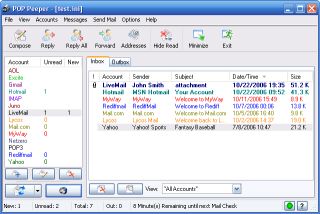 Pop Peeper is a small utility that runs in your task tray and allows you to keep a check on all your email accounts. It works for both POP3 mail and webmail and it supports multiple accounts, so you can check email from Yahoo, Hotmail, Gmail and many others, there’s a full regularly updated list on the website, so i’ll refrain from listing them all here.It allows you to preview the headers of your email, and view the messages. There is also support for file attachments, which allows you to view the name of the files. Using POP Peeper, you can quickly scan which messages are important enough to read, and which ones can be deleted without even opening your email client. A great little tool that works fast and efficient. Pop Peeper is a small utility that runs in your task tray and allows you to keep a check on all your email accounts. It works for both POP3 mail and webmail and it supports multiple accounts, so you can check email from Yahoo, Hotmail, Gmail and many others, there’s a full regularly updated list on the website, so i’ll refrain from listing them all here.It allows you to preview the headers of your email, and view the messages. There is also support for file attachments, which allows you to view the name of the files. Using POP Peeper, you can quickly scan which messages are important enough to read, and which ones can be deleted without even opening your email client. A great little tool that works fast and efficient.
Idea: When you go away on vacation, simply take a Flash drive with a copy of POP Peeper to keep a check on your email easily from any computer you use. POP Peeper is freeware too! Always an added bonus!
Pop on over here to peep at more info and download it (Sorry! Couldn’t resist)!
Posted in E-mail, Freeware, Internet, Main, Utilities, Windows | No Comments »
Sunday, November 26th, 2006
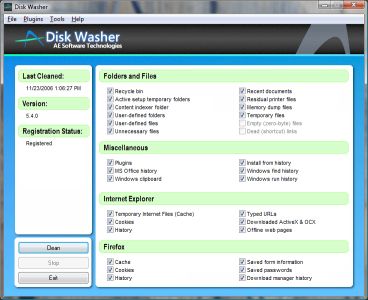 A new version of Disk Washer has just been recently released. Disk Washer is a software that helps you to maintain peak performance for your system by removing unnecessary files from your system. A new version of Disk Washer has just been recently released. Disk Washer is a software that helps you to maintain peak performance for your system by removing unnecessary files from your system.
Installation programs leftover, DLL problems and system registry errors are part of the things that Disk Washer resolves. Disk Washer helps to eliminate the things that clog your drive and make your system slow and instable. Latest Changes in the new version includes new GUI, enhancements, and stability improvements.
On first observation you might be tempted to rule out this software thinking that there are freeware like CCleaner, which have similar use. But a deeper look reveals that Disk Washer really is different as it helps you to recover disk space, clear your tracks, fix Windows problems, back up your files among other things. But the big question is this, “Is it worth the price that it is sold for?” That’s up to you! Check it out and see whether it works well with your PC or not. Try out the trial version first and see if it good enough for you.
Click here for more info on its features and trial download!
Posted in Developer, Internet, Main, Security, Shareware, Utilities | No Comments »
Sunday, November 26th, 2006
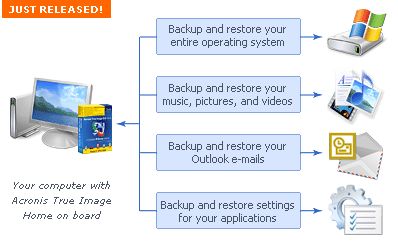 Acronis True Image is the ideal solution for making an entire exact copy of the contents of your hard disk. This means an exact clone including the operating system, applications, user settings, and all data. This is extremely useful if you’ve just bought a new computer or drive and want to move everything from your old computer or drive to the new one. Acronis True Image is the ideal solution for making an entire exact copy of the contents of your hard disk. This means an exact clone including the operating system, applications, user settings, and all data. This is extremely useful if you’ve just bought a new computer or drive and want to move everything from your old computer or drive to the new one.
It does exactly what it claims to, all it takes is a few hours, depending on size of course, size doesn’t matter with Acronis True Image either!
It’ll work no matter how big your hard disk is, but obviously time taken to clone is relative to size, although it worked pretty fast cloning a 20 GB drive the time i used it. It can even work in the background. The best thing is that even though you wont need to clone an entire drive for upgrade purposes often, it works good as a ‘normal’ backup program too.
Tip: Check the site for updates first before using to avoid any potential problems.
You can get a 15 day trial and more info by going here
Posted in Business, Commercial, Main, Open Source, Shareware, Social Software, Utilities, Windows | 1 Comment »
Friday, November 24th, 2006
 Nowadays most video cards support dual monitors and the prices of LCD displays have come down considerably so more people are using dual monitors than before. Some people find them useful if they do a lot of graphic or design work, as it allows more workspace without having to constantly maximise and minimise windows,etc. Ultramon is software to help you get the most out of a multi-monitor set-up. Nowadays most video cards support dual monitors and the prices of LCD displays have come down considerably so more people are using dual monitors than before. Some people find them useful if they do a lot of graphic or design work, as it allows more workspace without having to constantly maximise and minimise windows,etc. Ultramon is software to help you get the most out of a multi-monitor set-up.
It adds additional window buttons, so you can quickly move windows or stretch a window across the desktop.
It also uses a “Smart Taskbar” to manage more applications, so that you have a taskbar on each monitor and each taskbar only showing the tasks from the monitor it’s on.
Shortcut extensions make it easy to position applications on the desired monitor. The UltraMon screen saver and wallpaper manager make it possible to use a different wallpaper and screen saver on each monitor too. It also includes a flexible mirroring feature with support for mirroring one or more monitors, and use different resolutions for each monitor.Its also pretty cool to be able to move windows from one screen to the other!
You can download a fully functional trial here.
Posted in Main, Shareware, Utilities, Video | 2 Comments »
Friday, November 24th, 2006
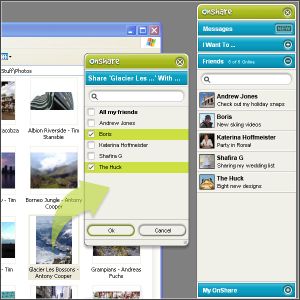 Just found a new way to share files and chat with friends in complete privacy. All thanks to this software, Onshare. Just found a new way to share files and chat with friends in complete privacy. All thanks to this software, Onshare.
OnShare is a free way to share files and chat with your friends in complete privacy. It’s a simple download that directly networks computers together. The fact that you get to control exactly what your friends can see and get their hands on really makes this useful tool. You only share files with people you invite so you know they’re from a trusted source and the files you share stay exactly where they are on your computer.
One cool feature that this software has is that its pioneering technology lets you reach into your friends’ computers, grab whatever you want and use it just as if it were on your own computer. And, if you have more than one computer, you can easily share between them wherever they are in the world.
The security of your files and chat is guaranteed as the file sharing and messaging is encrypted at 2048 bit, so secure that no one can intercept your chats and files. It is even said that the security model was conceived and developed by ex–military scientists. [I don’t know how true that is]
In case you are wondering how this works, your friends appear as drives on your computer, meaning you can access their shared files directly from within Windows. View, drag, drop, copy and paste just like you’re used to.
Click here to find out more and download it.
Posted in Internet, Main, Multimedia, Open Source, Shareware, Utilities | 2 Comments »
Friday, November 24th, 2006
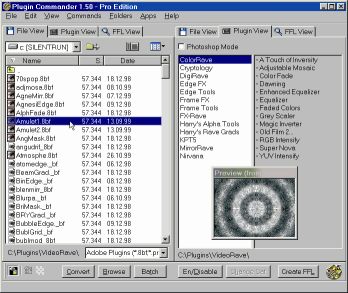 If you’ve had problems using plug-ins, tubes or other add-ons in a graphics, video or animation application then you might find this software, which I recently came across, very useful. It’s called Plugin Commander. If you’ve had problems using plug-ins, tubes or other add-ons in a graphics, video or animation application then you might find this software, which I recently came across, very useful. It’s called Plugin Commander.
Plugin Commander is a tool for dealing with various image formats, plugins and effect types from various graphics applications. It allows you to manage and preview your plugin, tube and add-on collection quickly and easily. You can deactivate the plug-ins you rarely need and define how your favorite effects will appear in the host application.
There are two editions of this useful software, the commercial Pro Edition and the Light Edition, which is freeware. The light edition being freeware has limited features but to enjoy a fully-featured version, it’s best you go for the Pro Edition.
CHECK IT OUT!
Posted in Audio, Browsers, Business, Commercial, Design, Developer, Information Management, Internet, Main, Multimedia, OS Updates, Photo, Security, Shareware, Shell and Desktop, Utilities, Video, Windows | No Comments »
Thursday, November 23rd, 2006
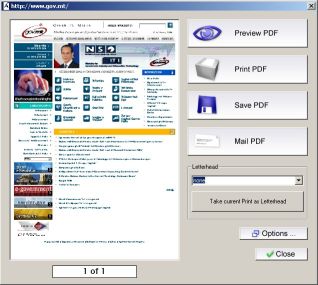 PDF is the ideal electronic package to contain everything from spreadsheets, presentations, and brochures, to photographs, rich graphics, and more. So it is necessary to have a good software that can help you create PDF files with ease. PDF is the ideal electronic package to contain everything from spreadsheets, presentations, and brochures, to photographs, rich graphics, and more. So it is necessary to have a good software that can help you create PDF files with ease.
Aloaha PDF Suite is the perfect tool to create your PDF Documents. One click is enough. Just print your document to any of your printers and it will convert the print job to a PDF Document, which you can save, email or publish to an exchange public folder. Of course you can opt for 40 or 128 encryption and digitally sign the PDF automatically.
The great thing about this software is that PDF Signer and PDF Editor are included in the Aloaha PDF Suite Pro package – no extra license costs!
Though this package is great, it is not a freeware, to get the full version you will have to come up with nothing less than $49. In case you are thinking, there are other free software like PDFCreator that does the same thing. Let me point this out to you: PDFCreator doesn’t support encrypting documents with smartcard/certificates; hardly will you find a free generator that does that. If all you want is a cheap and easy way to send a CV to someone, PDFCreator or OpenOffice will do the job but if you want a secure method to distribute and control sensitive or important documents, this suite does the job a lot cheaper than Acrobat.
Ready to try it out! CLICK HERE to learn more about its features and download the commercial demo.
NOTE:
- The evaluation version is fully functional and works without any serial key. The only limitation is a watermark in the left upper corner of every PDF Page
- It works well with Windows 2003/NT/XP. NT4 Users should read the NT4 FAQ before installing Aloaha
- All monitored printer have to remain on status paused!
- Some features such as the digital signature API, the signature hotfolder “tosign” and the XP/2003 FAX Connector require an evaluation key. You have to contact the publisher if you need to evaluate one of these features.
CHECK OUT THE TRIALVERSION!
Posted in Business, Commercial, Developer, Information Management, Main, Shareware, Text, Utilities | 2 Comments »
Thursday, November 23rd, 2006
 If you work in web design or graphics either professionally or personally, you’re probably used to dealing with fonts a lot from time to time. Well now things just got a whole lot easier thanks to The Font Thing! If you work in web design or graphics either professionally or personally, you’re probably used to dealing with fonts a lot from time to time. Well now things just got a whole lot easier thanks to The Font Thing!
You can type in a word and it’ll show you that word in all your different fonts. Also shows you that word in other fonts that you don’t have installed yet, and gives you the option to install them. It allows you to fully browse installed and even uninstalled fonts and view sample text in any color you want,so you can easily choose the ideal one you’ve been searching for from your collection. Also you can install or uninstall any number of fonts at once.
As a totally free program, you can’t go wrong in taking this for a test drive if you work with fonts a lot!
Check out the homepage here for the full list of features and to download it.
Posted in Design, Freeware, Main, Shell and Desktop, Utilities | No Comments »
Tuesday, November 21st, 2006
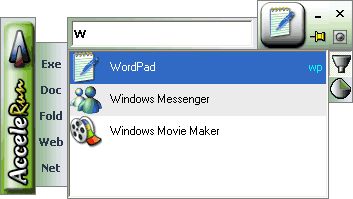 A couple of days ago, November 19 to be precise, AcceleRun was updated to version 1.6. Accelerun is a software that launches any of hundreds of installed programs within two seconds. A couple of days ago, November 19 to be precise, AcceleRun was updated to version 1.6. Accelerun is a software that launches any of hundreds of installed programs within two seconds.
You don’t need to search through long menus again; you don’t have to worry about complex key combinations. All you have to do is to type in a few letters in the name of the program, folder, file or website, and Accelerun will find the matches – the more letters you type, the more the search narrows.
Accelerun makes your PC easier to navigate; you can move round a lot quicker using Accelerun. The fact that it requires minimum memory usage, has an easy-to-use design and it is ready for use in minutes after first launch make it a very useful tool.
Latest Changes in this latest version include:
- New options
- Speed and size optimizations
- Bug fixes
Learn more and check out the free version!
Posted in Commercial, Developer, Main, News, Shareware, Shell and Desktop, Utilities, Windows | No Comments »
Tuesday, November 21st, 2006
 Should getting burners get you burnt? Nope! The truth is, you don’t need to burn a hole in your pocket to get a nice burner that can help you create data, audio and even DVD disks and help you burn them into any type of media you want. FinalBurner is a freeware that helps you achieve this with ease. Should getting burners get you burnt? Nope! The truth is, you don’t need to burn a hole in your pocket to get a nice burner that can help you create data, audio and even DVD disks and help you burn them into any type of media you want. FinalBurner is a freeware that helps you achieve this with ease.
FinalBurner is a freeware alternative to expensive CD and DVD burners. It enables you to create data, audio, DVD disks and burn them onto any type of media, such as CD R/RW, DVD+R/RW, DVD-R/RW, DVD DL. You can also create an ISO image of a disk. It combines all the elements of a professional CD recorder, delivered with a convenient user interface that pleases the eye. It is designed without any extraneous features. It restricts the complex process of CD recording to a few mouse clicks, which is ideal for typical users.
With FinalBurner you can produce high quality output easily without any deep knowledge of CD recording technologies. You just select a few main settings and start burning. FinalBurner’s artificial intelligence will find the perfect recording balance.
Start burning without getting burnt, go and check it out! Click HERE for more info and free download!
Posted in Developer, Main, Multimedia, Shareware, Utilities, Video | No Comments »
|
|
|




