Archive for the 'Windows' Category
Thursday, December 20th, 2007
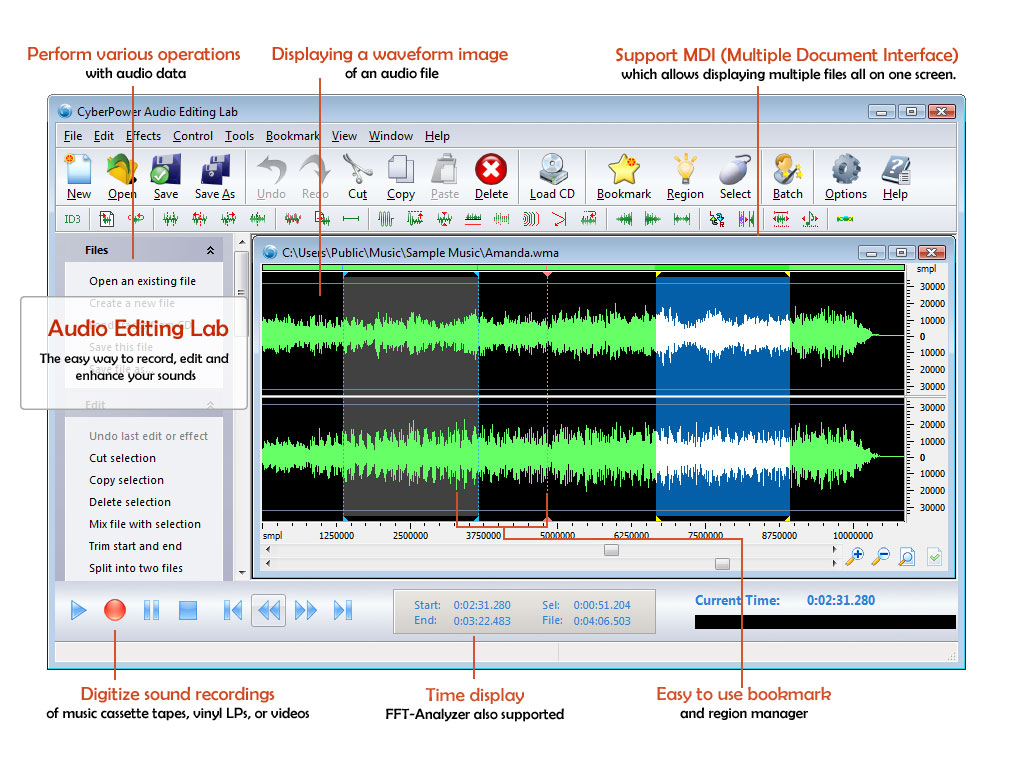 CyberPower Audio Editing Lab is a solution for audio editing and mastering. The program contains facilities you need to create great sounding recordings and audio CDs, including professional tools for recording, analysis and editing. CyberPower Audio Editing Lab is a solution for audio editing and mastering. The program contains facilities you need to create great sounding recordings and audio CDs, including professional tools for recording, analysis and editing.
Pros: This is a very well designed package. Functionalities start with CD ripping with CDDB look up. One could record from LP and cassettes and do noise reduction prior to committing to a recordable media. Editing tools include noise reduction, dynamic processing, equalizing etc. Recordings distorted by noise, clicks, crackle, clipping or missing high frequency content can be restored. Besides standard cut, copy, paste and mix editing are also available. Unlimited levels of undo and redo is a very useful feature. Editing of music tags helps in filling up details that are not available through on-line data bases or additional information one may want to add.
The User interface is well arranged too. With file related icons on top, followed by the series of effects the package supports. These icons have uses graphics to show the likeness of effect that happens on the spectrum. One is intuitively zero in on the effect required. Effects include echo, amplification, noise reduction, reverb, chorus and flanger, as well as time stretching.
Batch processing is another valuable feature. Large number of files can be processed through a series of effects if the need be. The batch processing can be really useful in cleaning up stocks of old recordings once the series of editing/cleaning/effects to be used has been decided through experimentation.
Cons: Nothing adverse was noticed.
Overall: A well designed package with quite a nice user interface. I’d rate it at 5 star level.
{More Info and Download}
Posted in Audio Editor, Developer, Music, Shareware, Windows | No Comments »
Wednesday, December 19th, 2007
 The application Catalogs CD automatically, no typing needed. On inserting a CD in the CD-ROM drive or scanning its barcode or typing the artist and title will download all the data from the internet, including artist, title, year, track titles and the cover image The application Catalogs CD automatically, no typing needed. On inserting a CD in the CD-ROM drive or scanning its barcode or typing the artist and title will download all the data from the internet, including artist, title, year, track titles and the cover image
Pros: The package provides extensive set of features to get your music collection really organized. The application is able to download data from on-line databases given the artist and the album name. The CD can simply be inserted in the drive for the application to read the unique id and find the information from these databases. A third option is to simply read the bar code on the CD package. A scanner interface lets you scan in cover images if available on paper.
Navigating through the information collected is easy. Overall directory structure, album and artist name and then track details of specific albums could be browsed through. Organizing is flexible, group by artist names/genre or whatever way you feel most comfortable with. Browsing of information, whether a specific track or cover art, is simplified. Edit features are available, as is update of older information by newer data available in on-line databases. Search facilities are ok too. Print out of the collection related data can be organized several ways.
Information can be exported in HTML, CSV or the most generalized way of XML, to other devices. It is easy to export to iPod. So that while buying a CD you could make sure you are not purchasing a second copy or a quick check on any other information.
A generally useful information management feature provided is managing loan information. One can keep track of what CD has been borrowed by whom and when they are due back.
Cons: While collecting the information as you buy a CD is easy, getting the information entered for a sizeable existing collection could be a pain even with the simple way they can be collected with this package. But that’s a one time hassle only.
Overall 4 stars.
{More Info and Download}
Posted in Catalogue, Developer, Information Management, Shareware, Windows | No Comments »
Tuesday, December 18th, 2007
 WaveMax 3 is audio editing tool. Recording, analysis and editing tools that include a range of effects on the one hand and spectrum analysis tool like FFT analysis. WaveMax 3 is audio editing tool. Recording, analysis and editing tools that include a range of effects on the one hand and spectrum analysis tool like FFT analysis.
Pros: The User interface is well arranged around the central area where the file being processed is displayed. First set of icons are for file manipulation. This is followed by a set of icons that initiate various effects. Effects include echo, amplification, noise reduction, reverb, chorus and flanger, as well as time stretching/pitch control combination. Series of undo/redo is really useful as it is always could to be able to go back to a known point when the effects applied do not sound right. Standard edit operations like cut, copy, paste and mixing are available. Noise reduction, equalizing of channels etc are part of the edit tools.
Often needed functionalities like CD ripping, recording from LP records or cassettes is made easier with this tool. CD ripping includes looking up of CDDB database. Tag editing is possible
Text to speech function allows documents to be converted to synthetic speech so that one could listen to important documents while on the move. It’s possible to process multiple documents through the batch processing functionality. As could be any other set of editing steps that can be used on a set of recordings, for example in cleaning up stacks of old recordings that needs same processing.
WaveMax works as a wav/mp3 editor but supports a number of other file formats including wma, wav, mp3, mp2, vox, gsm, dsp, cda, aiff, au, raw etc.
Cons: The package is well designed and easy to use but looks a lot like the interface of the CyberPower Audio Editing Lab 12.01. There are differences but there are striking similarities too.
Overall: By itself I’d have possibly rated it at level 5 but because of the doubts expressed in the earlier section the rating cannot be more than 4 starts.
{More Info and Download}
Posted in Developer, Multimedia, Shareware, Utilities, Windows | No Comments »
Monday, December 17th, 2007
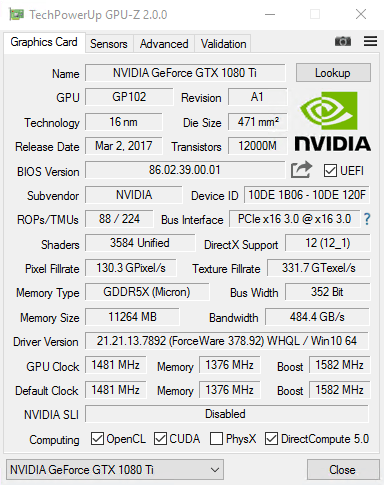
There are a number of utilities out there for giving you information on different parts of your system, but one place where finding information is difficult is in the area of your video card and your GPU. These things do not have a lot of information about them within the hardware device manager in your control panel and of course getting any information about them from the publisher is something that is very annoying to do. Some companies are better than others (ATI for example with their Catalyst Control Centre), but overall it would be better if there was a better way.
Well, as of just a few days ago, there is a better way! That better way is the software package known as GPU-Z. This handy piece of software is a utility that is specifically designed with video cards in mind. It will give you all of the information that you need about your video card; everything from the name of the video card all the way down to things like the bus interface and clocking information. This is information you can find from a number of other separate sources, but the key is that GPU puts it all together for your viewing convenience on one screen. The utility is very lightweight too, meaning that your system is not going to die just from using this piece of software.
More information about this can be found at http://www.techpowerup.com/gpuz/
Posted in Developer, Main, Utilities, Video, Windows | No Comments »
Monday, December 17th, 2007
 Get the dictionaries of numerous languages stored at your system and make your study easier than ever. You can have so many things arranged with the help of iLanguage 2.2 such as the multilingual dictionary along with the editor working for you. Remember and learn a lot for improving your vocabulary with the help of the software. You can even evaluate your skills by having the test conducted with the program itself. The program has numerous other innovative learning features that make your activity truly engaging. Get the dictionaries of numerous languages stored at your system and make your study easier than ever. You can have so many things arranged with the help of iLanguage 2.2 such as the multilingual dictionary along with the editor working for you. Remember and learn a lot for improving your vocabulary with the help of the software. You can even evaluate your skills by having the test conducted with the program itself. The program has numerous other innovative learning features that make your activity truly engaging.
iLanguage 2.2 does take some time to get downloaded because of it’s size. The appearance of the program is decent with pleasing blue and gray shades. You can manage the wordbooks by setting various dictionaries and also you can change the Basic settings for it. You can have the word book password protected to have your work safe. It also provides you with the search option for searching the new lessons that you can copy to the wordlist and also remove if not required. Customizing the virtual keys is also easy as you just need to paste or drag and drop the character, and you can have the hotkeys set with the character to enter it easily into the text. The program also allows connecting to the online dictionaries and also importing the vocabulary from them. You can record the word pronunciation to make it easier to understand the words. Import, export the Wordbook easily and get the ‘Points’ when required. You can conduct tests in various ways to check how much you have learnt. The software has so many features that it becomes difficult to enumerate. The thing that may become a drawback is that it has a large variety of features that may create confusion while using.
To increase efficiency and improve your studying pattern and for generating perfection in your linguistic endeavor you can use iLanguage.
{More Info and Download}
Posted in Business, Developer, Dictionary, Information Management, Internet, Shareware, Windows | No Comments »
Monday, December 17th, 2007
 Have different email accounts for different people and purposes such as one for work, another for family, the third for college friends, fourth for dating, and so on? Tired of opening, closing, and reopening these accounts time and again during the day to check for new email or to send an email to a specific person or group? Keep getting the passwords mixed — there are just too many of them to remember! Or, do you keep all these accounts open in different browser windows throughout the day? Now, that could cause a lot of confusion. Want an easier, faster, and perhaps more efficient way to deal with your multiple email accounts? Try the Multi-Mail Notifier. Have different email accounts for different people and purposes such as one for work, another for family, the third for college friends, fourth for dating, and so on? Tired of opening, closing, and reopening these accounts time and again during the day to check for new email or to send an email to a specific person or group? Keep getting the passwords mixed — there are just too many of them to remember! Or, do you keep all these accounts open in different browser windows throughout the day? Now, that could cause a lot of confusion. Want an easier, faster, and perhaps more efficient way to deal with your multiple email accounts? Try the Multi-Mail Notifier.
This software application is your assistant whose only job is to keep an eye on all your email accounts and notify you each time a new email comes in. The Multi-Mail Notifier runs in your computers tray and displays visual and sound messages to alert you of new incoming mail to one or more of your email addresses. Once you set all the email addresses you want monitored by the software, a table is created which primarily lists out the email id and the status of incoming mail (number of unread messages in the inbox). You can also quickly access a specific email account of yours by clicking on the Read E-mail button to read the incoming mail. No need to open a browser window yourself and then logging on to the specific mail server, entering the Username and Password and so on. All this is done for you automatically by the Multi-Mail Notifier.
Further, the Multi-Mail Notifier supports a variety of email account types, including Gmail, Hotmail, POP3, and Yahoo.
{More info and Download}
Posted in Developer, E-mail, Information Management, Internet, Shareware, Utilities, Windows | No Comments »
Monday, December 17th, 2007
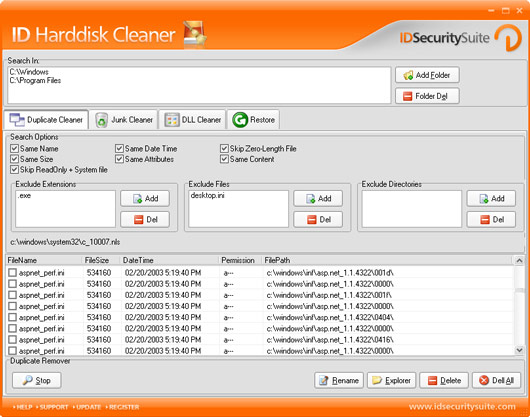 Are you fed up of the low space warning and the slow processing of your system? Are you looking for a good solution that would save you from this chaotic situation? Now you can get rid of these entire problems with few simple clicks and easy selections with the help of ID Harddisk Cleaner 1.2. It can easily search your computer for unwanted files that obstruct the working of your PC from giving the best performance. The software is competent enough to make your PC faster and make a great deal of space available on the disk. Are you fed up of the low space warning and the slow processing of your system? Are you looking for a good solution that would save you from this chaotic situation? Now you can get rid of these entire problems with few simple clicks and easy selections with the help of ID Harddisk Cleaner 1.2. It can easily search your computer for unwanted files that obstruct the working of your PC from giving the best performance. The software is competent enough to make your PC faster and make a great deal of space available on the disk.
ID Harddisk Cleaner 1.2 proves its efficiency by giving the best results through its optimum performance. It would save your important files and deals with the garbage files that are not required by the system. It also provides you with the features to customize the program settings as per your choices. This ensures specification that which files are to be deleted and which are needed to be kept at the system. The appearance of the program is flashy but pleasing and all set with different options on it. You can add or delete the folders to detect the unwanted garbage files to remove. It provides you with the option like Duplicate Cleaner, Junk Cleaner, and DLL Cleaner along with the restoring option. You can choose to exclude particular type of extensions, files and directories so that they do not get deleted in the process. The search results are shown listed on the screen of the program. Set the search option to have specific search carried out for various types of cleaning modes. The program has the help provided through online support regarding any problem if you face any. By setting the preferences it would every time recognize the files to be taken as garbage for deleting.
ID Harddisk Cleaner 1.2 proves to be a worth to have disk cleaning utility so once you’ve got it – no more PC hang outs, no more low space for your PC.
{More Info and Download}
Posted in Developer, Security, Shareware, Utilities, Windows | No Comments »
Tuesday, December 11th, 2007
 For everyone that loved the previous version of digital designer and was waiting for the next release, here it is! As of December 5 th, your waiting is over and with the version 2.3 release, LEGO has added a number of different things to their software package. The most important thing that has been added to the package is a larger selection when it comes to selecting the pieces that you want to use in order to build your LEGO invention. While the inventory is still quite limited in relation to the full range of physical products that LEGO offers, one can expect the inventory to get better and better as time happens to go by. For everyone that loved the previous version of digital designer and was waiting for the next release, here it is! As of December 5 th, your waiting is over and with the version 2.3 release, LEGO has added a number of different things to their software package. The most important thing that has been added to the package is a larger selection when it comes to selecting the pieces that you want to use in order to build your LEGO invention. While the inventory is still quite limited in relation to the full range of physical products that LEGO offers, one can expect the inventory to get better and better as time happens to go by.
For those of you that are new to LEGO digital designer, imagine having a software package that could bring your childhood memories to life in startling clarity and you have the LEGO digital designer! Play with the software in the same way that you would play with the bricks as a kid and you will find that the sky and your imagination are the only limits on what you can accomplish. Be warned though, this program can be quite addictive once you get started so don’t download it the night before a big test or a big presentation!
More information on this software can be found at http://ldd.lego.com/
Posted in Design, Developer, Main, Shareware, Shell and Desktop, Windows | 1 Comment »
Tuesday, December 11th, 2007
 The latest version of Malwarebytes does not have that many changes on it and was released on December 7th. However, the changes that it does have are very significant because they take care of a number of the core functions that used to have problems. Every now and then users would see a bug that would crash the software and a lot of those bugs have been located and removed from the system and in addition to that changes have been made to the aesthetics of the program so that it looks and feels very good indeed. The latest version of Malwarebytes does not have that many changes on it and was released on December 7th. However, the changes that it does have are very significant because they take care of a number of the core functions that used to have problems. Every now and then users would see a bug that would crash the software and a lot of those bugs have been located and removed from the system and in addition to that changes have been made to the aesthetics of the program so that it looks and feels very good indeed.
Malwarebytes did not need that many changes because for the most part it was an excellent piece of freeware already. It is a freeware package that you can use to either quickly scan or alternatively fully scan your hard drive and other drives on your computer in order to detect different pieces of harmful malware. Once found, the program then has the ability to quarantine the offending pieces of malware and even remove them completely from your system. This is the functionality of software packages costing hundreds of dollars, but it is yours for free when you download the Malwarebytes program.
More information can be found at http://www.malwarebytes.org/
Posted in Developer, Freeware, Internet, Main, Security, Windows | No Comments »
Monday, December 10th, 2007
 Compact audio editor for professionals, music lover’s and home users to create, edit and add effects to audio. Editing functions such as Cut, Copy, Paste, Adjust Volume, Insert File/Silence etc. Effects like Equalization, Echo and Modulate. Compact audio editor for professionals, music lover’s and home users to create, edit and add effects to audio. Editing functions such as Cut, Copy, Paste, Adjust Volume, Insert File/Silence etc. Effects like Equalization, Echo and Modulate.
Pros: With the range of features available with the package one can not only record audio through the PC+ Window environment but apply effects, adjustments of different channels of a stereo recording too. That’s almost like a professional recording studio.
Large audio files of up to 2 GB can be used to create and save audio files in a range of formats. Play, pause, stop and play reverse supports fast editing such as cut, copy, delete, silence, paste, undo and so on.
Many effects are supported such as equalizer, band pass/stop filters, noise reduction, echo, reverb, modulate, stretch/shrink, change speed etc. Use cursor to mark up the points between which these effects are to be applied and then play the track. Noise or silence too can be introduced. Batch processing is available. Audio formats supported are Wav, WMA, MP3, AU, RAW, SND and so on.
Choice of a set of skins also is a nice touch to the concept. As are the readouts related to the cursor placements and the graphic representation of the signal being played.
Cons: There are a lot of icons related to the extensive range of functions supported by the package. They appear at the top and bottom of the screen. They look crowded and the widths of the icons are smallish. The tool bars can do with a little larger set of icons.
Overall: The package has an awesome array of features. Except for the size of the icons, no other issues were noticed. Surely rates 4 stars.
{More Info and Download}
Posted in Developer, Multimedia, Music, Shareware, Windows | 2 Comments »
|
|
|




