Tilgore Kraut - March 19, 2009
 While sitting alone, we usually find images as our best companions that help us to relive those wonderful moments of our lives once again. But, even slight blemishes and poor image quality can ruin your pleasure of viewing all through. So, why not make your image viewing experience even better by trying out the new CactusView 1.0, which facilitates you in viewing as well as editing your images. It’s integrated with wide range of features that enables you to form slideshow, view thumbnail list, and edit your images as per your requirements for giving them attractive and striking appearance. While sitting alone, we usually find images as our best companions that help us to relive those wonderful moments of our lives once again. But, even slight blemishes and poor image quality can ruin your pleasure of viewing all through. So, why not make your image viewing experience even better by trying out the new CactusView 1.0, which facilitates you in viewing as well as editing your images. It’s integrated with wide range of features that enables you to form slideshow, view thumbnail list, and edit your images as per your requirements for giving them attractive and striking appearance.
The console of the CactusView 1.0 opens with a dialog box prompting you to select an image for viewing it. The chosen image is then displayed at the mid of main window with various options placed at the top side. You can easily load different format image files like jpg, j2k, jp2, tif, jpe, png, bmp, ppm, along with gif, ico, wmf, psd, jpeg, pdf, emf, and various others. Using the features associated with the program, you can perform various functions. With the options, you can easily scroll through between previous and next image, view image list in the folder, zoom in/out, rotate the image, and make it best fit to the screen.
To make your images look attractive by changing it to lighter or darker shades, and editing contrast, brightness, RGB, colors, enhance image, etc. Even, you can crop the desired image area, safeguard it with watermark, apply sketch effect, black and white, emboss, red eye removal, and more. Add beautiful frames to your images with squares, circles, color lines, fade centre, overlay, flowers, magazine, and different other styles. Along with these, the option range includes annotate, crop, copy to clipboard, EXIF information, IPTC information, magnify, and even more to use. Edit the images and finally form them into a slideshow for fantastic viewing experience.
CactusView 1.0 enables you, in addition to viewing images, to perform basic editing of the images to make correction in order to make them more imposing.
{More Info and Download}
Rating:  Loading... No Comments »
O. James Samson - March 18, 2009
 Generally, a personal computer or a laptop is not a power hog. If you stick to simple computer usage without the very expensive peripherals (simple speaker, no plasma screen monitors), another computer or laptop at home can’t increase anyone’s computer bill by double digit percentage. Generally, a personal computer or a laptop is not a power hog. If you stick to simple computer usage without the very expensive peripherals (simple speaker, no plasma screen monitors), another computer or laptop at home can’t increase anyone’s computer bill by double digit percentage.
The problem comes in when you’re using the computer for the most parts of the day. Sometimes, the computer stays on even without anyone using them since switching your computer on and off could easily destroy some of your computer’s components. Even if your computer has low power requirement, you might end up increasing your power bill because of your continued use.
But saving energy through your computer could be done with an application named Edison. Named after the great inventor, Edison is an application that could help you save energy by providing data and functions that could assist you in saving electricity. Aside from helping you save energy, its primary goal is to help save the earth by minimizing your energy consumption in your computer.
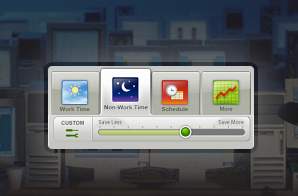
The application works in two ways: first it will gather data from your computer and will inform you of your computer usage behavior. After two or three days, you should have a decent data the time of the day you use your computer the most. This should give you a chance to schedule your computer usage. The second feature of the application is the power usage settings. The application can switch off your computer when you’re not using it after sometime and would implement power reduction settings if you choose to do so. You’ll even have updated information on how much energy you have saved so far.
Unfortunately, the application is only available in XP and Vista. But since they just released the Vista Version, it’s a good guess that they will come out with Mac or Linux versions later.
Interested? Check it out at http://www.verdiem.com/edison.aspx
Rating: Loading... No Comments »
O. James Samson - March 18, 2009
 Because of the increasing power of personal computers, setting up a music studio at home is almost a breeze. Aside form a computer, everything else could be found at home or too inexpensive to purchase – a decent microphone, speakers and few changes in the room to make it virtually soundproof. Because of the increasing power of personal computers, setting up a music studio at home is almost a breeze. Aside form a computer, everything else could be found at home or too inexpensive to purchase – a decent microphone, speakers and few changes in the room to make it virtually soundproof.
But the core of the advancement of home studio is based on software. Instead of purchasing very expensive mixers, everything could be controlled from a computer. As long as the user is familiar with the application, everything else is a lot easier.
A good application that you can consider using is the DarkWave Studio. DarkWave Studio is one of the few audio editing applications that will let you control live input. The application has a virtual mixer wherein you can make some small tweaks to the sound until you achieve your desired sound quality. Multi-track control is also possible which also gives the user control over recorded sound and mixing them according to the user’s preferences.
Aside from this feature, there are two more impressive features, making this software an impressive addition. First is the HD recording ability. Instead of going through regular recording quality wherein there is no full-surround sound experience, HD sounds provides more crisp and quality. The second feature is the unlimited support for different VST (Virtual Studio Technology) plug-ins. Most audio applications only have limited support to different types of VST plug-ins but almost anything could be integrated with DarkWave. Improving the application or modifying it according to users’ preferences is almost unlimited.
Check out http://www.experimentalscene.com/darkwave/ for more info
Rating: Loading... No Comments »
Tilgore Kraut - March 17, 2009
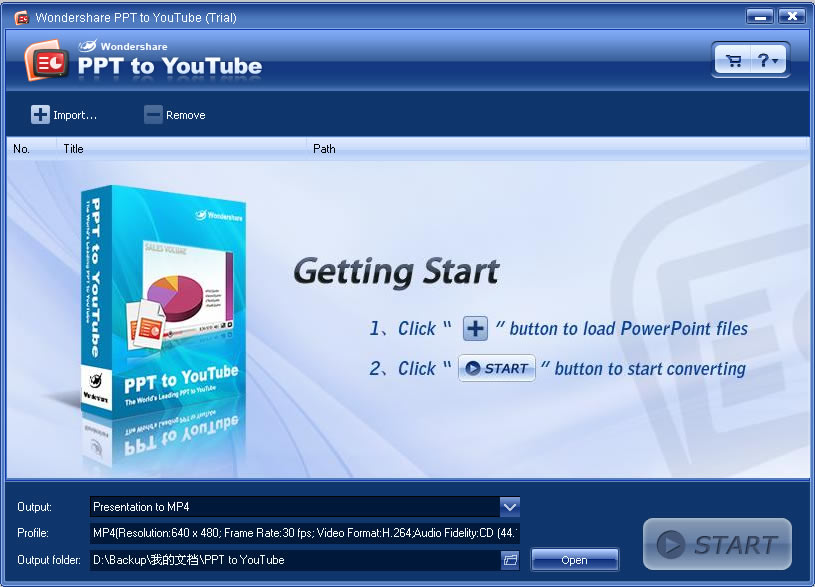 Wondershare PPT to YouTube is a professional PowerPoint to YouTube video converter. It can convert PowerPoint presentations to YouTube MP4, WMV video formats with all the elements in the original PowerPoint retained. Wondershare PPT to YouTube is a professional PowerPoint to YouTube video converter. It can convert PowerPoint presentations to YouTube MP4, WMV video formats with all the elements in the original PowerPoint retained.
Features: Wondershare PPT to YouTube converts PowerPoint slideshows into video. This is necessary as YouTube accepts only WMV or MP4 formats. PowerPoint is the most popular format for creating presentations contents. YouTube is one of the best ways to share contents with others. This application marries to two so that promotional material created in PowerPoint presentations can be widely distributed. It thus becomes convenient and easy to create video slideshow with PowerPoint and this converter. Distribute through YouTube your creation to the wide open world audience. Business promotion via the YouTube is now enabled through this package. It is likely to yield better results than direct e-mail campaigns.
While converting the slideshows to the WMV or MP4 videos you can retain animations, transitions, sounds and movie clips. The application has batch processing facilities enabling conversion of many files at a time, up to 12 PowerPoint files can be converted in a batch. For converting a slide show import the file into the application. Set the output format you want and then start the process by clicking on the convert button. Convert to MPEG4 DivX or Xvid formats, 640×480 resolution, MP3 audio and 30 FPS for best results. Resulting video should be less than 10 minutes in duration. MP4 video can work with Smartphones and other handheld devices. WMV works with Zune portable media player.
Overall: Nice and easy converter for uploading on YouTube a comprehensive audience.
{More Info and Download}
Rating: Loading... 1 Comment »
Tilgore Kraut - March 17, 2009
 WinUtilities Disk Cleaner securely clears obsolete/junk files, duplicate files and broken shortcuts from your computer. By clearing out these unwanted files WinUtilities Disk Cleaner can help you utilize your amount of available hard drive space. WinUtilities Disk Cleaner securely clears obsolete/junk files, duplicate files and broken shortcuts from your computer. By clearing out these unwanted files WinUtilities Disk Cleaner can help you utilize your amount of available hard drive space.
Features: WinUtilities Disk Cleaner lets you free up space in the hard disk by cleaning up unnecessary junk. The junk that is both unnecessary and unwanted. More free space on the disk ensures better performance of your system. Many a Windows applications create quite a few temporary files. When closed they should clean up these temp files. But they pile quite often because some applications do not do this clean up well. A program error that cause unnatural termination of the program, badly designed application and may the shut down was not proper. When installing many applications add folders as well as shortcuts to the desktop and start menu.
One of the reasons these files may get overlooked is they are no real problems most often until a sizeable volume builds up. Most of these residue files are small by themselves. However thy can pile up to a substantial amount quite quickly. With WinUtilities Disk Cleaner you can safely, easily and effectively remove these unwanted and unnecessary files from you computer. The utility also has other tools that help you easily & securely delete these files. Clearing up such unnecessary muck out of the hard disk periodically helps improve performance. The program works with Windows 95, NT4, 98, Me, 2000, XP, 2003 Server and Vista.
Overall: Nice enough utility when you are substantially full in the hard disk. But that may be difficult in these days of monster hard disks with capacities in 500 GB to 1 TB of storage. It’d take a lot of time to do a scan of such huge disks too.
{More Info and Download}
Rating: Loading... No Comments »
Tilgore Kraut - March 17, 2009
 Amazon.com is a storehouse of useful information whether you’re looking to buy something or just find information about it. But generally you have to first enter your search term and then click through to a product page to find items like customer reviews or sales rank. Amazon.com is a storehouse of useful information whether you’re looking to buy something or just find information about it. But generally you have to first enter your search term and then click through to a product page to find items like customer reviews or sales rank.
Amazanian is a web site that uses the Amazon API to provides mode detailed information on the search results page. For each item, you’ll find a price, release date, availability information, customer rating, category, and sales rank. You can also click on tabs to read editorial or customer reviews and see similar products. And you add items to a shopping list with the click of a button. When you’re ready to check out from Amazon, you can click a button on the shopping list to add everything to your Amazon cart. Read the rest of this entry »
Rating: Loading... No Comments »
Tilgore Kraut - March 16, 2009
 Do your writing skills leave a lot to be desired? WhiteSmoke 2009 is an English writing software that will boost your writing skills, make your writing look and sound more professional, and help you find the right words when words seem to fail you. Do your writing skills leave a lot to be desired? WhiteSmoke 2009 is an English writing software that will boost your writing skills, make your writing look and sound more professional, and help you find the right words when words seem to fail you.
Features: Whether one writes for business or pleasure quite often one could use a little help. WhiteSmoke 2009 aims to be such a companion when you are writing and can point out errors that include not only spelling errors but also style related. This package is indeed better that a lot of run of the mill packages aimed at this niche. The application provides a grammar checker that can detect and correct tricky grammar errors. A style checker helps improve sentences, vocabulary and writing style. The included punctuation checker attempts to improve readability with accurate punctuation.
Error explanations that pop up provide you with detailed explanations of the problem detected and helps you learn from errors. The application can work in conjunction with any document preparation in MS Word, Outlook and other text based applications. All these help are supported by a Thesaurus so that accurate word definition, synonyms and idiomatic phrases are available to you when needed. Letter templates help with templates for standard situations. Something like 600 templates are provided by the package. Supported by NLP and text enrichment technologies this package not only helps your English get better it also can help some one with English as the second language to smoothen out all the kinks. White Smoke 2009 is an amazing English writing software that is sure to have you writing high quality letters, articles, and website content quickly and effortlessly.
Overall: This is truly a great help, particularly the learning experience it provides.
{More Info and Download}
Rating: Loading... No Comments »
Tilgore Kraut - March 16, 2009
 keyCulator is the simplest calculator software in the world. However, the simplicity is both a concept and a power! This is the only calculator software without a program window. Actually, there is no window at all! keyCulator is the simplest calculator software in the world. However, the simplicity is both a concept and a power! This is the only calculator software without a program window. Actually, there is no window at all!
Features: keyCulator is a simple calculator software. It does not need a separate program window or any complicated interface. It works with the program that you may be using at that time. It can add this calculator functionality to any running program at all. It does work standalone too. Supposing you need a calculation to be shown in a Word document and have the calculator running. Typing 2+2 and hitting the = sign will automatically produce the string 2+2+4. If you do not need the 2+2 string that can be done too and only the result entered into the document. You may want to a calculation and then comeback into the document. All these options are available with this calculator.
When running, all you need to do is press the NumLock button. The numeric keypad becomes the calculator keys. The enter key becomes the = key. For calculations outside any other program simply enter numbers and operators as you would with any calculator. As soon as you hit the = key the expression as well as the result is shown in the hint window at the bottom of the screen. You can continue to do calculations with the results of the first step. Simply use the operator of the next level and continue normally you will keep getting results as they are calculated with the result of the earlier stage, the new operator and the new number at the current level.
Overall: Nice and easy to use program. Though for a very simple purpose it does the job well.
{More Info and Download}
Rating: Loading... No Comments »
Tilgore Kraut - March 16, 2009
 Address book with user-friendly interface that will help you to start a new life. Address book with user-friendly interface that will help you to start a new life.
Features: Delicious Address Book is a user friendly program that can keep track of all your contacts. No need to flip through a bulky address book you have been maintaining manually. Here’s no way you can forget your friend’s phone number or another’s email address. It makes the search very easy. The interface in its friendly way helps updating details of your contact or finding the details. Contacts are organized in a tree so that a structure is imposed on the details and it becomes easy to find.
For example a top level branching could be based on whether the contact is from work or he/she is a friend. Names, addresses, phone numbers, email addresses etc are maintained in the database. A value added feature for busy people is a built in Calendar that never lets you forget any meeting or events.
Overall: Even though the version number says it is not a version 1.0, looks like all the kinks has not been ironed out yet. It gave several internal OLE automation error messages during the try out. Did not look like there was anything additional you could do that you could not do in Outlook.
{More Info and Download}
Rating: Loading... No Comments »
Tilgore Kraut - March 14, 2009
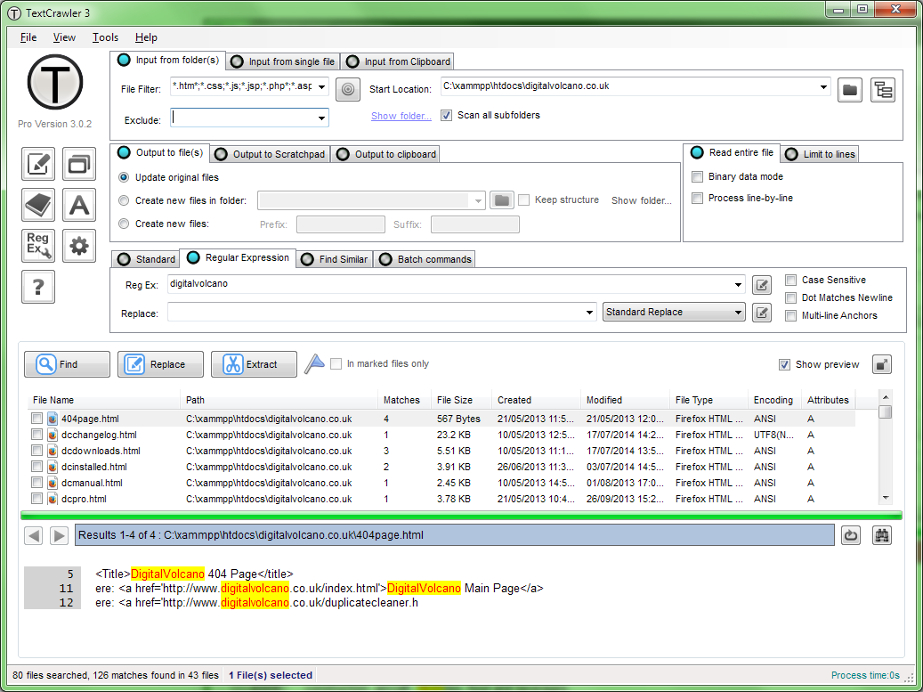 A tool for find and replace across multiple text files. Supports regular expressions and provides an expression tester, batch processing and library facility. It also features an interactive file list and highlighted search results. A tool for find and replace across multiple text files. Supports regular expressions and provides an expression tester, batch processing and library facility. It also features an interactive file list and highlighted search results.
Features: A tool for work with text files. TextCrawler enables you to instantly find and replace words and phrases across multiple files and folders. It utilizes a Regular Expression engine that helps you create sophisticated searches, perform batch operations, extract text from files etc. Varied search parameters could be used.
To make sure the regular expressions specified are workable, the program provides a regular expression tester. Save the regular expressions that work in a library for future use. You can save the search & replace scripts too. Search results are highlighted by the program. Multiple operations can be batched to operate on a file. Search and replace results can be exported to another program.
The extract feature lets you mine of specific information from a set of files. For example you can specify a regular expression to define an e-mail address and extract these addresses. The results are displayed on a separate window and can be saved. You can specify a set of files starting with a “start location”. There are couple of viewing modes. In one all the files that were searched are listed. In the second mode all files searched are displayed in preview window at the same time. The interface is simple and quite intuitive. It is easy to use.
Overall: Simple to use text processing application and is quite powerful.
{More Info and Download}
Rating: Loading... No Comments »
|
|
|



 (3 votes, average: 4.67 out of 5)

