Author Archive
Wednesday, February 14th, 2007
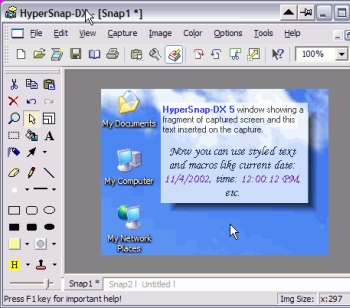 If you’ve been looking for a fast and convenient way to take screen captures from your Windows screen and you’ve not found one yet, you should try using HyperSnap-DX. If you’ve been looking for a fast and convenient way to take screen captures from your Windows screen and you’ve not found one yet, you should try using HyperSnap-DX.
HyperSnap-DX is a screen capture and image editing tool for Windows. What makes this program very useful is the fact that it doesn’t only take screen captures from standard desktop programs; it goes all the way to capture otherwise difficult stuff like DirectX, Direct3D, 3Dfx Voodoo, and Glide mode games easily. It can also capture frames from many software DVD players and other video playing software.
The latest version, HyperSnap-DX 6.13.02 has some very useful features, that makes it better than the previous versions. Some of the top features include:
- New in ver. 6 TextSnap™ feature to capture editable text from almost anywhere on the screen, when running under Windows 2000, XP or newer. Starting from ver. 6.10 can also capture tab-delimited data for easy paste into MS Excel.
- New & powerful image capture, editing, annotation and manipulation tools.
- Snags also those difficult-to-grab screens from DirectX™ and Glide™ games.
- Image stamps, frames, drop shadow, free-hand capture, FTP server uploads, more!
- Automatic color substitution!
- Non-rectangular window capture!
- Button Capture – perfect for professional technical writers who need to snap and document dozens of buttons!
- Fully customizable user interface. Rearrange menus and toolbars any way you want, assign any keyboard shortcuts you like, tear off menus to create instant toolbars, even control HyperSnap with voice commands!
You should check it out. CLICK HERE for more info and trial download.
Posted in Design, Developer, Photo, Shareware, Utilities, Windows | 2 Comments »
Tuesday, February 13th, 2007
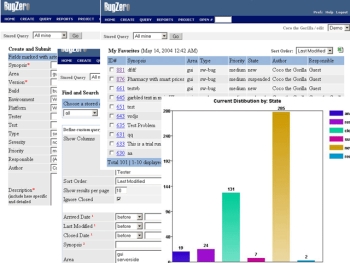 If you need a program that will help track software bugs, you need to check out Bugzero. If you need a program that will help track software bugs, you need to check out Bugzero.
Bugzero is a Web-based bug tracking tool but that is not just what it is used for it’s also a defect tracking, issue tracking, and change management system used in a distributed team environment to track software bugs, hardware defects, test cases, or any other issues.
But there is more to Bugzero than all that; it can also be used equally well as a helpdesk customer support, trouble ticketing, or email management system to collect and manage customer feedbacks, incidents, requests, and issues.
The new version, Bugzero 4.5.2 which just hit the market yesterday has these latest Changes:
- A new virus scan feature was added
- A few minor bugs were fixed
- A project can now be reloaded from database without restarting the application
The only thing you may have an issue with is the price. It looks expensive, but is it really expensive? It’s all a matter what you want to use it for, check out the trial version first and if it is what you need, it will be a worthwhile investment.
CLICK HERE for more info and trial download.
Posted in Business, Commercial, Design, Developer, Information Management, Main, Shareware, Utilities, Web services, Windows | No Comments »
Monday, February 12th, 2007
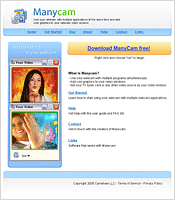 Have you always wanted to use your webcam in more than one application at the same time but you’ve not been able to do so because you can’t find a software that works? I got good news for you, try using ManyCam. Have you always wanted to use your webcam in more than one application at the same time but you’ve not been able to do so because you can’t find a software that works? I got good news for you, try using ManyCam.
How does it work?
ManyCam solves this problem for you by splitting one video stream into several video streams. All you need to do is to choose ManyCam virtual Webcam as the video source in your webcam applications.
One other thing I love about this software is that it lets you add cool features like funny animations, time and text to the video stream. All you have to do is right click the ManyCam icon in your bottom tray to access these features.
It’s so easy to use. Go and try it. CLICK HERE
Posted in Commercial, Developer, Main, Shareware, Video, Windows | No Comments »
Monday, February 12th, 2007
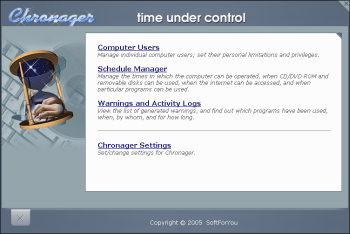 The Internet is a great platform to make things happen but it could also be a source of distraction and even danger to kids. That is why this software is going to be very useful for you if you’ve always worried about how to control your child’s use of the PC. The Internet is a great platform to make things happen but it could also be a source of distraction and even danger to kids. That is why this software is going to be very useful for you if you’ve always worried about how to control your child’s use of the PC.
Chronager is a parental or time control software program that gives you complete control over your child’s use of the computer. It lets you determine when he or she can use it for entertainment, and when for doing homework. It enables you to restrict the times when the computer can be used, and to set the times that your child may surf the Internet, play games, use particular programs, and watch movies.
Now you can have total control of how your child uses the computer. Go check it out!
http://www.softforyou.com/chr-index.html
Posted in Developer, Health, Main, Security, Shareware, Windows | No Comments »
Friday, February 9th, 2007
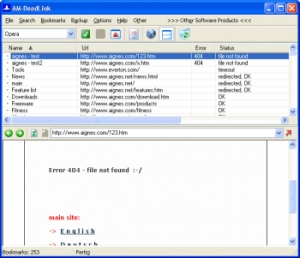 Here is a good software for you to use to detect dead links and duplicates. Here is a good software for you to use to detect dead links and duplicates.
AM-DeadLink detects dead links and duplicates in your Browser Bookmarks. If a Bookmark has become unavailable you can delete it from your Browser. This software is really good. It checks Bookmarks from Internet Explorer, Opera, and Netscape. With AM-Deadlink you can also download FavIcons for all your Favorites and Bookmarks.
The truth is the software is not a hundred percent accurate it could declare some links as dead when they are still active but like I have observed it doesn’t happen often, you can be sure of a 98.5% accuracy, which is more than good enough.
A new version, AM-DeadLink 3.0, has just been released with these changes:
- Windows Vista: Flip3D, thumbnail preview and correct animations supported
- Windows Vista: Use “Segoe UI” as default font
- Windows Vista: Several controls could disappear when the ALT key was pressed
- Internal check technology completely rewritten (should fix several “mysterious” bugs)
- Save all Firefox FavIcons to disk (extract embedded FavIcons)
- Sort Bookmarks with FavIcons to the top of list (Bookmarks menu)
- Several user interface tweaks
- File+Open works also for Opera/Firefox/Mozilla
- AM-DeadLink could crash on exit when a anti virus software or a desktop search software blocked the configuration files
- Minor tweaks and fixes
Want To Check It Out? IT’S FREE! CLICK HERE
Posted in Developer, Freeware, Information Management, Internet, Main, Shell and Desktop, Utilities, Windows | No Comments »
Friday, February 9th, 2007
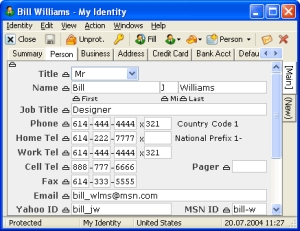 RoboForm is a password manager and one-click web form filler that is so easy to use.. All you have to do is to enter your personal information and the program securely stores it for future reference. It is a good program and it includes no adware or spyware. Works as an add-on to Microsoft Internet Explorer or Netscape web browsers. RoboForm is a password manager and one-click web form filler that is so easy to use.. All you have to do is to enter your personal information and the program securely stores it for future reference. It is a good program and it includes no adware or spyware. Works as an add-on to Microsoft Internet Explorer or Netscape web browsers.
The latest updated version which was released just yesterday has these changes:
- Make RoboForm work in Protected Mode of IE7 on
Vista, many changes
- Now RoboForm2Go can attach to Firefox even if Adapter is not installed
- Introduce Passcards that can click a link/button even if there is no forms
- Improve AutoSubmit to handle sites where JS prefills the forms such as Amazon.com
- Add (Clear History) command to the ‘Search Files’ window pull-down
- Add Export to IE Favorites and Firefox bookmarks
- Add Import of Search Engines to SearchCards from IE and Firefox
- Support SeaMonkey 1.1 in Adapter
- Enterprise version of RoboForm that allows offline activation and Enterprise Policies
Etc.
CLICK HERE for more info.
Posted in Design, Developer, Information Management, Internet, Main, Shareware, Utilities | No Comments »
Friday, February 9th, 2007
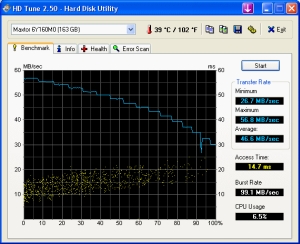 Unlike other programs even shareware in its category, HD Tune fulfils its purpose efficiently. HD Tune is a hard Disk utility to benchmark, show info, SMART status, temperature and check disk surface. Unlike other programs even shareware in its category, HD Tune fulfils its purpose efficiently. HD Tune is a hard Disk utility to benchmark, show info, SMART status, temperature and check disk surface.
HD Tune is free but it works better than most shareware in its category like Hard Disk Inspector which costs much but does little HD Tune is free, small but powerful.
The new updated version, HD Tune 2.53 released towards the end of last month has these changes:
- Added New S.M.A.R.T descriptions
- Fixed: Resource leak could cause a crash
WANT TO TRY IT OUT? CLICK HERE
Posted in Developer, Information Management, Main, Programming, Security, Shareware, Utilities | No Comments »
Thursday, February 8th, 2007
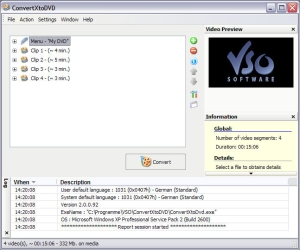 If you’ve been looking for a good and reliable software to burn your videos to DVD, you need to check this out. If you’ve been looking for a good and reliable software to burn your videos to DVD, you need to check this out.
ConvertXtoDVD is a software to convert and burn your videos to DVD. What I really appreciate about this software is that in just a couple of clicks you can backup your movies to DVD playable on any home DVD player easily.
You won’t have any problem converting in any popular format as it supports popular formats such as Xvid, MOV, VOB, Mpeg, Mpeg4, MP4, AVI, WMV, DV and stream formats. It simply converts your files into a compliant DVD Video set of files and burns it on a DVD media.
I’m sure you will love the fact that ConvertXtoDVD 2.1.12.214 works for NTSC and PAL video formats and creates chapters automatically. Multiple audio tracks are also supported.
Want to see if it is what you need? CLICK HERE
Posted in Business, Developer, Main, Movies, Social Software, Utilities, Video, Windows | No Comments »
Thursday, February 8th, 2007
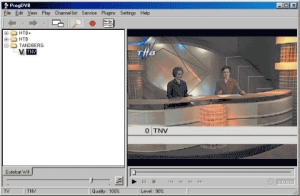 Here is a great program worth checking out. Here is a great program worth checking out.
This free software, ProgDVB allows you to watch SAT-Television and listen to Radio channels directly from satellite but you must use DVB-PCI cards with hardware decoders on the board, SAT-dish, and personal x86-compatible computers with Microsoft Windows installed.
It has options for working with network broadcasting and Audio/Video recording of the stream to different digital-media formats.
The latest version released a couple of days ago, ProgDVB 5.00.01, has these changes:
- Supports skins for main form (and in future it will support skins for OSD)
- Notes: This version does not support OSD and localization and has no important new functions so far. Besides, .Net version will always work a little slower
Want to try it? It’s FREE! CLICK HERE!
Posted in Commercial, Design, Developer, Freeware, Internet, Main, Movies, Video, Windows | 1 Comment »
Wednesday, February 7th, 2007
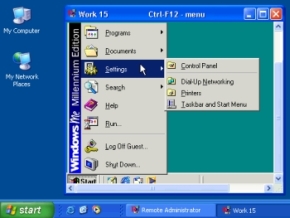 Looking for a software that can let your have total control of your computer from anywhere? I think you should try this software; Radmin (Remote Administrator). Looking for a software that can let your have total control of your computer from anywhere? I think you should try this software; Radmin (Remote Administrator).
Radmin (Remote Administrator) is a remote control and remote access program which enables you to work on one or more remote computers from your own computer. It can be considered as complete remote control solution where all key features such as Remote Control, File Transfer, text and voice chats, NT security, Telnet, and Multilanguage support are included.
Known for high speed, strong security and solid reliability, this software is worth checking out. Check out the trial download first and see if it does what you need it to do [You have 30 days to confirm that].
Want to check it out? CLICK HERE
Posted in Business, Developer, Main, Programming, Security, Shareware, Windows | No Comments »
|
|
|




