Author Archive
Tuesday, December 19th, 2006
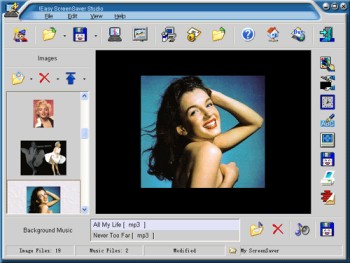 Why buy a screensaver when you can make your own? Here is a really great software, Easy ScreenSaver Station. It allows you make your own screensaver easily. Why buy a screensaver when you can make your own? Here is a really great software, Easy ScreenSaver Station. It allows you make your own screensaver easily.
With this software, you get to create screensavers that are just the way you want them. Images, Flash movies and background music can be included into your creations easily. Want to use photos from your digital camera or scanner directly? No problem. Easy Screensaver Station allows you to do this with ease.
After some easy steps, you can save your creation as a single standard ScreenSaver (.SCR) or a self-installing ScreenSaver (.EXE) for distribution. More features such as image editing, transition settings, password protection, copyright settings, preview, email sending and so on are included. No programming skills or royalties required.
A new updated version of this great software is out with these updates:
- Product renamed to !Easy ScreenSaver Station (Original name is !Easy ScreenSaver Studio)
- Set License Agreement for your ScreenSaver
- Remembered the last position and size of the main window
- Optimized the operation to set delay time for the objects
Are you ready for some screensaving creating fun? Check it out here!
Posted in Business, Commercial, Design, Developer, Main, Shareware, Shell and Desktop, Themes, Utilities, Windows | 1 Comment »
Tuesday, December 19th, 2006
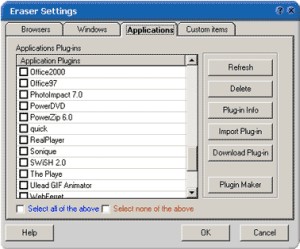 If you value your privacy online and you are in need of a software that will help achieve privacy protection with ease, you should try Track Eraser Pro. Tracks Eraser Pro will protect you by cleaning up all the tracks of Internet activities on your computer. If you value your privacy online and you are in need of a software that will help achieve privacy protection with ease, you should try Track Eraser Pro. Tracks Eraser Pro will protect you by cleaning up all the tracks of Internet activities on your computer.
What I really appreciate about Track Eraser Pro is that it’s an easy to use software. Only one click is enough to erase the cache, cookies, history, typed URLs, autocomplete memory, index.dat from your browser, and temp folder, run history, search history, open/save history, recent documents, etc.
Its free plugins gives you the opportunity to erase the tracks of up to 50 popular applications, such as playlist of Realplayer, Mediaplayer, QuickTime, recent files of Office, Acrobat, Winzip, etc easily.
That’s not all, a new version has just been recently released with these changes:
- Internet Explorer 7 fully supported
- Added support for Opera 9
- Added a Stop button
- Added Recycle Bin right click menu
- GUI optimized, Clean Hard Disk Free Space moved to Settings page main screen
- Minor bugs fixed
The only thing you might have an issue with like I did, is the price. It costs about $29.95. When I consider the fact that there certain freeware that does what it does, you may be tempted to ignore it. But it works very well and it has some extra features that is lacking in most other applications. Go check it out first! If you like it , go for it , if not don’t go past the trial version.
Are you ready to give it a try? CLICK HERE!
Posted in Commercial, Developer, Freeware, Main, Security, Utilities, Windows | No Comments »
Monday, December 18th, 2006
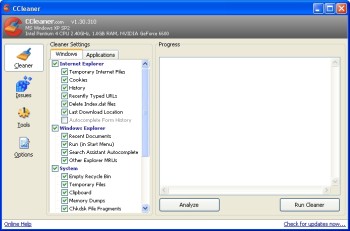 It’s not always easy to find a freeware that works perfectly doing what it is supposed to do not to talk of finding one that beat some shareware in its category hands down. But CCleaner is a really perfect system optimization tool that I will recommend to anybody any day. Started using it not too long ago and I have no regrets, instead it’s been good news galore. As it really helps me free up valuable disk space for things I need to get done and for my system to run faster. It’s not always easy to find a freeware that works perfectly doing what it is supposed to do not to talk of finding one that beat some shareware in its category hands down. But CCleaner is a really perfect system optimization tool that I will recommend to anybody any day. Started using it not too long ago and I have no regrets, instead it’s been good news galore. As it really helps me free up valuable disk space for things I need to get done and for my system to run faster.
CCleaner (Crap Cleaner) is a freeware system optimization and privacy tool. It removes unused files from your system – allowing Windows to run faster and freeing up valuable hard disk space. It also cleans traces of your online activities such as your Internet history.
A new updated version, 1.36.430, is out now with these changes:
- Fixed bug with Hotfix and logfile cleaning
- Added Office 2007 cleaning
- Minor tweaks and optimizations
This freeware really gets the crap out of your system. Check It Out HERE!
Posted in Developer, Freeware, Main, Security, Utilities | No Comments »
Monday, December 18th, 2006
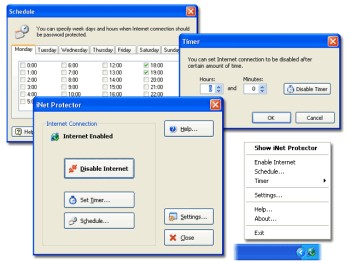 If you are a parent who wants to monitor and limit the time your children spend online or you are an employer concerned about the amount of time your employees spend online not doing the company’s work, then you might want to check out this software. It is called iNet Protector. If you are a parent who wants to monitor and limit the time your children spend online or you are an employer concerned about the amount of time your employees spend online not doing the company’s work, then you might want to check out this software. It is called iNet Protector.
iNet Protector helps to restrict access to the Web and password protect Internet connection. It allows you to enable and disable Internet connection any time. In order to enable Internet access, user defined password must be entered. The fact that there is some sort of flexibility, I mean you can schedule time periods when Internet connection should be disabled or enabled, makes this software useful.
A new updated version of this shareware was released a couple of days ago with the latest change being that the installer has been worked on to perform better.
Want to check it out? CLICK HERE!
Posted in Design, Developer, Internet, Main, Security, Shareware, Social Software, Utilities, Windows | 1 Comment »
Sunday, December 17th, 2006
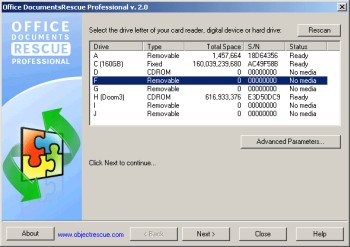 It could be really distressing not being able to find a valuable document you could have sworn was supposed to be there. Yeah! Believe me I Know that feeling. That’s why a software like Office DocumentsRescue Professional whose purpose is to retrieve your lost documents can really be a life saver. It could be really distressing not being able to find a valuable document you could have sworn was supposed to be there. Yeah! Believe me I Know that feeling. That’s why a software like Office DocumentsRescue Professional whose purpose is to retrieve your lost documents can really be a life saver.
Office DocumentsRescue Professional helps recover lost data from Hard Drives, CompactFlash cards (type I/II), IBM Microdrives, SmartMedia cards, MultiMedia cards (MMCs), Secure Digital (SD) cards, Memory Sticks, CD/DVD disks and any other storage device with the addition of wide range file format support: DOC, XLS, PPT, RTF, LIT, etc. It is an effective document recovery tool for Microsoft Word, Excel, PowerPoint, Project, Publisher, Visio etc
The real beauty of this software is that it doesn’t matter what caused your loss of document; PC crashes, accidental deletions, formatting of hard drive etc, Office Documents Rescue Pro gets it back for you. Isn’t it great?
Do you know how many jobs have been lost to lost documents? This might be your job saver, Check it out HERE.
Posted in Developer, Information Management, Main, Office, Shareware, Text, Utilities, Windows | No Comments »
Friday, December 15th, 2006
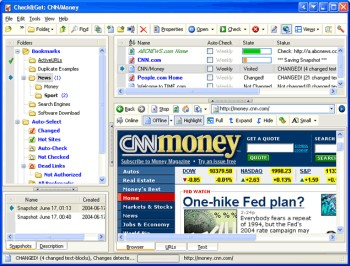 Need an easier way to check the latest updates on your favorite websites? This software does just that and much more in a quick and easy way. Need an easier way to check the latest updates on your favorite websites? This software does just that and much more in a quick and easy way.
Check&Get is a handy and powerful bookmark manager and web monitoring program that lets you check your favorite Internet pages and detect if their content has changed or has become unavailable. Not only that, it can notify you of changes or web-server downtime by bookmark highlighting, by pop-up message, by playing a sound file or by sending you e-mail message with the updated web page. And what really makes this software a delight is that it can even download the updated file from the Internet and save it to the specified folder on your hard disk. So you can browse it offline.
A new updated version of Check&Get has just been released version 3.1.0.440. The latest changes in the new updated version:
- Compatibility with Internet Explorer 7 added
- Additional Proxy settings added
- Usage of memory and performance optimized
Want to try it out? Click HERE!
Posted in Commercial, Developer, Information Management, Internet, Main, Shareware, Social Software, Windows | No Comments »
Thursday, December 14th, 2006
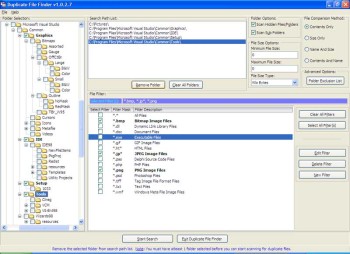 Last week, I told you about CloneSpy, a software that spies out clones [duplicates] of files in your PC and helps you get rid of them. If for any reason you are not satisfied with that or you can’t afford to buy the full version now, you can try out this freeware that does a similar thing, Duplicate File Finder. Last week, I told you about CloneSpy, a software that spies out clones [duplicates] of files in your PC and helps you get rid of them. If for any reason you are not satisfied with that or you can’t afford to buy the full version now, you can try out this freeware that does a similar thing, Duplicate File Finder.
Duplicate File Finder allows you to remove duplicate files from your computer. It allows you to search for duplicate files on your local PC and over the network. And you can preview graphic files before removing them.
Go get rid of the duplicate files in your system that is robbing you of precious space. Try Duplicate File Finder.
Get your free download and more info HERE!
Posted in Business, Developer, Freeware, Main, Utilities, Windows | No Comments »
Thursday, December 14th, 2006
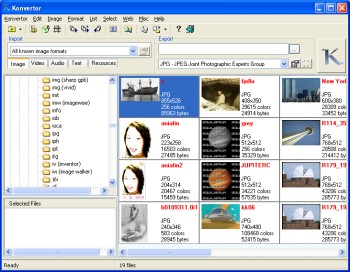 There is this really cool tool I’d like to recommend to you. You’ll love it. It’s Konvertor. It is a cool multimedia viewer and converter that gives you the power to organize all your pictures, graphics, videos and even music with personalized descriptions, so that you can find them without stress. There is this really cool tool I’d like to recommend to you. You’ll love it. It’s Konvertor. It is a cool multimedia viewer and converter that gives you the power to organize all your pictures, graphics, videos and even music with personalized descriptions, so that you can find them without stress.
Konvertor is a picture viewer, thumbnail browser, graphic, audio, video, and text converter. Konvertor gives you professional-quality imaging tools to get, view, modify, organize, enhance and print your images quickly. With Konvertor you get to enjoy a great user interface, and get fast operation with superior quality image display. It also allows the conversion between many file formats.
This software works best with Windows 2000, XP, 2003 and Vista. So you can’t use any earlier version of Windows with this software efficiently. Though it costs some money to get the full version as it is not a freeware, you can still get an evaluation version and see for yourself whether it is worth it or not before committing your money to it!
Click HERE for more info on its features and trial download!
Posted in Browsers, Business, Commercial, Design, Information Management, Main, Multimedia, Photo, Shareware, Shell and Desktop, Text, Utilities, Video, Windows | No Comments »
Thursday, December 14th, 2006
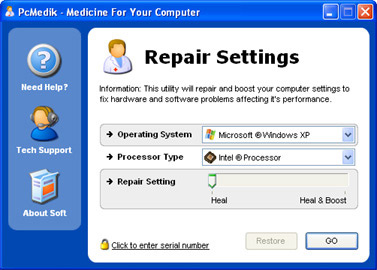 We are all interested in getting the best out of our PC. That’s why we try different software to help improve the performance of our system. And that’s why I think you need to give this product a try. We are all interested in getting the best out of our PC. That’s why we try different software to help improve the performance of our system. And that’s why I think you need to give this product a try.
PCMedik enhances PC performance, increasing overall speed and squeezing out every last bit of performance your computer is capable of. But that’s not all it also locates and repairs problems with software and hardware incompatibilities which lead to computer performance issues.
PCMedik’s cool features include:
- Makes direct changes to system registry and system files to enhance memory, screen drawing, animations, refresh rates, CPU threading speeds and security
- Automatically adjusts settings and changes made based on computer specifications, complete fault tolerance system implemented
- Easy and intuitive user interface which performs all setting changes immediately
etc.
If your system is far from fulfilling it’s potential then you need to try it out!
CLICK HERE TO TRY IT!
Posted in Business, Commercial, Developer, Main, Programming, Security, Social Software, Utilities, Windows | No Comments »
Thursday, December 14th, 2006
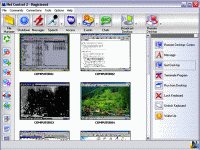 Here is a remote control, administration and monitoring software for you. It doesn’t matter what your needs are, Net Control 2 is useful for classroom, office and home local networks. Here is a remote control, administration and monitoring software for you. It doesn’t matter what your needs are, Net Control 2 is useful for classroom, office and home local networks.
Net control 2 gives you the ability to control computers remotely, manage files, send messages and monitor user computers. Are you in need of a software for several computers? Net Control helps you to easily control several computers simultaneously.
What you will enjoy in Net Control 2 includes:
- Broadcast Desktop feature allows to share instructor’s Desktop with all users in the network
- Remote power management (restart, turn on and off, wake-up computers remotely)
- Ability to run and terminate programs remotely
- Send text, graphic and sound messages
- Remote Desktop features (control user computer remotely, using keyboard and mouse)
- File management (allows to perform file operations on several computers simultaneously).
and so much more
Try it Out! CLICK HERE!
Posted in Business, Commercial, Developer, Internet, Main, Security, Utilities, Windows | No Comments »
|
|
|




