Archive for the 'Developer' Category
Saturday, March 10th, 2007
TuneXP is a freeware system utility designed to speed up your PC and make it run that little bit faster. It downloads and installs fast. Next you should click “help” then ” Documentation”.
This enables you to go through each tweak step by step. I recommend changing the ones that are “recommended for everyone” and leaving the others unless you really know what you’re doing. Defraging boot files is a good idea too, to help your computer start up that little bit faster, the ultra fast booting setting is a good idea too as it rearranges your boot files, also helping for quicker boot-up. you can also disable the built in windows unzipper if you use a third party program for this.
Together these little tweaks and more, all add up to make your system that little bit faster.
‘ve found it does make a noticeable difference with my computer, although i guess it might depend on your individual system. I like the tweaks it offers as i havent found them on any other tweaking programs, which usually seem to have the same ones that dont really do much. Anyway, its free and cant really do any harm.
You can download it here and read more info here.
Posted in Developer, Main, Programming, Shell and Desktop, Utilities, Windows | No Comments »
Friday, March 9th, 2007
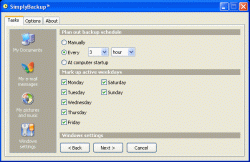 Need a fast and easy back up program? You need to check out SimplyBackup. Need a fast and easy back up program? You need to check out SimplyBackup.
SimplyBackup is a fast and easy backup program for Windows. It provides both manual and automatic data backup. It includes many useful features, such as Zip file compression, native file copying, strong AES-256 encryption, HTML log report, and more.
If there is in one thing you will enjoy about this software, it’s the user interface; it’s so simple and easy to learn that even fresh computer users won’t have a problem with it.
Another cool thing is that SimplyBackup includes backup templates to automatically back up My Documents, Windows desktop, Outlook folders, e-mail messages, address book, Windows system settings, and many more. You don’t have to specify those locations manually anymore.
You will also love the fact SimplyBackup is fast and has little impact on your system. It takes minimum system resources when running on your computer. The installation package is very small.
Don’t you think it’s worth checking out?
For more info and download, CLICK HERE or visit http://www.simplybackup.info/
Posted in Backup, Business, Commercial, Developer, Main, Shareware, Shell and Desktop, Utilities, Windows | No Comments »
Friday, March 9th, 2007
 If you need a program to help you keep an eye on your system especially the things that are not so obvious to the ordinary eye, you might want to check out SensorsView. If you need a program to help you keep an eye on your system especially the things that are not so obvious to the ordinary eye, you might want to check out SensorsView.
SensorsView is a program that monitors temperature of CPU, motherboard, hard disks, voltages, and fan speeds. It informs you about critical values of any parameters of your system (e.g. about overheating the processor or a stop of fans). You will appreciate the fact that SensorsView informs you about it and stores info in the log file.
The latest version, SensorsView Pro 3.1 Build 3061 was released on March 6, a couple of days ago.
In a nut shell it’s cool features include:
- Support almost all monitoring chips and motherboards
- Notification at critical values
- Showing chosen parameter in the tray
- Showing CPU usage
- Showing physical memory usage
- Showing HDD usage
- Showing NIC usage
- Log file for events and warning messages
Etc
Want to check it out? CLICK HERE
Posted in Developer, Main, Programming, Shareware, Shell and Desktop, Windows | No Comments »
Friday, March 9th, 2007
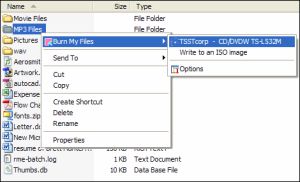 If there was ever a one click CD and DVD burning software, this is it. Burn My Files integrates with Windows Explorer. You need only select your file or folder, and with just one click, burn a CD or burn DVD. It’s so simple and very easy to use. If there was ever a one click CD and DVD burning software, this is it. Burn My Files integrates with Windows Explorer. You need only select your file or folder, and with just one click, burn a CD or burn DVD. It’s so simple and very easy to use.
The really cool thing about this software is that unlike most shareware, it offers a fully featured trial version for 30 days. This means you can try it free for 30 days and see if it’s something worth paying for or not. The publishers are that confident of their product.
Go and check out, you really don’t have anything to lose.
Go to http://www.burnmyfiles.com/
These are the cool features you will enjoy:
- Integrates with Windows Explorer
- One click to start burn
- CD burning software
- DVD burning software
- Burn DVD +R and -R
- Create ISO images
Posted in Audio, Developer, Main, Shareware, Utilities, Windows | No Comments »
Friday, March 9th, 2007
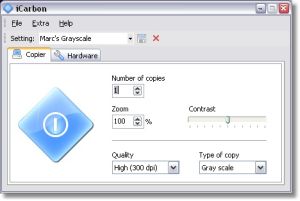 Have you ever had the need to photocopy something? who hasn’t! But you don’t have a photocopier, right? So you have to go pay for photocopies someplace. Well not anymore! Have you ever had the need to photocopy something? who hasn’t! But you don’t have a photocopier, right? So you have to go pay for photocopies someplace. Well not anymore!
At least not if you have a scanner and printer anyway!
iCarbon is a small freeware program that enables you to combine your scanner and printer to act just like a photocopier does. It’s compatible with TWAIN-compatible scanners. Configuration options include the paper size, color type (black and white, grayscale and color) contrast and quality settings.
It’s a useful little tool to have around whenever you need a quick copy of a document and it’s easy to use. Check it out.
Posted in Business, Design, Developer, Main, Photo, Shareware, Windows | No Comments »
Wednesday, March 7th, 2007
 Here’s an easy to use, simple to understand, budgeting program that won’t break the bank (as it’s free!). It’s called PearBudget and it can help you manage your finances a little better. Here’s an easy to use, simple to understand, budgeting program that won’t break the bank (as it’s free!). It’s called PearBudget and it can help you manage your finances a little better.
All it takes is three easy steps…
You simply enter an estimate of what you think you’ll spend during your yearly budget, this only takes a few minutes once a year. Next you hold onto your receipts and record your expenses, you only need to do this once or twice a month. Lastly you click “analyse” and it tells you how you’ve done!
While PearBudget isn’t a piece of software as such. (All it is is an Excel spreadsheet, made into a template for entering financial details.) It’s simple and effective to use!
At the moment its an .XLS file (Opens with Excel or OpenOffice) that you have to download but they are working on an online version and you can sign up for the beta of this or download the offline version, all by going here!
Posted in Business, Developer, Freeware, Internet, Main, Open Source, Shareware, Utilities, Windows | 2 Comments »
Wednesday, March 7th, 2007
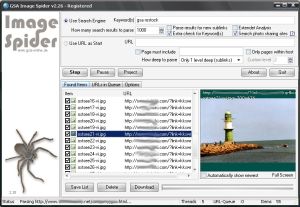 Check out this cool tool that can help you download images automatically. It is called GSA Image Spider. Check out this cool tool that can help you download images automatically. It is called GSA Image Spider.
GSA Image Spider can download all the images from a webserver automatically and this it does as you like it, with or without sublinks. It is a very easy to use software with a good user interface and it gives you amazing results in seconds.
Looking for relevant images from different websites? You can enter a keyword to find the relevant image from websites around the world easily.
Want to try out the demo version first and get a feel of the program? It provides only limited functionality and does not include many functions available in the registered version. You only get 10 images with the demo version but you will still get a feel of how it works and be able to make an informed decision whether to buy it or not.
Go check it out! Visit http://gsa-online.de/eng/image_spider.html or CLICK HERE!
Posted in Developer, Download Managers, Internet, Main, Photo, Shareware, Windows | No Comments »
Wednesday, March 7th, 2007
 Do you want a tool to help you stay on top of things, monitoring news from thousands of web sites and blogs around the world? Then Awasu is going work well for you. Do you want a tool to help you stay on top of things, monitoring news from thousands of web sites and blogs around the world? Then Awasu is going work well for you.
Awasu is a RSS client that lets you monitor news from thousands of web sites and blogs around the world. The really cool thing about this program is that it works in a unique way, and unlike other RSS clients, it has a powerful plugin architecture that allows you to monitor absolutely anything at all, even if it doesn’t provide an RSS feed. Awasu’s plugin architecture lets you extract information from any data source and monitor it in the same way as a regular feed.
This is really a very useful program that lets you do more advanced things like:
- Download your favorite podcasts
- Integrate with blogging tools
- Automatically keep your blogroll up-to-date
- Take information from within Awasu and republish it
- Keep different PC’s in sync with each other
Want to check it out? CLICK HERE or go to http://www.awasu.com/
Posted in Developer, Information Management, Internet, Main, RSS, Windows | No Comments »
Tuesday, March 6th, 2007
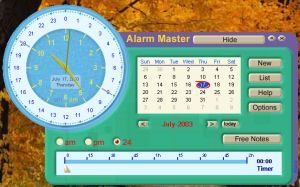 If you are someone who gets carried away and forgets things easily, Alarm Master will really help you get a hold on things. If you are someone who gets carried away and forgets things easily, Alarm Master will really help you get a hold on things.
Alarm master comes with alarm clock, scheduler, calendar and timer. Remember those important events that usually slip your mind and you’d have to apologize for not being there, with Alarm Master that is a thing of the past. With Alarm Master, not only do get reminded of important events but in a number of cool ways like playing your favourite music or sound [WAV or MP3], giving you a notification message, starting the program you like or even opening a document.
This is not your run of the mill alarm clock; it’s a very useful personal information manager. Number of alarms is almost unlimited and as a scheduler, there are special templates that allows you to set regular alarms; be it daily, weekly or monthly so that you can organize your schedule easily for monthly bills payments, birthdays you don’t want to miss, courses to attend etc.
There is also another version of Alarm Master called Alarm Master Plus; this has all the features of Alarm Master plus more.
For More Info And Trial Download, CLICK HERE!
Posted in Developer, Main, Shareware, Shell and Desktop, Themes, Utilities, Windows | No Comments »
Monday, March 5th, 2007
 Who says you can’t have fun with calculations? Who says you can’t have fun with calculations?
My talking calculator adds a new twist to talking calculators; it allows you to talk in your own voice and your own language. You are going to love solving your mathematical problems this time around with this easy to use calculator that is a load of fun.
A talking calculation robot, includes standard style, detail style, mini style, cartoon style, file calculation robot, unit converter, exercise center, formula manager, log manager. The user defined parameter, the unknown variable, the memory variables all make the daily calculation easy.
One other thing that is useful about this calculator apart from the fact that it does all the talking, (It could repeat talking, stop talking, talk the input key name, talk the expression , talk the result. It could talk in your own voice , if you replace the sound file) is that it displays the input and output in the same line, giving you an opportunity to be double sure about what you are calculating.
Want to check it out? Click HERE or visit http://www.ducklingsoft.com/mycalc.htm
Posted in Developer, Fun, Internet, Main, Shareware, Utilities, Windows | 1 Comment »
|
|
|




