Archive for the 'Developer' Category
Sunday, December 3rd, 2006
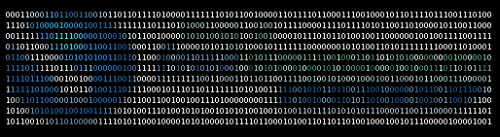
Ever thought those ASCII artpictures from the Internet’s history were really cool? You know, those pictures that hackers typed painstakingly into computer terminals? Photocopy the picture onto graph paper, then type it it pixel by pixel, each letter or number given a different shade rating… tedious and long work, but the results were stunning. If you printed it out and stood back you could see the original picture rendered in TEXT! Amazing.
So amazing in fact that ASCII art is still alive and people still think it’s a pretty neat idea. Well it is. But TEXT-IMAGE.com have taken all the hard work out of it and made it fun. On this site you can make original ASCII art, really cool 21st Century HTML colour ASCII art, or ACSII art made with Matrix text. That’s not just cool that’s SUPER cool. And no tedious typing.
Posted in Developer, Freeware, Fun, Internet, Main | No Comments »
Sunday, December 3rd, 2006
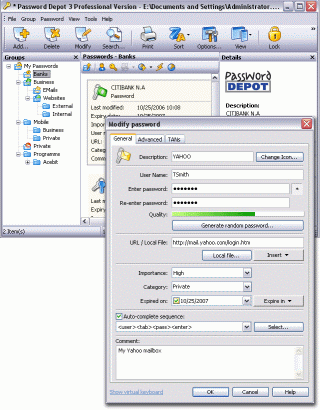 In one of my recent posts I told you about a software that can help you manage your passwords effectively, but in case you are not satisfied with that for any reason, you might consider checking this out! Password Depot. In one of my recent posts I told you about a software that can help you manage your passwords effectively, but in case you are not satisfied with that for any reason, you might consider checking this out! Password Depot.
Password Depot is a powerful and extremely user-friendly tool for the management of all your passwords. It offers rock-solid protection of your data due to double encryption with Rijndael 256. Your password list is protected twice: with the master password and with an internal key. Password Depot really stands out from the pack.
Some its great features include:
- User-friendly interface for convenient management of your passwords and access details: for the Internet, online banking (TANs), online shopping etc.
- Generate uncrackable passwords using the integrated Password Generator
- Maximum protection of your sensitive data thanks to the security algorithm Rijndael 256-Bit
- Protection from keyloggers and spyware: Password Depot protects your passwords even if your computer is infected with spyware and keyloggers
- Password Depot 3 runs on every Windows PC. Optionally, it also runs on USB flash drives
- Network compatible – allows shared use on a local network
- Store password lists on FTP servers for worldwide access to your data etc.
Though it’s not a freeware, you can try it out for free for 30 days.
CLICK HERE for more info and download!
Posted in Business, Commercial, Developer, Information Management, Internet, Main, Security, Shareware, Social Software, Utilities | No Comments »
Thursday, November 30th, 2006
 AT&T have some really wonderful speech synthesis software, and in a feat of precedented generousness they are sharing it with you! Yes you,because if you go over to AT&T and type in a coherent phrase or even a disjointed string of garbage, the AT&T software speech robot will dutifully speak it. AT&T have some really wonderful speech synthesis software, and in a feat of precedented generousness they are sharing it with you! Yes you,because if you go over to AT&T and type in a coherent phrase or even a disjointed string of garbage, the AT&T software speech robot will dutifully speak it.
The really cool part is that unlike a lot of other online speech synths, you can speak your words in a variety of ethnicities. You have US and UK English, Spanish, French, Canadian French, German and Indian English. Wow. Makes you want to type all kinds of stuff just to hear them say it, doesn’t it? Yes it does. And you will, believe me.
Posted in Audio, Developer, Freeware, Fun, Main | 4 Comments »
Thursday, November 30th, 2006
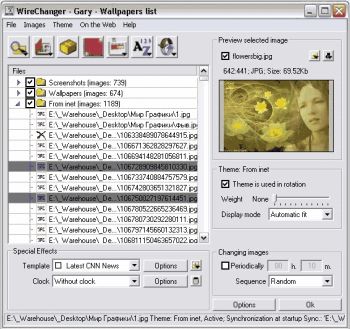
 Don’t you think it’s high time you changed the look on your desktop? If you do, you might want to use Wirechanger. Don’t you think it’s high time you changed the look on your desktop? If you do, you might want to use Wirechanger.
WireChanger is a Wallpaper manager that includes built-in utilities, templates, calendar and the option to add active clocks to your desktop. WireChanger offers you total and complete solution to manage your own desktop wallpapers, especially If you want to see something fresh every time you minimize your applications.
WireChanger will put customizable sticky notes on your desktop. To add a new note you just double-click your wallpaper in a free area and type the note’s text. I love the fact that your wallpaper can be colored and altered with special templates. Templates overlay your desktop background with useful information such as a calendar, the weather forecast, or famous quotations.
The calendar template transforms part or all of your background into a handy desktop calendar for two weeks or a current month with interactive day-by-day post-it notes. It can add an analog or digital desktop clock from the ColClocks collection to your wallpaper. You can also download a small utility called Desktop FlashGen to create an interactive desktop from your favorite flash file.
Want to check it out? Visit http://www.wiredplane.com/en/wirechanger/about.php
Posted in Design, Developer, Main, Shareware, Shell and Desktop, Themes, Utilities, Windows | 2 Comments »
Thursday, November 30th, 2006
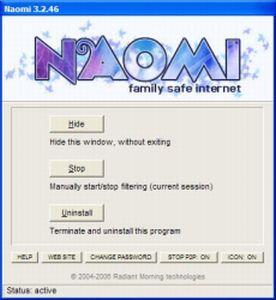
 Naomi is a free Internet parental control filter to help prevent your kids from viewing inappropriate material while online. Naomi is a free Internet parental control filter to help prevent your kids from viewing inappropriate material while online.
Naomi doesn’t rely on a simple list of banned sites like a lot of similiar programs do. Instead it examines in real time, all the data being transmitted and received through the Internet application, such as web browsers and chat programs. Monitoring is not limited to web sites, but covers the whole local Internet traffic. It also allows blocking of file-sharing applications and the whole thing can be password-protected. It’s also got some useful plug ins that may be of use, such as one to block Myspace access and one to hide the tray icon.
All in all its worth checking out if you’ve been looking for a free way of protecting your kids when they’re online! You can get more info and the free download from here.
Posted in Developer, Freeware, Internet, Main, Security, Utilities, Windows | 2 Comments »
Wednesday, November 29th, 2006
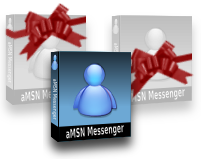 This is a free open-source MSN Messenger clone called aMSN. If for any reason you want to use MSN messenger but without using the official MSN messenger client, then maybe its time to check this out. This is a free open-source MSN Messenger clone called aMSN. If for any reason you want to use MSN messenger but without using the official MSN messenger client, then maybe its time to check this out.
It does just about everything the official MSN messenger program does, plus some more, such as being able to sign into more than one account at a time. It supports display pictures, custom emoticons, file transfer, even webcam support.
When you read the list of features, you’ll see its virtually identical to the official client in every way, but one potentially useful thing is that you can download plug-ins from the site, as well as this, its also skinnable.
You can check out all the features in full and download it by going here.
Posted in Commercial, Developer, Internet, Main, Open Source, Shareware, Shell and Desktop, Social Software, Utilities, Windows | No Comments »
Wednesday, November 29th, 2006
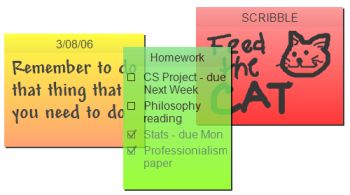 Sticky note paper is a popular way of taking down reminders, shopping lists, to-do lists, etc. Some people even ‘borrow’ some from work and use them for posting notes on the fridge freezer. The bright yellow pad enables us to quickly see a reminder note. Sticky note paper is a popular way of taking down reminders, shopping lists, to-do lists, etc. Some people even ‘borrow’ some from work and use them for posting notes on the fridge freezer. The bright yellow pad enables us to quickly see a reminder note.
Hott Notes is a free tool that enables you to write and place sticky-type notes on your desktop (ok, not the actual top of your desk, but on your screen,that thing you’re looking at now). You can use these notes in the usual manner – reminders, lists and more. The notes can be displayed in various translucent colors, so that you can use one color for reminders, another for business notes and one for home-related reminders.
You can even draw or write freehand on them!
Unlike the ‘borrowed’ from work sticky note paper, Hott Notes really is free and you can get it here with more info and here’s some screenshots.
Posted in Business, Commercial, Developer, Freeware, Information Management, Main, Open Source, Shell and Desktop, Text, Utilities, Windows | 2 Comments »
Wednesday, November 29th, 2006
 CDBurnerXP Pro is CD/DVD burning software with quite a lot to offer, considering it’s totally free! CDBurnerXP Pro is CD/DVD burning software with quite a lot to offer, considering it’s totally free!
It supports creation of multi-session disks, which is always useful if you have disc you want to keep coming back to add data or files to. It also creates Audio-CDs from mp3, wav, ogg and wma files. In addition to CD burning, you can also rip audio CDs, normalize WAV files, encode MP3 files, and erase disks. All this and it supports use of high write speeds too.
It’s able to write CD-R, CD-RW, DVD+R/RW, DVD-R/RW discs, creating either data or video discs. It can also rip audio-CDs, burn and create ISO images, convert WAV files to MP3 and vice versa, verify discs after burning, create bootable discs, print covers for your creation, convert BIN/NRG to ISO, etc. It supports Burn on the Fly and Burn-Proof hardware.
If you’ve been looking for CD/DVD burning software but don’t have money to burn, you won’t be playing with fire if you check out this freeware software right here! Some screenshots of this tool ‘in work’ can be found here.
Posted in Audio, Developer, Freeware, Main, Utilities, Video, Windows | 2 Comments »
Tuesday, November 28th, 2006
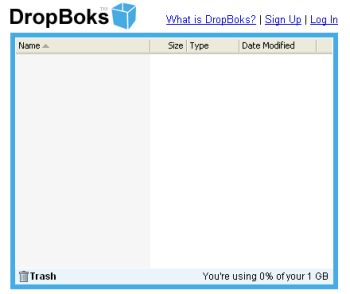 You need a place where you can upload and download files without any additional features like at Box.net? Well, try DropBoks. You need a place where you can upload and download files without any additional features like at Box.net? Well, try DropBoks.
It is a free storage solution where you can store up to 1GB of information. The only catch here is that you can’t upload (and download) big file at once (for example big music archive or a whole DivX movie or something else) – there’s a limit only 50MB at time.
It’s very simple to use (navigate) – sign up, then browse to the files you wish to upload and… in general that’s all. Selected files will be uploaded to a special folder from where users can download those files. When you don’t need some file anymore simply drag and drop it onto the trash icon.
Ps: One more thing. Remember I’ve told you that this service was free? Well, it’s so but guys who are running that site just ask for a $1 fee so there won’t be any ads.
Just try it for yourself. I’ve got a feeling you’ll love it.
Posted in Business, Commercial, Developer, Freeware, Information Management, Internet, Main, Open Source, Social Software, Utilities, Web services | No Comments »
Tuesday, November 28th, 2006
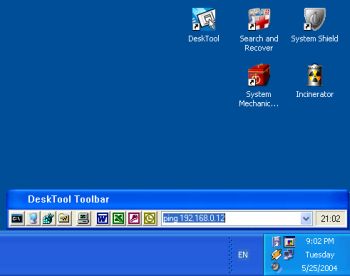 DeskTool is a desktop toolbar designed to give you easy access to frequently used applications by displaying an organized row of buttons from which to choose. DeskTool is tightly integrated into the desktop shell of Windows 9x and Windows NT/2000/XP. DeskTool is a desktop toolbar designed to give you easy access to frequently used applications by displaying an organized row of buttons from which to choose. DeskTool is tightly integrated into the desktop shell of Windows 9x and Windows NT/2000/XP.
It supports Drag and Drop for adding, deleting and moving buttons around on the toolbar. The really cool thing about it is that you can “dock” it to any one of the 4 edges of your screen (remember the Windows 95 taskbar?), or leave it free floating on the desktop. You can also make the toolbar “auto-hide” when docked to an edge, just as you can with the taskbar.
The fact that DeskTool can be made to stay on top of other windows makes it readily accessible.
A new updated version was released this month featuring these changes:
- Added support for multi-monitor configurations
- Added workaround when DeskTool appears out of the screen
- Changed location of the configuration file
- Improved installation
One downside to this shareware is that there are freeware that does similar things though not having the same feautures as DeskTool. Desktool goes for $15? Is it worth it? You’ll be the judge of that!
But since it really does what it is supposed to do very well, you might want to try it out! At least you can use the trial version freely to know if it’s worth it.
Check it out!
Posted in Business, Commercial, Developer, Information Management, Main, Shareware, Shell and Desktop, Utilities | 1 Comment »
|
|
|