Archive for the 'Internet' Category
Monday, November 20th, 2006
 Ever wondered if your Internet connection speed even comes close to what you pay for each month? I do! So i was happy when i found Speedtest.net, a cool looking site where you can choose from a selection of servers around the world and check your upload and download speed. Ever wondered if your Internet connection speed even comes close to what you pay for each month? I do! So i was happy when i found Speedtest.net, a cool looking site where you can choose from a selection of servers around the world and check your upload and download speed.
I kinda felt like i was planning for nuclear war with the flashy graphics, luckily for us all, i wasn’t!
It’s a cool site to go to if you wanna check just how fast your connection is going. See if it’s as fast as your provider claims, although results can vary at different times due to internet conditions.
It’s also a handy and useful tool for anyone who does things such as internet gaming,where having a fast speed is necessary for some games.
Speed on over to the site to check it out.
Posted in Internet, Main, Web services | No Comments »
Sunday, November 19th, 2006
 If you every have to give a webpage address to someone, its pretty easy to just copy and paste it, right? What if you had to write it down and it was long and complicated or worse, had to give it over the phone? If you every have to give a webpage address to someone, its pretty easy to just copy and paste it, right? What if you had to write it down and it was long and complicated or worse, had to give it over the phone?
Now imagine if it was this one: ‘http://local.google.com/maps?f=q&hl=en&q=white+house&sll=37.0625,-95.677068&sspn=26.991659,68.994141&ie=UTF8&om=1&z=16&ll=38.89763,-77.033515&spn=0.012909,0.033689’ …
Well, good luck!
Or how about you could just change that into this? http://stickythis.com/thewhitehouse
That’s where Stickythis comes in. It changes any URL into ‘http://stickythis.com (whatever you want it to be)’
You can go check it out here and add it to your collection of useful bookmarks!
Posted in Browsers, Business, Internet, Main, Web services | No Comments »
Friday, November 17th, 2006
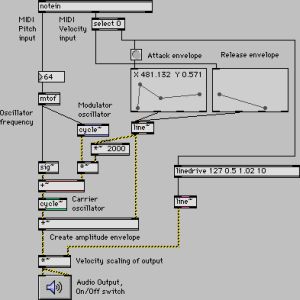 This software has apparently been in use in computer music for over fifteen years, and used by performers, composers, artists, teachers, and students all over the world. As they put it on the web site “Max/MSP is the way to make your computer do things that reflect your individual ideas and dreams”, which is a bit grandiose for my taste. This software has apparently been in use in computer music for over fifteen years, and used by performers, composers, artists, teachers, and students all over the world. As they put it on the web site “Max/MSP is the way to make your computer do things that reflect your individual ideas and dreams”, which is a bit grandiose for my taste.
More simply put, Max/MSP is a “graphical programming environment”, which means you can develop your own music generation and treatment software using a visual representation of the tools, connecting them together with patch cords on screen to make them talk to each other. This is really cool by the way! Not to mention very powerful.
The basic environment includes all the basic MIDI, control, user interface, and timing tools. That is the Max part of the suite. On top of Max you can build hundreds of other objects, including the two powerful collections of objects you can buy with Max, first of which is MSP, a collection of audio objects that facilitate everything from interactive filter design to direct to hard disk recording. The other set of objects is Jitter, a set of objects optimized for manipulating video and 3D graphics.
Yes it’s very geeky and techie, BUT it is VERY powerful. Computer driven music doesn’t get more leading edge than this.
Click here to join the magic.
Posted in Audio, Internet, Main, Multimedia, Shareware, Utilities | No Comments »
Thursday, November 16th, 2006
 In design stock photography is something you usually pay through the nose for. A good source of free stock photography is a boon for designers, graphic artists and web creators alike. Which is why it’s so very nice to see so many good quality free stock photo resources on the web. In design stock photography is something you usually pay through the nose for. A good source of free stock photography is a boon for designers, graphic artists and web creators alike. Which is why it’s so very nice to see so many good quality free stock photo resources on the web.
My favourite of all time has to be Stock Exchange, the first and best. The quality of the photos is great and you can contribute too. It’s like Flickr but with higher resolution to the graphics you create using these resources can be printable in magazines.
There are other resources too, all you have to do is search for “free stock photo -royalty”. The last bit is to stop searching for “royalty free” which is not free but something you pay for.
See Stock Exchange, but also these fine resources:
http://www.creatingonline.com/stock_photos/
http://www.free-stockphotos.com/
Posted in Internet, Main, Multimedia, Photo | No Comments »
Thursday, November 16th, 2006
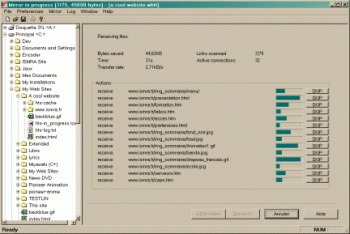 As great a tool as the Internet is, not being able to have access to certain information in certain sites because of server problems, limited Internet access or whatever can really be frustrating. So if you are looking for a way to stay connected to the Internet even when you are not connected, you might find this useful. As great a tool as the Internet is, not being able to have access to certain information in certain sites because of server problems, limited Internet access or whatever can really be frustrating. So if you are looking for a way to stay connected to the Internet even when you are not connected, you might find this useful.
HTTrack is an offline browser utility that allows you to download a website from the Internet to a local directory, building recursively all directories, getting html, images, and other files from the server to your computer.
The fact that it arranges the original site’s relative link-structure makes this software a really useful tool. All you have to do is to simply open a page of the “mirrored” website in your browser, and you can browse the site from link to link, as if you were viewing it online. It can also update an existing mirrored site, and resume interrupted downloads. It is fully configurable, and has an integrated help system.
If you have limited Internet access then this software is for you but if you have unlimited access to the Internet you may not really find it useful. But you can use it as backup for your favorite sites so that you can access necessary information whether you are connected or not, whether your server is down or not.
WinHTTrack is the Windows 98/NT/2000/XP release of HTTrack, and WebHTTrack the Linux/Unix/BSD release. Check out the download page.
Posted in Browsers, Freeware, Internet, Linux, Main, Utilities, Windows | No Comments »
Thursday, November 16th, 2006
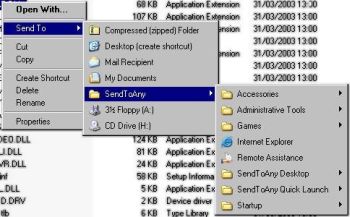 In the world of freeware and shareware there are not many programs that deliver exactly what they promise but this simple freeware really sets itself apart as it does exactly what it is supposed to do. In the world of freeware and shareware there are not many programs that deliver exactly what they promise but this simple freeware really sets itself apart as it does exactly what it is supposed to do.
SendToAny is a simple freeware that extends the Windows Explorer ‘Send To’ context menu with all known links. This is accomplished by synchronizing the Send To Menu with the Start Menu, Desktop and Quick Launch Menu. It allows any file to be sent to any application, regardless of file-type association, or an applications’ registration status.
One other thing I love about this program is that it resolves all types of links, including Microsoft Installer (MS Office, Adobe Acrobat, etc), which are normally invisible to the Send To menu.
As great as this program is I think it will be better if more options are introduced.
Want to check it out? Click Here!
Posted in Developer, Freeware, Internet, Main, Windows | No Comments »
Thursday, November 16th, 2006
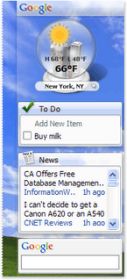 Google has refreshed the design of the recent 4.5 release of Google Desktop. To my mind now it’s better, faster and more personalized. In later versions of Google Desktop gadgets are floating on the desktop and the Sidebar has a definitely new look. Google has refreshed the design of the recent 4.5 release of Google Desktop. To my mind now it’s better, faster and more personalized. In later versions of Google Desktop gadgets are floating on the desktop and the Sidebar has a definitely new look.
The new Sidebar is transparent, so it fits seamlessly with your desktop environment. Gadgets that fought for attention now look right at home, and content-heavy gadgets get new frames and icons that make it easier to tell them apart. All of this leads to a better place to find your email, news, feeds, stock prices, weather and other essential information. And this version is compatible with all of the latest software including Microsoft Vista, Office 2007 and Mozilla Firefox 2.0.
via googledesktop
You can download and try the new Sidebar in Google Desktop now right from here.
Posted in Business, Developer, Freeware, Information Management, Internet, Main, News, Windows | No Comments »
Wednesday, November 15th, 2006
 I found a really cool resource on the web, which if you are a fan of old blues masters is actually something of a gold mine. Lots of the recordings of the old blues musicians have fallen into the public domain, being really old and all that. The problem with media that has fallen into the public domain is that it is pretty hard to find. I found a really cool resource on the web, which if you are a fan of old blues masters is actually something of a gold mine. Lots of the recordings of the old blues musicians have fallen into the public domain, being really old and all that. The problem with media that has fallen into the public domain is that it is pretty hard to find.
Luckily there is a new kind of movement on the Net where clever and resourceful people find out stuff which is public domain now and collect it together. This is one such resource.
Here you can find such brilliant old stuff as Leadbelly’s “Where Did You Sleep Last Night?”, Blind Willie Johnson singing “Praise God I’m Satisfied”, and Lottie Kimbough with “Wayward Girl Blues”. Oh yeah and I really love Memphis Minnie’s “Where is My Good Man At?”. Very cool.
Join the fun at PublicDomain4U.
Posted in Audio, Fun, Internet, Main, Web services | No Comments »
Wednesday, November 15th, 2006
 You know what’s really weird about the concept of backing up the entire Internet? Where on earth would you put it all? You know what’s really weird about the concept of backing up the entire Internet? Where on earth would you put it all?
I don’t know how it works, but over at www.archive.org they have a thing called the Internet Wayback Machine. You can put in a URL and it will take you back to what that page looked like in 1996. It must be vestigial logs from the hosting sites or something, I don’t see how it can work, but it does. I can verify I went back to a lot of my old websites that are LONG gone and there they were, graphics and all.
That’s not even possible, is it?
Mind boggling. Go boggle your own mind at The Internet Wayback Machine.
Posted in Developer, Internet, Main, Social Software | No Comments »
Wednesday, November 15th, 2006
 At the end of last week my Skype-client have told me that there’s a new BETA version (for Windows users) available… I was too busy that time to download and look at it but now time have come! So, what’s inside Skype 3.0 (Beta version)? First of all there are lots on new and very interesting functions (like skypecasts (which were available in the 2.6 Beta already), public chats etc.). At the end of last week my Skype-client have told me that there’s a new BETA version (for Windows users) available… I was too busy that time to download and look at it but now time have come! So, what’s inside Skype 3.0 (Beta version)? First of all there are lots on new and very interesting functions (like skypecasts (which were available in the 2.6 Beta already), public chats etc.).
So, lets start with those skypecasts:
In Skype 3.0, you can browse the current Skypecasts straight in Skype on the Live tab. When you decide to join or host one, the Skypecast itself will run within a separate tab where you have all the host or participant controls to ask for mike, see who’s the host and do all those other things you need to do in a Skypecast. So there won’t be no more of those clunky pop-up browser windows. To join Skypecast just click the link and talk (or just listen to the conversation). Every Skypecast have all ‘statistic’ you need to know (subject, who’s hosting it, number of participants right now). One more thing about the host: one who organized the whole talk have more rights and can vary a few things, for ex. They can cut somebody short so you won’t be able to talk, just listening to the conversation. Also he can set a chat time (how long the conversation will take place). There’s a 5 hours limit (maximum). For that time chat will be available even if there’s no one is talking. After that chat will be deleted (only if there’s no one inside, if there’s at least one person it still will ‘live’). (more…)
Posted in Freeware, Internet, Main, Multimedia, Social Software | 1 Comment »
|
|
|





