Archive for the 'Main' Category
Tuesday, March 11th, 2008
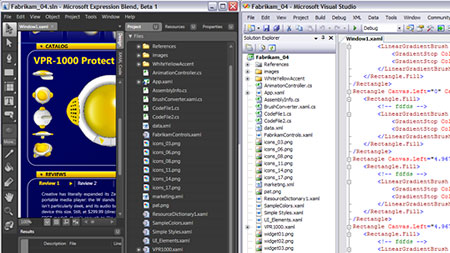 This is one of the previews of Microsoft Expression Blend, a piece of software that used to be known as the Expression Interactive Designer. This is a piece of software that is simply phenomenal in its execution and because the particular market that it caters to is so popular at the current moment in time, it appears as if the Expression Blend is going to be a hit in any form. This is one of the previews of Microsoft Expression Blend, a piece of software that used to be known as the Expression Interactive Designer. This is a piece of software that is simply phenomenal in its execution and because the particular market that it caters to is so popular at the current moment in time, it appears as if the Expression Blend is going to be a hit in any form.
If you are looking to design different applications and want a program that can help you make those applications great, then look no further than Microsoft Expression Blend. This software will help you design applications that are great to look at and it will help you utilize multiple tools to do that. Not only is there support for the creation of cinematic interfaces, but you will find that everything from pixel manipulation to vector dynamics is available on Microsoft Expression Blend, allowing you to get the job done in multiple ways.
This fully functional preview will allow you to get a full sense of what the program will be like when the full 2.5 version gets released later on this year and more information is available at http://www.microsoft.com/expression/.
Posted in Design, Developer, Main, Microsoft | No Comments »
Wednesday, March 5th, 2008
 Fix8 is a free program for using with your webcam. It allows you to add in “special effects”. These consist of animated objects such as hats, etc, but can also consist of avatars. These follow your heads position so for example you can wear a virtual hat. The avatars face is controlled by your own facial movements. For example, if you wink, it winks, if your mouth moves, it’s mouth moves, etc. Fix8 is a free program for using with your webcam. It allows you to add in “special effects”. These consist of animated objects such as hats, etc, but can also consist of avatars. These follow your heads position so for example you can wear a virtual hat. The avatars face is controlled by your own facial movements. For example, if you wink, it winks, if your mouth moves, it’s mouth moves, etc.
This can lead to hours of enjoyment or just a few minutes, depending on how easily amused or creative you are I guess!
There’s a wide selection to choose from that come with the basic version, which is completely free, with the choice to upgrade if you feel like spending a little money at a later time. You can also record videos for you and your friend’s later amusement.
Sound interesting to you? All you need is your computer and webcam and to go here to see a video example and download it..
Posted in Chat, Main, Video | No Comments »
Friday, February 29th, 2008
 Whether you are just starting a new company, a new job, or you just got a major promotion, you will definitely be in need of some fancy new business cards. This business card design software gives you the chance to do exactly what it says. There are at least 25,000 business card designs, 15,000 images for you to play with, 200 different fonts and texts, and no limit to the number of ways you can combine the card designs, fonts, logos and images. Whether you are just starting a new company, a new job, or you just got a major promotion, you will definitely be in need of some fancy new business cards. This business card design software gives you the chance to do exactly what it says. There are at least 25,000 business card designs, 15,000 images for you to play with, 200 different fonts and texts, and no limit to the number of ways you can combine the card designs, fonts, logos and images.
It doesn’t matter if you want a flashy colorful business card, or a simple straightforward one, this program gives you the option to create the business card you have always imagined, and allows you to give as much or as little information as you wish. You can even decide whether you want to give your information horizontally or vertically, and change the arrangements to create the absolute most effective card for you. Plus, even after you combine all of your design options in the program, you still have more options when it comes to printing your own business cards. Now you are able to print them right from home or your office, and you can choose to print them on standard white paper, or add a bit of flavor with colored paper or printed designs.
More info you’ll find right here.
Posted in Business, Commercial, Design, Developer, Main, Shareware, Windows | 2 Comments »
Friday, February 29th, 2008
 When it comes to internet security, everybody is looking for the next great thing, but for some reason BitDefender hasn’t quite gotten its name out there. However, BitDefender is actually one of the latest and greatest software programs to defend your computer from viruses, spyware, and stealthy attacks. It also has features to allow parents to block certain sites from their children. It includes a built-in firewall protection to keep hackers from detecting your computer, and to notify you when anyone else is logged onto your network. When it comes to internet security, everybody is looking for the next great thing, but for some reason BitDefender hasn’t quite gotten its name out there. However, BitDefender is actually one of the latest and greatest software programs to defend your computer from viruses, spyware, and stealthy attacks. It also has features to allow parents to block certain sites from their children. It includes a built-in firewall protection to keep hackers from detecting your computer, and to notify you when anyone else is logged onto your network.
The best part about BitDefender is that it is automatically designed to update itself every hour so there will never be a missed update, but should you ever miss an update, BitDefender’s Behavioral Heuristic Analyzer in Virtual Environments or “B-HAVE” technology will detect threats ahead of time and block them before you ever even know they are there. Not to mention the new technology that allows BitDefender to automatically scan and block out websites trying to gain access to your personal information. And all of this is done automatically without you even telling it what to do. Many users agree that this is one of the best internet security programs on the market simply because it does not slow your computer down while it is scanning, and it will not flood you with dozens of alarm notices.
Posted in Developer, Internet, Main, Security, Shareware | 2 Comments »
Thursday, February 28th, 2008
 Perfect for the small business, FormTool is a unique software designed to help you get rid of all of your paperwork and complete forms digitally. This program allows you to recreate the paper in your hand on the computer, and fill it out. Then you can mail it, save it, or file it any way you want. Plus, there are tons of other options and features that allows you to save time and be creative. Perfect for the small business, FormTool is a unique software designed to help you get rid of all of your paperwork and complete forms digitally. This program allows you to recreate the paper in your hand on the computer, and fill it out. Then you can mail it, save it, or file it any way you want. Plus, there are tons of other options and features that allows you to save time and be creative.
From the very beginning you can create your own forms, either the same as the ones you work with on paper, or you can design your own using FormTool’s simple form creating capabilities, including shapes, lines and check boxes. Once you are done you can send these forms out, or you can print them.
If you happen to be filling out a ton of forms with your information on them, FormTool will make life easier by automatically filling in information that has already been input on other forms. This saves you from answering the same questions over and over. Just in case, FormTool includes a special password option so that other people will not be able to access the saved information from your forms. And most importantly, FormTool comes with its own spell checking system so you never have to worry about misspelling important information.
More info available at www.formtool.com
Posted in Developer, Main, Templates, Windows | 2 Comments »
Friday, February 22nd, 2008
 Whether you are a student or you have a son or daughter that is a student, you know that resources are invaluable when it comes to writing reports and preparing for tests. Encyclopedia Britannica knows this as well, and they have created some of the best reference materials available for the computer that are now on the market. Whether you are a student or you have a son or daughter that is a student, you know that resources are invaluable when it comes to writing reports and preparing for tests. Encyclopedia Britannica knows this as well, and they have created some of the best reference materials available for the computer that are now on the market.
If you need help with your English course, Encyclopedia Britannica has reference software for Shakespear as well as software that includes a computerized version of the Merriam-Webster Dictionary. If you need help with your history course, Encyclopedia Britannica gives you the chance to purchase their software references on US Presidents, Black History, Hispanic Heritage and World War 2. There are also such titles as “Birds of the World” and “National Parks” for you to reference.
These are some of the best reference materials out there, and they include more than just page after page of information. They also give you the opportunity to access a list of the most important events pertaining to that subject, video and audio clips, as well as many pictures, photos, and historical essays on the topic. The best part is that you don’t have to spend a ton of time searching for relevant information because you can now do a simple keyword search and the computer will automatically tell you where to find the information that you are looking for. This is great for last minute essay writing and test crunching.
Posted in Developer, Information Management, Internet, Main, Web 2.0, Windows | No Comments »
Friday, February 22nd, 2008
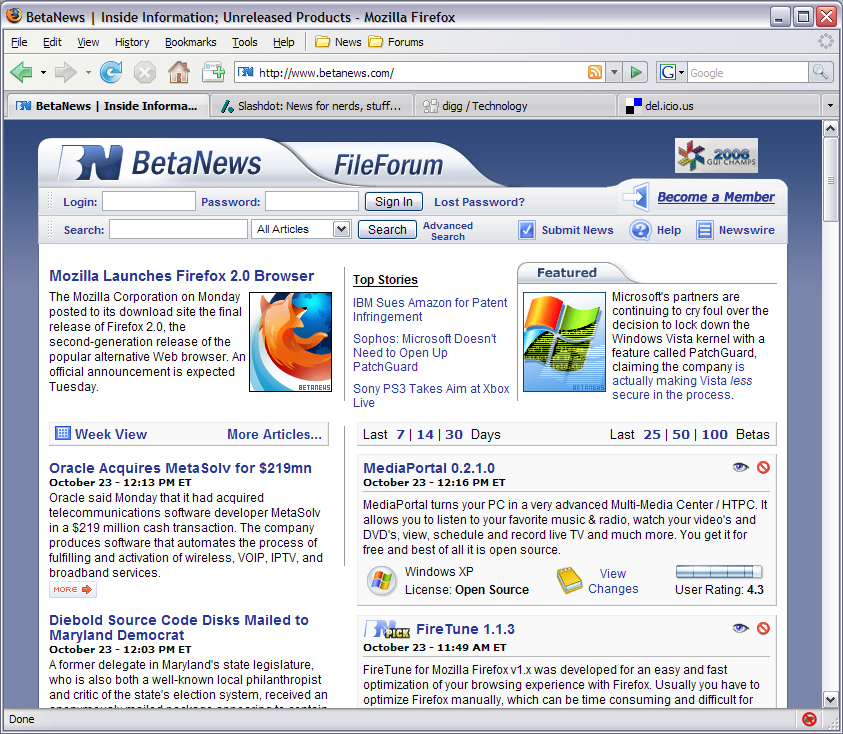 The coming of Mozilla Firefox to the world was a great event as many people were now able to get a browser that worked with what they wanted to do online. The great event is repeated every time a new version of the browser is released and recently the Mozilla Organization released the newest version of the Firefox browser, version 2.0.0.12. Ever since its inception, the goal of the Mozilla Firefox project was to make browsing online easier and more intuitive. Now, with help from a number of suggestions and programmers, they have done exactly that. The coming of Mozilla Firefox to the world was a great event as many people were now able to get a browser that worked with what they wanted to do online. The great event is repeated every time a new version of the browser is released and recently the Mozilla Organization released the newest version of the Firefox browser, version 2.0.0.12. Ever since its inception, the goal of the Mozilla Firefox project was to make browsing online easier and more intuitive. Now, with help from a number of suggestions and programmers, they have done exactly that.
In addition to things like tabbed browsing, the cross-platform nature of the browser and the built-in pop-up blocker that people already know about, the new version of Firefox comes with a number of different new and innovative ideas. Firstly, the actual software program itself has been streamlined so that it uses up fewer resources in being utilized. At the same time, a number of reported bugs have been fixed and both the privacy and security features attached to the browser have been updated. Finally, hassle free downloading is still incorporated into the overall design, something that should please downloading internet users that have used the previous versions of Mozilla Firefox.
More information about the latest version of Mozilla Firefox can be found at http://www.mozilla.org/projects/firefox/.
Posted in Browsers, FireFox, Freeware, Main, Security, Windows | No Comments »
Wednesday, February 20th, 2008
Xara 3D adds impact to web pages with top quality still and animated 3D headings, buttons and logos. With Xara3D an endless variety of 3D graphics can be created from TrueType fonts or imported 2D shapes.
Pros: 3D still and animated headings, buttons, logos really add value to graphics used on a website. Xara 3D appears to be a sophisticated tool bag to create such effects quite easily. True type fonts and imported 2D shapes could be used to create a range of sophisticated effects easily. Tools are available to manipulate the extrude depth, lighting, bevel, color and texture, shadow, font size and type. Then there’s a whole range of animation possibilities including multi-page sequences and even animated 3D screensavers. Graphics created go through anti-aliasing to make sure they have the smoothest appearance on screen. Optimization for web use also is possible. The application handles a range of formats such as WMF/EMF, CorelXARA and Webster files for imports and exports GIF, Flash, JPEG, PNG, AVI or BMP.
Most impressive part of the user interaction interface is the real time view possible of effects being applied on the 3D text, banner and animations being created. 3D extrusion, bevels, fonts, colors and textures are some of the things one can control. You keep the changes or discard depending on what you see as you create things. Colors, shadows, lighting adds to the effect one is able to create with the text item one is trying to create.
Bordering/ framing effects controls provide another dimension to the effect being created. Once again the “what you see is what you get” kind of display really helps. The sophistication of the controls adds a lot of value to the application, one does not really expect this level on a package that costs less than $50.
{More Info and Download}
Posted in Main | No Comments »
Friday, February 15th, 2008
 IE7Pro is an add-on for Internet Explorer which adds some much needed features. This add-on makes IE a lot more customizable and usable than it is by default. So if you’re a die-hard IE user, now you can have your IE almost as cool as Firefox (almost! hehe!) as it adds a lot of useful functions. IE7Pro is an add-on for Internet Explorer which adds some much needed features. This add-on makes IE a lot more customizable and usable than it is by default. So if you’re a die-hard IE user, now you can have your IE almost as cool as Firefox (almost! hehe!) as it adds a lot of useful functions.
With this one add-on you now have the choice of several extra features which can each be enabled or disabled according to your own liking, such as:
- An adblocker,has a good blocklist by default but you can also import a blocklist of your choice.
- Download manager,supports resuming Downloads and simultaneous downloads.
- Surf privately. With only a click, erase all the tracks that you left behind while browsing.
Other features include:
- Crash recovery
- Super Drag and Drop
- Quick proxy switcher
- Enhanced Tabbed Browsing
- Mouse gestures
- Hotkey customization
- Address bar shortcuts
- Spell check
- Auto scrolling
- Auto refresh
- Tab history
- Lots of scripts available from www.iescripts.org
and more, see website for full details.
Once you’ve downloaded it and installed it, you’ll notice a small “e” icon at the bottom right corner of IE, right click it for options and to set preferences.
It’s free and you can get it here, with full details on all features.
Posted in Browsers, Internet, Main | No Comments »
Friday, February 15th, 2008
 Learning a foreign language is a very useful skill to have as, in some ways, it opens a whole world up that would otherwise be mostly closed to you. Thought about it but wondering where to start? Learning a foreign language is a very useful skill to have as, in some ways, it opens a whole world up that would otherwise be mostly closed to you. Thought about it but wondering where to start?
Mango Languages is a really useful site for anyone learning a language or considering doing so.
It comes in free, basic and pro versions. The free version includes 50 lessons and is certainly more than enough for anyone beginning learning another language. You’ll learn over 1,100 common high-frequency words. It speaks and shows phrases that will be useful in real life situations and explains the grammar in a very easy to understand manner. It has clear, easy to hear, audio examples and narration. The interface is extremely user friendly, you can click to repeat the phrase, go back or forward and even click to repeat individual words. This site is gonna be really appreciated by anyone who’s beginning learning a new language.
It currently offers lessons for:
- Brazilian-Portuguese, Spanish, Japanese, French, German, Italian, Greek, Russian, Mandarin Chinese, ESL Polish and ESL Spanish (ESL = English as a second language)
Click here and try it out for yourself, you don’t even have to register to try it out.
Posted in Main, Web 2.0 | 2 Comments »
|
|
|




