Archive for the 'Main' Category
Monday, August 20th, 2007
 It’s not very often that a software program comes along that has the ability to really do something innovative, but that is exactly what the ASCII Generator dotNET Beta 0.8.2 has that ability. It’s not very often that a software program comes along that has the ability to really do something innovative, but that is exactly what the ASCII Generator dotNET Beta 0.8.2 has that ability.
Have you ever gone online to any of the web 2.0 websites and seen some of the very interesting text art? Or better yet, have you ever been part of an online RPG where the only method of communication was through text, forcing the people inside the game to become very innovative in the way they conveyed images?
If you’re like most people that use the internet, chances are that you have indeed some across such things. Whether it is something as simple as a smiley face ‘=)’ emoticon or something far more involved, the concept we are talking about here is known as ASCII art. It is basically art that imitates real life pictures through the use of nothing more than basic ASCII symbols.
And that is exactly what the generator allows you to do. You just upload a picture into the ASCII Generator dotNET and it converts that picture into some sort of high quality ASCII art. It is a fantastic program to use and since it is open source, you can effectively get your hands on it really easy.
For more information, head on over to Jonathan Matthews’ website at http://ascgendotnet.jmsoftware.co.uk/
Posted in Freeware, Information Management, Internet, Main, Photo, Windows | No Comments »
Sunday, August 19th, 2007
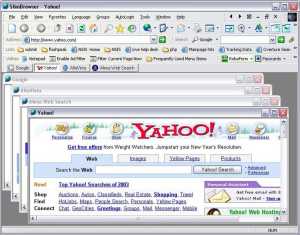 Looking for an alternative browsing experience or just of the same old same old browsers you’ve been using? This is worth a try, it’s no top class browser but it does the job. Looking for an alternative browsing experience or just of the same old same old browsers you’ve been using? This is worth a try, it’s no top class browser but it does the job.
Slim Browser is a multiple-site browser based on tab-page interface. It includes a fully automatic form filler which allows you to fill in, save and manage Web forms easily. It provides convenient access to major search engines on toolbar.
If you are still in doubt about whether this is worth checking out or not, check out what it can do for you:
- Multiple site browser based on tab-page interface;
- Built-in RSS News Rendering Engine. Now you can read RSS news directly inside SlimBrowser without additional RSS Reader software;
- Convenient access to major search engines by Quick-Search Bar;
- Seamless integration of most Internet Explorer toolbars;
- ScriptPad: Built-in VBScript/Jscript/HTML/Text editor;
- Seamless integration with AI RoboForm FormFiller/Password Manager;
- Built-in Popup Killer based on intelligent identification and pre-defined filtering;
- Site windows killed by mistake are FULLY RECOVERABLE;
- Site Group: Open and save a collection of sites as a group;
- Flexible control of startup actions;
- URL Alias: Type short alias instead long URL.
And so much more!
Slim Browser runs on all 32-bit windows systems, i.e.,Win95/98/ME/NT/2k/XP/2003/Vista. A few minor features may not be available under Win95.
Want to check it out? Visit http://www.flashpeak.com/sbrowser
Posted in Browsers, Developer, Freeware, Information Management, Internet, Main, Windows | 1 Comment »
Friday, August 17th, 2007
 If you’ve had problems in the past removing sensitive data from your system, this should be a life saver. Eraser is an advanced security tool, which allows you to completely remove sensitive data from your hard drive by overwriting it several times with carefully selected patterns.Eraser is Free software and its source code is released under GNU General Public License. So Why Is Eraser A Tool Worth Having? It’s a highly recommended resource all over the web. If you’ve had problems in the past removing sensitive data from your system, this should be a life saver. Eraser is an advanced security tool, which allows you to completely remove sensitive data from your hard drive by overwriting it several times with carefully selected patterns.Eraser is Free software and its source code is released under GNU General Public License. So Why Is Eraser A Tool Worth Having? It’s a highly recommended resource all over the web.
We all have some data that they would rather not share with others – passwords, personal information, classified documents from work, financial records, self-written poems, the list can be continued forever.
If you think when you delete a file, the data is gone, you are kidding yourself. When you delete a file, the operating system does not really remove the file from the disk; it only removes the reference of the file from the file system table. The file remains on the disk until another file is created over it, and even after that, it might be possible to recover data by studying the magnetic fields on the disk platter surface.
Before the file is overwritten, anyone can easily retrieve it with a disk maintenance or an undelete utility.
This is where Eraser comes in, Eraser is designed with a simple user interface, you can safely and easily erase private data from your hard drive.
Go to http://www.heidi.ie/eraser/ to check it out.
Posted in Developer, Freeware, Main, Programming, Security, Windows | No Comments »
Thursday, August 9th, 2007
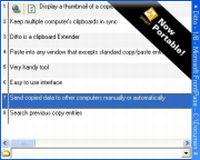 Ditto is a freeware clipboard extension. It runs as a taskbar icon and can be set to run at startup. Ditto is a freeware clipboard extension. It runs as a taskbar icon and can be set to run at startup.
The idea is that it allows you to have a long list of all the things you have copied to the clipboard for later reuse, this is usually text but can also be images. An interesting feature is the ability to keep multiple computers clipboards in sync over a network, this data is also encrypted for security when sent over the network.
The latest version is now portable too, so you can stick this on your flashdrive keyring for instant access from any computer.
This is a really useful extension for anyone who does a lot of copying and pasting. You can get it at the homepage here.
Posted in Developer, Flash, Freeware, Main, Security, Utilities, Windows | 2 Comments »
Thursday, August 9th, 2007

Do you wish you were doing a little more to help the environment? Here’s an alternative to the regular white homepage of Google. Its a black google page!
The idea behind it is that a black page background will use less electricity than a white one. So mathematically speaking, if lots of people were to use blackle.com as their homepage instead of the default google homepage, a lot of eletricity could be saved, ok maybe not a lot but every little helps, right?
Its a good first step I guess, but the page could do with some extras such as the “advanced search” link etc.
Check it out for yourself at www.blackle.com
Posted in Google, Main, Web services, Windows | 2 Comments »
Wednesday, August 8th, 2007
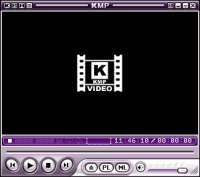 If you are looking for a versatile media player which can handle different formats, you need to check out KMPlayer. If you are looking for a versatile media player which can handle different formats, you need to check out KMPlayer.
KMPlayer is a versatile media player which can cover various types of container formats such as VCD, DVD, AVI, MKV, Ogg Theora, OGM, 3GP, MPEG-1/2/4, WMV, RealMedia, and QuickTime among others.
A cool thing about the software is that it also handles a wide range of subtitles and allows you to capture audio, video, and screenshots in many ways, so it is definitely worth checking out!
One other thing, it’s free so you can go check it out.
Visit http://www.kmplayer.com/forums/index.php
Posted in Freeware, Information Management, Main, Multimedia, Video, Windows | 6 Comments »
Wednesday, August 8th, 2007
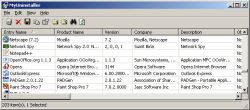 Here is something you will definitely find very useful. MyUninstaller is a good alternative to the standard Add/Remove applet of Windows operating system. It displays the list of all installed application, and allows you to uninstall an application, delete an uninstall entry, and save the list of all installed applications into a text file or HTML file. What makes it different from the standard Add/Remove applet? Here is something you will definitely find very useful. MyUninstaller is a good alternative to the standard Add/Remove applet of Windows operating system. It displays the list of all installed application, and allows you to uninstall an application, delete an uninstall entry, and save the list of all installed applications into a text file or HTML file. What makes it different from the standard Add/Remove applet?
It provides additional information for most installed applications that the standard Add/Remove applet doesn’t display: product name, company, version, uninstall string, installation folder and more.
A new updated version was just recently released, MyUninstaller 1.36 and the major change in this version is that a new feature has been added. Added “Change Software Installation” option, for programs that support installation change
Want to check it out? It’s free, go to http://www.nirsoft.net/utils/myuninst.html
Posted in Developer, Information Management, Main, Programming, Security, Shareware, Utilities, Windows | No Comments »
Friday, August 3rd, 2007
 Everybody wants to have photos, songs, and videos on mobile phones. The Mobile Media Center Beta is the software that enables you to have all this and much more. Smooth in functioning it lets you to have all entertaining stuff in your phone. Everybody wants to have photos, songs, and videos on mobile phones. The Mobile Media Center Beta is the software that enables you to have all this and much more. Smooth in functioning it lets you to have all entertaining stuff in your phone.
With a minute to download and the installation is quite simple and fast. Opening with a small and simple screen it has few options on it. Four menu options do all the work of transferring the file or folder. The ‘General’ option asks for the identification and selection of the preferred language. Then ‘Device’ option states the brand/type of the phone. The message can be send with bookmark the audio and video can be modified. With the ‘Advanced’ option the size of the page and the files per screen can be modified. The third option is the security option it asks for the IMEI serial number of the phone. You can also choose the option to run Mobile Media with the start-up itself. The ‘Pin’ option is used for changing PIN code and connection can tuned up. The folder, devices and applications options give you more functionality. You can start and stop the access easily with the ‘Start’ and ‘Stop’ options below the screen. It also has a support option to provide you details about the software. So if you are not familiar with tricks and trades of transferring pictures, you can get all the handholding you possibly need through the support option.
It gives you access to your PC if your phone supports the GPRS and even access to internet. You can get the favourite tunes, images, videos on your phone through your PC. Now you can carry all your things of your choice with you. Have it and enjoy your favourite PC content on your phone.
(More info and Download)
Posted in Audio, Business, Commercial, Developer, E-mail, Information Management, Main, Mobile, Shareware | No Comments »
Thursday, August 2nd, 2007
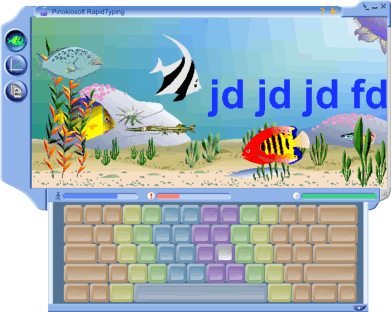 With RapidTyping Typing Tutor, learning the art of typing becomes real fun. It’s never been so easy to learn typing in an entertaining way. The best about this software is that it’s very easy to operate and has an appealing interface. With RapidTyping Typing Tutor, learning the art of typing becomes real fun. It’s never been so easy to learn typing in an entertaining way. The best about this software is that it’s very easy to operate and has an appealing interface.
The software is easy to download and gets installed in fewer seconds. It opens up with a screen having an under water world view in a blue frame. On its left side three options appear for current lesson screen, statistics screen and lesson editor view. The very first screen is the current lesson screen that deals with typing. The second option tells about the speed and rate of mistakes. By the third option you can create new lesson all by yourself or select from the given lesson folders. You can change the color of frame according to your choice. Kids would have fun exploring the new creatures as they type in more words. Once you are done with typing the complete lesson the speed, accuracy and time is shown automatically. There are two yellow color options on the top right. The first ‘?’ symbol is for updating of software and the other one is for more options. The options dialog box shows information about the hotkeys, sound options, languages, keyboard, etc. You can create a new user identity to do the typing. The animation can be enabled or disabled according to how you want the typing screen to be. At the bottom of the main screen appear three icons showing the level of, how much text you have type, your mistakes and your speed.
There is hardly any feature that the software fails to address about basic typing. It never even attempts at being sophisticated typing software but rather concentrates on doing basics. Rapid Typing tutor is a good software that the kids and even the grown ups can enjoy. Knowing the features and having a trial would definitely make you own it.
(More info and Download)
Posted in Commercial, Design, Developer, Information Management, Main, Shareware, Social Software, Windows | 8 Comments »
Monday, July 30th, 2007
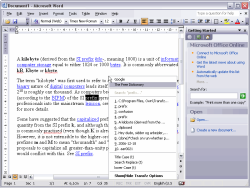 Here is a cool tool that comes highly recommended! Transfz (actually pronounced transfuse) is a integrated search agent in the form of a context menu that allows the user to launch online searches from any document or application on both the desktop and the web. Here is a cool tool that comes highly recommended! Transfz (actually pronounced transfuse) is a integrated search agent in the form of a context menu that allows the user to launch online searches from any document or application on both the desktop and the web.
The good thing about this software is that it supports powerful extensions: Search and Replace, UPPER case, HTML insert etc. You can use the built-in Plug-in Creator to easily allow your favorite search engine to become an ever present standard in your desktop/web experience.
In the latest version which was recently released, Transfz 1.10 Beta , new features has been added and some changes had been made. These include:
Features:
- High resolution icons in the global menu are included for all menuitems;
- Clipboard holder now holds unicode chars without problems;
- Google Video plugin added.
Changes:
- Better tooltip handling (eliminated unnecessary checks);
- Loop for clipboard gui update is faster due to less branching;
- Restructured included plugins to allow more plugins to appear in enabled by default;
- Numerous optimizations to make the icon based menu redraw faster.
Bug fixes:
- Menu now no longer ‘double-draw’ if ctrl-d is pressed after menu has opened;
- Clipboard disable in options module caused crash;
- CNN plugin updated to reflect site changes.
More info available at http://www.transfz.com/
Posted in Business, Developer, Information Management, Main, Utilities, Windows | 1 Comment »
|
|
|




