Archive for the 'Main' Category
Thursday, February 8th, 2007
 TVU Player is a free program that enables Internet users to watch streaming live Television programs around the world which which they may not normally be able to get on their real television. It promises to feature hard-to-find special-interest TV channels, international sports, lifestyle, news, and your favorite channels from around the globe as well as user-generated content. TVU Player is a free program that enables Internet users to watch streaming live Television programs around the world which which they may not normally be able to get on their real television. It promises to feature hard-to-find special-interest TV channels, international sports, lifestyle, news, and your favorite channels from around the globe as well as user-generated content.
You can switch between multiple TV channels just like on a TV. TVU Player is extremely simple to use, you just double click on the tv channel of your choice, wait for it to buffer, and start watching.
Thanks to the improvement of broadband connections, watching channels on your computer is now possible like this, some of the available channels are Fox, Fox News, NBC, ABC, Animal planet, Bloomsberg, Nasa TV, some sports channels, Comedy Central, Sci Fi, Nickelodeon, BBC News 24 and many more.
Check out Vidoo.com which also has a support forum and the tv channels daily program schedule and of course to download it.
Posted in Business, Developer, Freeware, Internet, Main, Movies, Multimedia, News, Social Software, Video | No Comments »
Thursday, February 8th, 2007
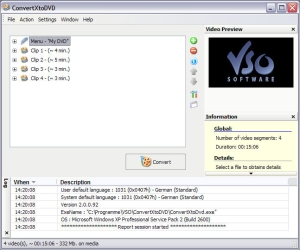 If you’ve been looking for a good and reliable software to burn your videos to DVD, you need to check this out. If you’ve been looking for a good and reliable software to burn your videos to DVD, you need to check this out.
ConvertXtoDVD is a software to convert and burn your videos to DVD. What I really appreciate about this software is that in just a couple of clicks you can backup your movies to DVD playable on any home DVD player easily.
You won’t have any problem converting in any popular format as it supports popular formats such as Xvid, MOV, VOB, Mpeg, Mpeg4, MP4, AVI, WMV, DV and stream formats. It simply converts your files into a compliant DVD Video set of files and burns it on a DVD media.
I’m sure you will love the fact that ConvertXtoDVD 2.1.12.214 works for NTSC and PAL video formats and creates chapters automatically. Multiple audio tracks are also supported.
Want to see if it is what you need? CLICK HERE
Posted in Business, Developer, Main, Movies, Social Software, Utilities, Video, Windows | No Comments »
Thursday, February 8th, 2007
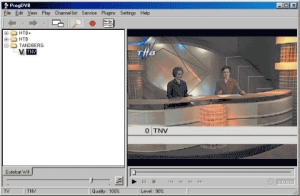 Here is a great program worth checking out. Here is a great program worth checking out.
This free software, ProgDVB allows you to watch SAT-Television and listen to Radio channels directly from satellite but you must use DVB-PCI cards with hardware decoders on the board, SAT-dish, and personal x86-compatible computers with Microsoft Windows installed.
It has options for working with network broadcasting and Audio/Video recording of the stream to different digital-media formats.
The latest version released a couple of days ago, ProgDVB 5.00.01, has these changes:
- Supports skins for main form (and in future it will support skins for OSD)
- Notes: This version does not support OSD and localization and has no important new functions so far. Besides, .Net version will always work a little slower
Want to try it? It’s FREE! CLICK HERE!
Posted in Commercial, Design, Developer, Freeware, Internet, Main, Movies, Video, Windows | 1 Comment »
Wednesday, February 7th, 2007
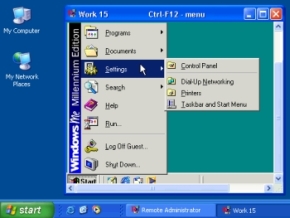 Looking for a software that can let your have total control of your computer from anywhere? I think you should try this software; Radmin (Remote Administrator). Looking for a software that can let your have total control of your computer from anywhere? I think you should try this software; Radmin (Remote Administrator).
Radmin (Remote Administrator) is a remote control and remote access program which enables you to work on one or more remote computers from your own computer. It can be considered as complete remote control solution where all key features such as Remote Control, File Transfer, text and voice chats, NT security, Telnet, and Multilanguage support are included.
Known for high speed, strong security and solid reliability, this software is worth checking out. Check out the trial download first and see if it does what you need it to do [You have 30 days to confirm that].
Want to check it out? CLICK HERE
Posted in Business, Developer, Main, Programming, Security, Shareware, Windows | No Comments »
Wednesday, February 7th, 2007
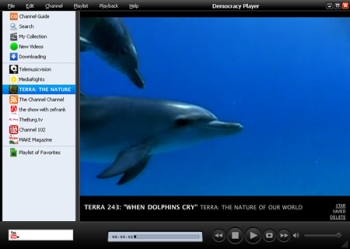 Here is a cool open source for you. It’s called Democracy player and just like democracy, gives you freedom. The freedom this Democracy gives you is the freedom to watch Internet videos like you watch TV. Here is a cool open source for you. It’s called Democracy player and just like democracy, gives you freedom. The freedom this Democracy gives you is the freedom to watch Internet videos like you watch TV.
It’s really very easy; you just download and watch all the best internet TV shows and videos in one powerful application. The cool thing about this player is that new channels arrive daily in the built-in Channel Guide.
Remember those videos you use to squint at to get what was going on? With Democracy Player that is a thing of the past as you can just sit back and watch big, high resolution videos one after another. It’s so easy to use that you’ll be watching interesting videos in moments.
Want to check it out? CLICK HERE
Posted in Business, Design, Developer, Freeware, Internet, Main, Movies, Multimedia, Social Software, Video, Windows | 2 Comments »
Wednesday, February 7th, 2007
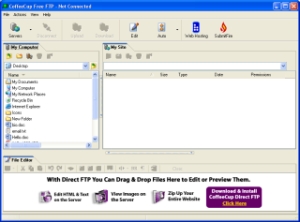 CoffeeCup Free FTP is an easy to use Drag and Drop FTP program. CoffeeCup Free FTP is an easy to use Drag and Drop FTP program.
This is a simple and easy to use FTP client with basic features for file uploads and downloads. It allows you to use an unlimited number of FTP accounts, resume broken downloads, and transfer binary, ASCII, or automode files. It supports multiple server profiles, it’s also capable of resuming broken uploads and downloads.
It works with any server and is so easy to setup. Just enter your username and password and click “Connect” and away you go. Theres not much to this apart from it being a simple and basic ftp program.
So if you’re in need of a free yet capable FTP program, why not check it out at the homepage here.
Posted in Developer, Freeware, FTP, Information Management, Main, Utilities, Windows | 2 Comments »
Wednesday, February 7th, 2007
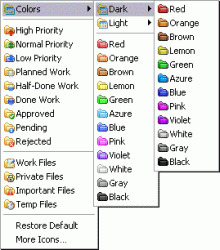 FolderMarker is a small little program that can work directly from the context menu. FolderMarker is a small little program that can work directly from the context menu.
It enables you to change folder icons or colors so you can more easily find them and know what’s inside.
You can change a folder icon by marking it by priority (high, normal, low), level of project completeness (done, half-done, planned,etc) and type of information stored in them (work, important, temp ,private files, etc).
Any folder Icon can be changed easily and fast from the right-click menu of a folder. Simply right-click on the folder, select a color-coded icon and it will be assigned to the folder at once.
It’s a cool and useful little addition for anyone who has a lot of folders they want to more easily keep track of. Its available in three editions, pro, home, and free. You can get more info about it at the webpage over here.
Posted in Design, Information Management, Main, Shareware, Shell and Desktop, Utilities, Windows | No Comments »
Tuesday, February 6th, 2007
 Footnote is an impressive resource that allows users to access millions of historical documents online. Footnote is an impressive resource that allows users to access millions of historical documents online.
Interested in the Civil War or maybe the Bureau of Investigation? Just look it up on Footnote and in seconds view digitized copies of the original documents including photographs, signed documents, letters, case studies and more.
Footnote has also established a partnership with the National Archives providing access to millions of historical documents for viewing online. Around 4.5 million documents have already been added to the site and apparently millions more to come.
I’ll admit, I wasn’t one to raise my hand during history class, but it’s pretty neat being able to view transcripts that George Washington wrote back in 1775 for the Continental Congress and the signature of John Hancock.
I’d imagine Footnote to be a prime attraction for genealogists, historians, public libraries, school systems and history buffs in general. Check it out for yourself!
Posted in Business, Information Management, Internet, Main, Text, Web services | No Comments »
Monday, February 5th, 2007
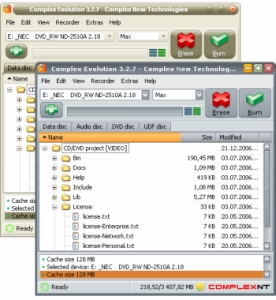 Evolution really makes disc burning easy, fast and as comfortable as possible. With this software, you can burn data, audio, video files easily. All you have to do is simply select the necessary files, add them to the required project and click the “Burn” button. That’s it! Evolution really makes disc burning easy, fast and as comfortable as possible. With this software, you can burn data, audio, video files easily. All you have to do is simply select the necessary files, add them to the required project and click the “Burn” button. That’s it!
One cool thing about this software is the skinning technology applied; this gives it an interface that is easily interchangeable to correspond to your most-demanded tastes. More than 2000 free skins are available at your disposal.
One uncool thing about it though is the price, 30 USD, but go check out the trial version first, if you think it’s worth it go for it.
The latest updated version, Evolution 4.0.1 [Build 267] just hit the market 2 days ago and the major change is that complete Blu-Ray and HD-DVD support has been added.
CLICK HERE for more info and trial download.
Posted in Business, Commercial, Developer, Main, Multimedia, Social Software, Utilities, Video, Windows | No Comments »
Monday, February 5th, 2007
 History Sweeper will automatically clean up the history of your activities, remove intrusive devices, and save your storage spaces. By so doing, this software protects your privacy and increases your online security. History Sweeper will automatically clean up the history of your activities, remove intrusive devices, and save your storage spaces. By so doing, this software protects your privacy and increases your online security.
How does it protect your privacy and increase your security?
The truth is this, whenever you use your PC, traces of your activities are left on your computer. This means anyone could come in and find out what you have been doing on-line; the sites you visited, the documents you used, the programs you ran, etc. this software helps you clear your tracks.
Also when you are on the Internet, you may have downloaded intrusive devices such as cookies, bugs, and spyware. These devices may strike at any time on your PC. But History sweeper helps you get rid of such quite easily.
CLICK HERE for more info and trial download.
Posted in Developer, Health, Internet, Main, Security, Shareware, Utilities, Windows | No Comments »
|
|
|




