Archive for the 'Main' Category
Wednesday, November 29th, 2006
 Sticky note paper is a popular way of taking down reminders, shopping lists, to-do lists, etc. Some people even ‘borrow’ some from work and use them for posting notes on the fridge freezer. The bright yellow pad enables us to quickly see a reminder note. Sticky note paper is a popular way of taking down reminders, shopping lists, to-do lists, etc. Some people even ‘borrow’ some from work and use them for posting notes on the fridge freezer. The bright yellow pad enables us to quickly see a reminder note.
Hott Notes is a free tool that enables you to write and place sticky-type notes on your desktop (ok, not the actual top of your desk, but on your screen,that thing you’re looking at now). You can use these notes in the usual manner – reminders, lists and more. The notes can be displayed in various translucent colors, so that you can use one color for reminders, another for business notes and one for home-related reminders.
You can even draw or write freehand on them!
Unlike the ‘borrowed’ from work sticky note paper, Hott Notes really is free and you can get it here with more info and here’s some screenshots.
Posted in Business, Commercial, Developer, Freeware, Information Management, Main, Open Source, Shell and Desktop, Text, Utilities, Windows | 2 Comments »
Wednesday, November 29th, 2006
 CDBurnerXP Pro is CD/DVD burning software with quite a lot to offer, considering it’s totally free! CDBurnerXP Pro is CD/DVD burning software with quite a lot to offer, considering it’s totally free!
It supports creation of multi-session disks, which is always useful if you have disc you want to keep coming back to add data or files to. It also creates Audio-CDs from mp3, wav, ogg and wma files. In addition to CD burning, you can also rip audio CDs, normalize WAV files, encode MP3 files, and erase disks. All this and it supports use of high write speeds too.
It’s able to write CD-R, CD-RW, DVD+R/RW, DVD-R/RW discs, creating either data or video discs. It can also rip audio-CDs, burn and create ISO images, convert WAV files to MP3 and vice versa, verify discs after burning, create bootable discs, print covers for your creation, convert BIN/NRG to ISO, etc. It supports Burn on the Fly and Burn-Proof hardware.
If you’ve been looking for CD/DVD burning software but don’t have money to burn, you won’t be playing with fire if you check out this freeware software right here! Some screenshots of this tool ‘in work’ can be found here.
Posted in Audio, Developer, Freeware, Main, Utilities, Video, Windows | 2 Comments »
Tuesday, November 28th, 2006
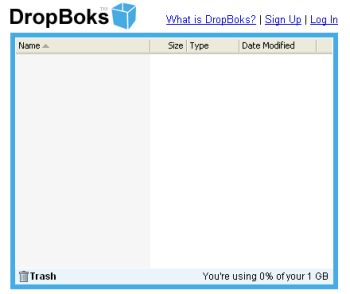 You need a place where you can upload and download files without any additional features like at Box.net? Well, try DropBoks. You need a place where you can upload and download files without any additional features like at Box.net? Well, try DropBoks.
It is a free storage solution where you can store up to 1GB of information. The only catch here is that you can’t upload (and download) big file at once (for example big music archive or a whole DivX movie or something else) – there’s a limit only 50MB at time.
It’s very simple to use (navigate) – sign up, then browse to the files you wish to upload and… in general that’s all. Selected files will be uploaded to a special folder from where users can download those files. When you don’t need some file anymore simply drag and drop it onto the trash icon.
Ps: One more thing. Remember I’ve told you that this service was free? Well, it’s so but guys who are running that site just ask for a $1 fee so there won’t be any ads.
Just try it for yourself. I’ve got a feeling you’ll love it.
Posted in Business, Commercial, Developer, Freeware, Information Management, Internet, Main, Open Source, Social Software, Utilities, Web services | No Comments »
Tuesday, November 28th, 2006
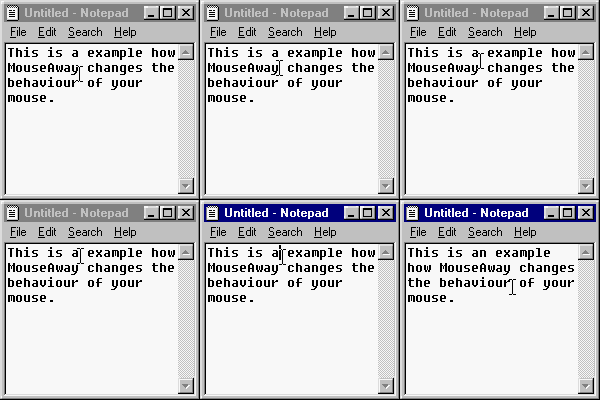 MouseAway is a simple and very small program that you may find useful. It simply moves your mouse cursor out of the way if you’re typing, so that you don’t have to manually move it yourself each time. MouseAway is a simple and very small program that you may find useful. It simply moves your mouse cursor out of the way if you’re typing, so that you don’t have to manually move it yourself each time.
It’s a pretty basic program that only does exactly as it says. The upside to it being so small and basic means it takes up very little memory. So if this is an minor annoyance for you, having to move the mouse cursor out of the way every time you type, then maybe it’s worth trying out!
(If its a major one, you really need to chill out a little!)
It’s freeware and you can download it from the homepage right here!
Posted in Commercial, Freeware, Main, Social Software, Text, Utilities | 1 Comment »
Tuesday, November 28th, 2006
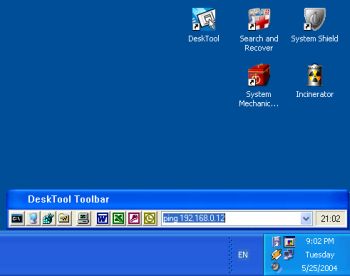 DeskTool is a desktop toolbar designed to give you easy access to frequently used applications by displaying an organized row of buttons from which to choose. DeskTool is tightly integrated into the desktop shell of Windows 9x and Windows NT/2000/XP. DeskTool is a desktop toolbar designed to give you easy access to frequently used applications by displaying an organized row of buttons from which to choose. DeskTool is tightly integrated into the desktop shell of Windows 9x and Windows NT/2000/XP.
It supports Drag and Drop for adding, deleting and moving buttons around on the toolbar. The really cool thing about it is that you can “dock” it to any one of the 4 edges of your screen (remember the Windows 95 taskbar?), or leave it free floating on the desktop. You can also make the toolbar “auto-hide” when docked to an edge, just as you can with the taskbar.
The fact that DeskTool can be made to stay on top of other windows makes it readily accessible.
A new updated version was released this month featuring these changes:
- Added support for multi-monitor configurations
- Added workaround when DeskTool appears out of the screen
- Changed location of the configuration file
- Improved installation
One downside to this shareware is that there are freeware that does similar things though not having the same feautures as DeskTool. Desktool goes for $15? Is it worth it? You’ll be the judge of that!
But since it really does what it is supposed to do very well, you might want to try it out! At least you can use the trial version freely to know if it’s worth it.
Check it out!
Posted in Business, Commercial, Developer, Information Management, Main, Shareware, Shell and Desktop, Utilities | 1 Comment »
Tuesday, November 28th, 2006
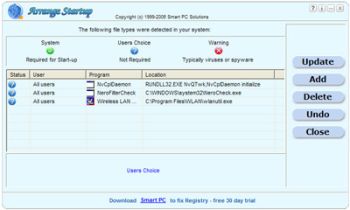 When you first started using your PC it used to boot pretty fast, right? If presently that is not the case and you’ve been looking for a software that can help you, Arrange Startup might come in handy. When you first started using your PC it used to boot pretty fast, right? If presently that is not the case and you’ve been looking for a software that can help you, Arrange Startup might come in handy.
The reason why some PC’s take too much time to boot at times is that too many applications which can be executed when needed form part of the startup list wasting hardware resources after each startup. This slows things down. Arrange Startup will help you to remove programs from start up list or add to them.
Arrange Startup classifies all of your programs that are executed at startup as system programs, suspicious applications that can be viruses, and the programs that are not necessary for startup.
One downside to this software is though they call it a freeware the fact that it puts a link to their website on your desktop may make you want to categorize it as an adware. Another problem you might encounter is that it may give warnings about applications that you know are harmless. It’s just trying to help you reduce the unnecessary load on your startup.
All in all it is a useful software. Check it out, it’s free!
Posted in Business, Developer, Freeware, Information Management, Main, Shell and Desktop, Utilities | 1 Comment »
Tuesday, November 28th, 2006
 Looking for an all-in-one package that can help you deal with the common daily problems you encounter on your PC? 12Ghosts might just be the thing for you. Looking for an all-in-one package that can help you deal with the common daily problems you encounter on your PC? 12Ghosts might just be the thing for you.
12Ghosts is a package that contains various utilities that accelerate and facilitate your working with your computer. If you need help with securing your important documents, automating daily tasks and so much more, 12Ghosts is right for you. Everything from an automatic saving device for documents to a shut down control tower is available, as well as Windows shell enhancements for easier and faster usage of Windows itself.
Recently a new updated version, 12Ghosts 8.10 was released. Some of the latest changes in this version include:
- ShutDown: New! Super fast shut down! This will just exit Windows and turn off the computer (or restart). Nothing is saved, though. Windows is NOT properly shut down. Use in emergency situations only
- Backup: The destination folder now is allowed to be below the source folder. It is excluded from backup automatically. For example, if you backup “C:\” to “C:\12-Backup” everything is backed up, except of course “C:\12-Backup” itself
- Wash: New! Suppress programs from START menu! Frequently used programs are added to the start menu automatically (XP/Vista). Protect your privacy and prevent certain programs from ever appearing there again
- Shredder is now checking if clean up of “delete_me…XX.del” files is required at startup of 12-Shredder. This may be necessary if Wipe Disk was interrupted before it could complete a Remove Old Names pass
- Tower: New color scheme with light background
Want to check it out? CLICK HERE!
Posted in Business, Commercial, Developer, Information Management, Internet, Main, Multimedia, Programming, Security, Shareware, Shell and Desktop, Utilities, Windows | 4 Comments »
Tuesday, November 28th, 2006
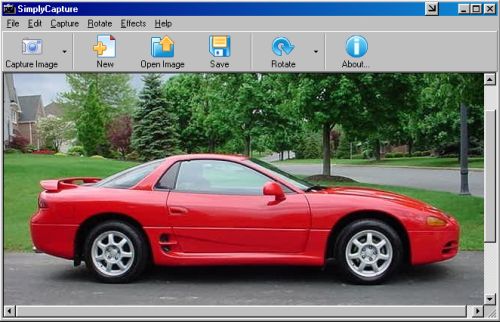
 This cool freeware is something you need to check out! SimplyCapture is a powerful screen/video capture tool that is really simple and very easy to use. With SimplyCapture you can capture exactly what you want in the screen (3 capture options: Full Screen, Active Window and Selected Area). This cool freeware is something you need to check out! SimplyCapture is a powerful screen/video capture tool that is really simple and very easy to use. With SimplyCapture you can capture exactly what you want in the screen (3 capture options: Full Screen, Active Window and Selected Area).
What I really love about it is that it allows you to capture screenshots of any video file! Just play a video in the SimplyCapture Video Player and start capturing screenshots of your favorite movies!
Some of it’s cool Features include:
- Great program layout
- Capture screenshots of video files
- Capture shots of your favorite movie files
- Integrated Video Player and Image Viewer for easy viewing of your captured movie images and a lot more
- Rotate and Flip image Options
- Cool Image Effects available to make your captured image even better
- Exclusive JPEG Conversion Tool (converts any image file to JPEG format; you can customize the output image quality and much more)
- And much more!
This great freeware works well with Windows 98/98SE/ME/2000 & XP
BE SURE TO CHECK IT OUT! IT’S FREE!
Posted in Business, Design, Developer, Freeware, Main, Multimedia, Photo, Windows | No Comments »
Tuesday, November 28th, 2006
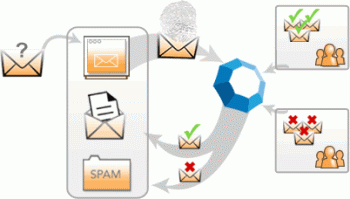 Cloudmark is an add-on for Microsoft Outlook and Outlook Express to prevent spam and also prevent and report phishing attacks. It can also block email viruses before they can do any potential damage. Cloudmark is an add-on for Microsoft Outlook and Outlook Express to prevent spam and also prevent and report phishing attacks. It can also block email viruses before they can do any potential damage.
To give it it’s full name, Cloudmark Desktop (formerly known as Cloudmark Safetybar) installs directly inside Outlook and Outlook Express, filters through your mail as it downloads, and moves suspected junk into a folder for you to review it later. The filtering mechanism is based on the Cloudmark service, the largest community-based platform used to stop the plague of junk email and email fraud, and it doesn’t require you to create any filters or rules. You can however create a white list, to make sure certain contacts will never be filtered, and also re-classify selected messages.
This is how it works. When a user clicks the ‘Block Spam’ or ‘Block Phish’ buttons, Cloudmark compares this feedback with feedback from other users. If other users in the network also consider the message to be spam or fraud, then similar messages are automatically blocked in the future, for all users in the network.
Likewise, if a user drags a message out of the Spam folder or clicks the ‘Unblock button’, Cloudmark compares this feedback with that of other users. If they agree, the message is unblocked throughout the Cloudmark network.
Well worth checking out if you’ve had it with too much spam. You can check out more info and a free trial by going here.
Posted in Business, Commercial, E-mail, Internet, Main, Security, Shareware, Windows | No Comments »
Tuesday, November 28th, 2006
 Ever wondered how life would be without your start menu? Now you have an opportunity to find out with this software, LAUNCHY. Ever wondered how life would be without your start menu? Now you have an opportunity to find out with this software, LAUNCHY.
Launchy is a free windows utility designed to help you forget about your start menu, the icons on your desktop, and even your file manager. Launchy indexes the programs in your start menu and can launch your documents, project files, folders, and bookmarks with just a few keystrokes!
What really trips me about this application is that once you start running it, it hides in the background. You have to bring it forward by holding the alt key and tapping the space key. Then you just type in a few keys of the program you are searching for and hit enter once it has been found.
You can perform a disappearing act on it again by hitting escape or Alt+Space.
CHECK IT OUT!
SYSTEM REQUIREMNETS: Win98/98SE/2000/ME/XP FILE SIZE: 822 KB
Posted in Freeware, Main, Open Source, Themes, Utilities, Windows | 1 Comment »
|
|
|