Archive for the 'Shareware' Category
Wednesday, October 17th, 2007
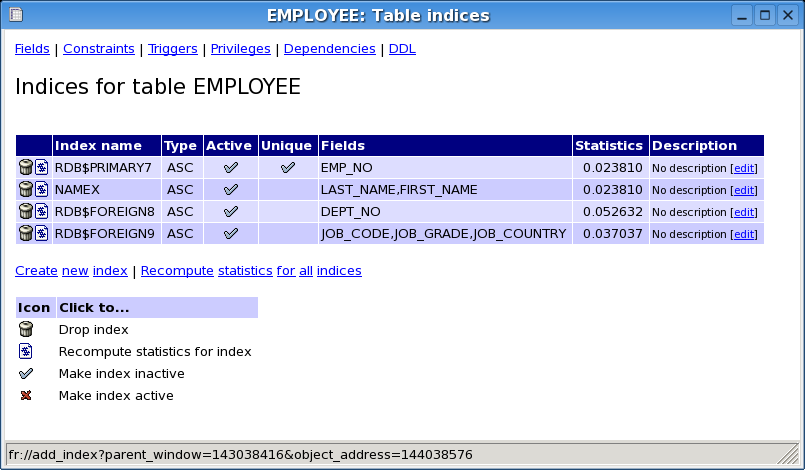 With the average knowledge of the average internet user getting higher and higher as time goes on, what many people are starting to realize is that the concept of database management is getting bigger and bigger and in many ways is already too big to control. So many of the proprietary software programs available today have a number of options that are unusable to the vast majority of the DBMS users of the world today and therefore something new and better is needed. For Firebird DBMS, it is quite possible that the tool of the future is FlameRobin. With the average knowledge of the average internet user getting higher and higher as time goes on, what many people are starting to realize is that the concept of database management is getting bigger and bigger and in many ways is already too big to control. So many of the proprietary software programs available today have a number of options that are unusable to the vast majority of the DBMS users of the world today and therefore something new and better is needed. For Firebird DBMS, it is quite possible that the tool of the future is FlameRobin.
The goals of FlameRobin are actually three-fold in nature. Firstly, the goal is to create a tool that is lightweight in the sense that it has a small electronic footprint while at the same time having a fast execution. Secondly, the goal is to create a tool that can be used across different platforms starting with Windows and Linux and then moving on to other platforms as well. Finally, the goal is also to create a tool that is dependent only on other open source software for its running. With all of these three goals in mind, what you are going to find is that FlameRobin is well on the way to achieving all three. But don’t take my word for it, go ahead and download it to see for yourself.
More information can be found at http://www.flamerobin.org/
Posted in Main, Shareware, Shell and Desktop, Utilities, Windows | 1 Comment »
Monday, October 15th, 2007
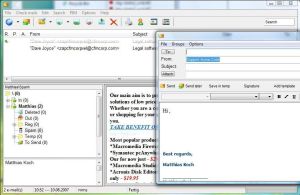 One of the things that people love nowadays is their e-mail client. I have an e-mail client and I have to admit that I would not be able to survive without it. The client allows me to collate the information that comes in from multiple e-mail addresses instantaneously and indeed allows me to understand everything that is going on in my world. There are a lot of people that rely on their e-mail client for everything and while these people might not like it, up until recently they have had to put up with the client installing itself on their hard drive and sprawling outwards. One of the things that people love nowadays is their e-mail client. I have an e-mail client and I have to admit that I would not be able to survive without it. The client allows me to collate the information that comes in from multiple e-mail addresses instantaneously and indeed allows me to understand everything that is going on in my world. There are a lot of people that rely on their e-mail client for everything and while these people might not like it, up until recently they have had to put up with the client installing itself on their hard drive and sprawling outwards.
However, Koma-Mail 3.621 allows this to change immensely. You can actually run this program directly from a USB stick or other removable storage piece and therefore you do not have to install it to your hard drive at all. It has all of the functionality of a typical e-mail client and setting it up is an absolute breeze. The latest updates have added more keyboard shortcuts to allow you to accomplish the tasks that you need to finish faster and ultimately the free status of this software package is perhaps the best selling point towards getting you to give it a try.
More information can be found at http://www.koma-code.de/
Posted in Developer, E-mail, Internet, Main, Shareware, Social Software, Windows | No Comments »
Monday, October 15th, 2007
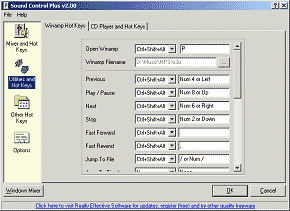 For people that are interested in getting the most out of their sound card, the typical sound programs that come with Windows might not be good enough. This old guard is represented most obviously by the Windows Sound Mixer, which is a program that does not have a lot of functionality. People have been looking high and wide for a better option and it is quite possible if you are one of these people that Sound Control 2.15 might be just the option that you’re looking for. For people that are interested in getting the most out of their sound card, the typical sound programs that come with Windows might not be good enough. This old guard is represented most obviously by the Windows Sound Mixer, which is a program that does not have a lot of functionality. People have been looking high and wide for a better option and it is quite possible if you are one of these people that Sound Control 2.15 might be just the option that you’re looking for.
The first thing that has a lot of people interested in the program is that it is a free replacement for the Windows Sound Mixer program. This means that it includes all of the important features of that program, but does not have the resource-intensive drain that most Windows applets seem to have. In addition to this however, the Sound Control 2.15 program allows you to set hotkeys for your sound control and therefore you can use those keys to manually adjust sound mixer volumes from your keyboard without having to bring up the dialogue box to do so. It is a specialized program that is loads of fun to use and exceptionally time-saving for people that are keyboard-orientated.
For more information, check out http://www.reallyeffective.co.uk/sc_moreinformation.php
Posted in Audio, Developer, Main, Shareware, Utilities, Windows | No Comments »
Friday, October 12th, 2007
 Often we have many items to maintain that can lead to a chaotic situation. If you want to effortlessly reduce the chaos and do your work with ease then there is good chance that the Inventory Log software is possibly the best option for you. Often we have many items to maintain that can lead to a chaotic situation. If you want to effortlessly reduce the chaos and do your work with ease then there is good chance that the Inventory Log software is possibly the best option for you.
Getting the software takes a very little time of yours as downloading and installation is over in a breeze. The software has a nice and elegant appearance that you can observe after launching it. Set the list for the items that are used or kept at storage. You can add in the items relating to different categories like food, meat, beverages, etc. Record the quantity as it also helps you to keep a track of items. The list is shown in the middle of the screen so that you can know what is available and what needs to be purchased again. List s very long? No problems search the item writing the related word in the Search box. The calendar shows the manager view for maintaining the things. The Manager is for maintaining the records of the things available and update then when you make a new purchase. Changing the quantity units available, the requirement and always stock for the items is much easier to record. Want to have a look at the whole inventory, simple, just go tot the inventory option and all the inventory items are shown on the screen. The program analyses the inventory and prepares the shopping list that with specified categories. Have the back up stored so that you do not any record. Set the Store name and add or delete the departments according to the item that you use. Get the print of the list and the go on with shopping as this time you won’t forget anything. The help guide is not supported by the software but the working is easier.
So go ahead and make your work of managing things easier with the Inventory Log software at your disposal.
{More info and Download}
Posted in Business, Catalogue, Developer, Information Management, Shareware, Windows | No Comments »
Thursday, October 11th, 2007
 Wink is a freeware program for creating presentations and tutorials on how to use software. This is ideal for creating tutorials that you wish to upload as an online flash tutorial for example. Wink is a freeware program for creating presentations and tutorials on how to use software. This is ideal for creating tutorials that you wish to upload as an online flash tutorial for example.
You can even record your voice to go along with it and/or you can also type in explanations and step by step instructions. It can capture screenshots automatically as you use your PC, based on your mouse and keyboard input, which gives professionally looking results.
It has a well made user guide and two useful tutorial projects, allows saving as PDF, and also has a lot of customization options. So if you’re looking for a free way of placing a software tutorial online, its worth a look!
Features:
(more…)
Posted in Commercial, Design, Developer, Freeware, Information Management, Main, Shareware, Shell and Desktop, Utilities, Windows | No Comments »
Tuesday, October 9th, 2007
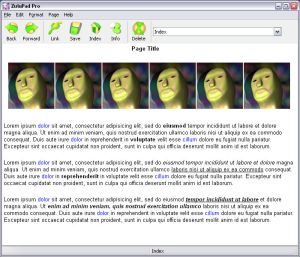 Described by its author as “notepad on crack”… Zulupad is a wiki-style program for helping you manage ideas, notes, etc. I’ll try to explain how it works. Described by its author as “notepad on crack”… Zulupad is a wiki-style program for helping you manage ideas, notes, etc. I’ll try to explain how it works.
It allows you to write notes and link the notes to each other. Each note you make is given a name. From that point on, anytime you type that word/name, it becomes a link to the page you first named. Also, adding a named note, will retroactively make all instances of that word/name throughout your document become links to that note. You can also select some text, and make it a link which automatically creates a new page with that name.
Just think of wikipedia and how it works,interlinked information based on linked keywords. This is very similar, but without having to learn wiki code.
Basically, this is potentially useful for anyone seeking to have a wiki-type “memo pad” for whatever reasons.
It comes in a free and pro version. Click here for more info
Posted in Developer, Information Management, Main, Shareware, Text, Time Managment, Utilities, Windows | No Comments »
Monday, October 8th, 2007
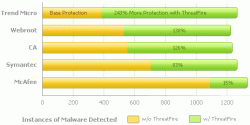 If you’ve had issues with malware and malicious applications destroying the flow data on your PC then this will definitely be good news for you, ThreatFire. If you’ve had issues with malware and malicious applications destroying the flow data on your PC then this will definitely be good news for you, ThreatFire.
ThreatFire is an application designed to protect your computer against malware such as trojans, spyware, rootkits, keyloggers, and buffer overflows by intelligently detecting and blocking behavior consistent with that of malware.
What I love about this software is that it does its great work by constantly monitoring your system, and analyzing programs and process activity.
Another good thing about this tool is that it automatically quarantines the malware [if it is a known threat] detected requiring no further action is required on your part. If the threat is unknown, or new, then ThreatFire will display an alert and prompt you to Allow or Quarantine the process. All alerts provide detailed information to help you make an informed decision.
Want to give it a shot? This is really worth checking out, believe me it works wonders.
http://www.threatfire.com/
Posted in Business, Commercial, Developer, Internet, Main, Security, Shareware, Windows | 1 Comment »
Thursday, October 4th, 2007
 Maya Personal Learning Edition is a cut down version of Autodesk’s Maya. For anyone who doesn’t know, Maya is a very well respected (and very expensive!) high end 3D graphics and animation program. Maya Personal Learning Edition is a cut down version of Autodesk’s Maya. For anyone who doesn’t know, Maya is a very well respected (and very expensive!) high end 3D graphics and animation program.
Chances are that whenever you see any of the latest 3D blockbuster cartoon (or special effects intensive) movies for example, Maya is probably one of the programs involved along the way, as it can do some very impressive stuff.
The problem is it takes a long time to master, if thats ever even possible! Also it’s very costly to purchase. So thats why they offer Maya Personal learning edition, which is basically free for non-commercial use!
For detailed info check it out here.
Posted in Animation, Business, Design, Developer, Freeware, Main, Shareware, Windows | No Comments »
Thursday, October 4th, 2007

Since you are reading this site, chances are you might be someone who downloads and tries out various software from time to time, right?
A downside to the Windows operating system is that when you uninstall programs, it doesn’t always remove everything, it can leave traces in the registry and also leftover files or folders here and there. These can clutter up and slow your system over time. There’s also the chance you might install something that just doesn’t agree with your system and messes it up.
Returnil virtual system is a program that lets you create a ‘virtual system’. This way, you can try out programs without really installing them, which means nothing can get messed up! Basically, what this means is that when it’s set to ON, any changes or installations you make will immediately be undone when you restart your computer. The home edition is free for personal use!
Check it out here for more details and the download.
Posted in Business, Developer, Freeware, Main, Security, Shareware, Shell and Desktop, Utilities, Windows | No Comments »
Wednesday, October 3rd, 2007

TimeSnapper is an Automatic Screenshot Journal. This basically means it takes screenshots of your computer screen at specified intervals. While at first this idea doesn’t sound all that interesting or useful, it actually does have its uses.
For example, people who charge by the hour can show what they were doing. It also has a productivity calculator that grades you on how your time was spent. You do this by telling it which programs count as you being productive, so if you spend too much time browsing online, this will hopefully make you feel guilty enough to spend more time using more productive programs! Or you could just use it to make sure no ones using your computer when you’re not around!
Check it out here.
Posted in Developer, Internet, Main, Shareware, Time Managment, Utilities, Windows | No Comments »
|
|
|




