Archive for the 'Shareware' Category
Wednesday, March 21st, 2007
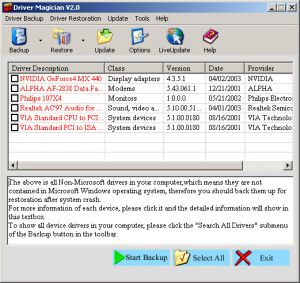 If you ever need a tool to extract and back up your drivers easily and quickly, this software can do the magic. If you ever need a tool to extract and back up your drivers easily and quickly, this software can do the magic.
Driver Magician is an easy-to-use and powerful tool for driver backup and restoration in Windows operation system. It helps you to extract device drivers from your hard disk and back up them to any location you specified.
You will really appreciate how easy this will make your in case of a system crash or something. When you reinstall operation system after system crash, you just select device drivers you want to restore, then it can restore them from driver backup quickly and easily without inserting any driver disk.
The cool thing is all you need is just a system reboot and all your hardware will be back in peak condition.
But that’s not all, it can back up and restore more items such as My Documents folder, Desktop, Registry, Internet Explorer favourite folder, data files of Outlook and Outlook Express.
The latest version, Driver Magician 3.18, which just hit the software market yesterday, March 20th, has these changes:
- Fixed: a bug of memory leak
- Updated: unknown devices database and drivers update database
- Back up drivers of non-present devices
- Some minor tweaks
Still not sure this is for you?
Here is a list of the features you’ll enjoy:
- Back up device drivers of your computer in four modes
- Restore device drivers from backup in one mouse click
- Update device drivers of your PC to improve system performance and stability
- Live Update device identifier database and driver update database
- Detect unknown devices
- Back up more items such as My Documents and Registry
- Restore more items from backup
- Get detailed information of the hardware drivers
- Clone all drivers to an auto-setup package (.EXE), so you can restore drivers without installing Driver Magician
Ready to experience the magic of Driver Magician?
CLICK HERE or visit http://www.drivermagician.com/
Posted in Backup, Developer, Information Management, Main, Security, Shareware, USB, Utilities, Windows | No Comments »
Wednesday, March 21st, 2007
 Do you have a favourite internet radio station you like to listen to online? Wouldn’t it be great if something could save every song from it to your computer automatically? Do you have a favourite internet radio station you like to listen to online? Wouldn’t it be great if something could save every song from it to your computer automatically?
Well that’s what this program does!
It’s very easy to install and very intuitive to use. For each stream that you select, StationRipper creates a separate folder where it saves each of the mp3’s from that streamed as individual files.
Later on, you can simply delete the ones you don’t want and keep the ones you like, for you to listen to any time you want. The new version will download album art for you – saving the album art with the MP3. Pretty cool way to save new music you discover.
Check it out and get more info here.
Posted in Audio, Developer, Fun, Main, Music, Radio, Shareware, Utilities, Windows | No Comments »
Tuesday, March 20th, 2007
 Need help monitoring and recording all activities on your computer? This software may be the help you need. Highly recommended all over the net Advanced Spy is one software that does what it is supposed to do perfectly.What Does It Do? Need help monitoring and recording all activities on your computer? This software may be the help you need. Highly recommended all over the net Advanced Spy is one software that does what it is supposed to do perfectly.What Does It Do?
It records all e-mails sent and received, all AOL, ICQ, Yahoo and MSN chat conversations, all web sites visited, every application executed, all text and images sent to the clipboard, every keystroke pressed, every password typed, and more!
You will love the fact that it can run in Total Stealth mode and send activity logs to your email and/or upload to ftp server. Advanced Spy is perfect for monitoring others who use your computer – children, spouses, employees, or guests!
Advanced Spy is also enhanced with other advanced features like; Email and log delivery, alert window, search in logs, and log exporting.
Want To Check It Out? CLICK HERE
Posted in Business, Developer, FTP, Internet, Main, Security, Shareware, Utilities, Windows | 1 Comment »
Monday, March 19th, 2007
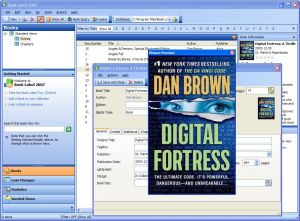 Need something to help keep your book collection really organized? Try Book Label. Need something to help keep your book collection really organized? Try Book Label.
Book Label keeps your book collection organized and easily accessible. You can get organized fast by downloading all information about your books from the Internet. Search, sort and print your collection as fast as it is easy.
What You Enjoy With Book Label
- Quick and Easy Data Entry – All information about your books is downloaded from online databases (including cover art)
- One-Click Sort & Search – Sorting your database is as easy as clicking a button
- Loan Management – Make sure you never lose another book by easy-to-use loan management
- Reports & Exports – Printing and exporting your data is only one mouse-click away
- Reliability & Speed – Book Label is built on a solid client/server database which means your collection can grow to virtually any size
- Manage Multiple Collections – You can create any number of databases and keep them separate
So what are you waiting for? Having problems with managing your book collection, Book Label might just be the thing you need.
CHECK IT OUT!
Posted in Business, Commercial, Developer, Information Management, Main, Shareware, Shell and Desktop, Text, Windows | 1 Comment »
Friday, March 16th, 2007
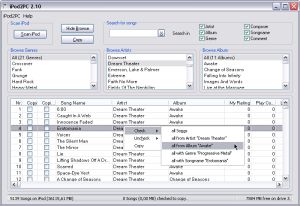 The problem with most programs is that they hardly do all what their publishers claim they do but here is a program that does exactly what it is said to do. The problem with most programs is that they hardly do all what their publishers claim they do but here is a program that does exactly what it is said to do.
With iPod2PC you can easily copy songs from any iPod to any PC’s hard disk to restore or backup them. One thing you will really enjoy with this software is that iPod2PC offers very fast searching and a browse mode which makes finding songs on the iPod easy. With the sophisticated song selection method (via context menu), choosing desired groups of songs for copying is very convenient.
It is so easy to use that you don’t need any level of expertise to be able to enjoy using it. The latest version, iPod2PC 3.9 which was released on March 2nd has this problem fixed:
Fixed: In rare cases the log contained invalid information
With the latest version you will enjoy these cool features:
Copy/restore your songs, videos and podcasts to your iTunes music library or a folder on your PC
Optionally automatic import of transferred songs in your iTunes library
Transfers your “My Rating”, “Play Count” and “Last played” information from the iPod songs
Improved interface for easy use
Support for all song types on the iPod (MP3, AAC, Wave, AIFF, Audible, Podcasts)
iPod2PC can run directly of your iPod, wherever you are… always available
Multiple iPod support
And much more.
Click HERE to check it out! Or Go To http://www.casicakes.com/ for more info.
Posted in Audio, Business, Developer, iPod, Main, Multimedia, Music, Shareware, Windows | No Comments »
Friday, March 16th, 2007
 Zattoo is a program that enables you to watch live television on your computer. Some of the channels currently available are ARD, arte, BBC Prime, BBC World, Bloomberg TV, Canale 5, CNN, EuroNews and EuroSport, to name but a few. (Also many non-English speaking channels). Zattoo is a program that enables you to watch live television on your computer. Some of the channels currently available are ARD, arte, BBC Prime, BBC World, Bloomberg TV, Canale 5, CNN, EuroNews and EuroSport, to name but a few. (Also many non-English speaking channels).
The bad news is that, currently, Zattoo will only work in Switzerland, the good news is they say they plan to go worldwide with it “soon”.
This looks like it could be a good service, as they say that it’s better than the usual internet video quality. They say it’s equal to TV quality. It remains to be seen if they can keep their promise, as my country isn’t currently served. But i was able to add my email to their mailing list so i can be notified when (if!) it is.
But it seems like one to watch, no pun intended! Check it out here.
Posted in Commercial, Developer, Fun, Information Management, Internet, Main, Shareware, TV, Video, Web services, Windows | 2 Comments »
Thursday, March 15th, 2007
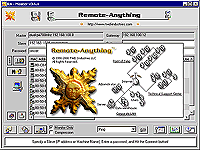 If you’ve been looking for a program that will allow you remote control over your PC but you’ve not been successful in your search, this might turn out to be what you need, Remote-Anything. If you’ve been looking for a program that will allow you remote control over your PC but you’ve not been successful in your search, this might turn out to be what you need, Remote-Anything.
Remote-Anything allows you to completely control the keyboard, mouse, and screen of a remote PC via a LAN or the Internet. With this software, you get Explorer like file transfer, the ability to install and use programs, to power up/down PC’s, and to record sessions and to play them back.
But why should you even consider using Remote Anything at all, why not something else?
- It is fast enough to watch real time video remotely and it automatically detects available PC’s
- The ultimate small footprint: the Slave is only 90 KB; Easy to deploy – just copy and run the Slave.exe file
- It is the first remote-control tool with a Directory Server
- Free program updates and support the first year
- Integrated Gateway to reach private IP addresses
With Remote-Anything, you get to control anything remotely. Want to check it out!
CLICK HERE or go to http://www.remote-anything.com/en/ra_index.htm
Posted in Developer, Information Management, Main, Multimedia, Programming, Shareware, Shell and Desktop, Windows | No Comments »
Thursday, March 15th, 2007
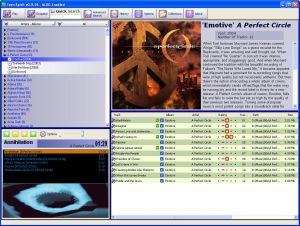 Teen Spirit (Conium) – A Good Audio-Video Player And Organizer Teen Spirit (Conium) – A Good Audio-Video Player And Organizer
Here is tool that you will definitely find useful; it is called Teen Spirit (Conium).
Teen Spirit is an Audio-Video player and organizer. What I love about it is it’s very user friendly interface. Want to retrieve info on your favorite artistes from the net? This tool is for you, it can retrieve info from internet such as lyrics, album reviews, album covers, artist biographies, and artiste pictures easily.
Teen Spirit also keeps history of the files you play, and allows you to review statistics and generates a personal hitlist based on your most played songs. One thing you will appreciate in this software is the fact that it helps you discover tracks in your vast music collection with features like auto-continue or by playing the music quiz.
The latest version in the software market now is Teen Spirit 0.91b[it was just released yesterday] and it comes with these changes:
- Virtual Track Collections. Add YouTube links as ‘Virtual’ Files in your collection. You may also import/export these files as ‘xlc xml link collection files’
- New actiion logger
- Easy Drag Drop tagging in tree view
- Web Services. Quick Search in Google – YouTube – Wikipedia (add yours in the services.xml) for artists / albums / tracks
- New ‘Tango’ compatible icons
- Many bug fixes and visual enhancements
Want to try it out? Visit http://www.artificialspirit.com/
Posted in Audio, Business, Developer, Information Management, Main, Movies, Shareware, Utilities, Video, Windows | No Comments »
Wednesday, March 14th, 2007
Check out this useful tool: RamCleaner.
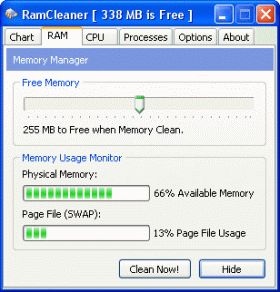 It allows your computer to run faster and uses your computer’s RAM more efficiently. This program allows you to free up a specific amount of RAM to the CPU at any time allowing your system to have more memory available. The good thing about this is that it makes program execution faster because as free memory it is ready and waiting. It allows your computer to run faster and uses your computer’s RAM more efficiently. This program allows you to free up a specific amount of RAM to the CPU at any time allowing your system to have more memory available. The good thing about this is that it makes program execution faster because as free memory it is ready and waiting.
RamCleaner automatically finds the best settings for your PC and carefully controls your system resources to give you the best performance.
You will also appreciate the fact that this cool tool:
- Defragments RAM
- Recovers RAM from the operating system and applications
- Recovers memory leaks
- Runs in the background keeping your system in peak condition
The latest version, RamCleaner 5.0, which hit the software market on 28th February, is available for you.
Want to check it out? Go to http://www.benutec.com/products/ramcleaner OR CLICK HERE
Posted in Business, Developer, Information Management, Main, Programming, Security, Shareware, Utilities, Windows | No Comments »
Tuesday, March 13th, 2007
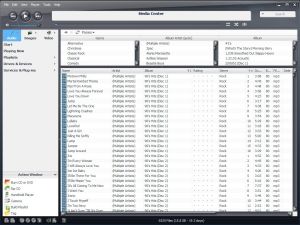 Here is a tool that will definitely help you manage your music and other media files easily. It is called J. River Media Center. Here is a tool that will definitely help you manage your music and other media files easily. It is called J. River Media Center.
J. River Media Center (formerly Media Jukebox) provides an easy and efficient way to collect, organize, and play music and other media files on your PC. If there ever is an all-in-one player and organizer for digital music, video, and Internet radio, J. River Media Center is it.
With this software, you can copy music to a portable digital audio player or move digital camera photos into the powerful image library. Whatever you want to do, whether it’s to make a CD of music for your car or record your favorite shows and watch them on your TV, J. River Media Center will do it for you easily.
Want to try it? Go to http://www.jrmediacenter.com/
Posted in Audio, Developer, Main, Multimedia, Music, Shareware, Windows | No Comments »
|
|
|






