Archive for the 'Shareware' Category
Sunday, December 10th, 2006
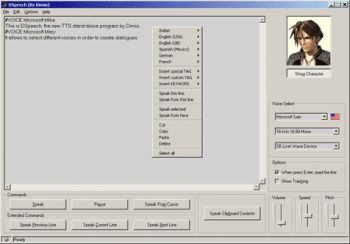 OK! Here is a really cool software. Ever thought about having a program that can bring your texts to life, well DSpeech does just that, it brings voice to your texts. OK! Here is a really cool software. Ever thought about having a program that can bring your texts to life, well DSpeech does just that, it brings voice to your texts.
DSpeech is a Text To Speech program with functionality of ASR (Automatic Speech Recognition) integrated into it. The cool thing is it is able to read written text aloud and choose the sentences to be pronounced based upon the vocal answers of the user. You could even save the output as WAV or MP3 file.
Another lovely feature is that it lets you select different voices, you get to even combine or juxtapose them in order to create dialogues between different voices.
You are really going to love it. It’s fun. Give voice to your texts , try out DSpeech and before you start checking your wallet, DSpeech is a freeware. It’ll cost you zero dollars. Go check it out!
One thing is worthy of note though, the program does not come with an installer so you’ll have to download the necessary files by yourself. The upside is it doesn’t write anything in your registry.
To learn more about DSpeech [and other products from the same publisher] and download it, CLICK HERE!
Posted in Business, Developer, Fun, Main, Shareware, Utilities, Voice, Windows | No Comments »
Sunday, December 10th, 2006
 Quicktime is of course a core technology on Apple Mac computers, but is an add-on to Windows too. Quicktime player, has many similarities with Windows Media Player and plays a lot of the same media. So why would you bother with Quicktime? My not stick with the native player on Windows. Quicktime is of course a core technology on Apple Mac computers, but is an add-on to Windows too. Quicktime player, has many similarities with Windows Media Player and plays a lot of the same media. So why would you bother with Quicktime? My not stick with the native player on Windows.
Well, as a predominantly Mac based writer, I will admit to a little bias, but honestly it doesn’t really matter what you use, WMP, Quicktime, DiVX Player, whatever floats your media. But I have to say that I like the quality and solidity of Quicktime. Okay it doesn’t play Windows files quite so well as WMP, but it does play them. It does however ROCK as the kids would say with QT files. There is actually no reason why you shouldn’t have many different video file players on your machine, Windows or Mac. Most of the cohabit very gracefully on any machine, and I have most of them on my Macs and PCs.
Most importantly, whatever media player you use, make sure you always have the latest versions, and that goes double for Quicktime. Check it out at the source.
Posted in Business, Commercial, Design, Developer, Mac Stuff, Main, Music, Photo, Shareware, Shell and Desktop, Utilities, Video, Windows | No Comments »
Saturday, December 9th, 2006
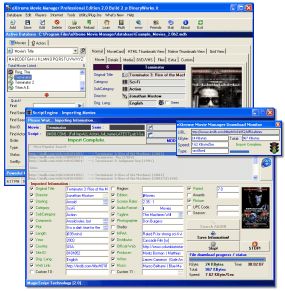 Movie buffs, you are going to love this! eXtreme Movie Manager is a great software to manage your movie collection. The facts that it lets you catalog any video formats such as DivX, XviD, DVD, VHS, SVHS, VCD, DVD-R, or LaserDisc with detailed information makes it a must have for all movie buffs. Movie buffs, you are going to love this! eXtreme Movie Manager is a great software to manage your movie collection. The facts that it lets you catalog any video formats such as DivX, XviD, DVD, VHS, SVHS, VCD, DVD-R, or LaserDisc with detailed information makes it a must have for all movie buffs.
And it is not just a movie/video collection manager, it’s also a movie and actor database and a cover manager. Arguably one of the most advanced Movies/Actors collection manager around. It can catalog movies stored in your Hard Disk and removable devices in seconds with all information about codecs, resolutions etc. automatically. And what I really love about it is that, with the exclusive “MagicScript” Technology, it allows you to retrieve movie information from all online movie databases.
The latest version just released of Dec 7 2006, eXtreme Movie Manager 5.6.2.0 has great changes that makes this software really cool. Here are some of the changes
- Now you can export also TV Shows
- Changed the Startup procedure
- Extended the Cover Manager also to TVShow, Episodes and Actors
- Now you can paste cover from clipboard also in cover manager
- Extended the Feature Field in Edit Window
- The Cover Manager now remember the position and size
- Changed some language definitions
- Added alt-e keystroke to open edit window
- Updated MagicScript Programmer’s guide with Block’s List
etc.
The only downside to this software is the User Interface, it could take a while for you to get the hang of it but once you do, you are going to love it, THAT’S A PROMISE! Try it!
CLICK HERE TO VIEW ALL CHANGES AND GET A TRIAL DOWNLOAD
Posted in Developer, Fun, Information Management, Internet, Main, Movies, Multimedia, Shareware, Social Software, Utilities | No Comments »
Saturday, December 9th, 2006
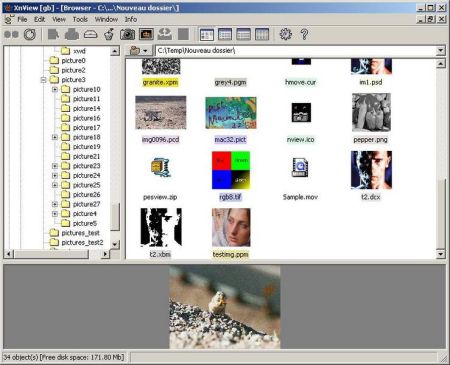
If you’ve been having problems with software that claim to help you view and convert graphic files, then you need to try this.
XnView is a group of utilities that features viewing, converting, screen capture, slideshow, and Twain support. These utilities support viewing more than 400 graphic formats and can create about 50.
Some of its nice features include :
- Import about 400 graphic file formats
- Export about 50 graphic file formats
- Multipage TIFF, Animated GIF, Animated ICO support
- Image IPTC, EXIF metadata support
- EXIF auto rotation support
- IPTC editing
- Resize, rotate, crop support
- Lossless rotate & crop (jpeg) support
AND SO MUCH MORE.
XnView has the following other editions available: XnView for Linux, XnView for FreeBSDand XnView for Mac OS X.
Want to try it out? It’s free! CLICK HERE FOR MORE INFO AND DOWNLOAD!
Posted in Commercial, Developer, Linux, Mac Stuff, Main, Multimedia, Shareware, Utilities, Windows | No Comments »
Thursday, December 7th, 2006
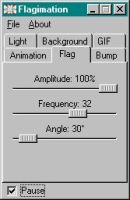 Flagimation is a cool little program that creates cool looking animated flags out of any image at all. It’s very simple to use, you simply open up an image file inside it, it can be BMP, JPEG, or GIF filetype, the resulting animation is shown straight away. Then you can choose from several settings such as amplitude, frequency, resize, light source, transparency, angle, the length and speed of animation. Flagimation is a cool little program that creates cool looking animated flags out of any image at all. It’s very simple to use, you simply open up an image file inside it, it can be BMP, JPEG, or GIF filetype, the resulting animation is shown straight away. Then you can choose from several settings such as amplitude, frequency, resize, light source, transparency, angle, the length and speed of animation.
This could be very useful for clubs or sports teams etc, or just anyone who’d like to have a cool animated flag on their website.
Check out some examples and get a free trial and more info right here. No wind required!
Posted in Business, Design, Developer, Main, Multimedia, Photo, Shareware, Utilities | 2 Comments »
Thursday, December 7th, 2006
 Having duplicate files on your PC can rob you of precious disk space and even slow down your system, that’s why this freeware is a really useful tool. I’m talking about CloneSpy. Like the name suggests it spies out clones [duplicates] of files on your system and helps you to get rid of them. Having duplicate files on your PC can rob you of precious disk space and even slow down your system, that’s why this freeware is a really useful tool. I’m talking about CloneSpy. Like the name suggests it spies out clones [duplicates] of files on your system and helps you to get rid of them.
In case you are wondering why you need this freeware, maybe you are thinking, duplicates will always be obvious and you can get rid of them when you see them. That’s the problem, they are not always obvious. Duplicate files can have exactly the same contents regardless of their name, date, time and location. CloneSpy helps you to fish them out with ease. CloneSpy is also able to find files that are not exactly identical, but have the same filename. So if you want to get rid of older versions of your favorite files you can do so with ease. It can also find zero length files, which are files that have no content.
Want to try it? CLICK HERE FOR FREE DOWNLOAD!
Posted in Commercial, Developer, Main, Shareware, Social Software, Utilities | No Comments »
Thursday, December 7th, 2006
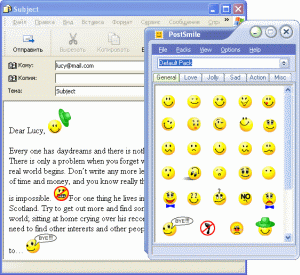 With PostSmile sending emails and posting on message boards gets to be fun. You can Drag and Drop images and animations, smiles and emoticons, text or HTML snippets, quotes and signatures into your email, message board or web-forum postings. With PostSmile sending emails and posting on message boards gets to be fun. You can Drag and Drop images and animations, smiles and emoticons, text or HTML snippets, quotes and signatures into your email, message board or web-forum postings.
One thing I appreciate about this program is that the smiley faces are divided into clear categories – Happy, Love, Sad, Communication, Other, Signatures, Famous Quotes, Love Quotes, Proverbs, Jokes and Compliments. PostSmile offers a wide variety of smiley faces but that’s not all, hundreds and hundreds of great emoticons are available in the PostSmile’s Online Collections Gallery. It also works well with all major email programs.
Like me you may be having an issue with the price. You may find it difficult to comprehend why you should part with $24.95 for smiley faces. Well they are offering a 25% Christmas discount presently, so it only goes for $18.71 for now. If you are still having an issue with the price, check out the trial version. But you need to note that you’ll only get limited smileys with the trial version , to get access to hundreds of emoticons , you’ll have to buy the full version.
Learn more and Check out the trial version!
Posted in Commercial, Design, Developer, Fun, Information Management, Internet, Main, Multimedia, Shareware, Social Software, Utilities | 1 Comment »
Wednesday, December 6th, 2006
 Do you love action games? If you do, you might want to try out this cool and free one, weird planet. Weird Planet is an action game in which you play as the main character who somehow finds himself in a strange planet and is looking for a way to escape. But you have to watch your step as you are being threatened by monsters. Do you love action games? If you do, you might want to try out this cool and free one, weird planet. Weird Planet is an action game in which you play as the main character who somehow finds himself in a strange planet and is looking for a way to escape. But you have to watch your step as you are being threatened by monsters.
Of course this is really a simple game so if you are not into simple games you may not find it interesting. But if you just want to have fun chilling out with this free and simple game, you’ll have a nice time.
Want to try it out, Click here!
Posted in Freeware, Fun, Games, Main, Shareware | No Comments »
Tuesday, December 5th, 2006
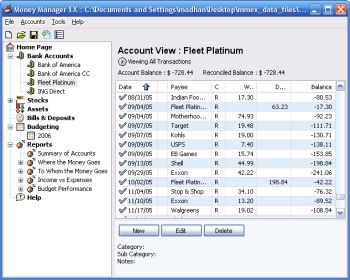 Money Manager Ex is a free open-source money managing and budgeting program. Money Manager Ex is a free open-source money managing and budgeting program.
Usually you gotta pay for decent personal finance software, so if you’re tryin’ to manage your money, you’ll appreciate that this ones free.
But how good is it? Pretty good! – You can manage multiple accounts and checking, savings, credit card, or loan accounts. You can even create your own categories and easily organise where your money goes into these. You can also track your bills and deposits and be reminded of upcoming bills and deposits so you won’t forget and lose track of them.You can import files from excel, microsoft money, and quicken, and also export to excel format. It also supports printing with inbuilt print preview.
Other useful features include viewing spending by category over a date range or by single category over time and viewing income versus expenses and how you’re doing on a budget.
Overall this is definitely worth checking out for anyone trying to budget and manage their finances better, its even free, which helps!
You can get more info and download it by clicking the homepage here.
Posted in Business, Commercial, Developer, Freeware, Internet, Main, Shareware, Social Software, Utilities, Windows | No Comments »
Tuesday, December 5th, 2006
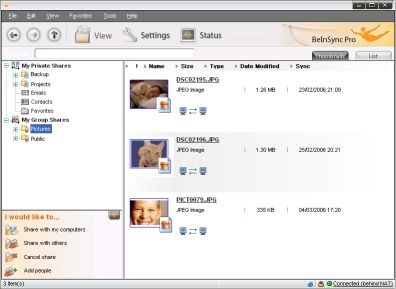 Checking my email on Yahoo! not too long ago I came across an advert of this wonderful software that helps you keep your files and emails in sync between your PCs. If you have multiple systems in different places like work, home and your laptop you will find this software useful. It’s called BeInSync and like the name suggests it helps you to always be in sync with all necessary info from anywhere. Checking my email on Yahoo! not too long ago I came across an advert of this wonderful software that helps you keep your files and emails in sync between your PCs. If you have multiple systems in different places like work, home and your laptop you will find this software useful. It’s called BeInSync and like the name suggests it helps you to always be in sync with all necessary info from anywhere.
BeInSync seamlessly and securely keeps your files and emails in sync between your PCs, making them available where and when you need them. It ‘s a great alternative to remote access products. Unlike GoToMyPC, you don’t have to long into that computer to send a file to yourself. BeInSync runs quietly in the background.
Beinsync makes it possible for you to
- Have your data in sync at home work and on the move
- Travel light and get to your data using remote Web Access
- Share any size files with colleagues, partners and friends.
Want to check it out? Click here!
Posted in Business, Developer, E-mail, Freeware, Internet, Main, Open Source, Shareware | No Comments »
|
|
|