Archive for the 'Shareware' Category
Tuesday, November 28th, 2006
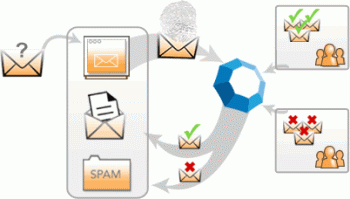 Cloudmark is an add-on for Microsoft Outlook and Outlook Express to prevent spam and also prevent and report phishing attacks. It can also block email viruses before they can do any potential damage. Cloudmark is an add-on for Microsoft Outlook and Outlook Express to prevent spam and also prevent and report phishing attacks. It can also block email viruses before they can do any potential damage.
To give it it’s full name, Cloudmark Desktop (formerly known as Cloudmark Safetybar) installs directly inside Outlook and Outlook Express, filters through your mail as it downloads, and moves suspected junk into a folder for you to review it later. The filtering mechanism is based on the Cloudmark service, the largest community-based platform used to stop the plague of junk email and email fraud, and it doesn’t require you to create any filters or rules. You can however create a white list, to make sure certain contacts will never be filtered, and also re-classify selected messages.
This is how it works. When a user clicks the ‘Block Spam’ or ‘Block Phish’ buttons, Cloudmark compares this feedback with feedback from other users. If other users in the network also consider the message to be spam or fraud, then similar messages are automatically blocked in the future, for all users in the network.
Likewise, if a user drags a message out of the Spam folder or clicks the ‘Unblock button’, Cloudmark compares this feedback with that of other users. If they agree, the message is unblocked throughout the Cloudmark network.
Well worth checking out if you’ve had it with too much spam. You can check out more info and a free trial by going here.
Posted in Business, Commercial, E-mail, Internet, Main, Security, Shareware, Windows | No Comments »
Monday, November 27th, 2006
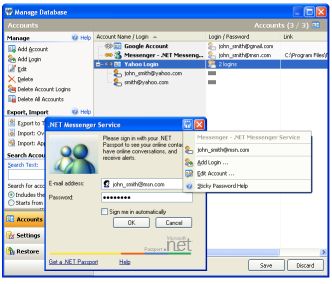 Remembering your passwords for different logins is not an easy task when there are so many of them. But a handy tool has just been released that can help you accomplish this with ease. Remembering your passwords for different logins is not an easy task when there are so many of them. But a handy tool has just been released that can help you accomplish this with ease.
Sticky Password automatically fills login and password fields in web forms and usual dialog windows. With its unique “Sticky Button” which appears on any window that it has password saved for, you get to do this with ease. I love the fact that there is a backup feature that keeps all passwords safely stored until the need arises for them.
Sticky Password also allows you to have multiple logins and passwords for a single account.
This software is a shareware, there is a trial version available but the full version costs about $24.95. But in case you are wondering what the big deal is about this software, there are so many others out there that are even free. Right? What makes it different from others is that unlike other password managers that are just used to keep and recall passwords, Sticky Password integrates password management features to any program on your computer.
Some of the key features of Sticky Password:
- The Password Protector is the most innovative and unique feature that prevents password theft. Learn more about password protector and anti-phishing.
- Portable Version allows you to always keep passwords in your hand. Sticky Password can run from any portable device – USB drive or even CD.
- Alternate authentication methods allow you to use any USB or Bluetooth device to unlock Sticky Password. Now you don’t need to type any passwords at all!
- The password storage database is protected with strong encryption algorithms that make it impossible to decrypt it in any acceptable amount of time. Learn more about password storage
- The form filler works for usual programs as well as web pages. Password, login and other fields are filled automatically only when you need it. Learn more about form filler
- Multiple logins and passwords are supported for a single account etc.
Click here to check out the trial version and for more info. NOTE: the trial version has a 30-day time out
UPDATE: Special offer from the owner of Sticky Password for our readers. More details in Comments
Posted in Information Management, Internet, Main, Multimedia, Programming, Shareware, Shell and Desktop, Text, Utilities, Windows | 9 Comments »
Monday, November 27th, 2006
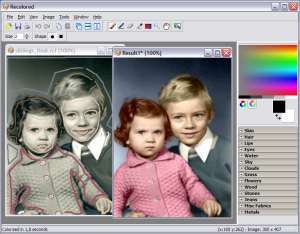 Got some old black and white photographs you wouldn’t mind seeing in color? Got some old black and white photographs you wouldn’t mind seeing in color?
Before computers helped, it had to be done by hand, requiring great skill and patience to achieve good results.
Nowadays, it’s possible to do it yourself on your computer, not easy, but possible!
Well general purpose graphics programs are usually awkward and time consuming to use if trying to recolor an old black and white photo. Recolored is software for colorizing black and white photos.
There is a learning curve and its a little too technical to describe in a simple blog review but it doesn’t take more than a few minutes to start getting results. Overall, I say Recolored is worth the download for anyone who’s got a lot of old photos and wonder what it really looked like to be there!
You can check out more detailed info and download the demo right here.
Posted in Design, Fun, Main, Photo, Shareware | No Comments »
Sunday, November 26th, 2006
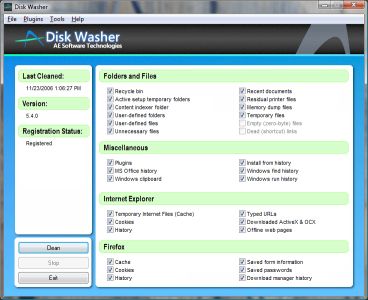 A new version of Disk Washer has just been recently released. Disk Washer is a software that helps you to maintain peak performance for your system by removing unnecessary files from your system. A new version of Disk Washer has just been recently released. Disk Washer is a software that helps you to maintain peak performance for your system by removing unnecessary files from your system.
Installation programs leftover, DLL problems and system registry errors are part of the things that Disk Washer resolves. Disk Washer helps to eliminate the things that clog your drive and make your system slow and instable. Latest Changes in the new version includes new GUI, enhancements, and stability improvements.
On first observation you might be tempted to rule out this software thinking that there are freeware like CCleaner, which have similar use. But a deeper look reveals that Disk Washer really is different as it helps you to recover disk space, clear your tracks, fix Windows problems, back up your files among other things. But the big question is this, “Is it worth the price that it is sold for?” That’s up to you! Check it out and see whether it works well with your PC or not. Try out the trial version first and see if it good enough for you.
Click here for more info on its features and trial download!
Posted in Developer, Internet, Main, Security, Shareware, Utilities | No Comments »
Sunday, November 26th, 2006
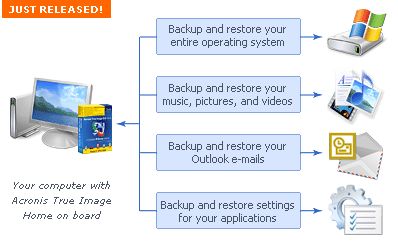 Acronis True Image is the ideal solution for making an entire exact copy of the contents of your hard disk. This means an exact clone including the operating system, applications, user settings, and all data. This is extremely useful if you’ve just bought a new computer or drive and want to move everything from your old computer or drive to the new one. Acronis True Image is the ideal solution for making an entire exact copy of the contents of your hard disk. This means an exact clone including the operating system, applications, user settings, and all data. This is extremely useful if you’ve just bought a new computer or drive and want to move everything from your old computer or drive to the new one.
It does exactly what it claims to, all it takes is a few hours, depending on size of course, size doesn’t matter with Acronis True Image either!
It’ll work no matter how big your hard disk is, but obviously time taken to clone is relative to size, although it worked pretty fast cloning a 20 GB drive the time i used it. It can even work in the background. The best thing is that even though you wont need to clone an entire drive for upgrade purposes often, it works good as a ‘normal’ backup program too.
Tip: Check the site for updates first before using to avoid any potential problems.
You can get a 15 day trial and more info by going here
Posted in Business, Commercial, Main, Open Source, Shareware, Social Software, Utilities, Windows | 1 Comment »
Friday, November 24th, 2006
 Nowadays most video cards support dual monitors and the prices of LCD displays have come down considerably so more people are using dual monitors than before. Some people find them useful if they do a lot of graphic or design work, as it allows more workspace without having to constantly maximise and minimise windows,etc. Ultramon is software to help you get the most out of a multi-monitor set-up. Nowadays most video cards support dual monitors and the prices of LCD displays have come down considerably so more people are using dual monitors than before. Some people find them useful if they do a lot of graphic or design work, as it allows more workspace without having to constantly maximise and minimise windows,etc. Ultramon is software to help you get the most out of a multi-monitor set-up.
It adds additional window buttons, so you can quickly move windows or stretch a window across the desktop.
It also uses a “Smart Taskbar” to manage more applications, so that you have a taskbar on each monitor and each taskbar only showing the tasks from the monitor it’s on.
Shortcut extensions make it easy to position applications on the desired monitor. The UltraMon screen saver and wallpaper manager make it possible to use a different wallpaper and screen saver on each monitor too. It also includes a flexible mirroring feature with support for mirroring one or more monitors, and use different resolutions for each monitor.Its also pretty cool to be able to move windows from one screen to the other!
You can download a fully functional trial here.
Posted in Main, Shareware, Utilities, Video | 2 Comments »
Friday, November 24th, 2006
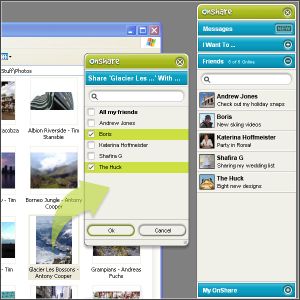 Just found a new way to share files and chat with friends in complete privacy. All thanks to this software, Onshare. Just found a new way to share files and chat with friends in complete privacy. All thanks to this software, Onshare.
OnShare is a free way to share files and chat with your friends in complete privacy. It’s a simple download that directly networks computers together. The fact that you get to control exactly what your friends can see and get their hands on really makes this useful tool. You only share files with people you invite so you know they’re from a trusted source and the files you share stay exactly where they are on your computer.
One cool feature that this software has is that its pioneering technology lets you reach into your friends’ computers, grab whatever you want and use it just as if it were on your own computer. And, if you have more than one computer, you can easily share between them wherever they are in the world.
The security of your files and chat is guaranteed as the file sharing and messaging is encrypted at 2048 bit, so secure that no one can intercept your chats and files. It is even said that the security model was conceived and developed by ex–military scientists. [I don’t know how true that is]
In case you are wondering how this works, your friends appear as drives on your computer, meaning you can access their shared files directly from within Windows. View, drag, drop, copy and paste just like you’re used to.
Click here to find out more and download it.
Posted in Internet, Main, Multimedia, Open Source, Shareware, Utilities | 2 Comments »
Friday, November 24th, 2006
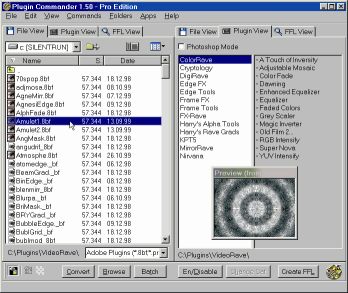 If you’ve had problems using plug-ins, tubes or other add-ons in a graphics, video or animation application then you might find this software, which I recently came across, very useful. It’s called Plugin Commander. If you’ve had problems using plug-ins, tubes or other add-ons in a graphics, video or animation application then you might find this software, which I recently came across, very useful. It’s called Plugin Commander.
Plugin Commander is a tool for dealing with various image formats, plugins and effect types from various graphics applications. It allows you to manage and preview your plugin, tube and add-on collection quickly and easily. You can deactivate the plug-ins you rarely need and define how your favorite effects will appear in the host application.
There are two editions of this useful software, the commercial Pro Edition and the Light Edition, which is freeware. The light edition being freeware has limited features but to enjoy a fully-featured version, it’s best you go for the Pro Edition.
CHECK IT OUT!
Posted in Audio, Browsers, Business, Commercial, Design, Developer, Information Management, Internet, Main, Multimedia, OS Updates, Photo, Security, Shareware, Shell and Desktop, Utilities, Video, Windows | No Comments »
Friday, November 24th, 2006
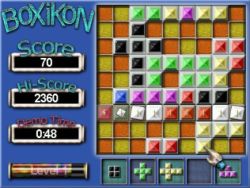 Having always been a fan of one of the most ageless games in the world, TETRIS; I was itching to see if anyone could come up with a Tetris – styled game that would be totally different. BoXiKon did that for me. Having always been a fan of one of the most ageless games in the world, TETRIS; I was itching to see if anyone could come up with a Tetris – styled game that would be totally different. BoXiKon did that for me.
BoXiKoN is a logic based puzzle game of strategy and forward thinking. The game obviously belongs to the Tetris family of shape games, but it really is quite different. There is a large emphasis on planning, organization and selection and less on arcade style quick reactions.
There is also a version for available for Mac users.
More info and download!
Posted in Fun, Games, Mac Stuff, Main, Shareware, Windows | No Comments »
Friday, November 24th, 2006
 Backgammon is a great game that has been around for a very long time, long before computers were even dreamed about. But you can now enjoy this game in a new way on your PC. Enter Backgammon 3D! Backgammon is a great game that has been around for a very long time, long before computers were even dreamed about. But you can now enjoy this game in a new way on your PC. Enter Backgammon 3D!
Backgammon 3D (or 3D Backgammon as it’s commonly known) is a 3D visualization of a classical board game – Backgammon. Now you can play with your computer not only on a flat screen, but also enjoy 3D operations – rotating the board, looking at the board from the side of your opponent, and other cool features.
One useful thing about the board rotation feature is that it helps you to see the game from different perspectives and this makes the game more interesting; you’ll definitely enjoy the game better this way.
CHECK IT OUT!
Posted in Fun, Games, Main, Shareware | No Comments »
|
|
|




