Archive for the 'Social Software' Category
Sunday, November 26th, 2006
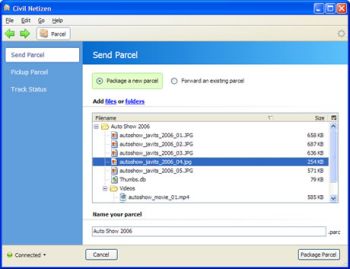 Civil Netizen is a free and secure way to send a file via the internet. It involves no complicated FTP settings, shared website settings, large email attachments, etc. Civil Netizen is a free and secure way to send a file via the internet. It involves no complicated FTP settings, shared website settings, large email attachments, etc.
You can send your file(s) through a simple drag and drop interface. Files can be up to a huge 4 GB!! Thats an awful lot of data, so now you can easily send and share your latest project you’ve been working on, etc, no matter how big (well, as long as its under 4GB obviously). It also fully preserves the folder structure if thats important to you.
You simply “parcel” your content with the online interface, and then you send a pick up slip via IM or email to your recipient. An important feature to mention is that all files are fully encrypted with 128 bit encryption from end to end, so it really is totally private.
It’s a totally free service and they say it always will be! Sounds good! Another one for the bookmarks! You can check it out or use it by going right here.
Posted in Commercial, Freeware, Internet, Main, Social Software, Web services | No Comments »
Sunday, November 26th, 2006
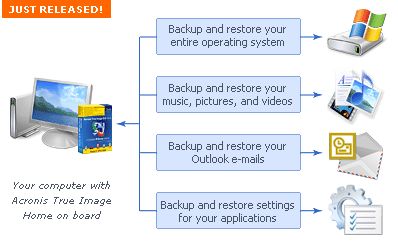 Acronis True Image is the ideal solution for making an entire exact copy of the contents of your hard disk. This means an exact clone including the operating system, applications, user settings, and all data. This is extremely useful if you’ve just bought a new computer or drive and want to move everything from your old computer or drive to the new one. Acronis True Image is the ideal solution for making an entire exact copy of the contents of your hard disk. This means an exact clone including the operating system, applications, user settings, and all data. This is extremely useful if you’ve just bought a new computer or drive and want to move everything from your old computer or drive to the new one.
It does exactly what it claims to, all it takes is a few hours, depending on size of course, size doesn’t matter with Acronis True Image either!
It’ll work no matter how big your hard disk is, but obviously time taken to clone is relative to size, although it worked pretty fast cloning a 20 GB drive the time i used it. It can even work in the background. The best thing is that even though you wont need to clone an entire drive for upgrade purposes often, it works good as a ‘normal’ backup program too.
Tip: Check the site for updates first before using to avoid any potential problems.
You can get a 15 day trial and more info by going here
Posted in Business, Commercial, Main, Open Source, Shareware, Social Software, Utilities, Windows | 1 Comment »
Monday, November 20th, 2006
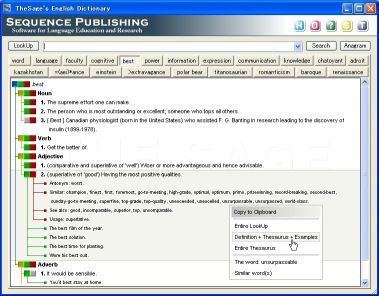 The thing with dictionaries is that it’s not enough to have them you must know how to use them. But the truth is this; there are so many dictionaries that are well stocked with words and their meanings but not easy to use. If you’ve had this problem with dictionaries, you might consider using TheSage. The thing with dictionaries is that it’s not enough to have them you must know how to use them. But the truth is this; there are so many dictionaries that are well stocked with words and their meanings but not easy to use. If you’ve had this problem with dictionaries, you might consider using TheSage.
The Sage’s English Dictionary and Thesaurus is a complete dictionary and a multifaceted thesaurus of the English language. The fact that it runs locally without an Internet connection makes it a must-have.
In case you are still wondering, “How does TheSage differ from any other traditional dictionary?” You might want to check the following features it possesses:
- A Comprehensive Dictionary with over 145,000 references with multiple detailed definitions (over 200,000)
- Tabbed interface, which allows multiple definitions and searches to be readily available
- A Complete Thesaurus with nearly 1,200,000 relationships between definitions (synonyms, antonyms, hypernyms, hyponyms, meronyms, holonyms…)
- A large collection of “Example Sentences” that already includes approximately 35,000 examples of usage
- Quick cross-referencing
- Standard and advanced wildcard search functionality
- Anagram search- only valid English words are returned
- History and session record keeping
- Options that allow customization of the appearance of TheSage
And so much more!
What really makes this particular one, my dictionary of choice is the fact that it can look up words directly from almost any program (IE, Word, Firefox, Outlook, Thunderbird, etc ) and is 100% portable [you can run it, fully functional, from portable devices such as a USB]
Want to check it out?
Click here for more info and download
[Silly Me! I forgot to mention, it’s totally FREE!]
Posted in Freeware, Main, Multimedia, Social Software, Text, Web services | No Comments »
Monday, November 20th, 2006
 Needing to stay in tune with up to date information, I’ve always had to check my favorite websites manually but then I discovered WebMonit and things took an automatic turn for the better. Needing to stay in tune with up to date information, I’ve always had to check my favorite websites manually but then I discovered WebMonit and things took an automatic turn for the better.
WebMonit keeps you up to date and saves you time doing it. WebMonit is a powerful and easy to use web pages monitor tool. It can monitor web pages changes automatically. Monitor content could be the whole webpage or a part of webpage or just a field. A user-defined event could be triggered when change occurs.
So if you need to watch the Stock Market, get the latest news, watch for software updates, latest movies releases and so on. This is for you.
I quite agree with the publisher that this piece of software “saves you time”, “keeps you up to date” and “gives you peace of mind” all at the same time. If you need to watch a large volume of information, it can be overwhelming to do it manually. With WebMonit you can let the computer check the websites regularly and contact you as soon as soon as it detects a change.
or more info and free download, CLICK HERE!
Posted in Internet, Main, Shareware, Social Software, Utilities | No Comments »
Saturday, November 18th, 2006
 Microsoft being so generous lately. What do I mean? Well, guys at Neowin.net got an info that everyone who took part in the Windows Vista beta test (and that’s about 20,000) company have provided a complimentary copy of Windows Vista Business or Ultimate. But there’s a little catch – really not all of 20,000 testers got new & hot software but only those who submitted at least 1 bug report. Microsoft being so generous lately. What do I mean? Well, guys at Neowin.net got an info that everyone who took part in the Windows Vista beta test (and that’s about 20,000) company have provided a complimentary copy of Windows Vista Business or Ultimate. But there’s a little catch – really not all of 20,000 testers got new & hot software but only those who submitted at least 1 bug report.
Microsoft sent out a mail to those testers just a few minutes ago which specified that it is being offered as a download only. No media will be mailed, and only currently active, invited members of the Windows Vista technical beta program who filed at least one bug are receiving this offer.
Well, can you say now Long Live Micrisoft or still not?
via Neowin
Posted in Business, Commercial, Main, News, Social Software, Windows | 1 Comment »
Thursday, November 16th, 2006
 Now that Microsoft has finalized the code of Microsoft Office 2007 at last, corporate customers will be able to get their hands on Office Small Business 2007 soon. Now that Microsoft has finalized the code of Microsoft Office 2007 at last, corporate customers will be able to get their hands on Office Small Business 2007 soon.
The rest of us will have to wait until early next year to buy a boxed version of Word, Excel, PowerPoint, Outlook and the other members of the Office 2007 family. The consumer editions of Microsoft Office 2007 will hit the stores early next year, in step with the Vista operating system.
Some of the major changes in Office 2007 include the fact that major programs each organize features into tabs rather than drop-down menus and dialog boxes and New XML-based files, which squeeze more data into fewer kilobytes have been added. It is worthy of note that you won’t be able to open a file in the new format immediately when using earlier versions of the programs. This will make sharing work with people without the new version [those who haven’t upgraded] difficult. (more…)
Posted in Business, Commercial, Developer, Main, Office, Social Software, Text, Windows | 17 Comments »
Wednesday, November 15th, 2006
 You know what’s really weird about the concept of backing up the entire Internet? Where on earth would you put it all? You know what’s really weird about the concept of backing up the entire Internet? Where on earth would you put it all?
I don’t know how it works, but over at www.archive.org they have a thing called the Internet Wayback Machine. You can put in a URL and it will take you back to what that page looked like in 1996. It must be vestigial logs from the hosting sites or something, I don’t see how it can work, but it does. I can verify I went back to a lot of my old websites that are LONG gone and there they were, graphics and all.
That’s not even possible, is it?
Mind boggling. Go boggle your own mind at The Internet Wayback Machine.
Posted in Developer, Internet, Main, Social Software | No Comments »
Wednesday, November 15th, 2006
 At the end of last week my Skype-client have told me that there’s a new BETA version (for Windows users) available… I was too busy that time to download and look at it but now time have come! So, what’s inside Skype 3.0 (Beta version)? First of all there are lots on new and very interesting functions (like skypecasts (which were available in the 2.6 Beta already), public chats etc.). At the end of last week my Skype-client have told me that there’s a new BETA version (for Windows users) available… I was too busy that time to download and look at it but now time have come! So, what’s inside Skype 3.0 (Beta version)? First of all there are lots on new and very interesting functions (like skypecasts (which were available in the 2.6 Beta already), public chats etc.).
So, lets start with those skypecasts:
In Skype 3.0, you can browse the current Skypecasts straight in Skype on the Live tab. When you decide to join or host one, the Skypecast itself will run within a separate tab where you have all the host or participant controls to ask for mike, see who’s the host and do all those other things you need to do in a Skypecast. So there won’t be no more of those clunky pop-up browser windows. To join Skypecast just click the link and talk (or just listen to the conversation). Every Skypecast have all ‘statistic’ you need to know (subject, who’s hosting it, number of participants right now). One more thing about the host: one who organized the whole talk have more rights and can vary a few things, for ex. They can cut somebody short so you won’t be able to talk, just listening to the conversation. Also he can set a chat time (how long the conversation will take place). There’s a 5 hours limit (maximum). For that time chat will be available even if there’s no one is talking. After that chat will be deleted (only if there’s no one inside, if there’s at least one person it still will ‘live’). (more…)
Posted in Freeware, Internet, Main, Multimedia, Social Software | 1 Comment »
|
|
|





