Archive for the 'Social Software' Category
Saturday, December 23rd, 2006
 If you like words, I dunno you’re a crossword person or something, then you need WordWeb. WordWeb is a quick and powerful international English thesaurus and dictionary for Windows, which can be accessed to look up words from almost any program running on Windows, showing definitions, synonyms and related words. It also like any good dictionary includes pronunciations and usage, and spelling and my favorite “sounds-like” links for when you have a senior moment and look up the wrong word but it sounds the same. If you like words, I dunno you’re a crossword person or something, then you need WordWeb. WordWeb is a quick and powerful international English thesaurus and dictionary for Windows, which can be accessed to look up words from almost any program running on Windows, showing definitions, synonyms and related words. It also like any good dictionary includes pronunciations and usage, and spelling and my favorite “sounds-like” links for when you have a senior moment and look up the wrong word but it sounds the same.
The downloadable WordWeb is a free cut-down version of the Pro version of the software. It includes a comprehensive English thesaurus and dictionary, includes definitions and synonyms, proper nouns, related words, and pronunciations. The program features over 140 000 words, with around 115 000 synonyms, and allows you to look up words in almost any program simply and quickly. Apparently “millions of people from all over the world use this top-rated software“. News to me. This is the first I’ve heard of it. Sounds very cool though.
Get it here.
Posted in Freeware, Fun, Information Management, Main, Shareware, Social Software, Text | 1 Comment »
Thursday, December 21st, 2006
 Being a 3D expert I’m always keen to hear about new 3D object creation software. I was aware of SketchUp before, but now of course it is a Google product and the engine of choice for making new objects for Google Earth. Being a 3D expert I’m always keen to hear about new 3D object creation software. I was aware of SketchUp before, but now of course it is a Google product and the engine of choice for making new objects for Google Earth.
The program is a simple but powerful tool for rapid prototyping of objects. Just make the shapes and pull them around in the interface. Colour and texture are easily editable. And also lighting is easy to adjust and preview. In fact real-time shadow casting lets you see exactly where the sun falls on your object as you work.
There are a huge amount of pre-drawn shapes to get you going, so you get a leg up into a job rather than having to start from scratch all the time. Once you’ve built your models, you can place them in Google Earth or post them to the 3D Warehouse.
The program works with both Mac or PC and you can get it here.
Posted in Design, Developer, Fun, Mac Stuff, Main, Multimedia, Photo, Shareware, Social Software, Utilities, Windows | No Comments »
Thursday, December 21st, 2006
 SupervisionCam is software for turning your PC into a video surveillance system. It can compare images from a video camera or from a local or Internet image file, at intervals chosen by you, and starts optional activities when it detects a movement. It can save the images as BMP or JPG files, play a sound, send a message or mail, start a program or create a HTML page and upload this page including the images to a LAN or internet (FTP) server with optional dial-up support. SupervisionCam is software for turning your PC into a video surveillance system. It can compare images from a video camera or from a local or Internet image file, at intervals chosen by you, and starts optional activities when it detects a movement. It can save the images as BMP or JPG files, play a sound, send a message or mail, start a program or create a HTML page and upload this page including the images to a LAN or internet (FTP) server with optional dial-up support.
SupervisionCam can also capture images in a defined time interval, so you can use it as a webCam as well! It offers lots of features – Fast viewer, support for more cameras, surveillance scheduler, static or dynamic motion detection threshold configuration, auto update over internet and a lot more.
This is pretty feature packed program that would suit someone wanting to have a cheap but reliable surveillance camera set up for example. You can download a trial from the homepage here and find the full list of features, but you’ll have to register to get the full version, unless the watermark doesn’t matter to you too much.
Posted in Developer, Information Management, Internet, Main, Photo, Shareware, Social Software, Video | No Comments »
Wednesday, December 20th, 2006
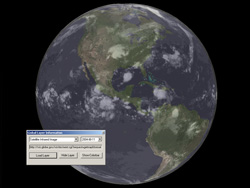 I just had the chance to install and play with Nasa World Wind. It proves to be quite an alternative to the famous Google Earth in some ways. This is a program that will allow you to zoom in on any place you want on Earth, but also Venus, Mars, Jupiter…even the Moon. I just had the chance to install and play with Nasa World Wind. It proves to be quite an alternative to the famous Google Earth in some ways. This is a program that will allow you to zoom in on any place you want on Earth, but also Venus, Mars, Jupiter…even the Moon.
You can select from various types of satellite map images, this would be very useful for anyone who’s into geology, geography etc. But you can also do much more, such as downloading live weather maps, which would be interesting for anyone into meteorology. It uses Shuttle Radar Topography Mission elevation data and high resolution LandSat imagery. Yes…this is a little more technical than Google Earth!
It has a similiar interface as Google Earth in some ways, such as being able to click and drag to spin the globe to the desired position. You can zoom in and out with the mousewheel,or by double clicking. You can select the map type you’d like to see from a menu on the top. Hint: The landsat one is the one to choose if you wanna zoom in on photo’s of streets, etc.
On many levels, World Wind is good for scientific, educational and research purposes. For driving directions, local information, exploring and other recreational activities, Google Earth might be a better options, as this program might be a little too scientific for most people.
You can check out much more info and download it completely free from the NASA site here.
Posted in Developer, Freeware, Fun, Information Management, Internet, Main, Social Software | 1 Comment »
Wednesday, December 20th, 2006
 Most people I know these days use Firefox. It’s a fast, secure tabbed browser that isn’t made by Microsoft, so scores big with all my PC and Mac friends. But Opera has been around longer and has some cool features too. I’m currently road testing the new version to see if I’ll migrate, and not sure at the moment. Most people I know these days use Firefox. It’s a fast, secure tabbed browser that isn’t made by Microsoft, so scores big with all my PC and Mac friends. But Opera has been around longer and has some cool features too. I’m currently road testing the new version to see if I’ll migrate, and not sure at the moment.
It has advanced fraud protection which protects you against sites that try to steal your personal information. It speaks BitTorrent so you can (cough) download files. You can add your favorite search engines to it easily and quickly, although most people I know only use the one, maybe two. There’s a bunch of other features like widgets, content and pop-up blockers. It’s all very good. Good enough to win me away from Firefox? Hmm, the jury is still out on that one.
For more info and a download go to the Opera Web.
Posted in Browsers, Business, Developer, Freeware, Information Management, Internet, Main, Open Source, Social Software | No Comments »
Monday, December 18th, 2006
 Hotkeys is a free and open source keyboard productivity environment. It’s loosely based upon the idea of the windows hot key, that little windows logo key on your keyboard that pops up the start menu when you hit it. Hotkeys is a free and open source keyboard productivity environment. It’s loosely based upon the idea of the windows hot key, that little windows logo key on your keyboard that pops up the start menu when you hit it.
If you usually find key combinations hard to remember, this will make things much easier. You simply hold down the windows key for three seconds or hit Win+Z (while hotkeys is running) and it pops up a keyboard layout on-screen with icons on the keys that are configured.The keyboard is highly configurable. You can change the color and layout to make it match your actual, physical keyboard. Besides support for more than 100 international keyboards layouts, hotkeys also supports Dvorak layout.You can drag the icons to different keys or drag new ones on to have it exactly the way you want it to be.
This is a pretty cool program for anyone who uses keyboard shortcuts a lot and needs a good way of remembering, changing, or organizing them.
You can download it here and read more info.
Posted in Commercial, Developer, Freeware, Main, Open Source, Social Software, Utilities | No Comments »
Monday, December 18th, 2006
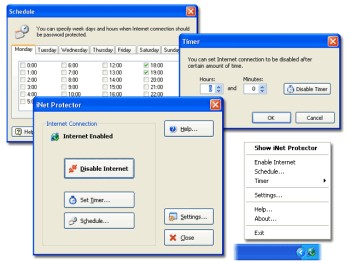 If you are a parent who wants to monitor and limit the time your children spend online or you are an employer concerned about the amount of time your employees spend online not doing the company’s work, then you might want to check out this software. It is called iNet Protector. If you are a parent who wants to monitor and limit the time your children spend online or you are an employer concerned about the amount of time your employees spend online not doing the company’s work, then you might want to check out this software. It is called iNet Protector.
iNet Protector helps to restrict access to the Web and password protect Internet connection. It allows you to enable and disable Internet connection any time. In order to enable Internet access, user defined password must be entered. The fact that there is some sort of flexibility, I mean you can schedule time periods when Internet connection should be disabled or enabled, makes this software useful.
A new updated version of this shareware was released a couple of days ago with the latest change being that the installer has been worked on to perform better.
Want to check it out? CLICK HERE!
Posted in Design, Developer, Internet, Main, Security, Shareware, Social Software, Utilities, Windows | 1 Comment »
Friday, December 15th, 2006
 Adobe just have released the first beta version of new Photoshop (CS3). One of the biggest (or can we say greatest) update in new version is that it will now run natively on Intel Macs. Adobe just have released the first beta version of new Photoshop (CS3). One of the biggest (or can we say greatest) update in new version is that it will now run natively on Intel Macs.
The official FAQ also mentions non-destructive Smart Filters, Quick Selection tool, Reine Edge, Automatic layer alignment and blending, Vanishing Point with multiple, adjustable angle perspective planes, and Black and White conversion.
The beta version of CS3 will be available for everybody here. If you want to find out more information on this topic visit blogs at Adobe’s website.
Posted in Business, Design, Developer, Mac Stuff, Main, Multimedia, News, Photo, Social Software, Windows | 3 Comments »
Friday, December 15th, 2006
 MB Free Tarot Dictionary is exactly that, a cross referenced dictionary of Tarot terms. But it’s a little more than that too. You get the meanings of different spreads, the layouts you do with the cards, plus you get information about decks, individual cards, and symbolism and other meanings. MB Free Tarot Dictionary is exactly that, a cross referenced dictionary of Tarot terms. But it’s a little more than that too. You get the meanings of different spreads, the layouts you do with the cards, plus you get information about decks, individual cards, and symbolism and other meanings.
It’s all very clearly explained, but I suspect you have to have an interest in Tarot to begin with or not much of it will make sense. This is not a beginners tool, although as a supplement to other tools like a really good book on the subject,it will be very helpful.
It’s more of a glossary that a reference guide, but will be of use to experts and intermediate users alike. Get it from the author’s web site.
Posted in Developer, Freeware, Fun, Information Management, Main, Social Software | 2 Comments »
Friday, December 15th, 2006
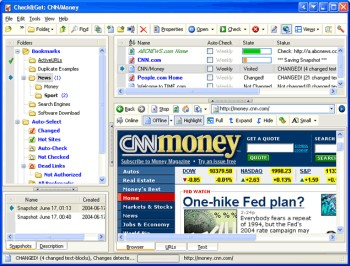 Need an easier way to check the latest updates on your favorite websites? This software does just that and much more in a quick and easy way. Need an easier way to check the latest updates on your favorite websites? This software does just that and much more in a quick and easy way.
Check&Get is a handy and powerful bookmark manager and web monitoring program that lets you check your favorite Internet pages and detect if their content has changed or has become unavailable. Not only that, it can notify you of changes or web-server downtime by bookmark highlighting, by pop-up message, by playing a sound file or by sending you e-mail message with the updated web page. And what really makes this software a delight is that it can even download the updated file from the Internet and save it to the specified folder on your hard disk. So you can browse it offline.
A new updated version of Check&Get has just been released version 3.1.0.440. The latest changes in the new updated version:
- Compatibility with Internet Explorer 7 added
- Additional Proxy settings added
- Usage of memory and performance optimized
Want to try it out? Click HERE!
Posted in Commercial, Developer, Information Management, Internet, Main, Shareware, Social Software, Windows | No Comments »
|
|
|




