Archive for the 'Utilities' Category
Wednesday, December 6th, 2006
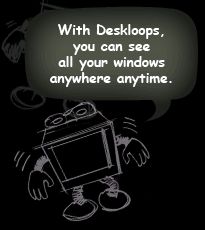 Deskloops is a program to help you navigate through your open windows easier. It creates a loop of all your windows which you can scroll through by going left or right. Alternatively you can go to the top of the screen and scroll through thumbnails of your windows. Deskloops is a program to help you navigate through your open windows easier. It creates a loop of all your windows which you can scroll through by going left or right. Alternatively you can go to the top of the screen and scroll through thumbnails of your windows.
Its much easier to watch it in action than it is to describe it, so check out the first video here entitled “Getting started” and you’ll understand clearer!
It’s a pretty well made program and the navigation system is pretty simple and uncluttered and gets the job done. Although i think nowadays many people will just stick to tabs. But for anyone who doesn’t use tabs, its worth checking out. Also the optional 3D effect feature looks pretty cool, but may get in the way after a while.
I’d recommend checking this out to anyone who finds themselves with a lot of windows open frequently and who doesn’t already use tabs!
You can download it here and read more info and watch some video demos/tutorials. Oh and its free!
Posted in Business, Design, Developer, Freeware, Fun, Internet, Main, Open Source, Utilities, Windows | 1 Comment »
Wednesday, December 6th, 2006
 If you are in need of a freeware that will help to make file name searches easier and faster, this application is for you.Instant File Name Search is a fast and easy to use search tool. You can instantly search files by name or wildcards on your computer or local network. If you are in need of a freeware that will help to make file name searches easier and faster, this application is for you.Instant File Name Search is a fast and easy to use search tool. You can instantly search files by name or wildcards on your computer or local network.
This cool tool supports:
- Instant search of files by name or wildcards
- Boolean operators (AND, OR, NOT)
- Search in various directories or LAN resources
- Database management (you can create several databases)
- Taskbar icon and hot keys for quick access
- Win95/98/ME or WinNT/2000/XP.
Want to check it out? CLICK HERE!
Posted in Commercial, Developer, Freeware, Main, Utilities, Windows | No Comments »
Wednesday, December 6th, 2006
One of those programs that makes life easier if you have a website or blog is an FTP program. Sure, you can use the command line client, or, worse yet, internet explorer’s built-in FTP functionality, but neither of these solutions is ideal. If you do a lot of FTP transfers, you need a full-featured program dedicated to this purpose. Filezilla is a quick and easy to use FTP program for Windows that you should check out.
The install is simple and takes less than a minute after downloading the installation file. After installing, start the program and you’ll find an interface with several window frames as well as some boxes at the top to input the address of the ftp server and your username and password. Connecting is as simple as filling in these boxes and hitting Enter.
It’s easy to drag and drop files from the Remote Site frame at the right into the frame at the bottom to download files. One thing you’ll have to remember is that you have to click the ‘Q’ (Queue) button on the toolbar at the top of the window, though. This is actually a great feature because it allows you to correct your mistakes before you make them. No transfers are completed until you are ready.
Another cool feature is that when you navigate through the menus, a brief help message appears on the status bar at the bottom of the screen to explain the command option. This also works with the toolbar at the top of the screen. I expected to see tooltips pop up when hovering over the buttons, but this works just as well and it appears instantly instead of after the pause that you have to wait through with tooltips.
Filezilla is freeware and actively maintained, so you can expect to see it updated regularly with lots of useful features.
Posted in Freeware, Main, Open Source, Utilities, Windows | No Comments »
Tuesday, December 5th, 2006
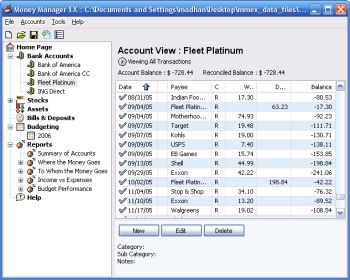 Money Manager Ex is a free open-source money managing and budgeting program. Money Manager Ex is a free open-source money managing and budgeting program.
Usually you gotta pay for decent personal finance software, so if you’re tryin’ to manage your money, you’ll appreciate that this ones free.
But how good is it? Pretty good! – You can manage multiple accounts and checking, savings, credit card, or loan accounts. You can even create your own categories and easily organise where your money goes into these. You can also track your bills and deposits and be reminded of upcoming bills and deposits so you won’t forget and lose track of them.You can import files from excel, microsoft money, and quicken, and also export to excel format. It also supports printing with inbuilt print preview.
Other useful features include viewing spending by category over a date range or by single category over time and viewing income versus expenses and how you’re doing on a budget.
Overall this is definitely worth checking out for anyone trying to budget and manage their finances better, its even free, which helps!
You can get more info and download it by clicking the homepage here.
Posted in Business, Commercial, Developer, Freeware, Internet, Main, Shareware, Social Software, Utilities, Windows | No Comments »
Monday, December 4th, 2006
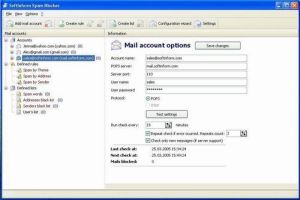 If you’ve had it with spam and you are looking for the final solution, you might want to check out Spam Blocker. If you’ve had it with spam and you are looking for the final solution, you might want to check out Spam Blocker.
Spam Blocker is an application for filtering incoming correspondence. This is a very simple, convenient and fast protection tool for prior analysis, blocking and deleting incoming advertising letters (spam) immediately on mail servers.
What really makes this a cool tool is that it helps to get rid of annoying email advertising by analyzing correspondence before it is loaded from server. Spam Blocker checks all mail and receives the headings of all messages from the user’s mailbox (email addresses, addressee names, message subject, etc.) and analyzes the messages for spam content.
One other thing that I love about this tool is that you, the user, get to define the criteria it which it will sort your message, thus eliminating the risk of losing important mails that you are expecting.
Want to check it out? Click Here!
Posted in Business, Commercial, E-mail, Internet, Main, Shareware, Utilities | No Comments »
Sunday, December 3rd, 2006
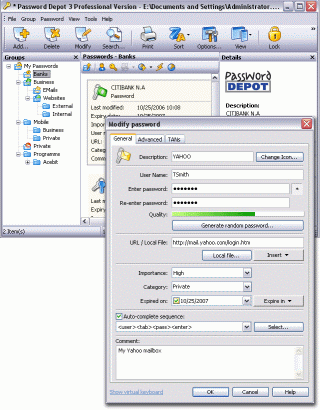 In one of my recent posts I told you about a software that can help you manage your passwords effectively, but in case you are not satisfied with that for any reason, you might consider checking this out! Password Depot. In one of my recent posts I told you about a software that can help you manage your passwords effectively, but in case you are not satisfied with that for any reason, you might consider checking this out! Password Depot.
Password Depot is a powerful and extremely user-friendly tool for the management of all your passwords. It offers rock-solid protection of your data due to double encryption with Rijndael 256. Your password list is protected twice: with the master password and with an internal key. Password Depot really stands out from the pack.
Some its great features include:
- User-friendly interface for convenient management of your passwords and access details: for the Internet, online banking (TANs), online shopping etc.
- Generate uncrackable passwords using the integrated Password Generator
- Maximum protection of your sensitive data thanks to the security algorithm Rijndael 256-Bit
- Protection from keyloggers and spyware: Password Depot protects your passwords even if your computer is infected with spyware and keyloggers
- Password Depot 3 runs on every Windows PC. Optionally, it also runs on USB flash drives
- Network compatible – allows shared use on a local network
- Store password lists on FTP servers for worldwide access to your data etc.
Though it’s not a freeware, you can try it out for free for 30 days.
CLICK HERE for more info and download!
Posted in Business, Commercial, Developer, Information Management, Internet, Main, Security, Shareware, Social Software, Utilities | No Comments »
Thursday, November 30th, 2006
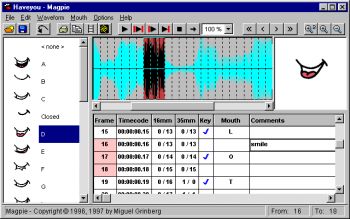 Magpie and Magpie Pro are very specialist software. What they do is allow animators to figure out what mouth shapes to animate when adding visuals to avoice. It’s called lip sync. Actors record voices, and animators hear those words and draw or fashion from clay,the expressions and mouth shapes of the characters. Sounds simple, but it’s really not. Magpie and Magpie Pro are very specialist software. What they do is allow animators to figure out what mouth shapes to animate when adding visuals to avoice. It’s called lip sync. Actors record voices, and animators hear those words and draw or fashion from clay,the expressions and mouth shapes of the characters. Sounds simple, but it’s really not.
Magpie and it’s big brother Magpie Pro make this easy by loading the sound file up and breaking it down into frame sized pieces. Then you can assign a mouth shape to the syllables you hear, frame by frame. Then you can play the sound and watch the mouth. If it matches and looks good, you’re done, if not it’s back to the old drawing board. Magpie makes it simple.
Find all the details and demo download at Third Wish Software.
Posted in Audio, Commercial, Design, Main, Multimedia, Shareware, Utilities, Video | 1 Comment »
Thursday, November 30th, 2006
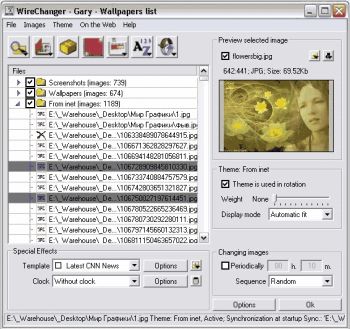
 Don’t you think it’s high time you changed the look on your desktop? If you do, you might want to use Wirechanger. Don’t you think it’s high time you changed the look on your desktop? If you do, you might want to use Wirechanger.
WireChanger is a Wallpaper manager that includes built-in utilities, templates, calendar and the option to add active clocks to your desktop. WireChanger offers you total and complete solution to manage your own desktop wallpapers, especially If you want to see something fresh every time you minimize your applications.
WireChanger will put customizable sticky notes on your desktop. To add a new note you just double-click your wallpaper in a free area and type the note’s text. I love the fact that your wallpaper can be colored and altered with special templates. Templates overlay your desktop background with useful information such as a calendar, the weather forecast, or famous quotations.
The calendar template transforms part or all of your background into a handy desktop calendar for two weeks or a current month with interactive day-by-day post-it notes. It can add an analog or digital desktop clock from the ColClocks collection to your wallpaper. You can also download a small utility called Desktop FlashGen to create an interactive desktop from your favorite flash file.
Want to check it out? Visit http://www.wiredplane.com/en/wirechanger/about.php
Posted in Design, Developer, Main, Shareware, Shell and Desktop, Themes, Utilities, Windows | 2 Comments »
Thursday, November 30th, 2006
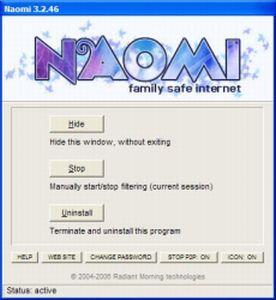
 Naomi is a free Internet parental control filter to help prevent your kids from viewing inappropriate material while online. Naomi is a free Internet parental control filter to help prevent your kids from viewing inappropriate material while online.
Naomi doesn’t rely on a simple list of banned sites like a lot of similiar programs do. Instead it examines in real time, all the data being transmitted and received through the Internet application, such as web browsers and chat programs. Monitoring is not limited to web sites, but covers the whole local Internet traffic. It also allows blocking of file-sharing applications and the whole thing can be password-protected. It’s also got some useful plug ins that may be of use, such as one to block Myspace access and one to hide the tray icon.
All in all its worth checking out if you’ve been looking for a free way of protecting your kids when they’re online! You can get more info and the free download from here.
Posted in Developer, Freeware, Internet, Main, Security, Utilities, Windows | 2 Comments »
Wednesday, November 29th, 2006
 This is a free open-source MSN Messenger clone called aMSN. If for any reason you want to use MSN messenger but without using the official MSN messenger client, then maybe its time to check this out. This is a free open-source MSN Messenger clone called aMSN. If for any reason you want to use MSN messenger but without using the official MSN messenger client, then maybe its time to check this out.
It does just about everything the official MSN messenger program does, plus some more, such as being able to sign into more than one account at a time. It supports display pictures, custom emoticons, file transfer, even webcam support.
When you read the list of features, you’ll see its virtually identical to the official client in every way, but one potentially useful thing is that you can download plug-ins from the site, as well as this, its also skinnable.
You can check out all the features in full and download it by going here.
Posted in Commercial, Developer, Internet, Main, Open Source, Shareware, Shell and Desktop, Social Software, Utilities, Windows | No Comments »
|
|
|