Archive for the 'Utilities' Category
Tuesday, November 21st, 2006
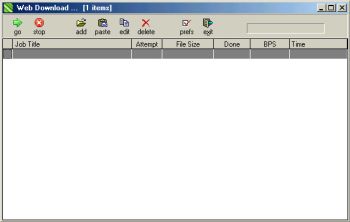 If you are in need of a simple software that can effectively manage your downloads, you might want to check this out! If you are in need of a simple software that can effectively manage your downloads, you might want to check this out!
Web Downloader helps you to manage all your Internet downloads. With it you can drag and drop links to it’s window, copy from clipboard, choose how fast and how many simultaneous downloads, where to save files to, change file names, etc.
The fact that you can also stop and resume downloads at will, and even use multiple threads for faster downloads makes the freeware a very useful tool. This simple and easy to use software works with proxies and supports authentication and is compatible with all Windows OS.
Check it out! It’s Free!
Posted in Developer, Download Managers, Freeware, Internet, Main, Utilities, Windows | 2 Comments »
Monday, November 20th, 2006
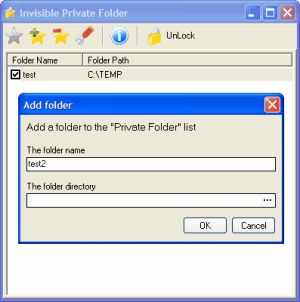 If there is one thing I actually treasure in life, it’s my privacy. I hate to have it invaded in any form. I used to be confused about how to keep my private files private on my system until I discovered this software, INVISIBLE PRIVATE FOLDER. If there is one thing I actually treasure in life, it’s my privacy. I hate to have it invaded in any form. I used to be confused about how to keep my private files private on my system until I discovered this software, INVISIBLE PRIVATE FOLDER.
Invisible Private Folder keeps your private files invisible from others, giving you a sense of security and privacy. Now you don’t have to worry about people having access to your files on, you can simply make them invisible. The Invisible Private Folder can help you keep your files protected from kids, friends and co-workers. It allows you to add any folder to the virtual invisible private folder. It enables you to block and hide any file or folder you do not want to be accessible to others.
The tool is enhanced with two different user modes; in one, a single user or the administrator can solely use the private folder and in the other mode multiple users can lock and manage his own private folders. But only the administrator can change user modes and settings and uninstall the software.
Click here for more info and download.
Posted in Developer, Information Management, Main, Security, Shareware, Utilities | No Comments »
Monday, November 20th, 2006
 Needing to stay in tune with up to date information, I’ve always had to check my favorite websites manually but then I discovered WebMonit and things took an automatic turn for the better. Needing to stay in tune with up to date information, I’ve always had to check my favorite websites manually but then I discovered WebMonit and things took an automatic turn for the better.
WebMonit keeps you up to date and saves you time doing it. WebMonit is a powerful and easy to use web pages monitor tool. It can monitor web pages changes automatically. Monitor content could be the whole webpage or a part of webpage or just a field. A user-defined event could be triggered when change occurs.
So if you need to watch the Stock Market, get the latest news, watch for software updates, latest movies releases and so on. This is for you.
I quite agree with the publisher that this piece of software “saves you time”, “keeps you up to date” and “gives you peace of mind” all at the same time. If you need to watch a large volume of information, it can be overwhelming to do it manually. With WebMonit you can let the computer check the websites regularly and contact you as soon as soon as it detects a change.
or more info and free download, CLICK HERE!
Posted in Internet, Main, Shareware, Social Software, Utilities | No Comments »
Monday, November 20th, 2006
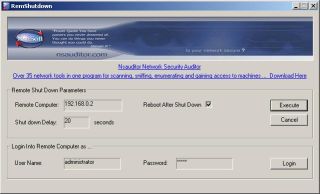 In need of a free tool that you can use to shut down or restart network computers? You might want to try this freeware I just discovered! RemShutdown. In need of a free tool that you can use to shut down or restart network computers? You might want to try this freeware I just discovered! RemShutdown.
It is a very simple freeware, designed with a user-friendly interface that allows remote shutdown or restart of network computers. It enables you to specify a delay during which a specified message can be displayed and applications running on the remote computer at the time of the shut down can be closed. The simplicity of its design makes it very easy to use.
It is worthy of note though, that it works best with Windows 2000 and above, any OS lower than 2000 will not work well with it. The file size is just 518 KB so having a free disk space of 1MB and at least 32MB RAM should give you a quick download.
DO you need it? CHECK IT OUT!
Posted in Developer, Freeware, Information Management, Internet, Main, Utilities | No Comments »
Sunday, November 19th, 2006
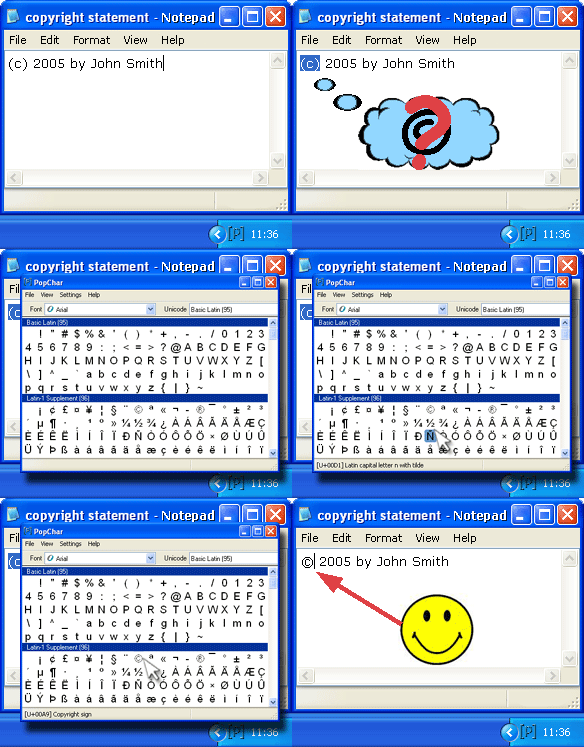 Trying to type names with special characters at times may seem to be a daunting task. If you have friends with names that have characters not in the 26 alphabets you would have noticed that trying to type their names correctly slows down your typing as you have to seek out the character map on your PC and search for the appropriate characters. Maybe you’ve even decided that no matter how they feel about it you would rather type “Bergström” as “Bergrstrom”, than go through the stress of looking for special characters like “ö”. No need to get yourself all worked up or cross your friends over special characters, PopChar can help you maintain peace with your friends. Trying to type names with special characters at times may seem to be a daunting task. If you have friends with names that have characters not in the 26 alphabets you would have noticed that trying to type their names correctly slows down your typing as you have to seek out the character map on your PC and search for the appropriate characters. Maybe you’ve even decided that no matter how they feel about it you would rather type “Bergström” as “Bergrstrom”, than go through the stress of looking for special characters like “ö”. No need to get yourself all worked up or cross your friends over special characters, PopChar can help you maintain peace with your friends.
PopChar is a user-friendly character map that unlike the conventional character map is easy to use and even easier to access. WHY? Because this character map sits quietly in your user tray. Whenever you need a special character, it is there – no matter what application you’re currently using.
PopChar is a utility that lets you insert special characters, accented and foreign letters, etc. from all installed fonts into your documents. You never need to search for and remember keystrokes any longer. Just pop up the window, click the desired character, and the character appears in your current document. PopChar is also a better option than the normal character map if you need to insert Hebrew characters, Arabic characters, HTML characters, Unicode characters and more.
Don’t take my word for it! Try it out your self!
You need to note this though; the free version contains limited characters, so if you download it and some characters appear dim and inaccessible, it’s not because something is wrong with your system. It’s because you are expected to order the full version to get access to the full features. But you can check out the trial version first and even learn more about its features HERE!
Posted in Developer, Main, Shareware, Text, Utilities | No Comments »
Friday, November 17th, 2006
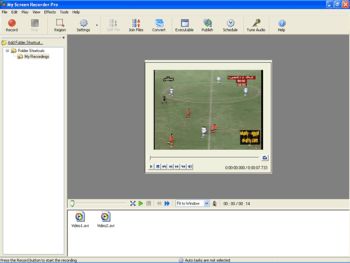 If for any reason at all, you are in need of a good screen recording software that allows you to record your desktop screen activity effectively for later playback, you might want to consider this cool one, My Screen Recorder Pro. If for any reason at all, you are in need of a good screen recording software that allows you to record your desktop screen activity effectively for later playback, you might want to consider this cool one, My Screen Recorder Pro.
This advanced screen-capturing tool can capture anything you see on the computer screen, including the entire desktop, windows, menus, cursors, and even video with sound. You can also use it to record to AVI, Windows Media or Flash files. And if you are thinking about creating demos, I mean developing videos to demonstrate features of a Website, software product, creating movies used in user training or any other task that requires capturing desktop activity, this is the software for you.
One thing I really dig about it is that you can speak into the microphone while recording is in progress to include audio with the recorded video. That means you can create your own audio narration to go with the recording. It’s really cool!
As cool as the software is, I still think it’s kind of expensive but you can check out the free trial version and see if it is exactly what you need.
Posted in Main, Security, Shareware, Utilities, Video | No Comments »
Friday, November 17th, 2006
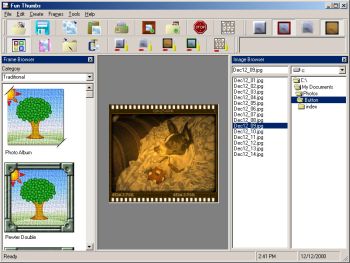 I’ve discovered a software that can come in handy in helping you give your old pictures a new look. It is called Fun thumbs. I’ve discovered a software that can come in handy in helping you give your old pictures a new look. It is called Fun thumbs.
With Fun Thumbs you can create small copies [thumbnails] of your image. And you can either do this individually, or with one button click you can create thumbnails for all the images in a directory as well as an interactive HTML Album (webpage) of your images. You can view your album on your browser, or even get it uploaded to the Internet! One thing I love about this is that The HTML album is fully configurable and even allows you to add in your own custom headers and footers.
One really cool thing about Fun Thumbs is that it allows you to apply various special effects to your thumbnail or original image. These include over 35 frames, which you can dress up your thumbnails with. You can also apply a patterned edge faded into the image, solid colored borders, buttonizer effects, sepia tone effects and more! With features like the ability to easily add the name of the image right onto the thumbnail (or original image) you can easily manage your photos and images.
Do you want to see what it does?
Posted in Design, Fun, Main, Shareware, Shell and Desktop, Themes, Utilities | 1 Comment »
Friday, November 17th, 2006
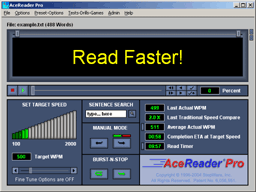 Every once in a while i come across a unique program that promises to teach a useful skill,through the magic of some well thought out yet simple technique. This is one such program. Every once in a while i come across a unique program that promises to teach a useful skill,through the magic of some well thought out yet simple technique. This is one such program.
Speed reading is simply the ability to read very fast by learning to scan the words rather than thinking about them or pronouncing them in your head. I’m not sure how well this works if you have something important to read as scanning things doesn’t really focus your attention on them, but anyway!
Acereader uses two techniques, Rapid Serial Visual Presentation (R.S.V.P.) and Tachistoscopic Scroll Presentation (try saying or even reading that 3 times!!!). It’s pretty easy to use, you can open any text file inside it or copy and paste. It has different grades from beginner to advanced and you’ll be amazed at how naturally you read fast using the method of having the words appear and scroll in front of you. It’s won a bunch of awards as you can see here for being “best educational software”, so it’s not as crazy as it sounds!
Go check out the demo and a lot more detailed info here.
Posted in Developer, Fun, Games, Main, Shareware, Utilities | 1 Comment »
Friday, November 17th, 2006
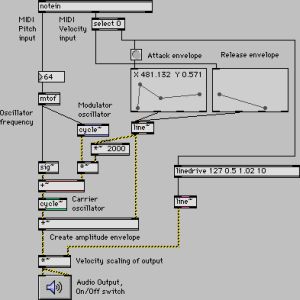 This software has apparently been in use in computer music for over fifteen years, and used by performers, composers, artists, teachers, and students all over the world. As they put it on the web site “Max/MSP is the way to make your computer do things that reflect your individual ideas and dreams”, which is a bit grandiose for my taste. This software has apparently been in use in computer music for over fifteen years, and used by performers, composers, artists, teachers, and students all over the world. As they put it on the web site “Max/MSP is the way to make your computer do things that reflect your individual ideas and dreams”, which is a bit grandiose for my taste.
More simply put, Max/MSP is a “graphical programming environment”, which means you can develop your own music generation and treatment software using a visual representation of the tools, connecting them together with patch cords on screen to make them talk to each other. This is really cool by the way! Not to mention very powerful.
The basic environment includes all the basic MIDI, control, user interface, and timing tools. That is the Max part of the suite. On top of Max you can build hundreds of other objects, including the two powerful collections of objects you can buy with Max, first of which is MSP, a collection of audio objects that facilitate everything from interactive filter design to direct to hard disk recording. The other set of objects is Jitter, a set of objects optimized for manipulating video and 3D graphics.
Yes it’s very geeky and techie, BUT it is VERY powerful. Computer driven music doesn’t get more leading edge than this.
Click here to join the magic.
Posted in Audio, Internet, Main, Multimedia, Shareware, Utilities | No Comments »
Thursday, November 16th, 2006
 A new version of ObjectDock, ObjectDock 1.5 has just been released. Just in case you are not familiar with this software, let me tell you what it does. A new version of ObjectDock, ObjectDock 1.5 has just been released. Just in case you are not familiar with this software, let me tell you what it does.
ObjectDock is a program that enables users to organize their programs and running tasks into a dock. ObjectDock enables users to have more control over how they organize their desktop. Rather than have a bunch of icons on the desktop, these icons can be put into docks. ObjectDock can also be used to replace the Start bar entirely freeing up valuable screen real-estate.
Some of its features include:
- Standard docks
- Highly flexible visual appearance
- Mouse-Over Zoom effects
- Easy replacement of icon images
- Optional Start Bar replacement
In case you are wondering “what on earth is a dock?” Don’t sweat it!
A dock is simply a bar that can be set to the edge of your screen with a background and a row of icons. The function of a dock is to bring applications and other various shortcuts to you in an organized fashion relieving your desktop of clutter.
So if you want to give your system a new look you may want to check it out!
You can either go for the free version or the PLUS version. ObjectDock Plus has extra features like Multiple Docks on screen at once, Multi-Monitor Support, system tray support, tabbed docks, hot spot activation etc. but it’s not free.
But if you don’t dig any of the versions for whatsoever reason, you can check out RocketDock, it’s a similar program and it’s free.
Posted in Business, Freeware, Information Management, Main, Shareware, Utilities | No Comments »
|
|
|





