Archive for the 'Windows' Category
Monday, December 25th, 2006
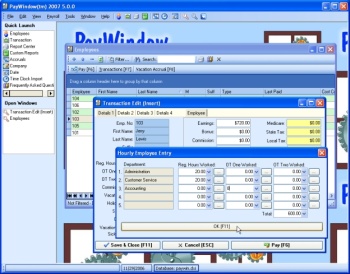 If you need a payroll program that is so easy to use that it doesn’t require any accounting training, you may want to check out PayWindow 2007. If you need a payroll program that is so easy to use that it doesn’t require any accounting training, you may want to check out PayWindow 2007.
PayWindow 2007 allows you to make payments using any pay period: hourly, salaried, commissioned, and non-employee workers. You can print Checks, 941, W2s, 1099-MISC forms and reports galore.
The fact that you don’t need to have training or experience in accounting to use the software effectively makes it a really useful tool. PayWindow 2007 comes with easy to follow on-line tutors that make it so easy because they show you exactly what to do. It also comes with the Federal and State tax tables included and you can actually edit them yourself.
So if you are in need of a payroll program that will make performing your payroll quick and easy, you can try using PayWindow 2007.
CHECK IT OUT HERE!
Posted in Business, Commercial, Developer, Main, Shareware, Utilities, Windows | No Comments »
Saturday, December 23rd, 2006
 Yet another WinZip clone? There’s more to IZarc than just being yet another unzip utility. Yet another WinZip clone? There’s more to IZarc than just being yet another unzip utility.
IZarc is an archiving tool that supports many different types of archive formats like: 7-ZIP, A, ACE, ARC, ARJ, B64, BH, BIN, BZ2, BZA, C2D, CAB, CDI, CPIO, DEB, ENC, GCA, GZ, GZA, HA, IMG, ISO, JAR, LHA, LIB, LZH, MDF, MBF, MIM, NRG, PAK, PDI, PK3, RAR, RPM, TAR, TAZ, TBZ, TGZ, TZ, UUE, WAR, XXE, YZ1, Z, ZIP, ZOO.
I also really like that it can open and convert CD/DVD images – ISO, BIN, MDF or NRG. Normally you’d have to find a separate program to do all that! It also does all the usual stuff, the full list of features is here.
IZArc can integrate into the Windows shell easily to help give you that extra speed when you need to use it suddenly.
It’s even skinnable in case you want to change around the look of it a little. It’s totally free and you can find out more or download it right here.
Posted in Developer, Freeware, Main, Utilities, Windows | No Comments »
Thursday, December 21st, 2006
 If you are someone who uses Geographic Information System (GIS) files then this might interest you. ArcExplorer lets you display and otherwise probe a variety of standard geographical data sources. As a stand-alone desktop application, you can look at ESRI shapefiles, ArcInfo files, various sorts of image files, even Spatial Database Engine layers, and a bit more. If you are someone who uses Geographic Information System (GIS) files then this might interest you. ArcExplorer lets you display and otherwise probe a variety of standard geographical data sources. As a stand-alone desktop application, you can look at ESRI shapefiles, ArcInfo files, various sorts of image files, even Spatial Database Engine layers, and a bit more.
You can pan and zoom through map layers and interact with all the attribute information. You can also colour up map features based on data in the files, and present the data in a variety of other ways too. The really cool part is of course as the software is free you can re-distribute the ArcExplorer software and your data to your users, who can then install ArcExplorer on their machines and view your data as easily and effectively as you did.
There are editions of the software for Java (which basically offers cross-platform support for Windows, UNIX, and Linux), a Java Edition for Education (primarily for the Macintosh OS X platform, but also Windows) and then there’s ArcExplorer Web which you can use directly from your Web browser.
Follow this link to download ArcExplorer for free.
Posted in Business, Commercial, Freeware, Information Management, Internet, Linux, Mac Stuff, Main, Multimedia, Video, Windows | No Comments »
Thursday, December 21st, 2006
 Being a 3D expert I’m always keen to hear about new 3D object creation software. I was aware of SketchUp before, but now of course it is a Google product and the engine of choice for making new objects for Google Earth. Being a 3D expert I’m always keen to hear about new 3D object creation software. I was aware of SketchUp before, but now of course it is a Google product and the engine of choice for making new objects for Google Earth.
The program is a simple but powerful tool for rapid prototyping of objects. Just make the shapes and pull them around in the interface. Colour and texture are easily editable. And also lighting is easy to adjust and preview. In fact real-time shadow casting lets you see exactly where the sun falls on your object as you work.
There are a huge amount of pre-drawn shapes to get you going, so you get a leg up into a job rather than having to start from scratch all the time. Once you’ve built your models, you can place them in Google Earth or post them to the 3D Warehouse.
The program works with both Mac or PC and you can get it here.
Posted in Design, Developer, Fun, Mac Stuff, Main, Multimedia, Photo, Shareware, Social Software, Utilities, Windows | No Comments »
Thursday, December 21st, 2006
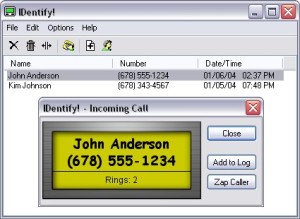 Here is a really useful tool. IDentify! is a cool software that allows you verify a caller’s identity before answering. Get rid of those pesky telemarketers or anyone you don’t want to communicate with easily. Here is a really useful tool. IDentify! is a cool software that allows you verify a caller’s identity before answering. Get rid of those pesky telemarketers or anyone you don’t want to communicate with easily.
With this cool software and a Caller ID capable modem, you can have a Caller ID box built right into your computer, but with many features that regular Caller ID boxes don’t have.
Some of its great features include:
- Announce callers using any SAPI compliant text-to-speech engine.
- Automatically answer certain calls, including Blocked and “Out of Area” calls, play a pre-recorded message to the caller, and then hang up.
- “Do Not Disturb” feature that only allows important callers to get through.
- An E-mail Notification feature can send a message after receiving a call to any e-mail account
Click HERE for trial download and more info.
Posted in Business, Developer, Internet, Main, Shareware, Voice, Windows | No Comments »
Thursday, December 21st, 2006
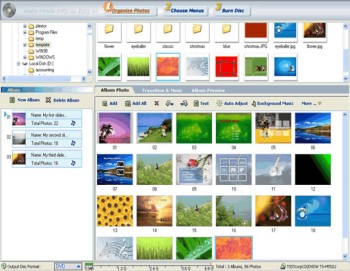 If you are in need of a software to create a photo slideshow you can watch on your TV, this software may come in handy. Photo DVD Maker. If you are in need of a software to create a photo slideshow you can watch on your TV, this software may come in handy. Photo DVD Maker.
Photo DVD Maker allows you to make use of your DVD or CD burner to create entertaining photo slideshows you can watch on TV. With one click, Photo DVD Maker creates an exciting photo slide show complete with music, motion menus and transition effects.
A new updated version, Photo DVD Maker 7.40 was released a couple of days ago. This version has these changes:
- Supports setting starting and ending position to customize Pan & Zoom effects for individual slide
- Faster encoding and burning engine
So how about bringing those memorable pictures of yourself alive in a new way? Interested? CLICK HERE!
Posted in Design, Developer, Main, Photo, Shareware, Windows | 2 Comments »
Thursday, December 21st, 2006
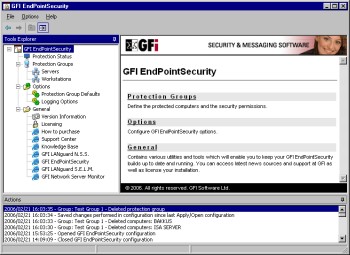 GFI EndPointSecurity allows you to control entry and exit of data via portable storage devices, by doing this software allows you to prevent users from taking confidential data or introducing viruses and Trojans to your network. GFI EndPointSecurity allows you to control entry and exit of data via portable storage devices, by doing this software allows you to prevent users from taking confidential data or introducing viruses and Trojans to your network.
What I love about GFI EndPointSecurity is the device control solution which allows administrators to actively manage user access to all sorts of devices like Media players, including iPod, Creative Zen and others, USB sticks, CompactFlash, memory cards, CDs, floppies & other storage devices, PDAs, Blackberries, mobile phones and similar communication devices Network cards, laptops and other network connections. You can define which users can use removable media centrally from Active Directory – simply by making them a member of pre-defined groups.
This is a real nice software to guarantee security and actively manage user access on your network. It sure costs a handful but it’s really a very useful tool. It’s really the end point of your security needs.
A trial will convince you, Check it out Here!
Posted in Developer, Internet, Main, Security, Shareware, Utilities, Windows | 1 Comment »
Wednesday, December 20th, 2006
 I miss BASIC. I used to code all the time when all computers had BASIC built in, now I hardly ever even think about it let alone write a line of code. But recently I’ve been getting the urge and I just noticed that the Visual Studio series has Express versions, like Visual Basic. I miss BASIC. I used to code all the time when all computers had BASIC built in, now I hardly ever even think about it let alone write a line of code. But recently I’ve been getting the urge and I just noticed that the Visual Studio series has Express versions, like Visual Basic.
You can easily design great-looking applications using the simple drag-and-drop interface designer. ANd using themes you can make apps that have that XP look. To help you debug your code, there is Code colorization, syntax checking, and what it calls “IntelliSense” which provides an kind of interactive suggestions and code snippets, I think. That’s not something I’ve tried yet. But AutoCorrect is very cool. It’s like the spell checker in Word and can suggest corrections apparently for over 230 common programming mistakes.
To learn more about getting back into code, go see Visual Basic Express on the Microsoft web.
Posted in Developer, Internet, Main, Programming, Windows | No Comments »
Tuesday, December 19th, 2006
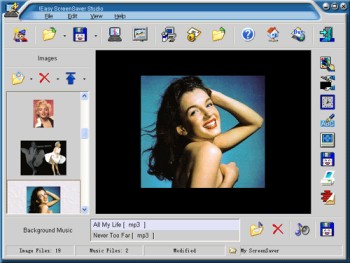 Why buy a screensaver when you can make your own? Here is a really great software, Easy ScreenSaver Station. It allows you make your own screensaver easily. Why buy a screensaver when you can make your own? Here is a really great software, Easy ScreenSaver Station. It allows you make your own screensaver easily.
With this software, you get to create screensavers that are just the way you want them. Images, Flash movies and background music can be included into your creations easily. Want to use photos from your digital camera or scanner directly? No problem. Easy Screensaver Station allows you to do this with ease.
After some easy steps, you can save your creation as a single standard ScreenSaver (.SCR) or a self-installing ScreenSaver (.EXE) for distribution. More features such as image editing, transition settings, password protection, copyright settings, preview, email sending and so on are included. No programming skills or royalties required.
A new updated version of this great software is out with these updates:
- Product renamed to !Easy ScreenSaver Station (Original name is !Easy ScreenSaver Studio)
- Set License Agreement for your ScreenSaver
- Remembered the last position and size of the main window
- Optimized the operation to set delay time for the objects
Are you ready for some screensaving creating fun? Check it out here!
Posted in Business, Commercial, Design, Developer, Main, Shareware, Shell and Desktop, Themes, Utilities, Windows | 1 Comment »
Tuesday, December 19th, 2006
 Videozilla is a video conversion tool for converting video files from and to a variety of different file types really easily. Supporting AVI, MPEG, RM, MOV, ASF, WMV, SWF, FLV, MP4, M4V, 3GP, 3G2 all the hard work is done with a simple a right-click on the video files. You can also do rudimentary editing, setting your own start and end points in a video. You can also change width and height, video and audio quality etc, all on the fly. Videozilla is a video conversion tool for converting video files from and to a variety of different file types really easily. Supporting AVI, MPEG, RM, MOV, ASF, WMV, SWF, FLV, MP4, M4V, 3GP, 3G2 all the hard work is done with a simple a right-click on the video files. You can also do rudimentary editing, setting your own start and end points in a video. You can also change width and height, video and audio quality etc, all on the fly.
You can also do audio extraction from video and save as audio as an industry standard MP3 or WAV. A fabulous add on to any Windows machine. Once you have it you’ll wonder how you got along without it. Shareware product so be prepared to shell out the cash because this one is real good.
http://www.videozilla.net/index.html
Posted in Developer, Main, Multimedia, Shareware, Utilities, Video, Windows | 3 Comments »
|
|
|




