Author Archive
Thursday, August 30th, 2007
 One of the things that can drive people crazy when they are working in Windows is having to scroll through dozens of different programs before they are able to find the one they want on their taskbar. There really for the longest time was no good solution to this problem and of course because Microsoft is brilliant at coming up with ways to make problems worse more than they can make them better, they came up with the idea of actually grouping together similar icons on the taskbar to save space. Of course, while this did save space on the taskbar, the thing that ended up getting worse was the fact that if a person was switching between MSN conversations or browser windows, things just became terrible for them in terms of being able to find the specific window they were looking for. One of the things that can drive people crazy when they are working in Windows is having to scroll through dozens of different programs before they are able to find the one they want on their taskbar. There really for the longest time was no good solution to this problem and of course because Microsoft is brilliant at coming up with ways to make problems worse more than they can make them better, they came up with the idea of actually grouping together similar icons on the taskbar to save space. Of course, while this did save space on the taskbar, the thing that ended up getting worse was the fact that if a person was switching between MSN conversations or browser windows, things just became terrible for them in terms of being able to find the specific window they were looking for.
If this sounds like you and the stress of taskbar space conservation has just become too much, then take a look at TrayIt! This is an innovative program that has been around for awhile, but has recently gotten a whole lot better. It allows you to save all of that taskbar space by using a small icon on the system tray for each application instead of the regular rectangular indication of the minimized window that you commonly see. It is great to use, free and even works with Windows Vista!
More information can be found at http://www.teamcti.com/trayit/trayit.htm
Posted in Design, Files and Folders, Main, Shareware, Shell and Desktop, Utilities, Windows | No Comments »
Wednesday, August 29th, 2007
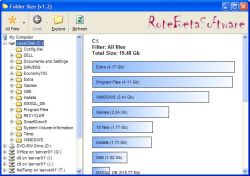 If you’re like, chances are you download a lot of stuff and save a lot of stuff from Microsoft Office programs onto your hard drive. In some cases, you might even have remnants of old folders that were part of an earlier attempt to organize files on your hard drive. I know that at one point I have up to three or four different generations worth of organizational folders on my hard drive and in some cases had the same file saved once in all of them! Redundancy is a bad thing because it can really hamper your ability to save new files onto your hard drive, but if you download Folder Size 1.3, you can figure out where the redundancies might be and cut them down. If you’re like, chances are you download a lot of stuff and save a lot of stuff from Microsoft Office programs onto your hard drive. In some cases, you might even have remnants of old folders that were part of an earlier attempt to organize files on your hard drive. I know that at one point I have up to three or four different generations worth of organizational folders on my hard drive and in some cases had the same file saved once in all of them! Redundancy is a bad thing because it can really hamper your ability to save new files onto your hard drive, but if you download Folder Size 1.3, you can figure out where the redundancies might be and cut them down.
With Folder Size 1.3 installed, what you are going to find is that when you highlight a folder, a bar graph will appear with the sizes of all of the folders contained in that folder clearly highlighted for you to see. You don’t have to go to the properties of each folder any more to figure out what is where and ultimately this will make the process of cleaning up your hard drive much easier to do. In addition to that, there are a number of different tasks that are easier now because you can see the size of each folder right away.
More information can be found at the developer’s home page at http://www.rotebetasoftware.com/foldersize.html
Posted in Catalogue, Developer, Files and Folders, Information Management, Main, Shareware, Utilities, Windows | No Comments »
Wednesday, August 29th, 2007
 One of the most important things in the lives of a lot of people when it comes to activities on their computer is file sharing. And for people that are not really that computer savvy, the one thing you need to be thinking about is that they are probably into photo sharing. Where other areas of internet activity have really only been popularized by people that are computer savvy, the idea of being able to use digital cameras to take pictures and then upload those pictures into album software packages is something that has really been adopted by almost every household around. One of the most important things in the lives of a lot of people when it comes to activities on their computer is file sharing. And for people that are not really that computer savvy, the one thing you need to be thinking about is that they are probably into photo sharing. Where other areas of internet activity have really only been popularized by people that are computer savvy, the idea of being able to use digital cameras to take pictures and then upload those pictures into album software packages is something that has really been adopted by almost every household around.
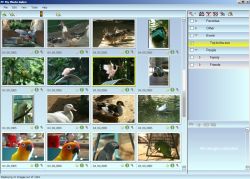
That is why software pieces like MyPhotoIndex are extremely useful in today’s society. It is a free photo organizer that allows you to assign categories to all your photos and sort them in a number of different ways. You can even print them, save them in multiple file formats and attach them to outgoing outlook express packages with extreme ease. While the program is still in its early stages, it is expanding in leaps and bounds and should be very good to use very soon. Oh yeah, and it’s absolutely free!
More info available at http://www.myphotoindex.com/
Posted in Design, Developer, Freeware, Main, Photo, Windows | 1 Comment »
Wednesday, August 29th, 2007
 If you’ve been connected to the Internet for any amount of time in your life, then you probably understand the need for some kind of protection for your machine. Even if you’ve never had experiences with viruses, chances are that you’ve had experiences with spyware that have resulted in a complete slowdown of the system resources that you have available to you. If you’ve been unlucky, then you’ve also encountered malware; stuff that can seriously harm your computer or any other computer that your computer might come into contact with (i.e . anything that is part of the same network). It is very important that you find a good security mechanism for your computer, but doing so is very much easier said than done in today’s world. If you’ve been connected to the Internet for any amount of time in your life, then you probably understand the need for some kind of protection for your machine. Even if you’ve never had experiences with viruses, chances are that you’ve had experiences with spyware that have resulted in a complete slowdown of the system resources that you have available to you. If you’ve been unlucky, then you’ve also encountered malware; stuff that can seriously harm your computer or any other computer that your computer might come into contact with (i.e . anything that is part of the same network). It is very important that you find a good security mechanism for your computer, but doing so is very much easier said than done in today’s world.
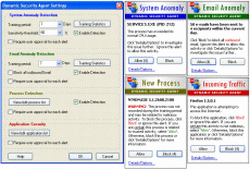
However, the Dynamic Security Agent 1.0.6.27 is perhaps the best you are going to get for being a free piece of software. According to the publisher, it is capable of providing zero hour protection from any type of spyware, malware or other type of intrusion that happens to be known to the software (i.e . in its database). Reviews of this one are very positive and suggest that it is a good piece of software to use if you are looking for good protection for free!
More info is available here.
Posted in Developer, Freeware, Internet, Main, Security, Utilities, Windows | No Comments »
Wednesday, August 29th, 2007
 One of the most annoying things to do when it comes to dealing with computers is figure out what to do with them when you want a specific part of the resources to be freed up for use elsewhere. For example, my copy of Windows Vista has options for shut downs, restarts, reboots, sleeps, standbys, locks and any other synonym you could possibly think of on those commands. Each one is useful, but when you are presented with an incoherent mass of commands, you are not going to be very sure of which one would be most appropriate for the situation that you are currently in. One of the most annoying things to do when it comes to dealing with computers is figure out what to do with them when you want a specific part of the resources to be freed up for use elsewhere. For example, my copy of Windows Vista has options for shut downs, restarts, reboots, sleeps, standbys, locks and any other synonym you could possibly think of on those commands. Each one is useful, but when you are presented with an incoherent mass of commands, you are not going to be very sure of which one would be most appropriate for the situation that you are currently in.
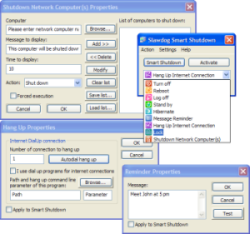
Thankfully, this is where pieces of software like the Slawdog Smart Shutdown 1.4.1 Build 244 comes in. This software has by far the most comprehensive list of shut down options you are ever likely to see in your life. The Smart Shutdown 1.4.1 is simply a great piece of software technology because not only does it contain all of the commands that the Windows software itself normally has, but it also has sub-commands you can use if all you want to do is get your recycling bin emptied or your cache reset. There are so many things you can do with the Smart Shutdown such as setting periodic reminders that it would be a steal at any price; and you get it for free!
More information can be found at Slawdog.com.
Posted in Developer, Freeware, Main, Utilities, Windows | No Comments »
Tuesday, August 28th, 2007
 With the recent boom of the internet, one thing that has become a whole lot popular is the concept of online chat. However, the concept of online chat has really evolved from what it used to be. Chat used to be IRC and rooms on different internet sites with little more functionality than being able to type in something and then have that something appear in the chat room. And while a lot of people enjoyed that and in the case of IRC still enjoy it, many others thirsted for more. With the recent boom of the internet, one thing that has become a whole lot popular is the concept of online chat. However, the concept of online chat has really evolved from what it used to be. Chat used to be IRC and rooms on different internet sites with little more functionality than being able to type in something and then have that something appear in the chat room. And while a lot of people enjoyed that and in the case of IRC still enjoy it, many others thirsted for more.
Well, MSN got things started and with MSN’s live chat feature allowing for the first time a lot of great video chatting features, what people eventually saw was that there was demand for such a thing. And this is the demand that ooVoo fills with its presence.
One of the best things about this program is that it can actually support up to six users at the exact same time. In addition to that, you can also send video files back and forth between ooVoo users and even send such files to people that don’t have the software installed! It is simply an amazing piece of software and because of its free status, it is one that people have really embraced.
More information can be found at http://www.oovoo.com/
Posted in Freeware, Internet, Main, Multimedia, Social Software, Video, Web services, Windows | No Comments »
Friday, August 24th, 2007
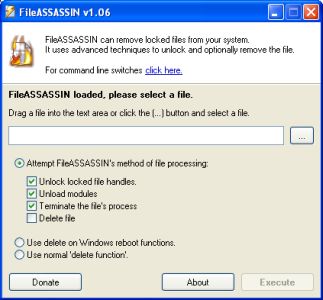 The boom of the internet has been good in a lot of different ways, but it has also been bad in a lot of different ways. One of the most infamous aspects of the internet boom has been the development and subsequent dispersal of spyware, viruses and malware through internet channels and many people have had really bad things happen to their computers as a result of build-up of these specific types of programs. The boom of the internet has been good in a lot of different ways, but it has also been bad in a lot of different ways. One of the most infamous aspects of the internet boom has been the development and subsequent dispersal of spyware, viruses and malware through internet channels and many people have had really bad things happen to their computers as a result of build-up of these specific types of programs.
One of the worst types of programs is malware, simply because it is so difficult to remove. Well, the difficulty to remove malware files from your internet without expensive software to do so is now gone because of the introduction to the market of the FileASSASSIN software.
What FileASSASSIN does is it uses the most advanced techniques available to get deep down into the modules of the malware. It then goes ahead and closes any handles in the malware from a remote source as well as terminating processes that you as a user would not be able to terminate yourself. Without any remote handles or harmful processes, removing the malware becomes a piece of cake.
More information about FileASSASSIN 1.06 can be found directly at http://www.malwarebytes.org/fileassassin.php
Posted in Developer, Information Management, Internet, Main, Security, Shareware, Windows | No Comments »
Friday, August 24th, 2007
 One of the most interesting aspects of the recent internet boom is the emergence of a number of different interactive websites. Collectively referred to as web 2.0, many of these websites require input and active effort from the people that are members of the sites and indeed it is that interactive element that really drives the interest that so many people have in websites like this. One of the most interesting aspects of the recent internet boom is the emergence of a number of different interactive websites. Collectively referred to as web 2.0, many of these websites require input and active effort from the people that are members of the sites and indeed it is that interactive element that really drives the interest that so many people have in websites like this.
At the core of the web 2.0 revolution is the concept of social networking. The social networking websites have really changed the way that people look at the internet nowadays and many people will tell you right off the bat that this is for the better. But what if you could have a piece of software that acted like a social website no matter what you were doing on the internet? Wouldn’t that be absolutely fantastic?
Well, take a look at the RatePoint Toolbar! It is a toolbar that allows you to actually rate every single website that you come across. Then, based on the ratings that you give, you are then connected to websites that the software thinks you will enjoy specifically because of the ratings that you give off. It is a very cool and nifty way of doing business and it can actually help you come across some very amazing websites that you would never have been able to find under different circumstances.
There is actually a version of the Toolbar available for internet explorer users as well and if you are interested in learning more you can head on over to the software’s homepage at http://web.ratepoint.com/tools
Posted in Browsers, FireFox, Freeware, Information Management, Internet, Main, Social Software, Web 2.0, Windows | No Comments »
Wednesday, August 22nd, 2007
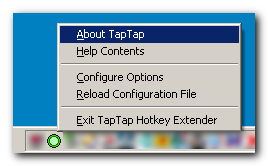
There are a lot of ways to manipulate the information that passes on your computer screen and indeed one of the ways that information can be manipulated is through the use of hotkeys. People that love to use their keyboard know exactly what hotkeys are, but for people that don’t a hotkey is simply some combination of keys that you use in order to make a specific command happen.
For example, if you are typing in Microsoft Word and you want to save your file, you can use the hotkey combination of CTRL + S in order to activate the save command option.
One thing that a lot of people that use hotkeys don’t realize is that hotkeys for many programs can actually be configured. So, if you want to change the CTRL + S for some reason, you actually can. However, some types of hotkey combinations are absolutely not allowed by certain programs and if you tend to use a lot of hotkeys, this can sometimes become quite a drag.
However, with the TapTap Hotkey Extender, you can circumvent the problem by using the program to simulate different hotkeys. In other words, you can use the forbidden hotkey combination by using this program to make the program think that it is a different combination. It’s like anonymous web surfing, but applied to the concept of hotkeys.
More information can be found at http://www.donationcoder.com/Software/Mouser/TapTap/
Posted in Browsers, Developer, Main, Shareware, Shell and Desktop, Utilities, Windows | No Comments »
Wednesday, August 22nd, 2007
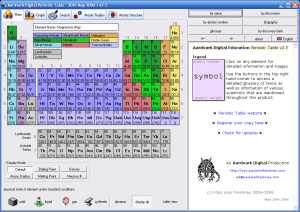 Chemistry is a very important part of the education of a number of students both at the high school and university levels in today’s world and of course the center of everything chemistry is the Periodic Table of the Elements. One of the biggest educational struggles in today’s world has been coming up with a Periodic Table study guide that is easy to use, yet comprehensive enough to contain all of the useful information that children are going to need to know in today’s world. Chemistry is a very important part of the education of a number of students both at the high school and university levels in today’s world and of course the center of everything chemistry is the Periodic Table of the Elements. One of the biggest educational struggles in today’s world has been coming up with a Periodic Table study guide that is easy to use, yet comprehensive enough to contain all of the useful information that children are going to need to know in today’s world.
Well, the Periodic Table Standard 3.2 shows that when you decide to bring software into the mix, the sky is truly the limit! This is perhaps the most comprehensive study guide for the Periodic Table ever created, yet at the same time it is a study guide that is extremely easy to use. Clicking on any of the elements will bring up typical information about it like name, symbol, atomic number, atomic weight and all of those other frequently accessed characteristics. In addition to that, you will also get information on the history of the element, the production of it, where it occurs in nature as well as information on alternative names. To cap things off, beautiful real life pictures of each element are also available. It is truly the study aid to end all study aids because of how effective it is.
More information can be found at http://freshney.org/education/pt/
Posted in Design, Developer, Information Management, Main, Shareware, Shell and Desktop, Windows | No Comments »
|
|
|




