Author Archive
Monday, November 13th, 2006
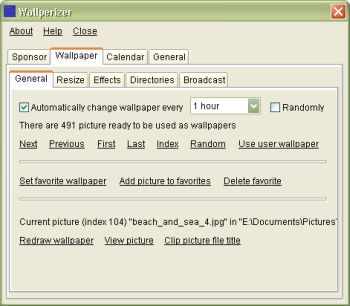 Tired of your system wearing the same old look? Well, this freeware offers to give your computer a new and ever-changing look. Tired of your system wearing the same old look? Well, this freeware offers to give your computer a new and ever-changing look.
Wallperizer is a desktop wallpaper changer, which allows you to add up to 100 directories, where the program would look for pictures that would be used as wallpapers. It’s really nice because the wallpapers can be changed automatically, either in order or randomly.
One of the cool features of Wallperizer is Brightness normalization. This is an automatic process where bright pictures are made darker and dark pictures are made brighter. Brightness normalization can be used to bring the brightness of wallpapers close to environmental light.
Another cool feature is that a calendar can be displayed on the wallpaper. These calendars have skins that you can edit, load and save.
For more features check out the History of changes.
A new updated version has just been released, 1.2.1 and the major change in this new update is that a label has been added below the list of directories, from which the wallpaper pictures are loaded, which shows the entire name of the focused directory. This is useful when a directory name is very long
For more info and free download; Click here! Previous version can be found here.
SYSTEM REQUIREMENTS: Windows 98 / Me / NT4 / 2000 / XP / Vista. On Windows Vista, the program must currently be run as administrator.
NOTE: Though there are no special requirements for running the program; for Windows NT4 you need to have installed service pack 6.
To install the program, just run the downloaded file (but first close any running instances of the program).
Posted in Freeware, Main, Themes, Utilities, Windows | No Comments »
Monday, November 13th, 2006
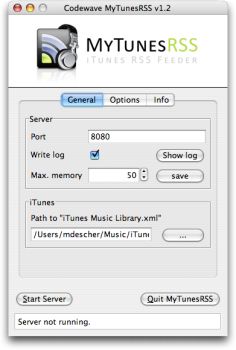 The first version of the freeware, MyTunesRSS1.0 was released April 2 2006. Since then it has undergone a series of updates, a new updated version was just released a couple of days ago, November 8 to be precise; MyTunesRSS 2.3.4 The first version of the freeware, MyTunesRSS1.0 was released April 2 2006. Since then it has undergone a series of updates, a new updated version was just released a couple of days ago, November 8 to be precise; MyTunesRSS 2.3.4
MyTunesRSS allows you to access the music and videos from your iTunes library over a local network or even the Internet. You can access your music from all over the world using a simple web browser. The user interface lets you search for titles or browse your whole library by album or artist. You can access your iTunes playlists or create new ones directly in MyTunesRSS.
MyTunesRSS includes an embedded Tomcat server that allows you to access the iTunes library with any web browser. You can create an RSS feed from the results. Any device capable of receiving RSS feeds can get the songs from your iTunes library through the feed. For example, the Playstation Portable can play songs from your iTunes library over WLAN with this application.
Latest changes in the new updated version, 2.3.4 include:
- Prevent MyTunesRSS from being started more than once
- Initial “iTunes Music Library.xml” search can be cancelled
- ZIP archives with multiple tracks contain a complete M3U playlist
- Bug fixes
Click here for the complete version history
NOTE: MyTunesRSS is pure Java, so you can only run it on any platform supporting Java Runtime 1.5 and iTunes.
Click here for free download
Posted in Audio, Freeware, Internet, Main, Multimedia | No Comments »
Monday, November 13th, 2006
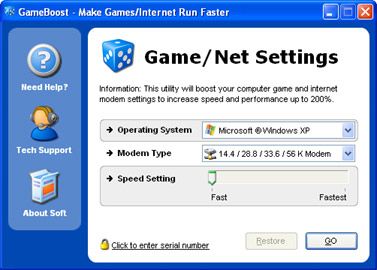 The problem with downloading and playing games on the system or even online at times is that you may not get the best speed out of your PC and Internet connection. You experience some glitches or slow downs. This software, Game Boost helps put an end to such problems or at least reduce their frequency of occurrence. The problem with downloading and playing games on the system or even online at times is that you may not get the best speed out of your PC and Internet connection. You experience some glitches or slow downs. This software, Game Boost helps put an end to such problems or at least reduce their frequency of occurrence.
GameBoost is a shareware from the stables of PGWARE. Based off of their GameGain and Throttle products, GameBoost increases overall speed and squeezes out every last bit of performance your computer and Internet connection is capable of.
One of the things I like about it is that it is very easy to use and fully compliant with all versions of Windows. It also adjusts itself to your computer specifications.
GameBoost is a tool for all that allows you to modify your computers settings to increase gaming and Internet speed performance. The fact that no modifications to your hardware are made and all adjustments and settings are done in an easy to use interface makes this program a darling. GameBoost makes direct changes to system registry and system files to enhance memory, screen drawing, animations, refresh rates, CPU threading speeds, Internet speed.
Tired of those frame rate glitches or slow downs disrupting your favorite games? Give GameBoost a try!
Click here for trial version and more info!
Posted in Games, Internet, Main, Shareware, Windows | No Comments »
Monday, November 13th, 2006
 If you have had it with losing data to corrupted zip files and Self Extracting files [SFX], then this software might be for you. Advanced Zip Repair [AZR] is a powerful tool that helps you repair corrupted zip files and Self Extracting Files. It can scan the zip archives and recover your data in them as much as possible, to minimize the loss in file corruption. If you have had it with losing data to corrupted zip files and Self Extracting files [SFX], then this software might be for you. Advanced Zip Repair [AZR] is a powerful tool that helps you repair corrupted zip files and Self Extracting Files. It can scan the zip archives and recover your data in them as much as possible, to minimize the loss in file corruption.
It’s attractive features include its ability to fix all sub-types of zip files and all kinds of self-extracting files and the fact that it supports the repair of zip files on corrupted medias, such as floppy disks, zip disks, CDROMs etc. among others.
To know whether AZR can repair your zip file successfully you’ll need to repair your zip archive normally in “Repair” tab. If it can be repaired successfully, you will see a message box after the repair process, where you can click the “Show Repair Report” button and see a report of all the recoverable items in the zip archive. For every item, the report will display its file name, file size, the packed size and its recoverable status.
The downside to this software is that though you can get the demo version for free there is a limitation; it will only show a report of all the recoverable items in the Zip archive, but will not output the fixed archive. To get the actual repaired Zip archive, you need to order the full version. Advanced Zip Repair has been recently updated and the updated version, Advanced Zip Repair 1.8 released.
The major changes in the new updated version:
- Improved the support to spanned/split zip files;
- Fixed some minor bugs
For a detailed list of its features and to download, CLICK HERE!
Posted in Main, Shareware, Utilities | No Comments »
Monday, November 13th, 2006
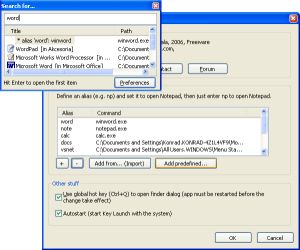 If, like I do, you have a lot of programs on your start menu and you don’t want it to take forever bringing up any program you need, then you may find this freeware useful. If, like I do, you have a lot of programs on your start menu and you don’t want it to take forever bringing up any program you need, then you may find this freeware useful.
Key Launch is a simple and small utility for fast typers. It allows you to open programs by entering a few characters from their names, instead of going through all these menus and submenus. For example: Just enter “calc” to find all programs containing this string.
If you want you can add “aliases”, e.g. you can define that “excel” means “Microsoft Excel” or “word” “Microsoft Word”. Just type the alias and the program will open. How long does it take you to find a program in your Start Menu? If you’re familiar with a keyboard, then you can do this in less than a second.
If you are not a fast typer and don’t have much programs on your system, you may just stick to your conventional way of going through the start menu but if you know your way around a keyboard, you’ll really find this useful.
Learn more and download it HERE! It’s FREE!
SYSTEM REQUIREMENT: Windows XP and NT only.
Posted in Freeware, Main, Utilities | No Comments »
Monday, November 13th, 2006
 Auto Shutdown as the name implies is a freeware that shuts down your system automatically after a specified amount of time. It is not to be confused with AutoShutdown Standard 5.0, a shareware from the stables of Barefoot Productions, which provides unattended control for a Windows PC: shutdown, restart, logoff, standby or hibernate your computer based on date/time, idle computer time, hot keys or a manually triggered command. Auto Shutdown as the name implies is a freeware that shuts down your system automatically after a specified amount of time. It is not to be confused with AutoShutdown Standard 5.0, a shareware from the stables of Barefoot Productions, which provides unattended control for a Windows PC: shutdown, restart, logoff, standby or hibernate your computer based on date/time, idle computer time, hot keys or a manually triggered command.
Auto Shutdown is a freeware published by Konradp.com, which does the simple action of automatically shutting down your system. It works like this:
- Set the time
- Set the action to be taken
– Shutdown means that the computer will be turned off (after logging off, if needed). Force means that the running applications (if any) will be forced to close themselves). This can be dangerous, is some cases you may lose your data, unsaved documents;
– Remind me about means that, when the time comes, a message box will be shown with your message (e.g. “Food is ready!” or “the movie has began!”).
That’s it. When the time comes auto shutdown will do the specified job.
It is worthy of note that you must not close the dialog box of the “Auto Shutdown” program while in use, if you do then nothing will happen. Auto Shutdown must be running to work.
There is really no big deal about this program because it only shuts down the system and remind you about certain things unlike programs like Intelligent Shutdown, Auto Shutdown Standard or Auto Shutdown Pro that does a variety of things but the fact that it is free and easy to use makes it a welcome tool.
Click here for more info and download. It is supported by all Windows Opearting Systems.
Posted in Main | 5 Comments »
Friday, November 10th, 2006
 If you are a fan of ARCTIC RUSH and you enjoyed watching the popular screen saver “3D Artic Bear” then you are going to love the adventures of the popular bear in this advanced screensaver version. If you are a fan of ARCTIC RUSH and you enjoyed watching the popular screen saver “3D Artic Bear” then you are going to love the adventures of the popular bear in this advanced screensaver version.
In this advanced version, the adventures come alive like never before. Not only does he just drink and listen to music, you get to hear the music the bear is listening to too. The beautiful thing about this version is the bear’s dance step, now you have a dancing, beer-drinking bear that gets to play OLIVER TWIST with you – asking for more. And if you want to make him happy, just buy a box of beer at the online shop.
In the Free version, the bear has only one beer so it doesn’t dance much. But if you purchase the full version, you get a box of beer and it’s dancing galore. Check it out!
COOL FEATURES IN THIS VERSION INCLUDES
- Great 3d graphics
- Nice animation
- Beautiful visual effects
SYSTEM REQUIREMENTS
- All Windows OS [95 till date]
Posted in Main | No Comments »
Friday, November 10th, 2006
If you are looking for a software that will enable you to build your website easily without the stress of learning HTML codes then Antenna Web Studio is for you.
Antenna enables you to make great looking web sites rapidly. You can create your own web pages and digital photo galleries in minutes, without any HTML knowledge. Antenna’s powerful editor is entirely visual, and pixel accurate – putting you in control. Wherever you drag & drop text, pictures, buttons, flash animation and movies on the page, that’s exactly where they will appear in the web browser. It’s a WYSIWYG [WHAT YOU SEE IS WHAT YOU GET] editor.
One of the things I really love about it is that when you are ready to publish your site, you won’t need to buy any additional software. Because Antenna has its own publisher built in, and it can be set to publish changes only, so you can update your site very quickly.
The publishers make it so easy to use with the free online tutorials and expert tips. There is also a comprehensive 100 page fully illustrated color User Guide and free technical support. So it’s not one of those programs, you buy only to be left to figure it all out by yourself.
With Antenna web studio you can easily make any part of your website multilingual at any time and you can concentrate on aesthetics and design – instead of spending hours just trying to make your HTML code work – have fun and make your site look stunning!
One other thing I love about this software is that unlike other programs where you don’t get the full version until you pay; you can download the full version of Antenna Web Studio, fully functional, and try it out for 16 days before you have to pay a dime.
Click HERE to check out its key features.
Want to try it out? Click HERE for 16-day free trial download.
Posted in Main | 1 Comment »
Thursday, November 9th, 2006
 Do you have great pictures on your digital camera that you want to share with friends but they are kind of too big to be emailed conveniently and too large to be displayed on websites? Are you in need of a freeware that can help you make high quality copies of your photos at a smaller size? Do you have great pictures on your digital camera that you want to share with friends but they are kind of too big to be emailed conveniently and too large to be displayed on websites? Are you in need of a freeware that can help you make high quality copies of your photos at a smaller size?
PhotoRazor might just be right for you. Photo Razor like the name implies is a freeware that acts as a razor to photos, cutting them to smaller sizes.
It is a free photo resizing software that helps you to make high quality copies of your photos at a smaller size – ideal for on-screen viewing. This reduces the file size making them much easier to email and share with friends and family.
Obviously you don’t want to lose your large originals in the process of resizing – you’ll need those for printing, so PhotoRazor saves the smaller resized copies to a separate folder, ensuring your precious original photographs are kept safe and untouched. It also allows you to adjust the size & quality and see the result before processing, a real time saver.
SYSTEM REQUIREMENT: Windows XP/2000/98/ME/NT
Click HERE for more info and free download.
Posted in Main | 1 Comment »
Thursday, November 9th, 2006
 Total Organizer is a Personal Information Manager that helps you organize and plan your business and personal life. The unique thing about it is that it allows you to store all of your contacts, tasks, notes, and to-do lists divided into tree-structured categories. Each item- note, task, contact, etc may belong to several categories (tags). So, this is a combination of folders (tree) and tags. Total Organizer is a Personal Information Manager that helps you organize and plan your business and personal life. The unique thing about it is that it allows you to store all of your contacts, tasks, notes, and to-do lists divided into tree-structured categories. Each item- note, task, contact, etc may belong to several categories (tags). So, this is a combination of folders (tree) and tags.
It is worthy of note that if you create subfolders or subcategories, then by opening a folder you can see all the items belonging to it, and the contents of all its subfolders.
Total Organizer comes in two versions: The freeware version, and the Pro version (TOTAL ORGANIZER PRO). The Pro version differs in that it allows you to view and manage so named “Relations” – that is, connections between items (created automatically, by the program, and manually). Both versions have recently been updated and their new updated versions just released.
Latest Changes In The Free Version [Total Organizer]:
- Converting types of items (e.g. converting a note to a task)
- Keywords auto-completion
- A few minor bug fixes
Latest Changes in Total Organizer Pro includes all the changes in the free version and:
- Adding file attachments and links
- Adding pictures to items (contacts, notes etc)
For more info and download of the free version and the Pro version, Click HERE!
SYSTEM REQUIREMENTS: Windows 2000/2003/XP
NOTE: Total Organizer Pro has a trial period of 20 days. After that you must buy it to continue to enjoy its features.
Posted in Main | 1 Comment »
|
|
|





