Author Archive
Friday, May 16th, 2008
 Flash Clock is a great interactive flash digital and flash analog clock widget for website or flash movie. You can publish Flash Clock widget and adjust its size, visual parameters, GMT offset, adding up-to-date feeling to your online resource. Flash Clock is a great interactive flash digital and flash analog clock widget for website or flash movie. You can publish Flash Clock widget and adjust its size, visual parameters, GMT offset, adding up-to-date feeling to your online resource.
Pros: Flash Clock provides widgets for a analog clock or a digital clock in Flash. One can integrate the same in a website for that touch of up to date feeling or publish it within a flash movie. Publishing takes a minute.
There’s a whole range of customization possible. Change the size, colors of all the components. Foe example the clock rim, clock face, the main minute and hour hands and the second hand all can have colors defined. There are sound effects for every second, minute and hour that can be customized and any background image one wants to add. These are for the analog clock face. The digital clock face too has similar customization possibilities, for example the flickering effect of the seconds indicator.
The time displayed is derived from the local computer time or based on a time zone defined. So GMT offset can be provided as could the daylight saving time. All the possible modifications are available for change in one administrative panel. Installation of the widget is easy consists of just cut and paste of the HTML code generated after all the modifications have been taken into account. Integration into a flash movie needs the widget to be dragged and dropped and that is about all.
{More Info and Download}
Posted in Main | No Comments »
Thursday, May 15th, 2008
 Photo! 3D Album 1.0 gives an exciting opportunity to create stunning 3D albums where you and your friends will see photos in a picturesque 3D galleries. Enjoy walking inside the virtual space using mouse or automatically and share albums on the net! Photo! 3D Album 1.0 gives an exciting opportunity to create stunning 3D albums where you and your friends will see photos in a picturesque 3D galleries. Enjoy walking inside the virtual space using mouse or automatically and share albums on the net!
Pros: Photo! 3D Album creates albums where the photos are displayed on the inside walls of a 3 D structure and the viewer moves around this synthetic environment to view the photos. 3D albums can be viewed in automatic mode, when the program itself guides you through the gallery halls. You can also enter the free move mode and wander freely inside the virtual space using your mouse. The possibilities of environments can be endless. It can be a modern showroom, a fabulous art gallery or even the inside of an Egyptian pyramid. More such environments are being created by the publishers and can be downloaded for use.
The lifelike atmosphere is captured for these environments by detailed graphics and surface textures and rendered with painstaking attention to details of lighting etc.
Sharing these presentations is easy. One can create a CD/DVD of course. Through the Pho.to photo sharing service the album can be uploaded in a single click as a Flash reel. Friends and family are mailed the link and can enjoy the Flash presentation easily. Creating an executable that plays itself without the need for the 3D album software is another method by which photos can be shared.
3D Album installer also contains Photo! 3D Screensaver software letting you view created galleries as a screensaver. Also you have an excellent possibility to add an mp3 music file into the screensaver and listen to your favorite music while observing the gallery.
Cons: Currently there are only 3 options of display environment. Unless this is increased significantly, people are likely to be bored with these choices soon and one would start repeating oneself.
{More Info and Download}
Posted in Main | 1 Comment »
Tuesday, May 6th, 2008
 Yahoo! has partnered with McAfee to integrated the security firm’s SiteAdvisor technology in Yahoo! search results. That means Yahoo! will remove some of the most dangerous sites from search results altogether, and will include highly visible warning messages on search listings that force downloads, include browser exploits, or sites that send unsolicited emails. Yahoo! has partnered with McAfee to integrated the security firm’s SiteAdvisor technology in Yahoo! search results. That means Yahoo! will remove some of the most dangerous sites from search results altogether, and will include highly visible warning messages on search listings that force downloads, include browser exploits, or sites that send unsolicited emails.
Google offers a similar service, through a partnership with Stop Badware. But Google doesn’t check for web sites that initiated automatic downloads when you load them, or sites that include links to harmful web pages. Yahoo!’s new SearchScan feature does.
SearchScan will be turned on by default for Yahoo! users in the US, Canada, the UK, Australia, France, Germany, Italy, New Zealand, and Spain. You can turn it off by visiting the SearchScan settings page. (more…)
Posted in Main | No Comments »
Tuesday, May 6th, 2008
 Phishing today has become one of the biggest threats spawned by the Internet. Today everyone wants to protect their data and personal information while working online and hence there is the perennial search for the perfect anti phising solution. Well now you can put a rest to your search and try out the XMicro AntiPhishing 1.2.4.0 that checks for phishing attacks and online frauds. Try using and it you would find it easy to save your critical data like bank account details, passwords, etc from un authorized access. It also ensures safety of your PC as you can restrict access to various sites. It keeps a database of the sites that contains malwares, site relating online frauds and those who have objectionable material. Phishing today has become one of the biggest threats spawned by the Internet. Today everyone wants to protect their data and personal information while working online and hence there is the perennial search for the perfect anti phising solution. Well now you can put a rest to your search and try out the XMicro AntiPhishing 1.2.4.0 that checks for phishing attacks and online frauds. Try using and it you would find it easy to save your critical data like bank account details, passwords, etc from un authorized access. It also ensures safety of your PC as you can restrict access to various sites. It keeps a database of the sites that contains malwares, site relating online frauds and those who have objectionable material.
XMicro AntiPhishing shows the interface and the features that allows you start the working conveniently. The program does not require much of configurations to be done and works with different internet connections automatically. The software shows various options on the toolbar such as AntiSpyware, Firewall, AntiSpam, PassManager, and AntiPhishing. You can simply select the desired configurations to have the program work accordingly. You can change the Connection settings for the program to work; enable Direct Server Connection or Use Internet Explorer itself to query. It may happen that when you are away from your PC somebody else is using it and opening the pornographic sites. By settings the configurations or eve you can let they be at default the program denies access to such sites. It contains the list of blocked keywords mentioning names and URLs. These if found with the site the program seizes the site opening operation and prompts the user about the threats. You can make the changes and even have the sites blocked manually.
XMicro AntiPhishing 1.2.4.0 presents easy to use functions that prevent the users from opening any such site that may cause loss of personal information like passwords, account details, etc and frauds.
{More Info and Download}
Posted in Main | No Comments »
Monday, May 5th, 2008
 It may happen that often you lose data from your drives or CD, etc accidentally because of a system crash or deletion. The situation becomes more chaotic when you find that you have lost the data that was quite important and was urgently required by you. Now you can either enter all the data again which invariably takes up a lot of your time or you start a search for an application that could recover that deleted files. One such software that you can use is Back2Life 2.6. It searches and recovers the files that had been deleted from your system Drive or any removable media. With this utility you can easily have the files selected and stored back at your system. It is also equally capable of recovering the folders that contain other subfolders without breaking a sweat. It may happen that often you lose data from your drives or CD, etc accidentally because of a system crash or deletion. The situation becomes more chaotic when you find that you have lost the data that was quite important and was urgently required by you. Now you can either enter all the data again which invariably takes up a lot of your time or you start a search for an application that could recover that deleted files. One such software that you can use is Back2Life 2.6. It searches and recovers the files that had been deleted from your system Drive or any removable media. With this utility you can easily have the files selected and stored back at your system. It is also equally capable of recovering the folders that contain other subfolders without breaking a sweat.
Back2Life 2.6 does not contain a cluttered set of features making it hassle free for a user to operate it. When you open the program then on the very left of the screen you get to see the drives that are present with the PC. From there you can make the selection of the drive from which you wish to recover the files. You can change the preferences for the scanning by changing settings for the Scan Filter. Click on Find and the program start the process of searching. It shows the recovered folders on the left side and the containing files on the right. While the scanning process goes on the progress is also shown on the screen. For the confirmation of the required files you can have the HEX preview of them. When you have made the selection of the files then you just need to click ‘Recover’ for restoring the file to the respective folder or any specific folder. Change the Properties to make any changes in the program’s functioning.
Back2Life 2.6 supports recovering the data from local hard disks, CD-R and CD-RW, removable disks, USB Sticks, memory flash cards of digital camera and much more. The supported file system types are NTFS FAT, and CDFS.
{More info and Download}
Posted in Main | 1 Comment »
Monday, May 5th, 2008
 Video and image morphing has never been so easy. Now you can do it without any complex operation and features with VidMorph PRO 1.1. With this program you can create amazing image animations and that too without having any technical skills. You can easily create video effects from the images, movies, or home videos in quick time. The software is capable of saving the output videos in different formats like AVI, Flash, ipod mp4 video, WMV, Animated GIF, 3gp mobile video, and many others. The software is a pleasure to use and you will feel the fun when you can merge different video and images into one movie in one go. Video and image morphing has never been so easy. Now you can do it without any complex operation and features with VidMorph PRO 1.1. With this program you can create amazing image animations and that too without having any technical skills. You can easily create video effects from the images, movies, or home videos in quick time. The software is capable of saving the output videos in different formats like AVI, Flash, ipod mp4 video, WMV, Animated GIF, 3gp mobile video, and many others. The software is a pleasure to use and you will feel the fun when you can merge different video and images into one movie in one go.
VidMorph PRO 1.1 on launch displays a neat interface that has features well set for the convenience of the user. Open the new project which can be for a video or an image. The program shows the middle screen divided into two parts. The first part is for the selecting the video or image, that would be the starting view. The second part is for the selecting the video or image that the starting one would morph into. You are given the points on the both the selection that you can change for deciding the movement while one image or video morphs into another. The multiple images or videos that are selected are shown in sequence at the bottom of the screen. You can zoom in/out and even have the video, image or the area cropped. You can specify the duration of the one content morphing into other. Have the preview of the morph before you start the process getting the final output. The software supports working with different file formats like EMF, BMP, RLE, GIF, JPG, ICO, TIFF, AVI, ASF, MP4, MOV, MPEG, WMV and different others. To make the output more fun and wonderful you can add sound track to it.
VidMorph PRO 1.1 features uncomplicated options and easygoing functions.
{More Info and Download}
Posted in Main | No Comments »
Sunday, May 4th, 2008
 Its definitely hard to remember the usernames and passwords for all the websites that we visit daily. The benefit of using a smart browser like Firefox is that it saves the login credentials within the Firefox password manager and retrieves them automatically when you visit a particular website thus allowing you to access it. Its definitely hard to remember the usernames and passwords for all the websites that we visit daily. The benefit of using a smart browser like Firefox is that it saves the login credentials within the Firefox password manager and retrieves them automatically when you visit a particular website thus allowing you to access it.
But what if you want to print out that login credentials list for future reference or want to save it as a document list somewhere within your operating system. Password Export, a Firefox addon, is there to help you in this regard.
This Firefox addon will let you export a CSV/XML formatted list of all the login credentials stored within the Firefox password manager. This list will have the usernames, passwords, emails and URLs of all the sites that you have ever logged into through Firefox.
Not only can you export the list but you can also import it on another PC or operating system (e.g. Ubuntu) so that you don’t have to enter your login credentials again and again when you visit known websites daily. (more…)
Posted in FireFox, Plugin | No Comments »
Sunday, May 4th, 2008
TweetWheel is a web-based Twitter visualization tool that shows you how your friends and contacts are connected with one another. All you have to do is enter your Twitter username (no password needed) and TweetWheel will go to work digging up all of your contacts, and then probing their contact lists.
The process isn’t quick, it can easily take a couple of minutes if you have a large number of contacts. But in the end, what you get is a pretty picture showing all of your contacts sitting around in a circle, with an enormous number of lines showing which of your contacts follow one another on Twitter as well. The results would be pretty much impossible to decipher, if not for the fact that you can scroll over any Twitter user’s name to get a close up look at their connection lines. (more…)
Posted in Utilities, Web 2.0, Web services | No Comments »
Sunday, May 4th, 2008
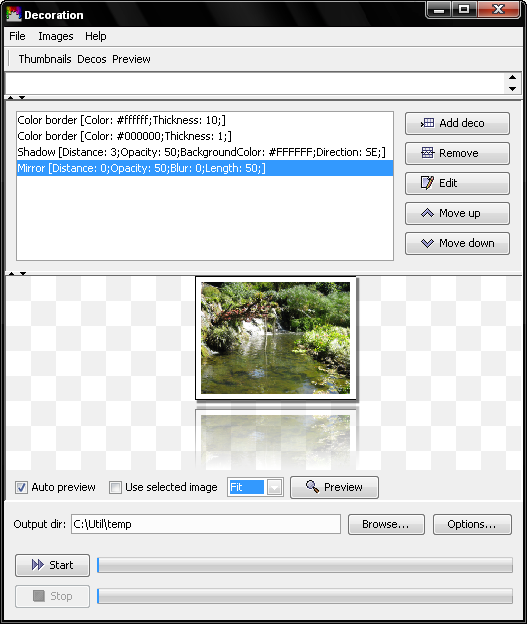 If you have lots of images on your computer but are bored of watching them in the same style then there are chances that you would be looking for a change. To change the look of the pictures and make them look brand new all you need to do is get hold of Decoration 1.0. With its filter option you can select and make the changes to the images as you desire. Make changes to the color border, round corners, gradient frame and apply different effects to the images like drop shadow, mosaic, blur, mirror, tint, etc. You can even perform the functions like rotate, crop, zoom and so on, and adding watermarks to the images. It is even helpful in generating buttons for your website. If you have lots of images on your computer but are bored of watching them in the same style then there are chances that you would be looking for a change. To change the look of the pictures and make them look brand new all you need to do is get hold of Decoration 1.0. With its filter option you can select and make the changes to the images as you desire. Make changes to the color border, round corners, gradient frame and apply different effects to the images like drop shadow, mosaic, blur, mirror, tint, etc. You can even perform the functions like rotate, crop, zoom and so on, and adding watermarks to the images. It is even helpful in generating buttons for your website.
The Decoration 1.0 is uncomplicated in usage and does not require any special skill to make the required selections. Easily Load the files from your system or Webpage and you can load multiple files as the software supports batch processing also. You’re also provided with the preview option that makes it easy for you to confirm the selection of the images. Make the selection of the set of filters or create a new set and save it for further use. Make the selections of the changes that you want to be applied to the images like to change the brightness, gamma, glow, and have the image sharpen or use any other one. You can even have the filter parameters changed to suit your requirement like level of color, effect, etc. You can even have the image overwrite or save the output image with another name and select the level of quality for the image. In the same way you can have the button icons changed and edited.
Decoration 1.0 supports batch processing and its simple user interface is good for novice users to work with. It provides various effects that user can play with to modify their images and have fun.
{More info and Download}
Posted in Design, Developer, Photo, Shareware, Utilities | No Comments »
Sunday, May 4th, 2008
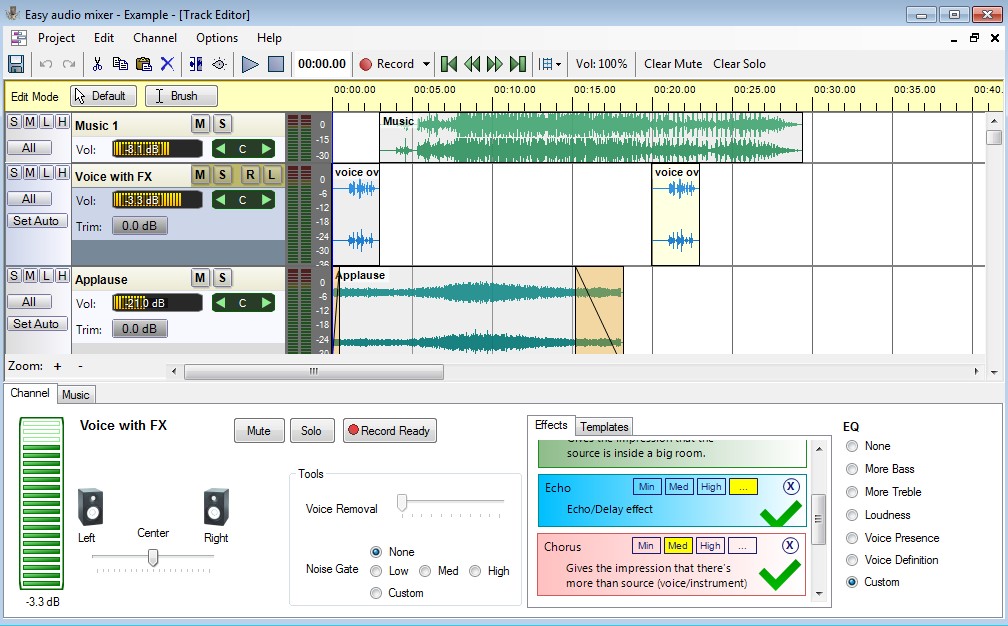 When you have the habit of listening to the same song again and again sometimes you might have thought of remixing them so that you can listen to them with a different feel. Or else if you like singing and want to make a record of the songs sung by you, you can try Easy audio mixer 1.0 Easy audio mixer 1.0 that can helps you to edit the audio files and even have the new files recorded. It is equipped with options to help you apply effects and even have the audio channels edited. The program supports saving the resulting files into WAV or WMA files that are compatible to be played anywhere. It is even more magical as you can replace your voice with the singers while maintaining the song music. When you have the habit of listening to the same song again and again sometimes you might have thought of remixing them so that you can listen to them with a different feel. Or else if you like singing and want to make a record of the songs sung by you, you can try Easy audio mixer 1.0 Easy audio mixer 1.0 that can helps you to edit the audio files and even have the new files recorded. It is equipped with options to help you apply effects and even have the audio channels edited. The program supports saving the resulting files into WAV or WMA files that are compatible to be played anywhere. It is even more magical as you can replace your voice with the singers while maintaining the song music.
Easy audio mixer 1.0 program is integrated with features presenting a user-friendly interface. The software comprises of different features to perform the editing work on the audio files. Import the wav, mp3, or wma files into the program to start the editing and then create spellbinding music files. You can even have the files played with the Playback Controls to confirm of the selection of the right one. When you open the files, you get the Music and voice sections where you can make the changes. With it you can change the different features like to change Channel, Mute it and even enable solo channels only. You can add the music files easily and even you can easily change the FX settings. Have the Voice removed with the help of the voice removal filter and select to Stereo pan the channel. You can set the volume level for music, voice, and master volume also. Records the voice to be added to the music and you can also work multi tracks without any trouble.
With the Easy audio mixer 1.0 you’re provided different options to modify various aspects of the audio files and even create new ones. It also provides features like Bass, Record, Blues, etc and even you can apply different effects to make the audio file more interesting.
{More info and Download}
Posted in Music, Shareware, Windows | No Comments »
|
|
|




