Author Archive
Thursday, January 31st, 2008
 While copying your digital pictures you often may experience the problem that the system asks you to replace the pictures because of the same names. Every time you need to change the name of the pictures and then save them which ends up being a major hassle. Imagine the situation when you have to save a large numbers of pictures, then what? Well with the PicRename 1.0.1.9 software it would become easy for you rename the pictures with the shots dates, etc. It makes it easy for you to remember the date and also arrange them in proper sequence in which they were taken. While copying your digital pictures you often may experience the problem that the system asks you to replace the pictures because of the same names. Every time you need to change the name of the pictures and then save them which ends up being a major hassle. Imagine the situation when you have to save a large numbers of pictures, then what? Well with the PicRename 1.0.1.9 software it would become easy for you rename the pictures with the shots dates, etc. It makes it easy for you to remember the date and also arrange them in proper sequence in which they were taken.
PicRename 1.0.1.9 opens with the pleasant looking screen that has the simple options to work with. To start work with it you need to select the directory that contains the pictures and the containing pictures are shown on the left side of the screen. You can have the preview of the images on the right side screen; it also lets you assure that that you selected the right images. You can make the selection to click to Select All that places the mark on all the boxes that are placed in front of the images. For having the name changed you need to make the selection from ‘Settings’ option. For rename you can use from the given options. You can choose the Date Picture Taken, Date Originally Created, Date Created, and also set to enable to Show Previews and Milliseconds. The program can read the EXIF tags and set the Date accordingly if chosen. When you’re done with the selections then you are required to click ‘Rename’. The images would get rename and you can save the changes that you made.
The functions and working of the PicRename 1.0.1.9 is as simple as it appears from the description. You would not require much to do and also one of its best of the features is that the software can read the EXIF tags itself for setting the name.
{More Info and Download}
Posted in Files and Folders, Shareware, Utilities, Windows | No Comments »
Tuesday, January 29th, 2008
  WinGet is a download manager that can increase download speeds by up to 300 percent. You may automatically resume broken downloads if your connection is lost or if your computer accidentally shuts down. WinGet is a download manager that can increase download speeds by up to 300 percent. You may automatically resume broken downloads if your connection is lost or if your computer accidentally shuts down.
Pros: WinGet download manager supports both ftp and http servers. One is able to queue all downloads in one go, the application will ensure downloads are reliably completed via unlimited retries and individual monitoring of each download scheduled. Even when there are breaks in the download the package is able to resume at appropriate points. WinGet lets you browse around the ftp site chosen to decide the pieces you’d like to download.
WinGet gets integrated into the browsers Internet explorer, Opera or the Firefox and operates as the default download manager. It is integrated into the right click menu.
Download speed can be tuned through parameter settings such as number of threads operating the download and simultaneous files being downloaded. In this age of multiple cores, whenever one has spare power, it could be utilized for speeding up the download process. The application is able to work through proxy servers too and communicate through the firewall.
Cons: Whether downloads get speeded up to 300% or not is questionable. This could not be measured. However, qualitatively the download speed does get speeded up.
Overall a easy to use application, easy to learn, fairly well designed it is a 4 star item.
Posted in Developer, Download Managers, Freeware, Main | No Comments »
Tuesday, January 29th, 2008
 AllKeys Macro is a macro program plus work/break timer and mouse replacement tool. Provides a flexible but robust macro solution that allows users to record and organize a large number of macros. AllKeys Macro is a macro program plus work/break timer and mouse replacement tool. Provides a flexible but robust macro solution that allows users to record and organize a large number of macros.
Pros: This application is a macro manager, work/break timer and a mouse replacement tool. As a macro manager it lets macros to be recorded, edited and arranged properly. Macros could be applicable to specific applications or to all of them. Macro would be a nice way to create keyboard short cuts for repetitive tasks such as filling your address somewhere or to launch your favorite web mail. The software lets you remap the keys to whatever location you want a particular key or a set of keys to be. When defining a macro one could specify an application for the macro. The macro would then operate only in the environment of that application. Import/export of macros are provided for. Editing facilities for editing a macro recorded already or imported can be done through a simple interface.
One really nice feature of the macro playback is the speed of playback. One usually takes a bit of time to type in the commands. But since a computer can take in the input much faster and yet recognize the key strokes, macros can be arranged to be played back at a faster rate.
If you would prefer, you could replace the mouse operation by keyboard strokes. Initially you define a set of keys to be the up/down and lateral movement keys as also left and right clicks on the mouse.
The work/ break timer functionality lets the user define his continuous work time in one stretch and the break time there after. You get alerts for the break time. What’s more is performance statistics like keystroke and mouse clicks done per minute are recorded and displayed.
Cons: The user interface feels a little too complicated for the application. Learning time too could be significant. Unless you use a lot of macros, investing in learning time may not be worthwhile.
Overall the application does perform a useful function, overall rating 4 stars.
Posted in Macro, Main, Programming, Shareware | No Comments »
Friday, January 25th, 2008
 Everyone wants that their important email messages which they send out reaches the recipient securely and in a protected manner. Along with this you would also like to maintain the privacy of yours and the recipients. Now you can do it easily with Email Privacy 2.93 which effectively takes care of all your worries relating to email privacy. It lets you to send the messages directly to your recipient’s mailbox. The software is essentially a local SMTP server program that works for Windows while staying at the system-tray. Everyone wants that their important email messages which they send out reaches the recipient securely and in a protected manner. Along with this you would also like to maintain the privacy of yours and the recipients. Now you can do it easily with Email Privacy 2.93 which effectively takes care of all your worries relating to email privacy. It lets you to send the messages directly to your recipient’s mailbox. The software is essentially a local SMTP server program that works for Windows while staying at the system-tray.
Email Privacy 2.93 software is simple and works by itself without much user intervention once it has been configured. You can see the statistics for the Messages Sent and Sending Errors in the program screen. You can also set the program for DNS Server to Auto detect DNS Server and also set to Use Specific Server. Same goes for the SMTP server that you can enable the Standard SMTP Port or Use Specific Port. You can also enable to accept the connection from same system only. You can also view the log file for the activities that had taken place. Change and configure the program according to your requirements so that you would have the program working according to your requirements. The software is capable of working with email programs such as Outlook, Outlook Express, Eudora, etc. It works with such efficiency that you can send a large number of messages with a minute. Even it software does not leaves any traces at the PC by taking the email messages from the email client that you are using and places them in the mailboxes of the recipient without making temporary files at your PC. The software is good to be used to send the messages with privacy and security.
Email Privacy 2.93 is also capable of being connected to the email program that you are already using to send and receive messages.
{More Info and Download}
Posted in Developer, E-mail, Internet, Security, Shareware, Utilities | No Comments »
Friday, January 25th, 2008
 Among the various text search utilities available, Text Filterer 2.7 definitely stands out on account of its inherent capacity to dig out relevant text. It allows you to easily search for the full text, documents, and files with various types of formats. It can instantly search for the single word, exact phrases, partial words, or Boolean word combinations within the organized collection of the documents. It supports various format files plain text files, RTF, Unicode, XLS, PDF, HTML, DOC and also supports image formats like ICO, GIF, BMP, TIFF, JPEG, PNG, PSD, WMF, etc. It can even search and extract the supported files that are stored inside the ZIP, MHT and RAR, etc. Among the various text search utilities available, Text Filterer 2.7 definitely stands out on account of its inherent capacity to dig out relevant text. It allows you to easily search for the full text, documents, and files with various types of formats. It can instantly search for the single word, exact phrases, partial words, or Boolean word combinations within the organized collection of the documents. It supports various format files plain text files, RTF, Unicode, XLS, PDF, HTML, DOC and also supports image formats like ICO, GIF, BMP, TIFF, JPEG, PNG, PSD, WMF, etc. It can even search and extract the supported files that are stored inside the ZIP, MHT and RAR, etc.
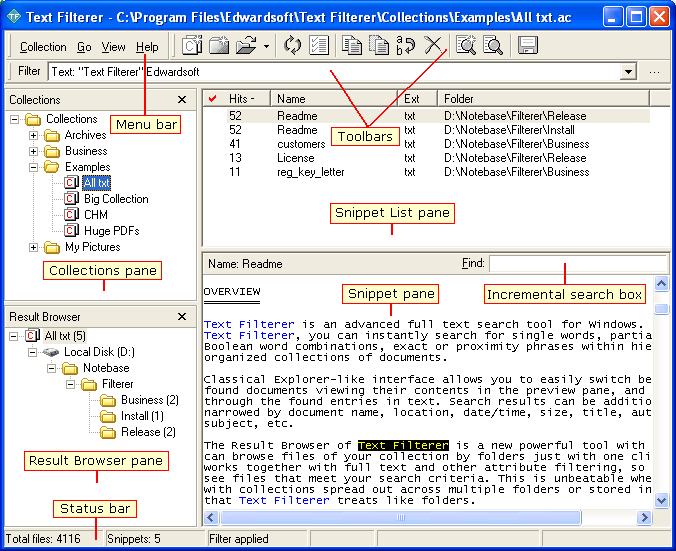
Text Filterer 2.7 opens with the decent interface to work with. You can create a new snippet collection that gets listed on the left side panel. You can also add in new collection in the collection pane. Set the name for it, enter and it shows a dialog box that asks you to set the parameters. It has different features that need to be set by you for having the filtration work done. The ‘File Scope’ option is for setting the features for directory, file masks and the snippet form. With the Snippets tab you can choose the snippet separator, identifier, etc. Columns tab has the features for making the search with the excel files. Set the filter criteria and set the features for different given formats. Make the selections for the collection statistics and rebuilding and temporary files, etc. click Ok and the program start building the collection with the set format files. It shows the collected files on the upper half area and the preview of the selected files is shown below. You can delete, edit, rename, copy and save the collection for your work. Working with the software is easy for collecting the snippets.
{More Info and Download}
Posted in Developer, Files and Folders, Shareware, Text, Windows | No Comments »
Thursday, January 24th, 2008
 Now you can control and manage your PC’s basic function even when you’re away from it. It’s easy to shut down, restart, log off and perform such function automatically by settings the things just once with the Supreme Shutdown Scheduler v1.1 that can achieve all this in no time. Now you can control and manage your PC’s basic function even when you’re away from it. It’s easy to shut down, restart, log off and perform such function automatically by settings the things just once with the Supreme Shutdown Scheduler v1.1 that can achieve all this in no time.
Supreme Shutdown Scheduler v1.1 software opens with the medium sized rectangular screen. It shows the features placed on the screen that you need to set for scheduling a task. With the System Statistics you can set the Current Time and Current Date that program also takes from your computer. Then is the option to set the time for the task to take place. Select the count for hours, minutes and seconds by which the program should shut down, restart or perform the other function as set by you. When you set the limit it shows the time by which the function would be performed. Select the day for the shutdown or restart process. Below are given the setting to select the action that has to be taken by the program. It shows four features Force, Log off, Shut down and Restart. You can abort also if you do not want to set the action to be taken by the program. For saving the settings that you had done you need to click ‘Conform’. The program stays at your system tray and work from there. Help features is also there to assist you in the functioning.
Supreme Shutdown Scheduler v1.1 can perform the function while staying at your system tray. You can also be set to launch the program to start minimized at system tray or with the windows start up. It effective functioning combined with its light weight design also comes across as a welcome relief as compared to some heavy and cumbersome software in its class.
{More Info and Download}
Posted in Commercial, Developer, Programming, Security, Shareware, Utilities | No Comments »
Thursday, January 24th, 2008
 With so many files laying scattered in our systems, one might sometimes get thoroughly lost while searching for the write folder where they placed a particular file. The good news is that now we have a utility that allows with a mark every folder with a special identity icon. With Folder Marker Pro 3.0 software you can assign different folder icons to various folders and sub folders easily. This not only allows you to track your documents easily but also allows you to mark out important data collections. With so many files laying scattered in our systems, one might sometimes get thoroughly lost while searching for the write folder where they placed a particular file. The good news is that now we have a utility that allows with a mark every folder with a special identity icon. With Folder Marker Pro 3.0 software you can assign different folder icons to various folders and sub folders easily. This not only allows you to track your documents easily but also allows you to mark out important data collections.
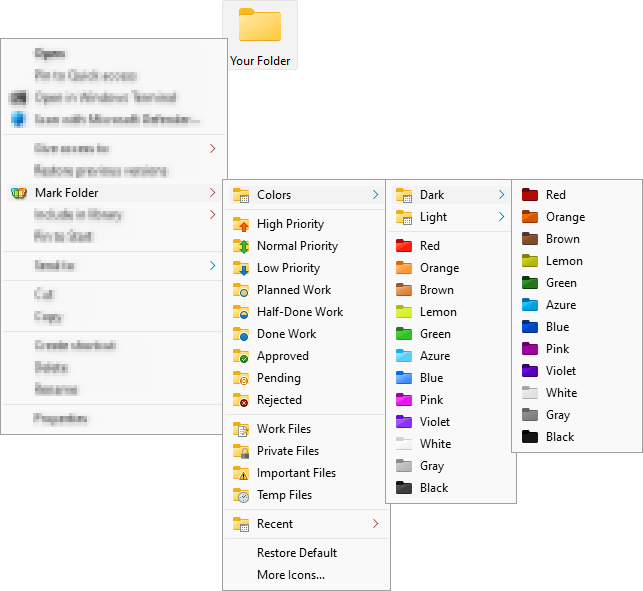
With the Folder Marker Pro 3.0 has a sleek user interface that anyone would feel comfortable to work with it. For assigning an icon you need to select the folder by browsing it with the given option. Then you can choose the icon that you want from the given categories. You get the categories that contain various icons; these are Additional, ABC…, Colors, and so on. You can set the icons wit red for denoting high priority or choose a music note icon for media files. You can set the alphabetic folders icons for denoting the folders with alphabets. You can set your own icons selecting from the icons at your systems with the ‘User’s Icon’ option. You can also enable the features to make the customized folders distributable and to apply the selected icon to all the subfolders. You can restore the default icon and also rollback all changes altogether. You can set the icon for the single and multiple folders.
Folder Marker Pro 3.0 software is also assisted by a help file that contains all the information that a user may require to operate the program.
{More info and Download}
Posted in Design, Desktop, Developer, Files and Folders, Shareware, Utilities, Windows | 1 Comment »
Friday, January 18th, 2008
 Increase your typing skills so that you can perform any work faster than before. You need not go to any other place to learn typing as you can do it while you’re sitting in your office or home. TypingWeb Amazing Free Typing Tutor 4 can prove to be good assistance for improving your typing skills. It’s has simple user interface that provides you with different levels to learn and then test your skill and make improvements. With its well structured lessons and exercises you would know about your weak points that you can work upon. Increase your typing skills so that you can perform any work faster than before. You need not go to any other place to learn typing as you can do it while you’re sitting in your office or home. TypingWeb Amazing Free Typing Tutor 4 can prove to be good assistance for improving your typing skills. It’s has simple user interface that provides you with different levels to learn and then test your skill and make improvements. With its well structured lessons and exercises you would know about your weak points that you can work upon.
TypingWeb Amazing Free Typing Tutor 4 software opens with a screen that asks for your username and then you can continue onto the next step. On the screen you get the main options placed on the top. With the ‘Main’ option you get the course, lessen, etc are placed at the middle screen from where you can choose and start typing. You can take the step to step lessons for learning the keys and then begin the typing of words and so on. You can even keep see the record of the progress level with the stats that you can even export. Keys option let you learn and memorize the keys. You can change the preferences like enabling the sounds, small fonts, problem keys to be shown, and so on. Make your interface look pleasing by changing the skin according to your choice. You can save your profile and go to the most interesting part of the program the ‘Games’ option. You can select the game that teaches you the typing in a delightful manner. Type the words while playing different games having enjoyment. It’s so much fun to learn typing with TypingWeb Amazing Free Typing Tutor 4.
TypingWeb Amazing Free Typing Tutor 4 software is excellent for learning typing with effortless ease. It covers almost all the aspects that are required to learn and makes typing interesting for the user.
{More info and Download}
Posted in Developer, Fun, Games, Utilities, Web services | No Comments »
Friday, January 18th, 2008
 Now you can remember everything from the birthday to the important projects that you need to make or present by the date with the help of TimeBell 1.3 software which will take care of most of your remembering work without fail. It’s easy to use and you are unlikely to experience any difficulty to set the features. Now you won’t forget the meetings with your boss, the subjects that you wanted to discuss with him and of course now you would not be charged as guilty for forgetting your anniversary. Now you can remember everything from the birthday to the important projects that you need to make or present by the date with the help of TimeBell 1.3 software which will take care of most of your remembering work without fail. It’s easy to use and you are unlikely to experience any difficulty to set the features. Now you won’t forget the meetings with your boss, the subjects that you wanted to discuss with him and of course now you would not be charged as guilty for forgetting your anniversary.
The program takes up the current date and time from your PC itself. You need to enter the date and time on which you want to set the reminder for. You can type in the message like ‘Daughter’s Birthday’, ‘Meeting with Boss’, etc to get with the reminder. If you set a time work on a particular file or want to be reminded of some file then you can attach a file with the reminder to be displayed. Select the sound of your choice from the given selection so that it catches your attention you notice the reminder. You can see the list of the reminder set by you with all the details like date, time, message, files to be opened, etc. If you want to Reboot and Shutdown at a specific time, then you just need to set the time for the action to take place. Change the skin of the program to make it look attractive. You can minimize on start and also have the program to start with windows.
{More info and Download}
Posted in Business, Calendar, Commercial, Developer, Reminder, Shareware, Shell and Desktop, Windows | No Comments »
Sunday, January 6th, 2008
 The slow speed of your system gives you the time to catch up with your sleep? Sound funny but surely you would like to avoid such situations when your system becomes unbearably slow. Well trying out the RAM Boost Master Free Version 5.0.0.5 software just may be the answer to your worries as the software effortlessly improves the operation of your system. The software incidentally provides you with features for performing Fast Free or even Deep Compress. Once you run the software you would instantly feel the difference as your computer would start responding much quicker to given commands. The slow speed of your system gives you the time to catch up with your sleep? Sound funny but surely you would like to avoid such situations when your system becomes unbearably slow. Well trying out the RAM Boost Master Free Version 5.0.0.5 software just may be the answer to your worries as the software effortlessly improves the operation of your system. The software incidentally provides you with features for performing Fast Free or even Deep Compress. Once you run the software you would instantly feel the difference as your computer would start responding much quicker to given commands.
RAM Boost Master Free Version 5.0.0.5 software frees up the physical memory of your PC to make it work with faster speed. The interface of the program is uncomplicated and does not require much of your efforts to set the options. Well to begin with you have the Fast Free for rapid clean up and Deep Compress for deep compression. It also provides you with the details about the memory status along with the graphs.
You can have the defragmentation done; just make the selection and the progress is shown on the screen. You can even free the space by cleaning the clipboard content with just a simple click. You can switch to the Advanced feature that help, you to enable the schedule to free the memory and also lets you check the Black and White list. You can also select the auto compression, enable the CPU protection and set the size of the memory to be free.
Settings give you the liberty to set the program to auto run on window startup, automatically clean the clipboard while compressing, and set the Page File Settings, etc. The attached Help Content is useful to have a look at for using the program so that you can set it work at its best.
RAM Boost Master Free Version 5.0.0.5 gives you the details how your system resources are used by Windows and how much memory is being used. You would require set the options once and it would keep working automatically at the background.
{More Info and Download}
Posted in Commercial, Developer, Freeware, Information Management, Utilities, Windows | No Comments »
|
|
|




