Author Archive
Tuesday, August 28th, 2007
How often have you tried to hide something on your system from others, both at office and home? Well with HideWizard you can hide almost all the programs and windows automatically. You can lock the screen and also use the shortcut keys for the functioning. It shows all the programs and icons present on the desktop.
Downloading and installation is smooth. The software starts up with a blue screen with simple options. List of the all the programs and tray icons present on the desktop is shown in a box on the screen. You can select one and with the right click add it to quick hide or auto hide list. You can also set the transparency level to be soft, opaque, or high, etc. ‘Settings’ option let you to set the quick hide option. Select the keyboard hotkey, or make the hide windows start on double right clicks of the mouse. You can mention the special program for hiding and also hide special windows. Set the mute while hiding window, enable hiding IE windows. Select the hidden windows not to be shown when hotkeys clicked again. In the ‘Auto Hide’ option select the programs and window; and the excluded windows can be seen. Easily the selection can be made to switch into the default or virtual desktop with mouse’s middle button. Select the hotkey, lock the screen, set the mute and there are other options also. It can be set to auto start with the windows, select hotkey for hide wizard or disable Ctrl-Alt-Delete. Small icon options on the top of the screen are to refresh the list and for hiding or displaying programs of auto hide list. It goes to the system tray when minimized. The hidden programs are protected with the password and can be seen with the Hide Wizard only. Overall the software does a great job of what it promises and it can come in real handy when you are sharing your system with another individual.
(More info and Download)
Posted in Shareware, Shell and Desktop, Utilities, Windows | No Comments »
Tuesday, August 28th, 2007
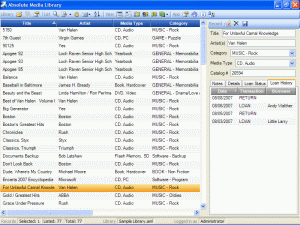 In case you are looking for a tool to track your information, then do give a thought to the Absolute Media Library which makes the job a cakewalk. It would help you with all the data that you need to keep record of and access them whenever you feel like. The software has good functioning and would help you to effortlessly manage a great deal of data. In case you are looking for a tool to track your information, then do give a thought to the Absolute Media Library which makes the job a cakewalk. It would help you with all the data that you need to keep record of and access them whenever you feel like. The software has good functioning and would help you to effortlessly manage a great deal of data.
The software after taking a moderate time for downloading and installing, starts up with a simple screen. It has the different features for performing the task. It is of great use for the personal as well as professional details. You can check the loan status and the history and even you can have the notes and other details. The screen in the middle shows the record of the listed and the selected files. It shows details like title, file type, category, etc. The right side column shows some of the option and the list of the chosen category. You can make the library search; select the ‘Search for’ option and the type of files you want. You can search the listed records or the library. You can set and see the borrower’s database showing all the information about the person. The list is shown and you can see the terms of loans, address and other notes. Select from the list and the information about the person is shown on the right side. You can also view the reports of the inventory and you can get a print also. The information about the records, library and log in is shown on the lower part of the screen. There are different other option on the menu bar like for listing and changing the view. Record or delete according to your requirement and save the details.
The software overall does a commendable job in quickly tracking and logically storing all information that is often required by you. With the accompanying Help guide you are sure to find a pleasure to use.
(More info and Download)
Posted in Catalogue, Commercial, Developer, Information Management, Internet, Multimedia, Shareware, Windows | No Comments »
Monday, August 27th, 2007
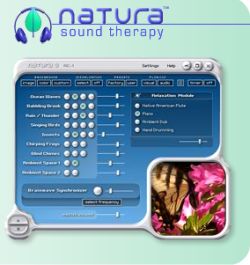 This software is good to make you feel relax and change your mood. It will help you to improve upon your concentration and work better. You can make your mood according to your own selection. This software is good to make you feel relax and change your mood. It will help you to improve upon your concentration and work better. You can make your mood according to your own selection.
The software would let you be waiting for a while to get downloaded. The appearance itself is a soothing one. Soon after installing you won’t wait along to set it and see the difference it will make to your life. You can set the color, image and customize the background. There’s a wide variety of these to choose from according to the set mood. Select the visualization to be displayed according to your liking. You can even off the visualization if you don’t want have one. Select the music and natural sounds to make yourself feel relax. You can choose the factory presets or select them by clicking the user button. Select the audio visual plug-ins and set the timer. The brainwave frequencies would let you sleep, relax, and change your mood much quickly. The visualization style like woodland waterfall is shown on the down right side of the screen. You can choose singing birds, chirping frogs, ocean waves and other different styles of sounds. Select the level and also you can adjust the brainwave synchronizer. Select the frequency and the master volume and play it. Choose the relaxation module to be Piano, Native American Flute, etc and relax in your selected style. You can create and save the combinations that you made and play them anytime.
Change the settings according to your liking and feel the relieving sensation pouring with in you. The help option is there for your guidance to know about the software and its working. It’s good software that would rejuvenate your life and let you refresh yourself.
(More info and Download)
Posted in Audio, Developer, iPod, Lyrics, Multimedia, Shareware, Windows | No Comments »
Monday, August 27th, 2007
 The craze for YouTube is crossing limits and many of us can’t stop watching all those interesting videos out there. However many of us would really love to download them from YouTube on your personal computer or mobile phone. Axara YouTube Tools let you download the videos with ease. It has other utilities that would enhance your working with the videos. The craze for YouTube is crossing limits and many of us can’t stop watching all those interesting videos out there. However many of us would really love to download them from YouTube on your personal computer or mobile phone. Axara YouTube Tools let you download the videos with ease. It has other utilities that would enhance your working with the videos.
The software has option for downloading the YouTube videos in the chosen formats. The program has a pleasant color screen with simple functions. You need to copy the URL of the page containing the video. Select the destination folder for downloading the video. You can keep the information same or change the file name and the video profile. The additional settings let you have the preview, select the batch mode or choose to split file. You can watch the preview at the bottom of the screen. The four utilities options below the screen let you to set the profile, edit the video, convert to other format and download. The video can be converted to supported formats by the options given on the top of the screen. The options for the conversion are ‘To AVI’, ‘To MPEG’, ‘To MOV’, ‘To WMV’ and ‘To SWF’. It supports various audio formats also. The software enables conversion from one format to the other one easily. The space below the screen the shows the conversion progress, the elapsed time and the remaining time. It also has the option to stop the download anytime. The software also consists of the editor that would let you cut the parts of the videos not required by you. The left side of the screen shows the option like PC, Laptop, ipod, etc. These options are there for making the video formats according to the video playing devices. Overall it’s a one great utility that you would surely like have on your system.
(More info and Download)
Posted in Commercial, Design, Developer, Flash, Information Management, Internet, Shareware, Social Software, Video, Windows | 3 Comments »
Saturday, August 25th, 2007
 The program allows us to effortlessly increase the speed of our computers. The software makes the PC work faster and provides you with different features. The software do not take much efforts for operating and elegant in usage. The program allows us to effortlessly increase the speed of our computers. The software makes the PC work faster and provides you with different features. The software do not take much efforts for operating and elegant in usage.
Little time is required for downloading and installing the software. The screen has a very pleasant appearance and opens up having different colors. The screen gives the fun feeling. The language can be chosen to be English, Dutch, Russian, etc. It has five options on the screen, ‘Boost the PC’, ‘Back Up your PC’, ‘Scan for Problem’, ‘Fix Found Problem’, and ‘Defrag your Registry’. Click the first option and press ‘Start’ to boost up the PC and the level is also shown. The back up option gets the back up for the registry and the system and you can give the desired name to the back up. Set the configuration and do the restoring. Select the drive and you can do the smart or quick scanning, click next and scanning gets started that can also be stopped. Repair the found problems easily and defrag/compact the registry with having the reports. Optimize the functioning and protect the PC against the malware. The list of the object is shown in the middle screen. You can use the startup and the also work with the scheduler. You can add, delete, or save the information and commands for the startup and also add or edit comments. Enable or disable the scheduler and also it has add, edit or delete. The working level and the speed of the PC get improved. With the quick options given on the lower part of the screen you can get back to the quick start or continue to next step.
The software has a help guide by which you can know about the functioning and operating procedure of the software. It’s good program for speeding and makes your computer problem free.
(More info and Download)
Posted in Developer, Information Management, Internet, Security, Shareware, Utilities, Windows | 1 Comment »
Tuesday, August 14th, 2007
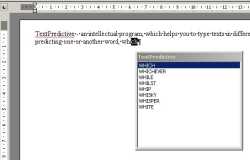 Bad at spellings or just started learning a language and do not know the correct spellings? Do not fret! Text Predictive is a solution to all spelling-related problems. This program is not just similar to the T9 or dictionary function available for text messaging on most cell phones and the Autocomplete option provided in most software, but also a lot better. Bad at spellings or just started learning a language and do not know the correct spellings? Do not fret! Text Predictive is a solution to all spelling-related problems. This program is not just similar to the T9 or dictionary function available for text messaging on most cell phones and the Autocomplete option provided in most software, but also a lot better.
This intellectual program helps the user type text in different languages in an easier and time-saving way by providing options for completing the words as soon as the user types in the first few letters of the word. All one has to do is select the required word from the list in the Text Predictive box and press Enter or simply click on the word.
The main features of this software are its ability to predict words as one types and its ability to adapt to the user’s writing style. The user-style adaptation is done by storing away in its memory the words most frequently used by the user.
The Text Predictive software works almost like a plug-in and is compatible with many text editors and programs, including MS Word, ICQ and Internet Explorer. So, if spellings are a challenge, irrespective of the text editor you are using, say goodbye to all your spelling worries and let Text Predictive do its job. Hence, if you have an idea, typing it out cannot get any easier.
This software would be most useful for people who are prone to making a lot of typos while keying in text but hate to proofread and are lazy to run a spelling check; those for whom spellings have always been a handicap; and for the foreign learners of a language who are either not comfortable or not aware of the spelling variants of the language.
(More info and Download)
Posted in Business, Developer, Shareware, Shell and Desktop, Text | No Comments »
Tuesday, August 14th, 2007
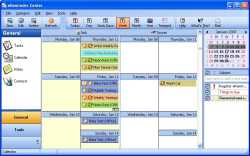 eReminder is an interactive full-featured multi-resource calendar application. At first glance, the software looks very colorful & attractive. The color combination used in this software is truly engaging indeed. This software allows the user to do all the tasks that are connected to a calendar in any way. The tasks include planning, managing & scheduling of important dates & times. It acts as a comprehensive solution to all the tasks that require the use of a calendar. The rich graphical content of the software might give an impression that it might be bulky but it turns out to be exceptionally fast & stable to use. The features are easy to use & navigate. The instructions are lucid & descriptive in nature & even a first time user doesn’t seem to face any problem navigating the menus to perform different tasks. eReminder is an interactive full-featured multi-resource calendar application. At first glance, the software looks very colorful & attractive. The color combination used in this software is truly engaging indeed. This software allows the user to do all the tasks that are connected to a calendar in any way. The tasks include planning, managing & scheduling of important dates & times. It acts as a comprehensive solution to all the tasks that require the use of a calendar. The rich graphical content of the software might give an impression that it might be bulky but it turns out to be exceptionally fast & stable to use. The features are easy to use & navigate. The instructions are lucid & descriptive in nature & even a first time user doesn’t seem to face any problem navigating the menus to perform different tasks.
eReminder also acts as a repository of important dates like birthdays, appointments, anniversaries, important meetings, holidays etc. The software user need not worry about missing any important date since eReminder keeps track of all the important dates while running in the background all the time. This frees up the user from the task of remembering too many birthdays & anniversaries. This software can also be programmed to use a predefined way of reminding the user: it can play music, launch applications, send mails & do a lot of other operations as per the user specifications. eReminder can also keep track of recurring events such as payment of bills or loan installments on time. This way, eReminder takes up a lot of worries from the user & acts as an ultimate reminder tool to keep track of all the important things in life. It also supports multiple views & helps the user to concentrate on the immediate task at hand & leave all the reminders to eReminder.
(More info and Download)
Posted in Business, Commercial, Design, Information Management, Internet, Shareware, Windows | 1 Comment »
Friday, August 10th, 2007
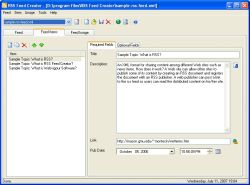 If you wanted the means of creating your own RSS feeds from the convenience of your desktop, then this software may just do the trick for you. For the uninitiated RSS stands in common IT parlance refers really simple syndication; a means for publishing frequently published material. So in case you have a website and wish to update your some section quite frequently; RSS feeds are what you should be looking at. To make things life easier for you this elegant piece of software does most of the hard work for you. Best part is that it is an WYSIWYG tool and even if you do not know the basics of XML, you can still have your RSS feeds up and running on a regular basis. If you wanted the means of creating your own RSS feeds from the convenience of your desktop, then this software may just do the trick for you. For the uninitiated RSS stands in common IT parlance refers really simple syndication; a means for publishing frequently published material. So in case you have a website and wish to update your some section quite frequently; RSS feeds are what you should be looking at. To make things life easier for you this elegant piece of software does most of the hard work for you. Best part is that it is an WYSIWYG tool and even if you do not know the basics of XML, you can still have your RSS feeds up and running on a regular basis.
The software installs itself like breeze and has a neat interface which has a default off light brown background. So what all you need to place to get your RSS feeds out. Not much; just place the title and link info and start typing in the workspace. The tools also allows for insertion of images in your feeds. Once you have created the RSS feed you can actually see a preview how the feed would appear with the help of the preview option. So in case you need make any changes, you need go back and make the necessary editions. Among other functionalities features like upload support via the means of a FTP transfer and seamless conversion of HTML in to RSS feeds add to its reputation.
RSS fee creator 2.4 manages to live up to expectation by allowing seamless RSS feeds to be generated from your desktop with effortless ease. It a tool many webmasters would love using quite often. Even those are running their personal blog or family sites will find great value in this product.
(More info and Download)
Posted in Business, Developer, Information Management, Internet, News, RSS, Shareware, Windows | No Comments »
Friday, August 10th, 2007
 Restorator is an innovative tool from Bome software that essentially allows you to add, modify, and delete resources of all Windows applications. These resources might be text, images, videos, menus, dialogs, icons, or sounds. Restorator is an innovative tool from Bome software that essentially allows you to add, modify, and delete resources of all Windows applications. These resources might be text, images, videos, menus, dialogs, icons, or sounds.
Restorator has a very handy graphical interface. The menu and the toolbar containing commonly used icons is right at the top. The different menus in Restorator are: File, Resources, Viewer, Edit, Tools, and Help. Below the toolbar, you can view all the resources on the left and the resource information and the associated files list on the right. If you want to find an already existing resource on your system, you can click the find icon on the toolbar. When you click a particular resource, for example, a dialog, its preview appears on the right. You can edit its look and feel by clicking the ab icon on the toolbar. You can change each and every field of the dialog box. You can specify different heights and widths, different alignment options, different texts, different styles, and different colors. If you desire, you can also add or remove fields from the dialog. Click the H icon on the toolbar to view the hexadecimal coding of the resource. If you want to perform advanced tasks, you need to use wizards. You can view and edit an icon by clicking the Res icon. You can also edit the icon in other installed image editing applications. Right-clicking any resource opens up a pop-up menu from which you can choose different options to manage resources.
For adding a resource, select the type of resource, provide a resource name, and then select its language. Restorator gives you the facility to create resources in different languages. Whenever you feel lost, you can click the Help menu for an exact solution. Resorator provides you complete flexibility for designing and customizing resources. It is ideal for both novice and expert users.
(More info and Download)
Posted in Developer, Information Management, Programming, Security, Shareware, Windows | No Comments »
Wednesday, August 8th, 2007
 There are many instances when a person forgets something he actually knew about. With the vast complexities of the machine named computer, this problem becomes all the more evident. It may happen many times that you tell to yourself “I just knew exactly how to do stuff on my computer, but have no clue to recall it now.” It becomes very frustrating. You have to start searching again for the little piece of information from the scratch. No one can actually do anything to avoid this; it is bound to happen because there only so much the human mind can remember. No one can remember anything and everything about all the software that we work with these days. It causes loss of precious time and makes the person to frustrate. There are many instances when a person forgets something he actually knew about. With the vast complexities of the machine named computer, this problem becomes all the more evident. It may happen many times that you tell to yourself “I just knew exactly how to do stuff on my computer, but have no clue to recall it now.” It becomes very frustrating. You have to start searching again for the little piece of information from the scratch. No one can actually do anything to avoid this; it is bound to happen because there only so much the human mind can remember. No one can remember anything and everything about all the software that we work with these days. It causes loss of precious time and makes the person to frustrate.
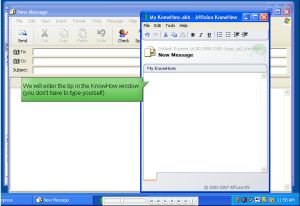
Know how is revolutionary software that helps people manage their information base. Know how enables a person to accumulate every information he needs to know about his computer and the software he uses on it in a way, so that he has to never look for it again. So how actually does it do so? Know how stores information about exactly which applications the user is using and which window he was working on. All this stored information makes sure that you need not look for any other information in case you forget anything. In addition to that it makes your life more organized; it also helps you share information about the applications you use with your friends. No more mistakes and thus no frustration. Everything is there on the memory of your friend, know how. Just clicking on the icons of the software retrieves all the information in the way it ought to be. The software is very useful, yet very easy to download and install. It can be used by anyone and everyone. So no more headaches now, thank to Knowhow.
(More info and Download)
Posted in Business, Developer, Information Management, Internet, Shareware, Utilities, Windows | No Comments »
|
|
|




