Archive for the 'Developer' Category
Thursday, December 21st, 2006
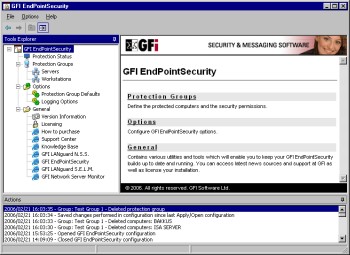 GFI EndPointSecurity allows you to control entry and exit of data via portable storage devices, by doing this software allows you to prevent users from taking confidential data or introducing viruses and Trojans to your network. GFI EndPointSecurity allows you to control entry and exit of data via portable storage devices, by doing this software allows you to prevent users from taking confidential data or introducing viruses and Trojans to your network.
What I love about GFI EndPointSecurity is the device control solution which allows administrators to actively manage user access to all sorts of devices like Media players, including iPod, Creative Zen and others, USB sticks, CompactFlash, memory cards, CDs, floppies & other storage devices, PDAs, Blackberries, mobile phones and similar communication devices Network cards, laptops and other network connections. You can define which users can use removable media centrally from Active Directory – simply by making them a member of pre-defined groups.
This is a real nice software to guarantee security and actively manage user access on your network. It sure costs a handful but it’s really a very useful tool. It’s really the end point of your security needs.
A trial will convince you, Check it out Here!
Posted in Developer, Internet, Main, Security, Shareware, Utilities, Windows | 1 Comment »
Thursday, December 21st, 2006
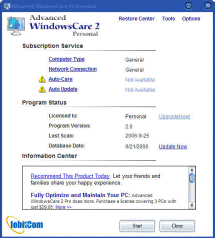 You know how it is with computers. When you first start using your shiny new computer, its running fast and smoothly, but a few months later its not so fast or smooth. Installing and uninstalling programs can leave leftovers littered throughout the Windows registry, temporary files can use up valuable space, spyware and adware can sneak onto your system wasting valuable resources as well as invading your privacy and security. You know how it is with computers. When you first start using your shiny new computer, its running fast and smoothly, but a few months later its not so fast or smooth. Installing and uninstalling programs can leave leftovers littered throughout the Windows registry, temporary files can use up valuable space, spyware and adware can sneak onto your system wasting valuable resources as well as invading your privacy and security.
Of course there’s lots of various programs to sort out all these various issues that you, the computer user, has to deal with from time to time. But wouldn’t it be great if there was just one program to help you do it all? That’s what Advanced WindowsCare attempts to do, and judging by some of the positive feedback i’ve seen online, and from using it myself satisfactorily, it’s pretty good indeed at what it claims to do!
It has a decent registry cleaner, spyware/adware detector and immuniser, junk files cleaner, privacy sweep, and system analyzer to help to set your computer run at its peak. All this in a simple to use interface. If you upgrade to the pro version, all this can be set up to run automatically at regular intervals!
But you can download the totally free version and you’ll wonder how you got by without this really useful little program that seems delivers it’s promises.
Posted in Developer, Main, Security, Shareware, Utilities | No Comments »
Thursday, December 21st, 2006
 SupervisionCam is software for turning your PC into a video surveillance system. It can compare images from a video camera or from a local or Internet image file, at intervals chosen by you, and starts optional activities when it detects a movement. It can save the images as BMP or JPG files, play a sound, send a message or mail, start a program or create a HTML page and upload this page including the images to a LAN or internet (FTP) server with optional dial-up support. SupervisionCam is software for turning your PC into a video surveillance system. It can compare images from a video camera or from a local or Internet image file, at intervals chosen by you, and starts optional activities when it detects a movement. It can save the images as BMP or JPG files, play a sound, send a message or mail, start a program or create a HTML page and upload this page including the images to a LAN or internet (FTP) server with optional dial-up support.
SupervisionCam can also capture images in a defined time interval, so you can use it as a webCam as well! It offers lots of features – Fast viewer, support for more cameras, surveillance scheduler, static or dynamic motion detection threshold configuration, auto update over internet and a lot more.
This is pretty feature packed program that would suit someone wanting to have a cheap but reliable surveillance camera set up for example. You can download a trial from the homepage here and find the full list of features, but you’ll have to register to get the full version, unless the watermark doesn’t matter to you too much.
Posted in Developer, Information Management, Internet, Main, Photo, Shareware, Social Software, Video | No Comments »
Wednesday, December 20th, 2006
 Okay I haven’t tried Zone Alarm for a while and it’s much improved since I saw it last. I didn’t used to like it very much because it used to subject me to many alarms which were just normal functions of programs I was using. In case you don’t know what it is, it is an easy-to-use firewall software which blocks hackers and other unknown threats from barging into your computer and breaking the place up. Okay I haven’t tried Zone Alarm for a while and it’s much improved since I saw it last. I didn’t used to like it very much because it used to subject me to many alarms which were just normal functions of programs I was using. In case you don’t know what it is, it is an easy-to-use firewall software which blocks hackers and other unknown threats from barging into your computer and breaking the place up.
The program identifies hackers and blocks access attempts, giving you an alert and letting you know what’s under attack and from where. The software automatically makes your computer invisible to anyone on the Internet. Better or worse than the built in Firewall software in Windows? Hmm, can’t really tell you, but it is easier to see what is going on. XP firewall just sits there telling you it’s working, but it never tells you at what.
Go to the web space and get your copy.
Posted in Developer, Freeware, Internet, Main, Utilities | 1 Comment »
Wednesday, December 20th, 2006
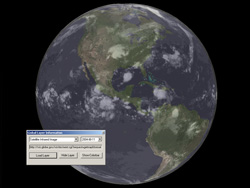 I just had the chance to install and play with Nasa World Wind. It proves to be quite an alternative to the famous Google Earth in some ways. This is a program that will allow you to zoom in on any place you want on Earth, but also Venus, Mars, Jupiter…even the Moon. I just had the chance to install and play with Nasa World Wind. It proves to be quite an alternative to the famous Google Earth in some ways. This is a program that will allow you to zoom in on any place you want on Earth, but also Venus, Mars, Jupiter…even the Moon.
You can select from various types of satellite map images, this would be very useful for anyone who’s into geology, geography etc. But you can also do much more, such as downloading live weather maps, which would be interesting for anyone into meteorology. It uses Shuttle Radar Topography Mission elevation data and high resolution LandSat imagery. Yes…this is a little more technical than Google Earth!
It has a similiar interface as Google Earth in some ways, such as being able to click and drag to spin the globe to the desired position. You can zoom in and out with the mousewheel,or by double clicking. You can select the map type you’d like to see from a menu on the top. Hint: The landsat one is the one to choose if you wanna zoom in on photo’s of streets, etc.
On many levels, World Wind is good for scientific, educational and research purposes. For driving directions, local information, exploring and other recreational activities, Google Earth might be a better options, as this program might be a little too scientific for most people.
You can check out much more info and download it completely free from the NASA site here.
Posted in Developer, Freeware, Fun, Information Management, Internet, Main, Social Software | 1 Comment »
Wednesday, December 20th, 2006
 I miss BASIC. I used to code all the time when all computers had BASIC built in, now I hardly ever even think about it let alone write a line of code. But recently I’ve been getting the urge and I just noticed that the Visual Studio series has Express versions, like Visual Basic. I miss BASIC. I used to code all the time when all computers had BASIC built in, now I hardly ever even think about it let alone write a line of code. But recently I’ve been getting the urge and I just noticed that the Visual Studio series has Express versions, like Visual Basic.
You can easily design great-looking applications using the simple drag-and-drop interface designer. ANd using themes you can make apps that have that XP look. To help you debug your code, there is Code colorization, syntax checking, and what it calls “IntelliSense” which provides an kind of interactive suggestions and code snippets, I think. That’s not something I’ve tried yet. But AutoCorrect is very cool. It’s like the spell checker in Word and can suggest corrections apparently for over 230 common programming mistakes.
To learn more about getting back into code, go see Visual Basic Express on the Microsoft web.
Posted in Developer, Internet, Main, Programming, Windows | No Comments »
Wednesday, December 20th, 2006
 Most people I know these days use Firefox. It’s a fast, secure tabbed browser that isn’t made by Microsoft, so scores big with all my PC and Mac friends. But Opera has been around longer and has some cool features too. I’m currently road testing the new version to see if I’ll migrate, and not sure at the moment. Most people I know these days use Firefox. It’s a fast, secure tabbed browser that isn’t made by Microsoft, so scores big with all my PC and Mac friends. But Opera has been around longer and has some cool features too. I’m currently road testing the new version to see if I’ll migrate, and not sure at the moment.
It has advanced fraud protection which protects you against sites that try to steal your personal information. It speaks BitTorrent so you can (cough) download files. You can add your favorite search engines to it easily and quickly, although most people I know only use the one, maybe two. There’s a bunch of other features like widgets, content and pop-up blockers. It’s all very good. Good enough to win me away from Firefox? Hmm, the jury is still out on that one.
For more info and a download go to the Opera Web.
Posted in Browsers, Business, Developer, Freeware, Information Management, Internet, Main, Open Source, Social Software | No Comments »
Tuesday, December 19th, 2006
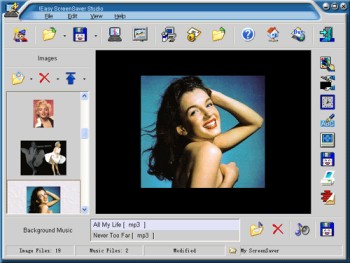 Why buy a screensaver when you can make your own? Here is a really great software, Easy ScreenSaver Station. It allows you make your own screensaver easily. Why buy a screensaver when you can make your own? Here is a really great software, Easy ScreenSaver Station. It allows you make your own screensaver easily.
With this software, you get to create screensavers that are just the way you want them. Images, Flash movies and background music can be included into your creations easily. Want to use photos from your digital camera or scanner directly? No problem. Easy Screensaver Station allows you to do this with ease.
After some easy steps, you can save your creation as a single standard ScreenSaver (.SCR) or a self-installing ScreenSaver (.EXE) for distribution. More features such as image editing, transition settings, password protection, copyright settings, preview, email sending and so on are included. No programming skills or royalties required.
A new updated version of this great software is out with these updates:
- Product renamed to !Easy ScreenSaver Station (Original name is !Easy ScreenSaver Studio)
- Set License Agreement for your ScreenSaver
- Remembered the last position and size of the main window
- Optimized the operation to set delay time for the objects
Are you ready for some screensaving creating fun? Check it out here!
Posted in Business, Commercial, Design, Developer, Main, Shareware, Shell and Desktop, Themes, Utilities, Windows | 1 Comment »
Tuesday, December 19th, 2006
 Videozilla is a video conversion tool for converting video files from and to a variety of different file types really easily. Supporting AVI, MPEG, RM, MOV, ASF, WMV, SWF, FLV, MP4, M4V, 3GP, 3G2 all the hard work is done with a simple a right-click on the video files. You can also do rudimentary editing, setting your own start and end points in a video. You can also change width and height, video and audio quality etc, all on the fly. Videozilla is a video conversion tool for converting video files from and to a variety of different file types really easily. Supporting AVI, MPEG, RM, MOV, ASF, WMV, SWF, FLV, MP4, M4V, 3GP, 3G2 all the hard work is done with a simple a right-click on the video files. You can also do rudimentary editing, setting your own start and end points in a video. You can also change width and height, video and audio quality etc, all on the fly.
You can also do audio extraction from video and save as audio as an industry standard MP3 or WAV. A fabulous add on to any Windows machine. Once you have it you’ll wonder how you got along without it. Shareware product so be prepared to shell out the cash because this one is real good.
http://www.videozilla.net/index.html
Posted in Developer, Main, Multimedia, Shareware, Utilities, Video, Windows | 3 Comments »
Tuesday, December 19th, 2006
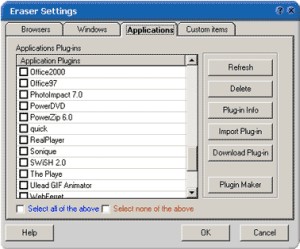 If you value your privacy online and you are in need of a software that will help achieve privacy protection with ease, you should try Track Eraser Pro. Tracks Eraser Pro will protect you by cleaning up all the tracks of Internet activities on your computer. If you value your privacy online and you are in need of a software that will help achieve privacy protection with ease, you should try Track Eraser Pro. Tracks Eraser Pro will protect you by cleaning up all the tracks of Internet activities on your computer.
What I really appreciate about Track Eraser Pro is that it’s an easy to use software. Only one click is enough to erase the cache, cookies, history, typed URLs, autocomplete memory, index.dat from your browser, and temp folder, run history, search history, open/save history, recent documents, etc.
Its free plugins gives you the opportunity to erase the tracks of up to 50 popular applications, such as playlist of Realplayer, Mediaplayer, QuickTime, recent files of Office, Acrobat, Winzip, etc easily.
That’s not all, a new version has just been recently released with these changes:
- Internet Explorer 7 fully supported
- Added support for Opera 9
- Added a Stop button
- Added Recycle Bin right click menu
- GUI optimized, Clean Hard Disk Free Space moved to Settings page main screen
- Minor bugs fixed
The only thing you might have an issue with like I did, is the price. It costs about $29.95. When I consider the fact that there certain freeware that does what it does, you may be tempted to ignore it. But it works very well and it has some extra features that is lacking in most other applications. Go check it out first! If you like it , go for it , if not don’t go past the trial version.
Are you ready to give it a try? CLICK HERE!
Posted in Commercial, Developer, Freeware, Main, Security, Utilities, Windows | No Comments »
|
|
|




