Archive for the 'Developer' Category
Tuesday, November 28th, 2006
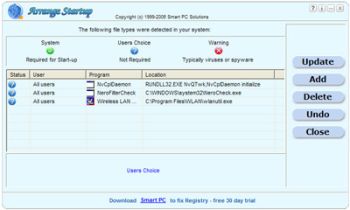 When you first started using your PC it used to boot pretty fast, right? If presently that is not the case and you’ve been looking for a software that can help you, Arrange Startup might come in handy. When you first started using your PC it used to boot pretty fast, right? If presently that is not the case and you’ve been looking for a software that can help you, Arrange Startup might come in handy.
The reason why some PC’s take too much time to boot at times is that too many applications which can be executed when needed form part of the startup list wasting hardware resources after each startup. This slows things down. Arrange Startup will help you to remove programs from start up list or add to them.
Arrange Startup classifies all of your programs that are executed at startup as system programs, suspicious applications that can be viruses, and the programs that are not necessary for startup.
One downside to this software is though they call it a freeware the fact that it puts a link to their website on your desktop may make you want to categorize it as an adware. Another problem you might encounter is that it may give warnings about applications that you know are harmless. It’s just trying to help you reduce the unnecessary load on your startup.
All in all it is a useful software. Check it out, it’s free!
Posted in Business, Developer, Freeware, Information Management, Main, Shell and Desktop, Utilities | 1 Comment »
Tuesday, November 28th, 2006
 Looking for an all-in-one package that can help you deal with the common daily problems you encounter on your PC? 12Ghosts might just be the thing for you. Looking for an all-in-one package that can help you deal with the common daily problems you encounter on your PC? 12Ghosts might just be the thing for you.
12Ghosts is a package that contains various utilities that accelerate and facilitate your working with your computer. If you need help with securing your important documents, automating daily tasks and so much more, 12Ghosts is right for you. Everything from an automatic saving device for documents to a shut down control tower is available, as well as Windows shell enhancements for easier and faster usage of Windows itself.
Recently a new updated version, 12Ghosts 8.10 was released. Some of the latest changes in this version include:
- ShutDown: New! Super fast shut down! This will just exit Windows and turn off the computer (or restart). Nothing is saved, though. Windows is NOT properly shut down. Use in emergency situations only
- Backup: The destination folder now is allowed to be below the source folder. It is excluded from backup automatically. For example, if you backup “C:\” to “C:\12-Backup” everything is backed up, except of course “C:\12-Backup” itself
- Wash: New! Suppress programs from START menu! Frequently used programs are added to the start menu automatically (XP/Vista). Protect your privacy and prevent certain programs from ever appearing there again
- Shredder is now checking if clean up of “delete_me…XX.del” files is required at startup of 12-Shredder. This may be necessary if Wipe Disk was interrupted before it could complete a Remove Old Names pass
- Tower: New color scheme with light background
Want to check it out? CLICK HERE!
Posted in Business, Commercial, Developer, Information Management, Internet, Main, Multimedia, Programming, Security, Shareware, Shell and Desktop, Utilities, Windows | 4 Comments »
Tuesday, November 28th, 2006
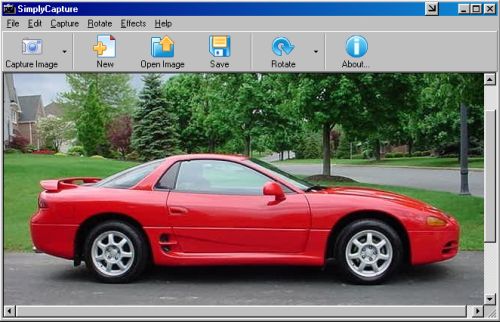
 This cool freeware is something you need to check out! SimplyCapture is a powerful screen/video capture tool that is really simple and very easy to use. With SimplyCapture you can capture exactly what you want in the screen (3 capture options: Full Screen, Active Window and Selected Area). This cool freeware is something you need to check out! SimplyCapture is a powerful screen/video capture tool that is really simple and very easy to use. With SimplyCapture you can capture exactly what you want in the screen (3 capture options: Full Screen, Active Window and Selected Area).
What I really love about it is that it allows you to capture screenshots of any video file! Just play a video in the SimplyCapture Video Player and start capturing screenshots of your favorite movies!
Some of it’s cool Features include:
- Great program layout
- Capture screenshots of video files
- Capture shots of your favorite movie files
- Integrated Video Player and Image Viewer for easy viewing of your captured movie images and a lot more
- Rotate and Flip image Options
- Cool Image Effects available to make your captured image even better
- Exclusive JPEG Conversion Tool (converts any image file to JPEG format; you can customize the output image quality and much more)
- And much more!
This great freeware works well with Windows 98/98SE/ME/2000 & XP
BE SURE TO CHECK IT OUT! IT’S FREE!
Posted in Business, Design, Developer, Freeware, Main, Multimedia, Photo, Windows | No Comments »
Tuesday, November 28th, 2006
 This week Opera Software has launched Opera Mini 3.0, the latest version of its mobile browser. Opera Mini is available for almost any mobile phone and optimized to reduce the size of data transferred to the phone, which makes browsing fast and cheaper for users that pay per kilobyte transferred. This week Opera Software has launched Opera Mini 3.0, the latest version of its mobile browser. Opera Mini is available for almost any mobile phone and optimized to reduce the size of data transferred to the phone, which makes browsing fast and cheaper for users that pay per kilobyte transferred.
Opera Mini can now allow users to launch their phone cameras through their browser to instantly publish photos to their e-mail, forum or blog. The integrated RSS feed reader keeps preferred news and content one click away in the browser. Users get the information they want sent directly to their phones.
Main features of Opera Mini:
- User-friendly access to all Web pages from a mobile phone
- Server-side data compression creates faster browsing and lower bills for services charged per kilobyte
- Download images, MP3s, etc. directly to the phone
- Style Opera Mini to your own taste by selecting from several new and bold skins to suit your mood
- Use Opera Mini’s advanced search functionality by selecting additional search engines for your start page
New with version 3.0:
- RSS feeds – Get all RSS news on your phone (now you can subscribe to your favorite RSS news feeds and every time you connect with Opera Mini all updates are just one click away. Sort the articles by feed source or by date)
- Photo blogging (share a picture from anywhere, anytime with your phone using Opera Mini’s photo sharing feature. Upload your photo to a blog or forum, or as an e-mail attachment)
- Content folding (the content folding feature shrinks lengthy menus to save your scrolling thumb. You can easily inspect the block of hidden content by hitting the [+] button next to it)
- Secure connection – safe and sound (secure connections will now let you safely use secured sites, such as your e-mail, bank site, online stores, with no exposure of your personal details)
- Even faster loading (all subsequent requests to a server within a session are now quicker. Opera Mini keeps an open connection between server and client reducing overhead TCP set-up times)
Just go to the Operamini site and download. You won’t regret it!
Posted in Browsers, Business, Commercial, Developer, Freeware, Internet, Main, Multimedia, News, OS Updates | 3 Comments »
Monday, November 27th, 2006
 It happens to everyone sooner or later, you try to use a CD or DVD for one reason or another and, no luck, the thing just can’t be read!Now you have two choices, either kick yourself for not having another backup, for buying “bargain” quality discs, or try recovery software such as IsoBuster. It happens to everyone sooner or later, you try to use a CD or DVD for one reason or another and, no luck, the thing just can’t be read!Now you have two choices, either kick yourself for not having another backup, for buying “bargain” quality discs, or try recovery software such as IsoBuster.
It can recover data from a damaged or corrupt CD or DVD. It supports all optical disc formats and all common optical disc file-systems. It can use both generic and alternative ways to get to the data and the use of primary and secondary file systems to get to the data and/or make use of file system data that might be ignored or ‘forgotten’ by popular OS. At the homepage you’ll find a massive and very impressive list of the various methods it uses to attempt to recover your data.
To read much more info and download the demo at the homepage visit here. Hopefully after trying IsoBuster out you’ll have your data back and have avoided getting a self-kicking and a shiny new coaster !
Posted in Commercial, Design, Developer, Main, Multimedia, Utilities, Video | 1 Comment »
Sunday, November 26th, 2006
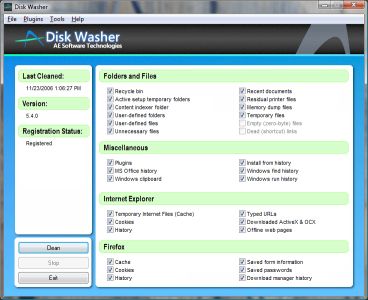 A new version of Disk Washer has just been recently released. Disk Washer is a software that helps you to maintain peak performance for your system by removing unnecessary files from your system. A new version of Disk Washer has just been recently released. Disk Washer is a software that helps you to maintain peak performance for your system by removing unnecessary files from your system.
Installation programs leftover, DLL problems and system registry errors are part of the things that Disk Washer resolves. Disk Washer helps to eliminate the things that clog your drive and make your system slow and instable. Latest Changes in the new version includes new GUI, enhancements, and stability improvements.
On first observation you might be tempted to rule out this software thinking that there are freeware like CCleaner, which have similar use. But a deeper look reveals that Disk Washer really is different as it helps you to recover disk space, clear your tracks, fix Windows problems, back up your files among other things. But the big question is this, “Is it worth the price that it is sold for?” That’s up to you! Check it out and see whether it works well with your PC or not. Try out the trial version first and see if it good enough for you.
Click here for more info on its features and trial download!
Posted in Developer, Internet, Main, Security, Shareware, Utilities | No Comments »
Friday, November 24th, 2006
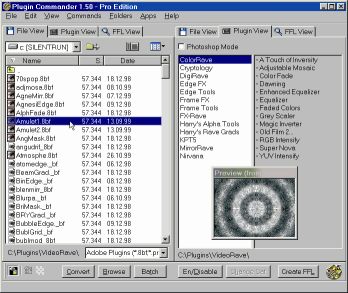 If you’ve had problems using plug-ins, tubes or other add-ons in a graphics, video or animation application then you might find this software, which I recently came across, very useful. It’s called Plugin Commander. If you’ve had problems using plug-ins, tubes or other add-ons in a graphics, video or animation application then you might find this software, which I recently came across, very useful. It’s called Plugin Commander.
Plugin Commander is a tool for dealing with various image formats, plugins and effect types from various graphics applications. It allows you to manage and preview your plugin, tube and add-on collection quickly and easily. You can deactivate the plug-ins you rarely need and define how your favorite effects will appear in the host application.
There are two editions of this useful software, the commercial Pro Edition and the Light Edition, which is freeware. The light edition being freeware has limited features but to enjoy a fully-featured version, it’s best you go for the Pro Edition.
CHECK IT OUT!
Posted in Audio, Browsers, Business, Commercial, Design, Developer, Information Management, Internet, Main, Multimedia, OS Updates, Photo, Security, Shareware, Shell and Desktop, Utilities, Video, Windows | No Comments »
Thursday, November 23rd, 2006
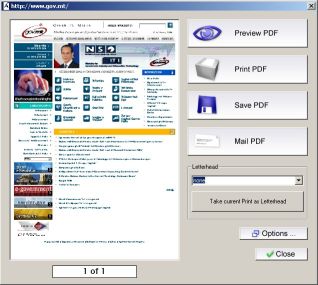 PDF is the ideal electronic package to contain everything from spreadsheets, presentations, and brochures, to photographs, rich graphics, and more. So it is necessary to have a good software that can help you create PDF files with ease. PDF is the ideal electronic package to contain everything from spreadsheets, presentations, and brochures, to photographs, rich graphics, and more. So it is necessary to have a good software that can help you create PDF files with ease.
Aloaha PDF Suite is the perfect tool to create your PDF Documents. One click is enough. Just print your document to any of your printers and it will convert the print job to a PDF Document, which you can save, email or publish to an exchange public folder. Of course you can opt for 40 or 128 encryption and digitally sign the PDF automatically.
The great thing about this software is that PDF Signer and PDF Editor are included in the Aloaha PDF Suite Pro package – no extra license costs!
Though this package is great, it is not a freeware, to get the full version you will have to come up with nothing less than $49. In case you are thinking, there are other free software like PDFCreator that does the same thing. Let me point this out to you: PDFCreator doesn’t support encrypting documents with smartcard/certificates; hardly will you find a free generator that does that. If all you want is a cheap and easy way to send a CV to someone, PDFCreator or OpenOffice will do the job but if you want a secure method to distribute and control sensitive or important documents, this suite does the job a lot cheaper than Acrobat.
Ready to try it out! CLICK HERE to learn more about its features and download the commercial demo.
NOTE:
- The evaluation version is fully functional and works without any serial key. The only limitation is a watermark in the left upper corner of every PDF Page
- It works well with Windows 2003/NT/XP. NT4 Users should read the NT4 FAQ before installing Aloaha
- All monitored printer have to remain on status paused!
- Some features such as the digital signature API, the signature hotfolder “tosign” and the XP/2003 FAX Connector require an evaluation key. You have to contact the publisher if you need to evaluate one of these features.
CHECK OUT THE TRIALVERSION!
Posted in Business, Commercial, Developer, Information Management, Main, Shareware, Text, Utilities | 2 Comments »
Thursday, November 23rd, 2006
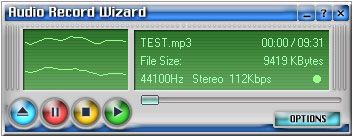 Get it on tape! Well, the modern digital version! Here’s a useful program that can record almost all sound from your sound card with good quality. It can also record from the microphone, line-in, and just about any programs such as your media player of choice. Get it on tape! Well, the modern digital version! Here’s a useful program that can record almost all sound from your sound card with good quality. It can also record from the microphone, line-in, and just about any programs such as your media player of choice.
For example you might wanna record an internet radio show. You can easily do that with this, and what’s more, it can record straight to mp3 format,saving you valuable disc space! To get an even small file size, mp3 modes are fully configurable.
Additional features include voice activation, file length limitation (so that it can’t make overly huge files) and schedule (how about recording your favorite internet radio show while you’re asleep or at work?) and it can even stop recording automatically.
Sounds like it could be the perfect solution for almost any situation where you might wanna record and save audio from your computer? You can download a demo (limited to recording 3 minutes) and more find out more info right here.
Posted in Audio, Commercial, Developer, Main, Multimedia, Shareware | No Comments »
Wednesday, November 22nd, 2006
 To be sincere with you, I am one of those who appreciate good things for free or next to nothing (that is why I love freeware). Be that as it may, one cannot ignore the fact that the best things in life do not come cheap. That brings me to why I am talking about this software. WebPosition. I’ve heard a couple of guys grumble about the price saying it’s expensive but I guess the question is, does it give great value for the money? To be sincere with you, I am one of those who appreciate good things for free or next to nothing (that is why I love freeware). Be that as it may, one cannot ignore the fact that the best things in life do not come cheap. That brings me to why I am talking about this software. WebPosition. I’ve heard a couple of guys grumble about the price saying it’s expensive but I guess the question is, does it give great value for the money?
WebPosition 4 (previously known as WebPosition Gold) increases your web site visibility resulting in more qualified search engine traffic. WebPosition 4 offers all of the tools necessary to improve your web site’s search engine rankings and increase revenue. The new version now includes a summary dashboard, trend graphs, essential off-site metrics (link popularity and search engine saturation reporting) and 200+ new search engines.
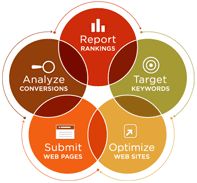
WebPosition 4 allows you to:
- Report your search engine rankings
- Target your keywords
- Optimize pages using built-in expertise
- Submit URLs to search engines
- Analyze conversions using WebTrends
It comes in two options – WebPosition 4 Standard and Webposition 4 Pro. The professional version possessing additional features like unlimited domain support, PPC keyword rank reporting, meta tag manager and much more.
Since it is necessary, no matter how good your product or service is, for people to first find you, having a software that makes your website very visible is vital for business. Is it worth it? That’s up to you!
Learn More and check out the free trial version first. Previous version of this tool can be found right here.
Posted in Commercial, Design, Developer, Information Management, Main, Shareware | No Comments »
|
|
|