Archive for the 'Main' Category
Tuesday, March 25th, 2008
You’ve probably seen them before, those images online which have a rippling water effect. Ever wondered how this was done or wanted to add this effect to your own pictures? Now is your chance.
Sqirlz Water Reflections is a program that can do this, it can also optionally add rain or snow effects. It works both on images and AVI videos. The rippling effect can be adjusted until you find the right effect that looks the most realistic for your image, you can fully control details such as wave size, perspective, flow, texture, color and transparency. You can save your finished masterpiece in a variety of formats including Flash (useful for easily adding to webpages!)
This effect can actually look really good if you use your imagination, check out the homepage for some examples and to download it, its freeware too!
Posted in Flash, Freeware, Main | No Comments »
Tuesday, March 25th, 2008
 Unlike other screen savers that are usually somewhat predictable, SurveillanceSaver is a screen saver with a difference. It shows live CCTV images from over 600 networked surveillance cameras worldwide. Now whenever your screen saver kicks in, you’ll be shown live images from random CCTV cameras that are connected to the internet. Unlike other screen savers that are usually somewhat predictable, SurveillanceSaver is a screen saver with a difference. It shows live CCTV images from over 600 networked surveillance cameras worldwide. Now whenever your screen saver kicks in, you’ll be shown live images from random CCTV cameras that are connected to the internet.
This makes for a very unpredictable and potentially entertaining screen saver, as you’re never quite sure what you may see. It could be someones backyard, a street, or a storefront. The possibilities are almost endless due to the huge amount of cameras it randomly selects from.
This software is free under the creative Commons license and can be downloaded here.
Posted in Main, Webcam | 3 Comments »
Monday, March 24th, 2008
 Apollo DVD copy, a hi-tech tool for copying DVD collection to DVD-R/RW or DVD+R/RW, has an in-built DVD burning engine and DVD video compression engine that provides you with the true DVD copy of your DVD collections within 20-40 minutes without reduction in quality. The copies produced by this tool can be run on both your PC and home DVD player. Apollo DVD copy, a hi-tech tool for copying DVD collection to DVD-R/RW or DVD+R/RW, has an in-built DVD burning engine and DVD video compression engine that provides you with the true DVD copy of your DVD collections within 20-40 minutes without reduction in quality. The copies produced by this tool can be run on both your PC and home DVD player.
With Apollo DVD copy, you can also copy DVDs to hard drive folders for editing or burning later.
One cool thing about this software is its high compatibility.
- It supports both NTSC and PAL Movies
- It supports DVD-R/RW, DVD+R/RW.
- It also supports a lot of the popular SCSI,IDE,USB DVD burners/recorders on the market.
Want to know more?
Visit http://www.xtodvd.com/dvdcopy.htm
Posted in CD/DVD burner, DVD, Main | No Comments »
Friday, March 21st, 2008
 Sooner or later a time comes when most of us need to convert a file between formats for one reason or another, usually because your particular program doesn’t support a particular format. Rather than hunting around for a file conversion program, there now exists quite a few sites for online file conversion and Youconvertit is certainly one of the better ones. Sooner or later a time comes when most of us need to convert a file between formats for one reason or another, usually because your particular program doesn’t support a particular format. Rather than hunting around for a file conversion program, there now exists quite a few sites for online file conversion and Youconvertit is certainly one of the better ones.
You have the option to choose between a very large variety of file formats. These include audio, document, image, video and archive file types. What’s cool about this particular service apart from the large range of file formats supported, is that you can add up to five files at a time for conversion. You can even add a url that links to a file online which you’d like to convert. It also provides an option for sending files to a recipients email address (again, up to five at a time).
As a slightly unrelated bonus but in keeping with the theme of conversion, they also offer unit conversion (distance,weight, etc)
It’s a site worth bookmarking, whether you find yourself needing to convert between file types regularly or just once in a while!
Check it out here.
Posted in Archive, Audio, Converter, Files and Folders, Main, Multimedia, Video, Web 2.0, Web services | No Comments »
Friday, March 21st, 2008
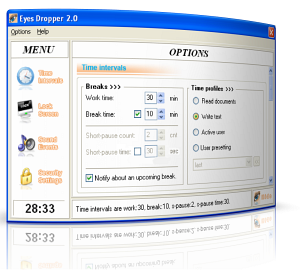 If like me you spend more time on the “puter” than you’d like to count then the software is something you should check out. It’s called Eyes Dropper. If like me you spend more time on the “puter” than you’d like to count then the software is something you should check out. It’s called Eyes Dropper.
It basically reminds you about rest-time and by so doing help save your eyesight. Does that sound ridiculous? Well, not really if you take your time to think about it. Staying glued to your pc all day is definitely not good for your eyesight, I should know, I wear thick lenses.
Now this software allows you to customize the duration of your work time and length of breaks. During the break you may exercise your eyes, look away or look at distant objects either in your office or outside, take a stroll outside your office. Sounds simple, right? But it’s very effective. Just one problem, I don’t agree with $20 price, this should be a freeware not shareware. But then give the trial version a shot and be the judge.
You can check it out http://duodimension.com/eyes_care_child_health/eyesdropper_1_overview.htm
Posted in Main | No Comments »
Thursday, March 20th, 2008
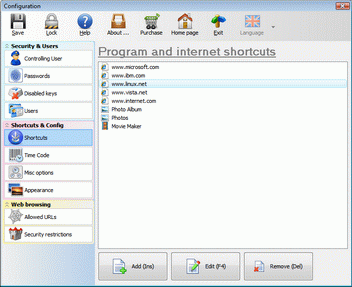 When running a computer that is used by many people. such as at an internet cafe or library, it’s essential that certain system areas and settings are off-limits. This is in the interest of security as well as basically making sure things don’t get messed up! When running a computer that is used by many people. such as at an internet cafe or library, it’s essential that certain system areas and settings are off-limits. This is in the interest of security as well as basically making sure things don’t get messed up!
Bulletproof Public PC does a good job of managing this issue. It can completely disable all access to any local files or settings, while allowing access to only the necessary specified programs such as a web browser. You can choose which sites to allow or disallow from being browse-able and can disable and lock down certain settings and even disable certain keys.
The amount of control it offers over the system is very detailed and can be customized for your needs. This is one program worth checking out if you run a publicly accessible computer.
Check it out at the homepage here
Posted in Main | 1 Comment »
Thursday, March 20th, 2008
 This is a neat little program I found for preventing your laptop from being stolen. It’s called LaptopAlarm and that’s exactly what it is. The best way of describing it is, it’s like a car alarm for your laptop! This is a neat little program I found for preventing your laptop from being stolen. It’s called LaptopAlarm and that’s exactly what it is. The best way of describing it is, it’s like a car alarm for your laptop!
If you need to walk away from your laptop in an area where it there is a potential chance of it being stolen or tampered with, this is the program for you, as long as loud noise isn’t a problem, as the alarm sound on this is very noticeable! (Be careful not to try this out with headphones!)
You get the options to set it to sound if the AC power is unplugged, the computer is shutdown or logged off, the USB Mouse is unplugged, and/or even if the mouse is moved. To shut off the alarm enter your password that you entered in settings.
LaptopAlarm doesn’t even need installing as it comes as a small exe file and it’s free!
Check it out here
Posted in Freeware, Main, Security | No Comments »
Thursday, March 20th, 2008
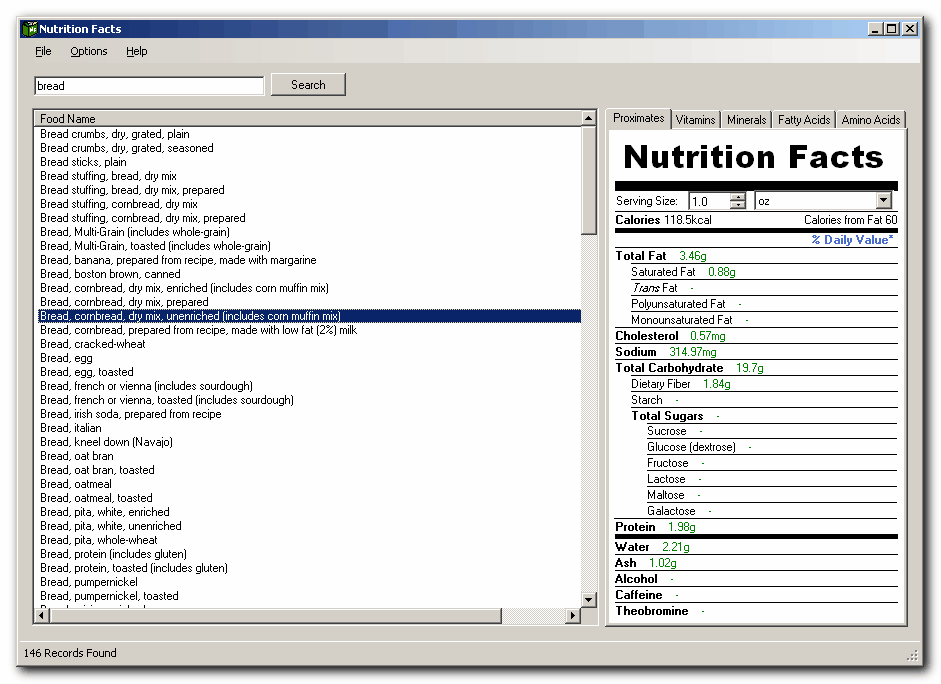 In the “eat what you can lay your hands on” crazy world we find ourselves in today, a tool like this comes highly recommended. What tool am I talking about? Nutritional Facts. In the “eat what you can lay your hands on” crazy world we find ourselves in today, a tool like this comes highly recommended. What tool am I talking about? Nutritional Facts.
Nutrition Facts provides detailed nutritional analysis on over 7500 foods. It has a simple interface which resembles the standard nutrition label found on most food items. Foods can easily be searched and quantities changed to adjust the nutritional data. This is definitely a good resource for those on diets and for those who should be. The tool uses a database that is based on the United States’ nutrition database.
That being said I think everyone, “diet conscious” and “diet unconscious” people alike should check this out, after all you are what you eat. You with me?
Check it out here http://silvertriad.com/
Posted in Main | No Comments »
Tuesday, March 18th, 2008
While working with your team you might have faced difficulty in sharing the documents, files, ideas, schedules if the members are far away. Also we quite often realize that whether our team members are at one office or at a far off place, we cannot be possible holding meetings for each and everything. To solve this problem and reduce the chaotic situation one can try using ProjectForum 6.0.3. It allows you to stay in touch with your team members easily and share the required files, etc with much ease, no matter where they are. You would not require disturbing them from their work and every time to leave their work stations. It helps you to share ideas, schedules, documents, and know the status of each member. It’s a private and secure way to work online. It supports wide range of passwords and provides tracking, locking, and various other features.
ProjectForum 6.0.3 comes loaded with different features and also has elegant interface to boot. Leave messages for your team members that they would get and even be online and get the messages, exchange the files, and do much more. Easily post your comment and even it’s simple to go for a new page or edit the page as per your choices. Have the images and files attached to share them with the required person. The messages and the conversations appear on the screen. It also helps in maintaining the list of the group members to stay in touch with them and to share the required information. Have the projects set in the key pages and even conduct the search for finding the required pages. You can have the schedule set for the meetings and set the hints To-Do and Meetings. It can help you to keep the track of all the work being done. Every one would find it easy to contribute the work that they had done.
ProjectForum 6.0.3 helps in managing the projects better and thus saves your time with efficient tracking of the work going on.
{More info and Download}
Posted in Main | No Comments »
Tuesday, March 18th, 2008
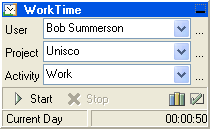 Analyzing the time you spend working on your computer is a facility provided by WorkTime. It accounts for the programs you run and the time you spend running them. It is launched on the Windows Start and it displays various information such as: total working time, working time for a period, time spent running a program or user-defined program group such as Games, Internet, Work etc. Analyzing the time you spend working on your computer is a facility provided by WorkTime. It accounts for the programs you run and the time you spend running them. It is launched on the Windows Start and it displays various information such as: total working time, working time for a period, time spent running a program or user-defined program group such as Games, Internet, Work etc.
With WorkTime you can carry out comparative analysis of time spent with different programs/program groups and all reports are printable. WorkTime supports multiple users; it has a multi-language interface and provides an alarm and countdown timer. It also reminds you to take regular breaks to prevent computer-related injuries.
Want to check it out?
Visit www.nestersoft.com/worktime/
Posted in Main, Security, Shareware, Utilities, Windows | No Comments »
|
|
|




