Archive for the 'Main' Category
Friday, February 15th, 2008
 Linkstash is a program for managing your bookmarks. It has surprisingly cool and useful features, considering most “bookmark manager” things don’t really do anything too amazing or especially useful. It manages all your bookmarks and works with all the main browsers, Internet Explorer, Firefox, Netscape and Opera, very useful if you like to use more than one browser. It also opens and closes with the browser. Linkstash is a program for managing your bookmarks. It has surprisingly cool and useful features, considering most “bookmark manager” things don’t really do anything too amazing or especially useful. It manages all your bookmarks and works with all the main browsers, Internet Explorer, Firefox, Netscape and Opera, very useful if you like to use more than one browser. It also opens and closes with the browser.
It has lots of features including :
- Dead links checker and updater,
- Favorites sync,
- Color highlighting of folders/links,
- Fields for comments, ratings, etc.,
- Secure encrypted password safe with automated password control for auto website log-on.
Its even available in a portable version!
I was very impressed with this program, definitely the best bookmark manager I’ve come across yet. Multiple backups, option to encrypt the whole bookmark file, even configure certain sites to open in certain browsers. Lots more features than I can go into detail with here.
Like the sound of it? More information at the homepage here
Posted in Browsers, FireFox, Information Management, Main, Password Manager | No Comments »
Wednesday, February 13th, 2008
 FoxLingo is an add-on for Firefox that describes itself as ” The ultimate Language tool”. It claims to simplify the process of translating online information from a foreign language into the one you understand. It has a massive choice of languages to translate between and you can choose which ones are most useful to you and add them in the toolbar. FoxLingo is an add-on for Firefox that describes itself as ” The ultimate Language tool”. It claims to simplify the process of translating online information from a foreign language into the one you understand. It has a massive choice of languages to translate between and you can choose which ones are most useful to you and add them in the toolbar.
It supports translation between 45 languages and accomplishes this with the help of 35 online translation services. It also has over 100 links to various language learning websites.
As well as translating text entered into the search box, you can search foreign pages using terms written in your own language, translate full webpages and even translate webpages automatically by detecting their country domain extension.
As with all online translators, the results will sometimes be not exactly perfect, but you’ll still get the general idea.
Further information and download it for Firefox here.
(Note: You might wanna check out potential privacy issues raised! See reviews at download link page.)
Posted in FireFox, Main | No Comments »
Wednesday, February 13th, 2008
 It’s all too common these days for good software to become “bloatware” after a few versions. What was once a good program can easily become bloated with countless features that you can barely understand, let alone ever have a use for. It’s all too common these days for good software to become “bloatware” after a few versions. What was once a good program can easily become bloated with countless features that you can barely understand, let alone ever have a use for.
So it’s refreshing to find this little program that does one useful thing and does it simply and good. It’s called Soprano and it plays audio files (mp3, ogg, wma, wav) it also supports streaming. It requires no installation, so is therefore portable naturally. It has its own compact playlist in a resizable window and supports dragging and dropping of songs or folders. It can be hotkey driven by editing the included hotkeys.txt file to your own liking.
In short, it plays music files and is easy to use, uses minimal resources and it’s free. A great music player for those who like to keep things simple yet functional! All weighing in at only 340kb as of this writing! So good things DO come in small packages.
You’ll find more details and can download it at the homepage here.
Posted in Audio, Main, Music | No Comments »
Wednesday, February 13th, 2008
 Nowadays its pretty easy to make simple videos to upload online to websites like YouTube, etc. A lot of people simply use Windows Media Maker as it does the basics well and is already included with Windows. VideoSpin is a similar free program that does the same sort of things as Windows Media Maker, but a few extra things too. Nowadays its pretty easy to make simple videos to upload online to websites like YouTube, etc. A lot of people simply use Windows Media Maker as it does the basics well and is already included with Windows. VideoSpin is a similar free program that does the same sort of things as Windows Media Maker, but a few extra things too.
In use, it’s very similar indeed, you simply drag and drop your video clips or music to the timeline where you can arrange, cut, crop etc and you can also add transition effects. So far this is sounding very much like Windows Media Maker right? Thats very true, but in my opinion it has a much more attractive and user friendly interface/layout and unlike Windows Movie Maker, VideoSpin has a fairly good title editor. It also includes an option of uploading finished videos straight to YouTube.
To sum it up , it’s worth checking out if you want a change from Windows Media Maker, it’s like a much improved version with better text titling and a more user friendly interface. Check more info and download it here.
Posted in Main, Video, Web 2.0, Web services | 1 Comment »
Tuesday, February 12th, 2008
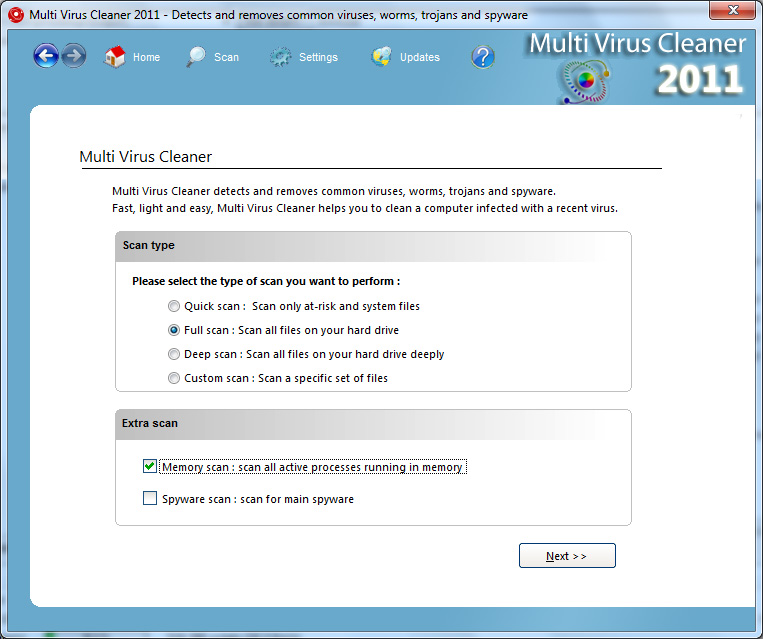 Multi Virus Cleaner is a very interesting piece of software for the simple reason that it is a tool that you use in a very specific and specialized situation, but when you do need to use that tool it delivers with a startling amount of effectiveness. The Multi Virus Cleaner, contrary to what the name might imply, is not a piece of software that you use as an anti-virus software. Anti-virus software comes with virus protection and regular scanning facilities, but at the same time is a full-featured way for you to prevent viruses from infecting your computer and ruining anything that you might have on your hard drive. Multi Virus Cleaner is a very interesting piece of software for the simple reason that it is a tool that you use in a very specific and specialized situation, but when you do need to use that tool it delivers with a startling amount of effectiveness. The Multi Virus Cleaner, contrary to what the name might imply, is not a piece of software that you use as an anti-virus software. Anti-virus software comes with virus protection and regular scanning facilities, but at the same time is a full-featured way for you to prevent viruses from infecting your computer and ruining anything that you might have on your hard drive.
However, this is not what Multi Virus Cleaner does. Multi Virus Cleaner is to be used when your computer gets infected by a virus and you then need to remove the virus from your computer. An anti-virus software might not be able to help you with some viruses, but the Multi Virus Cleaner can dispose of over 3400 types of virus, worm, Trojan and dialer. It also happens to be updated on a regular basis, meaning that more functionality is added to it all the time. This is simply one of the best free virus fighting tools out there and should be in the arsenal of every computer user when they need to remove a virus that has infected their system.
More information is available at http://www.viruskeeper.com/us/mvc.htm.
Posted in Developer, Internet, Main, Security, Shareware, Windows | No Comments »
Monday, February 11th, 2008
 Have you ever wanted to make your own comic strip, but the problem is that you can’t draw to save your life? Check out Pixton. It’s basically a user-defined comic creator, no artistic ability required. Have you ever wanted to make your own comic strip, but the problem is that you can’t draw to save your life? Check out Pixton. It’s basically a user-defined comic creator, no artistic ability required.
It allows you to make your own comic by positioning body parts, choosing facial expressions, skin color, hair etc. You also get the option of “remixing” other peoples comics or letting people remix yours (the original remains unchanged, it just makes a copy that can be changed around). The interface takes a little getting used to, but after a couple of minutes you’ll soon have your first basic comic-strip.
Admittedly, it may be basic, as it’s currently only stick figure characters, but its cool how you can reposition their body in every way and create your own facial expressions to match your speech bubbles. This flexibility in expressing your characters can lead to a surprisingly cool comic-strip. You’ll still need to supply a good imagination though!
Try it out for yourself at the Pixton site here, it all works online, no downloading required!
Posted in Main | No Comments »
Monday, February 11th, 2008
The MediaInfo Lite software is just a lighter version of the MediaInfo software in the sense that a number of the more complicated features from the software have been removed in order to decrease the resources on your computer that the program uses when it happens to run. The core functionality remains within the MediaInfo Lite software however and therefore people that are looking for basic functionality in terms of their media files in a package that does not eat up their RAM need look no further than MediaInfo Lite.
The basic functionality of the software is simply the ability to analyze media files that are on your hard drive or are on any attached media that you happen to have. This means that you can use MediaInfo Lite in conjunction with any media file in order to get the format of that file, the resolution that the file has if it is a video, the duration of the media file and a number of other pieces of essential information that will be required if you want to build and maintain an accurate listing of all your media files.
There is also extendable functionality through a shell for Windows Explorer, which allows you to gain that information about media files without having to actually go through the software. When the shell is installed, you will get that information when you hover over the file with your pointer.
More information is available at http://www.codecguide.com/download_other.htm#mediainfo.
Posted in Codec, Main, Video | No Comments »
Thursday, February 7th, 2008
 There’s a lot of online storage services in the last few years, some better than others. But ADrive has to be the one with the largest amount of storage space yet (tell me if I’m wrong) with a massive 50GB of space. No, it wasnt a typing error, thats right 50GB of online storage space for free. There’s a lot of online storage services in the last few years, some better than others. But ADrive has to be the one with the largest amount of storage space yet (tell me if I’m wrong) with a massive 50GB of space. No, it wasnt a typing error, thats right 50GB of online storage space for free.
Its currently in beta and is totally free to sign up to and use. You simply sign up with your email address for a free account and then you can start using it immediately. It even allow you to do complete folder uploads, as well as drag and drop support. You also can optionally share files. What’s more, the maximum file upload size is a whopping 2gb.
I’d recommend trying out this site to anyone who has a lot of data they’d like to back up remotely, as the site is very well designed and very usable, the user upload interface is very easy to use too. This storage service is surely raising the bar in online storage with the huge amount of storage offered alone. Another good thing is they seem to take data storage very seriously and professionally as you can see by reading this link http://adrive.com/technology
More info and try it out for yourself by visiting the homepage here.
Posted in Main, Web services | 7 Comments »
Wednesday, February 6th, 2008

CanYouRunIt is an online tool that gamers are sure to find useful.
If you’ve ever bought a game and excitedly brought it home only to find out that your computer is unable to run it, then this is a site worth adding to your bookmarks. It has an ever-growing list of computer games, mostly current popular titles. You simply select the one you’re interested in buying/installing, – you can safely accept any prompts that pop up, as it needs to scan your system. This takes about a minute or so.
It gives a detailed rundown on several areas such as graphics card, free memory and processor requirements for the game in question. The report is detailed yet simple enough for just about anyone to understand. It compares the games minimum system requirements to your systems capabilities, letting you know clearly if you’re able to run that game. This is a cool tool for example, for parents who’d like to make sure their computer can run the game their little one has been begging them for,(also suitable for the big kid in all of us who needs a break from work at times!)
Further info and start using it right away by going to the homepage here.
Posted in Games, Main | 1 Comment »
Monday, February 4th, 2008
 Quickbot is an online bot that can be a useful addition to your MSN Messenger contact list. You simply add Quickbot to your MSN buddy list and then it can help you out in several ways. You do this by simply adding “bot@techie.com” to your buddy list. Quickbot is an online bot that can be a useful addition to your MSN Messenger contact list. You simply add Quickbot to your MSN buddy list and then it can help you out in several ways. You do this by simply adding “bot@techie.com” to your buddy list.
The functions it has are controlled by typing commands (listed on the homepage below or just type “help” to it in MSN Messenger). It can provide translations for most of the European languages and Chinese. You can also do a bunch of other things ranging from doing calculations, telling the weather, news headlines, reversing text, random quotations,and generating insults, among others.
It’s an interesting tool as there’s nothing to install or download and it therefore takes up no space on your computer. It also replies to non command specific messages with humorous (if somewhat limited) artificial intelligence, which is a fun touch.
For full list of features check out the homepage here.
Posted in IM, Main | 1 Comment »
|
|
|




