Archive for the 'Main' Category
Wednesday, July 25th, 2007

So you’ve bought your new laptop or monitor and everything is shiny new and fine and dandy, right?
Well maybe not, a certain percentage of new LCD screens contain whats known as dead pixels or stuck pixels. It’s an inevitable occurance in some monitors, as during manufacturing, it would cost too much to check and replace every monitor which has them.
This program allows you to check for any dead or stuck pixels. Dead pixels are pixels on the screen that don’t ” switch on” and a stuck pixel is one that is permanently stuck at one color., this program could be of use to you, but I cant help thinking of the old saying …”What you don’t know, won’t trouble you”… since it’s usually very hard to tell if you have this “problem” anyway. So if for whatever reason, you absolutely need to know, you can download it for free right here.
If not, even if your monitor is affected, it’s usually virtually unnoticeable anyway, so don’t worry, move on and forget you ever read this : )
Posted in Developer, Freeware, Information Management, Main, Utilities, Windows | No Comments »
Tuesday, July 24th, 2007
 BS Player is yet another media player, but its one that’s worth checking out. Maybe you don’t like the standard media players such as Windows media player? (You wouldn’t be alone!) How about using this skinnable, highly functional media player that has some useful features. BS Player is yet another media player, but its one that’s worth checking out. Maybe you don’t like the standard media players such as Windows media player? (You wouldn’t be alone!) How about using this skinnable, highly functional media player that has some useful features.
BS Player plays LOTS of types of video and audio files (check out the homepage below for the full list), it also has some advanced features like TV output settings, aspect ratio adjustment, Multilingual interface, subtitles (all types), media library, skins, hotkeys, etc.
60 million users worldwide and its availability in 90 languages says a lot of people like this player, so go see or yourself. (One negative thing to say though, adware in the free version!)
Click here for more info and more details of its features.
Posted in Audio, Developer, Freeware, Internet, Main, Movies, Multimedia, Shareware, Video, Windows | No Comments »
Tuesday, July 24th, 2007
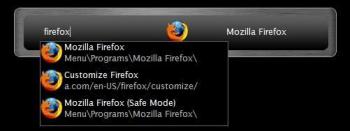 Ever close a file only to realize that you still want to edit it and don’t feel like navigating back to it just to re-open it? Ever wish you could load any program on your computer within two seconds without even having to touch your mouse? Well, a freeware Windows application called “Launchy” takes care of this for you. All you have to do is hit a a keyboard combination on your keyboard to load Launchy, which is just a small input dialog box, and then start typing what you’re looking for on your computer and Launchy will find it for you. Ever close a file only to realize that you still want to edit it and don’t feel like navigating back to it just to re-open it? Ever wish you could load any program on your computer within two seconds without even having to touch your mouse? Well, a freeware Windows application called “Launchy” takes care of this for you. All you have to do is hit a a keyboard combination on your keyboard to load Launchy, which is just a small input dialog box, and then start typing what you’re looking for on your computer and Launchy will find it for you.
Launchy will even guess what you’re looking for based off limited information. For example, if you just typed “oshop” Launchy would show you “Photoshop CS2” (if you have Photoshop CS2 installed), along with any other files on your computer that have the string “oshop” in them. You then pick which entry you want to launch from the drop-down menu Launchy presents and viola!
By default, the hotkey combination Launchy uses is “Alt+Spacebar”. However, this hotkey is the standard Windows hotkey to open the shortcut menu on Windows applications (the menu that let’s you minimize/maximize/restore/etc windows) and I like using Alt+Space+X to quickly maximize windows without using my mouse so I changed the hotkey in Launchy’s preferences to ‘Win+Space’ so that I can just press the Windows Logo key (located directly next to the Alt key) and spacebar to load Launchy. (more…)
Posted in FireFox, Freeware, Internet, Main, Utilities, Windows | No Comments »
Tuesday, July 24th, 2007
There are a number of important things in the world today and while Windows XP does have a lot of interesting stuff to it, there are certainly other things that it could benefit from having as well. For example, there are a number of different things that can be incorporated into the Windows XP install CD through the use of this addon pack. It was a pack created by Ryan VanderMeulen and it includes a number of useful addons that people interested in getting additional functionality out of Windows XP might want to take a close look at.
Some of these include:
- Shell extensions for the copy to and move to functions that are available in file manipulation;
- HashTab 1.9; a specific program that increases the functionality of Windows XP;
- Microsoft Calculator Plus 1.0; a replacement for the calculator file that normally comes with Windows XP and an upgrade in terms of what you can actually do with the calculator itself;
- MS HighMAT CD Writing wizard;
- MS Make Cab;
- An extension to the font properties and the OpenType fonts that come already with Windows XP;
- A remote desktop client; something that is lacking in the original Windows XP install.
More information can be found at http://www.ryanvm.net/msfn/updatepack.html
Posted in Business, Developer, Internet, Main, OS Updates, Programming, Utilities, Windows | No Comments »
Monday, July 23rd, 2007
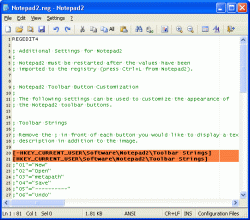 Notepad2 is another small, fast notepad replacement with some unusual features. It includes zoom, rectangular selection, regular expressions, and more. Notepad2 is another small, fast notepad replacement with some unusual features. It includes zoom, rectangular selection, regular expressions, and more.
Notepad2 is a fast and light-weight Notepad-like text editor with syntax highlighting. The good thing about this software is that it can be run out of the box without installation, and does not touch your system’s registry.
Want to check it out? It’s free, so go check it out at http://www.flos-freeware.ch/notepad2.html
Posted in Developer, Freeware, Main, Programming, Text, Windows | No Comments »
Monday, July 23rd, 2007
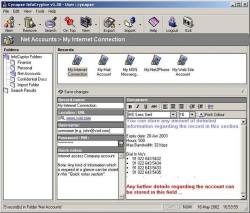 There are always times in life when we need to have some of our important information stored. Whether you are talking about the school notes that you want to use for the test, the work notes that are top secret or the phone number of that girl you just got at the bar last night (wink), you need a place to store information that you want not only to be kept safe, but also to be kept secret. InfoCryptor refers to itself as being a multi-user secure information storage application and upon taking a closer look at what it actually has the ability to do, this turns out to be exactly the case at hand. There are always times in life when we need to have some of our important information stored. Whether you are talking about the school notes that you want to use for the test, the work notes that are top secret or the phone number of that girl you just got at the bar last night (wink), you need a place to store information that you want not only to be kept safe, but also to be kept secret. InfoCryptor refers to itself as being a multi-user secure information storage application and upon taking a closer look at what it actually has the ability to do, this turns out to be exactly the case at hand.
Whether you are looking to store text documents, notes, passwords, e-mails, security codes, diagnostics or anything else, you will find a way to store it with ease with InfoCryptor. The interface is very easy to use so that you don’t have to spend hours accessing the information that you want to keep safe. More impressive than anything else perhaps is how amazing the software itself actually is. InfoCryptor can be your friend and your assistant all bundled up in one and this ultimately is why it has become so popular amongst so many different people.
More info can be found at http://www.cynapse.co.in/infocryptor/index.php
In the latest updated version recently released, Cynapse InfoCryptor 1.50.1203, the Major change is the fixed component update URL.
Posted in Business, Commercial, Developer, Information Management, Internet, Main, Security, Shareware | No Comments »
Friday, July 20th, 2007
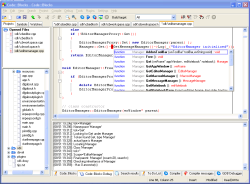 One of the most important things in today’s world has to be without a doubt the idea of programming. It’s all around us in today’s world and object oriented programming in particular has definitely become a very useful skill to have. Of all of the different object oriented languages around, C++ is perhaps the most used one. Along with its sister languages of C# and C (the original one of the series), it has been a great help to a lot of programmers to build the software of their dreams. One of the most important things in today’s world has to be without a doubt the idea of programming. It’s all around us in today’s world and object oriented programming in particular has definitely become a very useful skill to have. Of all of the different object oriented languages around, C++ is perhaps the most used one. Along with its sister languages of C# and C (the original one of the series), it has been a great help to a lot of programmers to build the software of their dreams.
Few things in the realm of computer science are more satisfying than putting the finishing touches on a piece of programming and with the Code::Blocks Studio you can have that satisfaction again and again in a way that is much easier than what those old time program compilers would have you do.
Gone are the days of looking at the blue screen with the yellow text; gone are the days where you had no functionality whatsoever! This program allows you to write and compile your C++ software in a method that provides you exceptional functionality in a package that is exceptionally user friendly. Programmers sometimes fear user friendliness because they fear it cuts back on functionality; but this software is the exception to that rule.
Give it a try and you’ll see why! More information can be found at http://www.codeblocks.org/
Posted in Developer, Internet, Linux, Main, Open Source, Programming, Shareware | 1 Comment »
Wednesday, July 18th, 2007
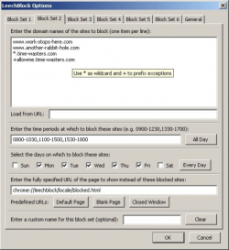 Leechblock is an add-on for Firefox which aims to help you get more out of your time. It does this by allowing you to selectively block access to websites defined by you during certain hours of certain days or everyday if you prefer. Leechblock is an add-on for Firefox which aims to help you get more out of your time. It does this by allowing you to selectively block access to websites defined by you during certain hours of certain days or everyday if you prefer.
So in theory, no longer will you waste too much time on things such as browsing social network sites and other peoples social bookmarks or reading too much of a certain free encyclopedia website. Instead, you can use your time more productively and exclude those time-eating activities to certain hours only or certain days only.
It also allows you to add a password, not to protect it, but to make it more difficult for you to try to by-pass it during moments of weakness! It’s highly customizable and does what it says, (at least until you give in and disable it!)
Check it out at the LeechBlock homepage here.
Posted in Browsers, Business, Design, Developer, FireFox, Freeware, Main, Time Managment, Utilities, Windows | No Comments »
Wednesday, July 18th, 2007
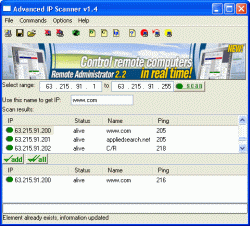 Whether you are looking for a way to get in touch with someone you missed on a chat room or simply just looking for information about some of the local computers on a network, you can used the Advanced IP Scanner 1.5 to get all of the lowdown that you could possibly want. You can actually use its amazing and user friendly interface to do everything in a breeze and when you take a look at the Advanced IP Scanner 1.5 in relation to other stuff that’s out there, it really becomes a no brainer as to which software type is better. Whether you are looking for a way to get in touch with someone you missed on a chat room or simply just looking for information about some of the local computers on a network, you can used the Advanced IP Scanner 1.5 to get all of the lowdown that you could possibly want. You can actually use its amazing and user friendly interface to do everything in a breeze and when you take a look at the Advanced IP Scanner 1.5 in relation to other stuff that’s out there, it really becomes a no brainer as to which software type is better.
The 1.5 version comes with an updated interface, more online help functions, improved scanning ability, optimized speed and a lot of odds and ends fixed up here and there. You can actually use the scanner with one-click methodology as a lot of its more important functions are actually accessible through one click. It is a very impressive piece of software that people have been using to help themselves for a very long time now and it only gets more impressive with each new release.
More information about it can be found at http://www.radmin.com/radmin/utility
Posted in Business, Developer, Freeware, Internet, Main, Utilities, Windows | 2 Comments »
Monday, July 16th, 2007
 Many people absolutely hate the idea of having to use a paper dictionary and thesaurus. First of all, you’d have to shuffle through both of them separately and that could waste a lot of time, but also flipping through a bunch of pages looking for one specific word is a time consuming process that could make you less productive in the future. Many people absolutely hate the idea of having to use a paper dictionary and thesaurus. First of all, you’d have to shuffle through both of them separately and that could waste a lot of time, but also flipping through a bunch of pages looking for one specific word is a time consuming process that could make you less productive in the future.
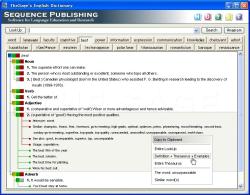
The solution? Take the dictionary and thesaurus to the electronic realm! And that’s exactly what’s been done here with TheSage’s English Dictionary and Thesaurus. It is a multifaceted software program with a complete dictionary and thesaurus of the English language. What’s even better is that it runs locally on your computer so you don’t even have to be connected to the Internet in order to use it.
You can not only search thousands of different entries with just one convenient search bar, but you can actually use wildcards and anagrams in your search; not to mention that the software itself keeps a history of searches for you to refer back to at a later date. You can even go ahead and customize the look of the dictionary program to make it look exactly how you want. It’s simply fantastic!
More information can be found at http://www.sequencepublishing.com/thesage.html
Posted in Developer, Dictionary, Freeware, Information Management, Internet, Main, Social Software | No Comments »
|
|
|




