Archive for the 'Main' Category
Wednesday, February 21st, 2007
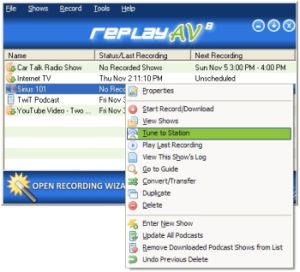 If you’ve been having problems with capturing some kinds of streaming video and audio, you are going to love this shareware. It is called Replay AV. If you’ve been having problems with capturing some kinds of streaming video and audio, you are going to love this shareware. It is called Replay AV.
Replay AV is an easy way to capture all kinds of Streaming Video and Audio, and I mean all kinds, including Radio Shows, Online TV Broadcasts, video clips, audio archives, and Podcasts. With Replay AV, you can enjoy a lot of things as you can record clips instantaneously, or schedule recordings to happen automatically later. Replay AV allows you to automatically convert to 36 different video and audio formats, including iPod Video, iPod Audio and iPod Audiobook.
You will love the fact that Replay AV comes with an integrated Replay Media Guide that lets you pick Radio Shows, Radio Stations, TV Stations and Podcasts to record very easily, with just a single click.
For more info, CLICK HERE or visit http://applian.com/replay-av/
Posted in Audio, Developer, Internet, Main, Multimedia, Radio, Shareware, Utilities, Video, Windows | No Comments »
Wednesday, February 21st, 2007
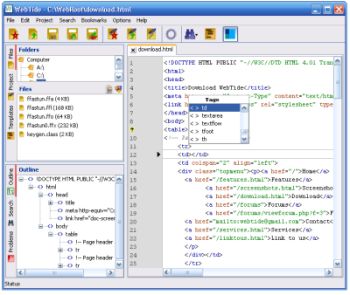 If you are a web developer, you are going to find this particular freeware useful. It’s called WebTide. If you are a web developer, you are going to find this particular freeware useful. It’s called WebTide.
WebTide text editor is a new free HTML editor. This useful tool is designed to help web developers in creating fast and professional websites. WebTide is also a programmer text editor for fast HTML error checks.
WebTide presents you with cool features like:
- The Outline- a code navigation tool
- The Project- a file management tool vital for a HTML editor
- The Search Tools- vital tools when you are handling large projects with a HTML editor
- The Coding Tools- help you increase you development speed
The latest version, WebTide 3.0, has these changes:
- PHP basic function completion
- HTML context completion
- CSS context completion
- XML completion
- CSS validation
- JavaScript validation
- XML validation
- Error underline in the editor
- Quick open project file
- JavaScript formatting
And lots more.
Want to check it out? Click Here
Posted in Business, Design, Developer, Internet, Main, Programming, Shareware | No Comments »
Tuesday, February 20th, 2007
 You really need to check this out; Screamer radio! You really need to check this out; Screamer radio!
Screamer Radio is a simple to use Internet radio player and recorder. Supported stream formats include Shoutcast/Icecast (mp3 and ogg) and Windows Media Audio.
Screamer radio is really a huge database of radio stations, you will enjoy the fact that you can easily record what you are listening to and even playback on multiple soundcards. One recording feature of this cool tool you will love is the Recording Buffer which allows you to start recording in the middle and still save the whole song.
The latest version, Screamer Radio 0.3.9 Build 20070217 Beta, which has just been recently released, has these changes:
- Removed an unnecessary callback from BASS and improved recorder semaphore protection hopefully eliminating any potential deadlock bugs therein
- Preset update notification added on manual update (silent on automatic)
- Implemented basic proxy auth support
Want to check it out! IT’S FREE!!!! CLICK HERE or Go To http://www.screamer-radio.com/ for more info and download.
Posted in Developer, Fun, Internet, Main, Music, Radio, Utilities, Windows | No Comments »
Tuesday, February 20th, 2007
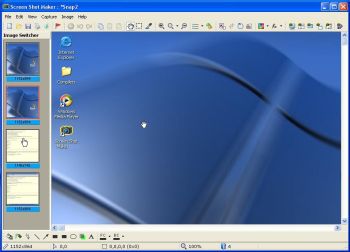 If you’ve been looking for an easy to use software to capture and save anything and everything on your screen, you might want to check out Screen Shot Maker. If you’ve been looking for an easy to use software to capture and save anything and everything on your screen, you might want to check out Screen Shot Maker.
Screen Shot Maker can capture and save everything that you can see on the screen of the computer. One thing you will love about this software is its ease of use; practically anyone can use this program. You will also appreciate the fact that it can help you accomplish a lot of things.
Here are some of its cool features:
- various and powerful modes of capturing: full screen region, any visible control (such button or window), active window, active window without border, repeat last capture
- allows to capture multiple images
- flexible color picker and color conversion tool
- most used graphics formats for saving images – BMP, JPEG, TGA, GIF, PNG, PCX, WMF, EMF and TIFF
- allows editing images: color adjustment, image processing (resize, rotate at any angle, flip, crop, filters),large set of graphics elements (shapes, arrows, free lines, fill, spray, text, highlight etc.)
- allows printing images, to copy to clipboard or save
- automatic mode for saving your time
Want to check it out? CLICK HERE
Posted in Design, Developer, Fun, Main, Shareware, Shell and Desktop, Utilities, Windows | No Comments »
Tuesday, February 20th, 2007
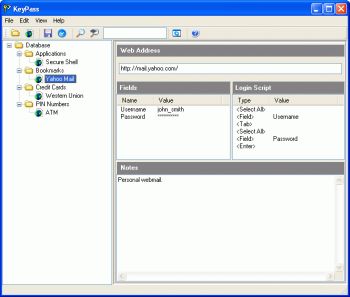 Here is a very useful tool for you to manage your passwords easily. It is called KeyPass. Here is a very useful tool for you to manage your passwords easily. It is called KeyPass.
KeyPass is a program that makes it very convenient for you to store all your passwords in a single database. Your passwords are kept highly secured as they are encrypted using 448-bit blowfish. No matter how many passwords you have or how complex they are, KeyPass makes it really very easy to access them, all you need is a single “master password” to unlock the passwords in the database.
What I really love about this cool tool is the fact that it doesn’t use the usual cut and paste or drag and drop style of some other password mangers. KeyPass types the passwords for you when a user-defined “hot key” is pressed, working with any browser or application, including web browsers, terminal emulators and corporate services easily.
The latest version, KeyPass 4.5.2 which was just released yesterday, has these latest changes:
- The last version introduced a bug where the expiry date is not properly refreshed when navigating from a database entry to a folder. This has been fixed
- KeyPass’ help file cannot be launched under Windows Vista 64. This has been fixed
Want to check it out? Visit http://www.dobysoft.com/products/keypass/
Posted in Backup, Business, Developer, Main, Security, Shareware, Windows | 1 Comment »
Monday, February 19th, 2007
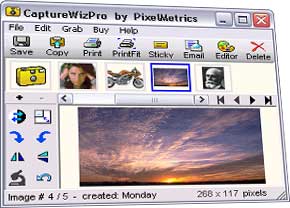 Sometimes you need to capture a screen. The easy way of course is PrintScreen, but sometimes that is bamboozled by software taking over the keyboard map. An easy way to capture those hard to get images, especially scrolling pages, and even audio and video is CaptureWizPro. Sometimes you need to capture a screen. The easy way of course is PrintScreen, but sometimes that is bamboozled by software taking over the keyboard map. An easy way to capture those hard to get images, especially scrolling pages, and even audio and video is CaptureWizPro.
The new Windows Vista compatible version has a pop-up capture toolbar with easy to use tools, easy to see visible over any screen, and simple three step capture process thats easy to follow. You also have additional utilities like sticky notes, a thumbnail viewer and programmable hot keys.
Go here to get it and find out more. And here you can find out some useful tips.
Posted in Design, Developer, Main, Photo, Shareware, Shell and Desktop, Utilities, Windows | No Comments »
Monday, February 19th, 2007
 Here is a cool software to improve and generally add fun to your chatting experience. It’s called CamTrack. Here is a cool software to improve and generally add fun to your chatting experience. It’s called CamTrack.
CamTrack is a unique webcam software. What’s unique about it? It enhances the way people video chat. With CamTrack you can amuse your friends with funny animations and webcam emoticon; keep your face centered automatically with automatic Face Tracking; use text overlays by writing directly on the webcam video; improve the quality of your webcam picture with noise reduction or share pictures with your friends through your webcam.
It’s really a cool way to video chat. It’s a shareware, go check out the trial version first and see if it’s worth it, I’m guessing you will really love this cool and fun software.
CLICK HERE for more info and trial download.
Or
Visit http://www.digitalpeers.com/
Posted in Chat, Developer, Internet, Main, Shareware, Social Software, Video, Windows | 1 Comment »
Monday, February 19th, 2007
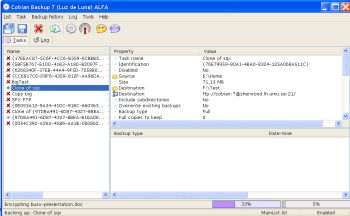 Need a program to back up your files and directories easily? You may want to check out Cobian Backup. Cobian Backup is a multi-threaded program you can use to backup your files and directories from their original location to other directories/drives in the same computer or other computer in your network. Need a program to back up your files and directories easily? You may want to check out Cobian Backup. Cobian Backup is a multi-threaded program you can use to backup your files and directories from their original location to other directories/drives in the same computer or other computer in your network.
The good thing about this program is that it uses very few resources, so it can even be running on the background on your system, checking your backup schedule and executing your backups when necessary.
One thing worthy of note about Cobian Backup is that it’s not really like your usual backup application: it only copies your files and folders in original or compressed mode to other destination, and as a result creating a security copy. In fact the best way to describe this open source is as a “Scheduler for security copies”.
The latest version of this cool open source, Cobian Backup 8.2.0.186 which just hit the World Wide Web last week has these latest changes:
- Fixed a bug that prevented some directories to be deleted
- A new Slovenian translation has been included
- Hungarian language updated
Want to Check It Out? CLICK HERE
Posted in Backup, Developer, Main, Open Source, Programming, Security, Utilities, Windows | 1 Comment »
Monday, February 19th, 2007
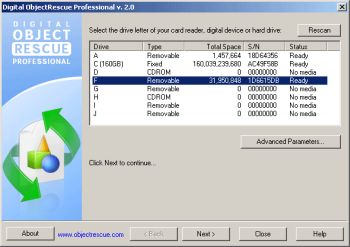 If you’ve ever lost precious data to deleted or corrupt files you’ll know the value of a good recovery or rescue software. ObjectRescue Pro recovers lost data from different or should I say diverse multimedia devices, from digital cameras, audio recorders, MP3 & WMA players to PC, PDAs and mobile phones. If you’ve ever lost precious data to deleted or corrupt files you’ll know the value of a good recovery or rescue software. ObjectRescue Pro recovers lost data from different or should I say diverse multimedia devices, from digital cameras, audio recorders, MP3 & WMA players to PC, PDAs and mobile phones.
You will really enjoy using this cool tool as it supports recovery from Hard Drives, Compact Flash cards (type I/II), IBM Microdrives, SmartMedia cards, MultiMedia cards, Secure Digital cards and Memory Sticks, and any other storage device with the addition of wide range file format support: DOC, XLS, ZIP, RAR, JPEG, AVI, MOV, MP3, WMA, WAV, etc.
The latest version which was released towards the end of last month, ObjectRescue Pro 4.4.1 has these latest changes:
- Vista support implemented (administrative rights request added)
- Added dialog if program is started without administrator privileges
Save yourself a headache and go get this software, it really is very useful.
CLICK HERE or visit http://objectrescue.com/products/objectrescuepro/ to check it out.
Posted in Business, Developer, Information Management, Main, Mobile, Multimedia, Shareware, Utilities, Windows | 2 Comments »
Friday, February 16th, 2007
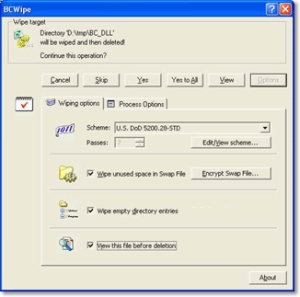 Performing just standard deletion of files doesn’t mean those files actually leave your hard drive. But with BCWipe, you can be sure of a total and secure file deletion. Performing just standard deletion of files doesn’t mean those files actually leave your hard drive. But with BCWipe, you can be sure of a total and secure file deletion.
BCWipe is designed to securely delete files from your hard drive. The truth is standard file deletion still leaves the contents of the so called deleted file on your disk. Unless it has been overwritten by files subsequently saved, it can be recovered using standard disk utilities.
‘Wiping’ is a term used to describe the process of shredding the contents of a file or disk space. It is impossible to restore any data that has been properly wiped. That’s exactly what BCWipe does. Working quickly and integrated with Windows Shell, BCWipe shreds data in files so that they can not be recovered by any means.
The latest version, which has just been recently released, BCWipe 3.10 has a major change of being worked on for Vista Support.
CLICK HERE for more info.
Posted in Developer, Information Management, Main, Security, Shareware, Utilities, Windows | No Comments »
|
|
|




