Archive for the 'Main' Category
Thursday, January 11th, 2007
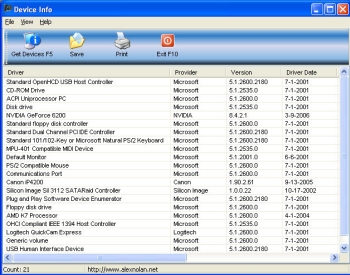 Here is a nice software for you get the necessary info on your devices. Device Info. Here is a nice software for you get the necessary info on your devices. Device Info.
Device Info lists all your PC’s device drivers and their provider and version. This simple spin off utility from System Spec now has a new version out. The new version, Device info 1.07 Beta, has these cool changes:
- It will now skip over any registry errors and continue to display devices. The previous version would not display any data if it encountered a registry error
- Additional columns of Information now displayed about the devices such as driver date etc
- Changed to Windows XP style.
One thing is worthy of note about this version, it only works on OS higher than Windows 98. The publisher promises that future versions will work on Windows 98.
This simple tool is available for you for free. Check it out!
Posted in Business, Commercial, Developer, Freeware, Information Management, Main, Security, Shell and Desktop, Utilities | No Comments »
Thursday, January 11th, 2007
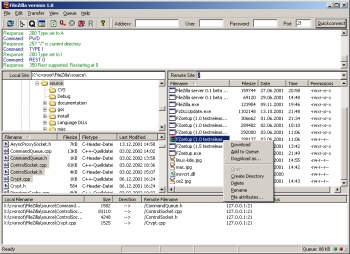 Here is a fast and reliable FTP client and server with lots of useful features and an intuitive interface for you; it is called FileZilla. Here is a fast and reliable FTP client and server with lots of useful features and an intuitive interface for you; it is called FileZilla.
FileZilla is a powerful FTP-client for Windows NT4, 2000 and XP. Designed for ease of use and with support for as many features as possible, while maintaining great speed and reliability, this software is really a nice piece of work.
Some of the main features of FileZilla, which you are sure to enjoy include:
- Ability to resume Uploads/Downloads (if the server supports it)
- Site Manager with folders
- Timeout detection
- Firewall support
- SOCKS4/5 and HTTP1.1 Proxy support
- SSL secured connections
- SFTP support
- Multi-language support
etc.
The latest version, FileZilla 3.0.0 Beta 5 which has just been released has these changes incorporated into it:
- Fix format string vulnerabilities
- Partial drag and drop support
- Lots of small bug fixes
Want to check it out? CLICK HERE!
Posted in Business, Developer, Freeware, FTP, Information Management, Internet, Main, Programming, Utilities, Windows | 1 Comment »
Thursday, January 11th, 2007
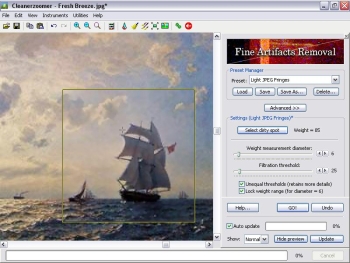 Here is a useful tool for you. Cleanerzoomer. With this cool tool you can now get great enlarged images from your zoomed pictures. Here is a useful tool for you. Cleanerzoomer. With this cool tool you can now get great enlarged images from your zoomed pictures.
Cleanerzoomer utilizes a complex multi-stage processing technology to accurately remove digital noise and JPEG artifacts from images; another modification of that technology, called ‘Nova Sharpen’, allows sharpening of blurry images producing an amazing crispness never possible to achieve using standard techniques.
With Cleanerzoomer, you can get clean and clear images of your zoomed pictures. It uses Nova Sharpen after an image has been enlarged to achieve an absolutely crisp and naturally-looking zoomed picture. I really love the additional Auto-balance instrument which is able to balance color, and other intricate qualities of the image greatly increasing its realism.
The new version, Cleanerzoomer 3.6 has been updated for speed optimization.
CLICK HERE to check it out!
Posted in Business, Design, Developer, Main, Multimedia, Photo, Shareware, Windows | No Comments »
Thursday, January 11th, 2007
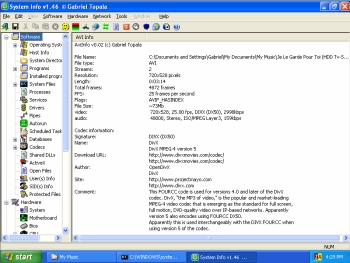 If you really want to get to your system inside out, you may consider checking out this software, SIW. If you really want to get to your system inside out, you may consider checking out this software, SIW.
SIW, which simply means System Information for Windows, is a Read-Only / Display-Only System Information tool that gathers detailed information about your system properties and settings. This great utility includes detailed specifications for Motherboard, BIOS, CPU, Devices, Memory, Video, Drivers, Ports, and Printers.
You will really appreciate this software as it displays information about Operating System, Installed Programs, Processes, Services, Serial Numbers, Users, Open Files, System uptime, Users, Network, Network Shares, and more, as well as real-time monitors for CPU, Memory, Page File usage and network traffic. And that’s not all; it also displays currently active network connections, Passwords hidden behind asterisks, installed codecs, and more. It’s a really useful tool.
Are you really interested in getting to know your system inside out? Get more info and download: http://www.gtopala.com/index.html
Posted in Developer, Information Management, Main, Shell and Desktop, Utilities, Windows | No Comments »
Thursday, January 11th, 2007
 If you are in need of a freeware that can help you deal with computer problems, eliminating system crashes, freezes and slow-downs and returning your system to the top shape status it used to have, then you need this software, Advanced WindowsCare Personal. If you are in need of a freeware that can help you deal with computer problems, eliminating system crashes, freezes and slow-downs and returning your system to the top shape status it used to have, then you need this software, Advanced WindowsCare Personal.
Advanced WindowsCare is a comprehensive PC care utility that takes a one-click approach to help protect, repair and optimize your computer. It provides an all-in-one and super convenient solution for PC maintenance and protection.
The one-click thing and the speed at which it does its job really make this software a must-have.
The recent version, Advanced WindowsCare Personal 2.3.0 has this latest changes incorporated into it:
- Added “News Center” Window
- Improved compatibility with Windows Vista
- Fixed “Registry Scan” bugs
- Fixed “Security Defense” bugs
- Fixed general bugs
How about checking it out yourself? Seeing is believing! Click Here!
Posted in Business, Developer, Information Management, Internet, Main, Security, Shareware, Utilities, Windows | No Comments »
Wednesday, January 10th, 2007
Autostitch is a cool little program I was glad to find and is sure to appeal to many amateur photographers. You know those times when you’re on vacation and you just wish you could fit more into the frame?
Well all you gotta do from now on is take two or more pictures and this program will “AutoStitch” them together, making one big picture.
Perfect for panoramic wide shots. I tried this out on a couple of shots I took of a very tall cathedral when i was in Prague. AutoStitch works its magic exactly as promised, I was pretty impressed. It’s simple to use, you simply select 2 or more photos and then it does its thing, creating a new image with all the photos as one!
You can get it right over here and see some good examples of it in use.
Posted in Design, Developer, Main, Photo | No Comments »
Wednesday, January 10th, 2007
 ArtRage is a really cool art program that is almost as good as the real thing, but without the expense or mess! You can “paint” very impressive paintings on your computer. ArtRage is a really cool art program that is almost as good as the real thing, but without the expense or mess! You can “paint” very impressive paintings on your computer.
There is obviously a lot of added benefits, if you make a mistake you can easily undo or change it, unlike the real world.
You can create any style of painting or drawing that you can imagine, from cartoons to oil paintings. There’s lots of different things to use such as crayons, pencils ,oils, chalk, markers etc. Paints smear and blend just like the real world and things can be adjusted in many ways. The interface is very easy to use, simple and tidy.
They say a picture is worth a thousand words, so rather than me just describe what’s possible with this program, check out some of the examples people have created here at the official ArtRage forum (plus i dont feel like typing a thousand words!)
Check out the ArtRage site for more details, the free edition is free (surprise surprise) but the full edition is only $19.95, surprisingly good value in my opinion!
Posted in Business, Commercial, Design, Developer, Freeware, Internet, Main, Multimedia, Shareware, Windows | No Comments »
Wednesday, January 10th, 2007
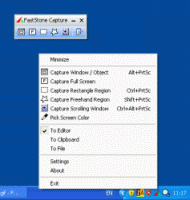 Here is a powerful and really cool utility for you. It’s called FastStone Capture. This is a powerful, flexible and intuitive screen capture utility. Here is a powerful and really cool utility for you. It’s called FastStone Capture. This is a powerful, flexible and intuitive screen capture utility.
I really enjoy the fact that it allows you to capture anything on the screen including windows, objects, full screen, rectangle regions, freehand-selected regions and scrolling windows/web-pages. FastStone Capture’s innovative features such as floating Capture Panel, hotkeys, resizing, cropping, text annotation, printing, emailing etc makes it a really useful tool to have.
The latest version FastStone Capture 5.1 has these changes:
- Added “Make Background Transparent” under Edit menu
- Added options in the Settings to show/hide “Screen Magnifier” and “Screen Color Picker” on Capture Panel
- Added “Bring to Front”/”Set to Back” to the right-click menu in Draw tool
- Changed hotkey for Draw tool from T to D
CLICK HERE to learn more and get a download.
Posted in Business, Commercial, Design, Developer, Main, Multimedia, Shareware, Utilities, Windows | 2 Comments »
Wednesday, January 10th, 2007
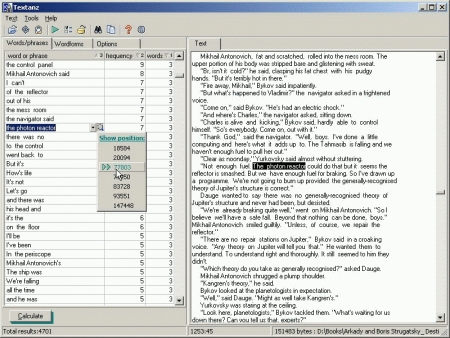
Are you in need of a software that can analyze text loaded from any source? If yes, this software is for you. It is called Textanz.
Textanz analyzes the text loaded from any source, and calculates frequencies of words, phrases or word forms. This information allows you to detect excessive use of words and constructions in text. Such a stylistic control is important, almost as much as the already-standard spell checking function.
The major change in the recent version, Textanz 2.3, which is becoming popular these days is the introduction of Charts – graphic presentation of frequency calculations.
Want to check it out? CLICK HERE!
Posted in Business, Developer, Information Management, Main, Shareware, Text, Windows | No Comments »
Tuesday, January 9th, 2007
 Belarc Advisor is a free little program thats sole purpose is to generate a detailed report of the hardware and software on your computer. Belarc Advisor is a free little program thats sole purpose is to generate a detailed report of the hardware and software on your computer.
This can become very useful information if you are upgrading hardware and need to know detailed information such as types of hardware such as memory chips or other installed components.
You simply run it and it generates a html page in your browser with detailed information about your computer’s hardware and your installed software.
The information includes Local Drive Volumes, memory Modules, printer information, Installed Licenses, Installed software, Multimedia information and a lot more. The report can be save for later or re-generated as needed.
It’s free for non-commercial use and you can get it here.
Posted in Business, Developer, Freeware, Information Management, Main, Utilities, Windows | No Comments »
|
|
|