Archive for the 'Windows' Category
Tuesday, September 11th, 2007
 Perl has become a very important language for people to use to the point where there are so many courses around on it. It seems that every few years a new language becomes important in the online game and ultimately if you are interested in figuring out exactly what Perl is about, you might have to at least follow one of the free online courses in order to get that information. However, software packages designed to help people are always useful and ActivePerl for Windows 5.8.8.822 is a great example of a very helpful software package. Perl has become a very important language for people to use to the point where there are so many courses around on it. It seems that every few years a new language becomes important in the online game and ultimately if you are interested in figuring out exactly what Perl is about, you might have to at least follow one of the free online courses in order to get that information. However, software packages designed to help people are always useful and ActivePerl for Windows 5.8.8.822 is a great example of a very helpful software package.
It is a free and easy to install distribution of Perl that carries with it guarantees of high quality combined with one of the most comprehensive support packages for Perl around. It of course comes with the core Perl functionality and then in addition to that tacks on the Perl Package Manager that you can use to install any CPAN packages you might need. In addition to that, you also get some of the more popular modules for Perl as well as complete support through an online help function. Ultimately, it is the free software of choice if you want to really have full-length support for all your Perl endeavours.
More information can be found on the product’s home page at http://www.activestate.com/Products/ActivePerl/
Posted in Commercial, Design, Internet, Main, Programming, Shareware, Windows | No Comments »
Monday, September 10th, 2007
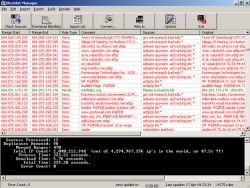 If you’re someone that is into the peer-2-peer experience, then chances are you already know what a blacklist is. A blacklist is something used by a company or private individual to keep track of which sources over p2p networks are sources known to contain harmful information along the lines of viruses, malware or spyware. These sources are then blocked by the blacklist so that their harmful stuff can’t ever reach the downloading corporation or citizen. It is an innovative idea that has allowed many people to enjoy their p2p experience in peace. If you’re someone that is into the peer-2-peer experience, then chances are you already know what a blacklist is. A blacklist is something used by a company or private individual to keep track of which sources over p2p networks are sources known to contain harmful information along the lines of viruses, malware or spyware. These sources are then blocked by the blacklist so that their harmful stuff can’t ever reach the downloading corporation or citizen. It is an innovative idea that has allowed many people to enjoy their p2p experience in peace.
The Blocklist Manager 2.6.5 Beta takes this concept to the next level by allowing you not only to create your own blacklist, but also to take advantage of the large number of blacklists that have already been created by different people and companies around the world. The Blocklist Manager 2.6.5 connects to all of those different sources and downloads their blacklists. Then, it checks for duplicates and reduces the list down to its smallest size. Once it has that super blacklist, it imports it to all your firewall applications and p2p software packages so that you can be protected from all of the known bad sources.
It’s a handy little program and you can get more info about it from http://www.bluetack.co.uk/modules.php?name=Content&pa=showpage&pid=14
Posted in Beta version, Developer, Information Management, Internet, Main, Security, Utilities, Windows | No Comments »
Monday, September 10th, 2007
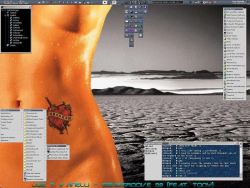 One of the reasons that software has become so popular in today’s world is because different pieces of software can do very specialized things. The perfect example of this is the IceAmpTitle 2.8.0.0. This is a piece of software designed to do one thing and one thing only, but it is able to do that one thing in a fantastic way. One of the reasons that software has become so popular in today’s world is because different pieces of software can do very specialized things. The perfect example of this is the IceAmpTitle 2.8.0.0. This is a piece of software designed to do one thing and one thing only, but it is able to do that one thing in a fantastic way.
The basic idea behind the IceAmpTitle 2.8.0.0 is to get the name of the song that your music player is currently playing and display it in a window on your desktop. The positioning of the window can be changed as can a number of other aesthetic things such as the font size and colour. There are a lot of customizable things to the software package and the final result, but the main point is that you can get the software to retrieve the name of the current song and unobtrusively display it in your desktop so that you don’t have to waste your time pulling up the music player in order to find the song name and artist name.
It currently works for the WinAmp, Sonique, K-Jofol, FreeAmp and Coolplayer audio players and it is expected that more will be following.
More information is available at territory.cjb.net. Click here for direct download.
Posted in Audio, Catalogue, Commercial, Freeware, Information Management, Lyrics, Main, Shell and Desktop, Windows | No Comments »
Monday, September 10th, 2007
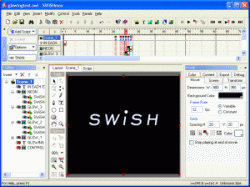 Flash animation is really going to be a big part of the internet for a time to come, simply because so many people are able to derive so much pleasure out of both the creation and the viewing of flash animations. Everything from political songs to humorous skits to hilarious games have been created in flash format and that is why the ability to create flash animations is such an important one for people to have. Of course, the Macromedia Flash software is horrendously expensive and that is why software like the SWiSH Max 1.0 Build 2006.06.29 is so important. Flash animation is really going to be a big part of the internet for a time to come, simply because so many people are able to derive so much pleasure out of both the creation and the viewing of flash animations. Everything from political songs to humorous skits to hilarious games have been created in flash format and that is why the ability to create flash animations is such an important one for people to have. Of course, the Macromedia Flash software is horrendously expensive and that is why software like the SWiSH Max 1.0 Build 2006.06.29 is so important.
This piece of software literally has everything you could possibly need in order to make beautiful flash animations. These animations can be made to be completely interactive because you can use the software to make shapes and motion paths, amongst all of the other typical flash features. One of the interesting aspects of the program is the fact that it has 230 built-in animated effects for you to use and it also has scripting language functionality for people that would like to use it to create exceptionally detailed and complicated flash animations.
More information can be found on the product’s homepage.
Posted in Animation, Commercial, Design, Flash, Main, Shareware, Windows | 1 Comment »
Friday, September 7th, 2007
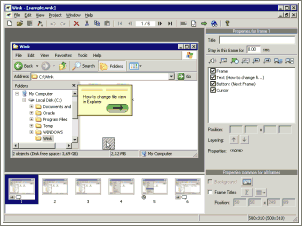 One of the big parts of the online world today centers on creating tutorials. There are so many different people discovering the internet every single day in today’s world that in order to help them along it is important for people to create tutorials. Online tutorials or alternatively tutorial software is easy to use and if done right can make things fun for the person during what might otherwise be something that is quite boring to learn. Of course, unless you have a lot of time, chances are that you aren’t going to be too thrilled with the prospect of creating a tutorial from scratch. One of the big parts of the online world today centers on creating tutorials. There are so many different people discovering the internet every single day in today’s world that in order to help them along it is important for people to create tutorials. Online tutorials or alternatively tutorial software is easy to use and if done right can make things fun for the person during what might otherwise be something that is quite boring to learn. Of course, unless you have a lot of time, chances are that you aren’t going to be too thrilled with the prospect of creating a tutorial from scratch.
This is where Wink 2.0 Build 1000 comes in. It is a tutorial creation software that is completely free to use. Basically, you can use it to do things like capture screenshots to use within your tutorial, import pictures that you already have, provide explanatory captions, provide step by step instructions and even provide navigation for the tutorial so that you can split different sections of the tutorial up into different parts. It is also something that allows you to actually show mouse movements to different parts of software, so that there is absolutely no way that someone reading your tutorial could mix something up. It finally has the ability to create tutorials in flash format, executable format, .pdf format, .html format or many other commonly used tutorial formats.
More information is available from http://debugmode.com/wink/
Posted in Business, Commercial, Freeware, Information Management, Main, Social Software, Utilities, Windows | 1 Comment »
Friday, September 7th, 2007
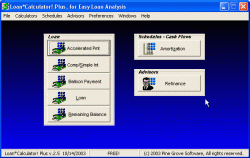 Loans are a big part of the lives of most people now, simply because a well thought out and well executed loan can bring you something big in your life well before you would have been able to get it otherwise. Mortgages, home equity loans, lines of credit and a number of other loans are taken out every day by people from different walks of life all hoping to be able to use the loan in order to help better their lives. Calculators are helpful when it comes to using loans and therefore it is important for people interested in loans to have software to help them along. Loans are a big part of the lives of most people now, simply because a well thought out and well executed loan can bring you something big in your life well before you would have been able to get it otherwise. Mortgages, home equity loans, lines of credit and a number of other loans are taken out every day by people from different walks of life all hoping to be able to use the loan in order to help better their lives. Calculators are helpful when it comes to using loans and therefore it is important for people interested in loans to have software to help them along.
That is where the Loan*Calculator! Plus 2.6 comes in. It is a piece of software containing seven different types of loan calculators. It includes a calculator for simple interest (only applied once a year) and compounded interest (calculated and applied multiple times each year). It also has calculators to help you calculate the factors of your loan as well as a calculator to help you figure out what your exact remaining balance is. In addition to that, it has a feature that can calculate your amortization schedule as well as an advisor function that can help you with potential refinances. In addition to that, it also has accelerated payment and balloon payment calculators.
It’s completely free to download and more information is available at http://www.pine-grove.com/Loan%20Calculator%20Plus/
Posted in Browsers, Developer, Finance, Freeware, Main, Social Software, Windows | 1 Comment »
Friday, September 7th, 2007
 OpenDNS is a free service that claims to speed up your internet page load times,along with protecting you from phishing sites. In addition to this,it can also optionally block adult sites. OpenDNS is a free service that claims to speed up your internet page load times,along with protecting you from phishing sites. In addition to this,it can also optionally block adult sites.
DNS stands for Domain name system (or service or servers) and while not being a household phrase like many of todays computer technology terms are becoming, it is still an integral part to how the internet works. Everytime you click a link or type an address into your browser address bar such as blahblahblah.com, DNS servers (usually at your ISP) translate that into the ip for the site (a bunch of numbers) and load the page, the alternative to that would be typing in a bunch of numbers for every website, so we all should be thankful for DNS!
OpenDNS claims to be organized in such a way that makes it much faster than most regular DNS servers.Also if you type in a slightly misspelled address into your browser address bar, it will automatically fix this and take you to the correct site.
So far it does seem to be speeding up my page load times and it doesn’t even require a download, just a minor setting change! For more information, go to the OpenDNS site.
Posted in Browsers, Developer, Information Management, Internet, Main, Open Source, Programming, Windows | No Comments »
Friday, September 7th, 2007
 With the advent of wireless internet, what people are seeing more and more often is that the areas around them are full of wireless connections. With people sending data back and forth as well as using wireless for convenience purposes, there is a good chance that some place near you has wireless connections that can be used. Ultimately, it is a great thing to have simply because of the convenience factor, but if you are interested in using some of the wireless signals around you then you really need to know where they happen to be first. With the advent of wireless internet, what people are seeing more and more often is that the areas around them are full of wireless connections. With people sending data back and forth as well as using wireless for convenience purposes, there is a good chance that some place near you has wireless connections that can be used. Ultimately, it is a great thing to have simply because of the convenience factor, but if you are interested in using some of the wireless signals around you then you really need to know where they happen to be first.
For example, if you want to know exactly where the wireless networks in your area are, then you can use the NetStumbler 0.4.0 to find out. It is a program that has the ability to search your area and find out the location of any 802.11b and 802.11a wireless local area networks. In addition to that, it includes GPS functionality so that you can use the two together as a powerful tool for quite literally “stumbling onto the internet.” The name is quite apt in that sense and many people have tried and approved this completely free piece of software.
More information can be found at http://www.stumbler.net/
Posted in Developer, Freeware, Information Management, Internet, Main, Utilities, Windows | No Comments »
Thursday, September 6th, 2007
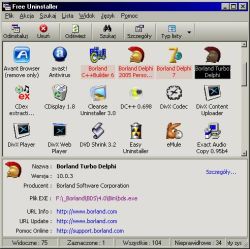 When you take a look at all of the different software pieces out there, what you often see is that there are a number that seem to created for some weird purpose that you wouldn’t really use on any regular basis. The Free Uninstaller is the exact opposite of that; it is a software program that is created with a very common use in mind. When you consider the add/remove program that comes with the Windows software, you can come to the conclusion that there are a lot of faults in it. It doesn’t work all the time and the permissions issues can sometimes really derail any plans you might have had for that annoying piece of software that you just can’t seem to uninstall. When you take a look at all of the different software pieces out there, what you often see is that there are a number that seem to created for some weird purpose that you wouldn’t really use on any regular basis. The Free Uninstaller is the exact opposite of that; it is a software program that is created with a very common use in mind. When you consider the add/remove program that comes with the Windows software, you can come to the conclusion that there are a lot of faults in it. It doesn’t work all the time and the permissions issues can sometimes really derail any plans you might have had for that annoying piece of software that you just can’t seem to uninstall.
There is actually a dual purpose to this program. First, it replaces the add/remove program that comes with Windows with a far more effective uninstaller; one that can remove any application that was installed with the Windows operating system. In addition to that, it also has the ability to remove entries from the uninstall list; fixing the other big problem with Windows add/remove software. Have you ever noticed a piece of software on the list that you just removed and tried to remove it again only to be told it wasn’t a real file? That’s a very frustrating situation and the Free Uninstaller 1.1 can be used to make sure it doesn’t happen again.
More info can be found at http://www.freeuninstalleren.glt.pl/
Posted in Developer, Files and Folders, Freeware, Information Management, Main, Security, Utilities, Windows | No Comments »
Thursday, September 6th, 2007
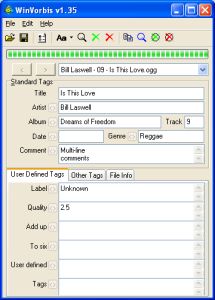 One of the coolest things ever developed for the use of online music files is the concept of Ogg Vorbis tags. These are tags attached to audio files that allow you to give information to other people that might be using the same file later on to listen. For example, if you’ve ever seen a file pop up in your Windows Media Player with information regarding the name of the artist, the title of the song, the year of publishing, the CD cover or anything else, what you were looking at was very likely a Vorbis tag! One of the coolest things ever developed for the use of online music files is the concept of Ogg Vorbis tags. These are tags attached to audio files that allow you to give information to other people that might be using the same file later on to listen. For example, if you’ve ever seen a file pop up in your Windows Media Player with information regarding the name of the artist, the title of the song, the year of publishing, the CD cover or anything else, what you were looking at was very likely a Vorbis tag!
Well, now you can create and maintain your Vorbis tags through the use of the WinVorbis 1.60 editor. It is a multi-file editor that really makes the process of encoding and entering tags for a whole CD’s worth of songs as easy as possible. Not only does it allow you easy editing of the typical artist and title tags, but it also allows you define up to a maximum of six other tags specifically for use with your CD files. It is about as user friendly as can be and the reason that so many people like it is specifically because it tags music tagging and makes it extremely easy.
Oh and by the way it’s free as well; more information on it can be found at http://winvorbis.stationplaylist.com/
Posted in Developer, Files and Folders, Freeware, Information Management, Main, Music, Windows | No Comments »
|
|
|




