Archive for the 'Windows' Category
Monday, January 29th, 2007
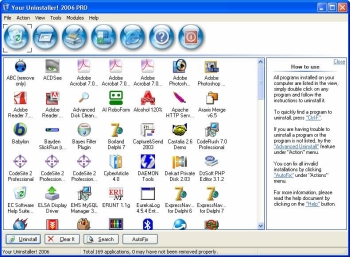 If you want to try something new or you are just looking for a worthy substitute to the Windows Add/Remove program, you might want to check this program out. It’s called Your Uninstaller! If you want to try something new or you are just looking for a worthy substitute to the Windows Add/Remove program, you might want to check this program out. It’s called Your Uninstaller!
Your Uninstaller! provides a total solution for your uninstalling tasks. Built to be a worthwhile alternative to the Windows Add/Remove program, it offers a much more user-friendly way to remove applications that you don’t need or those that have become a source of headache to you on your computer and it’s faster too. It starts up about 5-10 times faster than Add/Remove program.
Your Uninstaller! displays appropriate icons applications, so that you can easily find out the application you want to uninstall. One other good thing about this software is that it can automatically detect rubbish registry keys and entirely delete them with your permission.
Had it with those stubborn programs that just won’t go away, try Your Uninstaller!
Check it out: http://www.ursoftware.com/
Posted in Business, Commercial, Developer, Information Management, Main, Security, Shareware, Utilities, Windows | No Comments »
Friday, January 26th, 2007
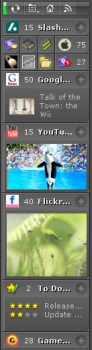 Got this cool way for you to stay on top of things easily. It’s called KlipFolio. It is a small, smart, and easily configurable personal dashboard. Got this cool way for you to stay on top of things easily. It’s called KlipFolio. It is a small, smart, and easily configurable personal dashboard.
What can it do?
It can be used to monitor anything online and I mean anything; weather, stocks, news, RSS feeds, auctions, whatever, the choice is yours, right on your desktop. So you can really be on top of things easily with KlipFolio, you don’t have to go check on your favorite sites always to know what the latest happenings are, this personal dashboard brings it all to your desktop.
The latest version, KlipFolio 4 Beta B , which just got released yesterday has these changes:
- Added auto-hide, always-on-top and normal window layering modes
- Layouts now saved for floating, strip and sidebar modes within session
- Minimize menu item, system tray icon and Win+K shortcut now minimizes everything
- Klips can now be collapsed by clicking on ghosts
- Made it easier to enter a sidebar mode gesturally when overshooting target
- Klips no longer ‘bumping’ offscreen (so easily)
Etc.
CLICK HERE for more info and download!
Did I fail to mention that it’s free? Yeah it is absolute free.
Posted in Commercial, Developer, Freeware, Information Management, Internet, Main, Shell and Desktop, Social Software, Windows | 1 Comment »
Friday, January 26th, 2007
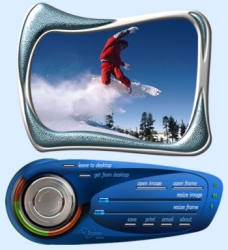 It’s time to give your photos a new look. Yeah! This software can help achieve that easily. It’s time to give your photos a new look. Yeah! This software can help achieve that easily.
Photo Frame Show is an imaging and desktop enhancement program that adds frames to digital photos in order to enhance your personal albums, projects, Web sites or desktop wallpapers.
Are you wondering how frames can change the look of your photos? Try it you’ll be surprised by the outcome.
There are a variety of frames to choose from, you just have to add them to your images and you’ll be surprised what you’ll get. You can save your framed images in popular formats for use on your projects; print your framed images through an on-screen virtual printer; email your framed images to your friends directly from within the program.
But you see it’s not just about frames , the coolest thing about this software is that it enables you to blend your favorite pictures with your desktop wallpaper by dragging and dropping them at your desired location on screen.
Go check it out: CLICK HERE!
Posted in Commercial, Design, Developer, Fun, Main, Shareware, Shell and Desktop, Windows | No Comments »
Thursday, January 25th, 2007
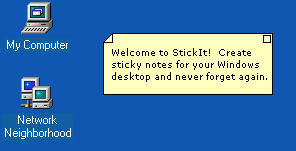 If you are one of those people who easily forgets things and needs constant reminders to do what you are supposed to do, you need to check this out, I call it the sticky reminder but the publisher calls it StickIt. If you are one of those people who easily forgets things and needs constant reminders to do what you are supposed to do, you need to check this out, I call it the sticky reminder but the publisher calls it StickIt.
StickIt is a Windows desktop sticky note application. With this cool tool you can create notes and place them anywhere on your computer. I love the fact that the notes don’t just disappear, they remain where they are – where you left them, until you close them –and get this; they will even reappear after rebooting your computer. So no forgetting those important stuff again.
The notes can be customized by you. You are given the option of selecting from a wide range of text colors and background colors for your notes. Go and check it out! It’s free.
CLICK HERE for download and more info.
Posted in Business, Design, Developer, Information Management, Main, Shareware, Shell and Desktop, Social Software, Text, Utilities, Windows | No Comments »
Thursday, January 25th, 2007
 There is this cool screensaver that keeps you abreast of currents events that I want you to check out. It’s called News Screensaver. There is this cool screensaver that keeps you abreast of currents events that I want you to check out. It’s called News Screensaver.
News Screensaver will allow you to always have the most recent news, weather forecasts and stock quotes on your computer screen.
The screensaver supports all RSS, RDF and Atom formats. The program comes with more than 100 links to variously themed news feeds, such as Top News, Business, Science, Sport, Regional, Technology, Industries, Health etc.
The cool thing about it is that it is customizable; you can add the necessary news feed yourself, so you can stay informed about the things that really interest you. It’s a cool way to get serious info regularly.
Check it out: CLICK HERE!
Posted in Commercial, Design, Developer, Fun, Information Management, Internet, Main, Shareware, Shell and Desktop, Utilities, Windows | No Comments »
Thursday, January 25th, 2007
 Trend Micro Anti-Spyware for the Web is an online tool that checks your machine for spyware, and helps remove any infections it locates and identifies. The software displays a report when it’s done listing the spywares detected and asks you if you want removal. Trick question. Trend Micro Anti-Spyware for the Web is an online tool that checks your machine for spyware, and helps remove any infections it locates and identifies. The software displays a report when it’s done listing the spywares detected and asks you if you want removal. Trick question.
You may have spyware if you machine is slow when opening programs or saving files, you suffer from interminable pop-up windows, you have a new browser homepage, or worst of all new and unexpected toolbars in your browser. The online spywarre checker fixes all that.
Spyware is more widespread and more dangerous than viruses these days so be safe. Go to Trend Micro for more.
Posted in Developer, Information Management, Main, Security, Shareware, Utilities, Web services, Windows | 2 Comments »
Thursday, January 25th, 2007
 Keeping track of employees or children? Want to know where they’ve been, what they’ve typed, what files they created? Ah how cynical and suspicious the world is, but with good reason. People do things on the Internet they wouldn’t like someone else to know about. And sometimes YOU need to know about it if you are a parent or an employer. Keeping track of employees or children? Want to know where they’ve been, what they’ve typed, what files they created? Ah how cynical and suspicious the world is, but with good reason. People do things on the Internet they wouldn’t like someone else to know about. And sometimes YOU need to know about it if you are a parent or an employer.
Keyloggers are good, but they take time to set up. Sometimes you don’t have time to install one. Sometimes you need SpyArsenal Detective. A simple EXE file, you can even have it on a memory stick. Run it and you get full information about the user activity on a target PC in just seconds. All the recent activity in a form you can explore and print. You can be in and out in moments and the machine is back to normal. And the price for this wonderful utility? Free.
Go to Spy Arsenal to find out more.
Posted in Commercial, Developer, Freeware, Information Management, Internet, Main, Programming, Security, Utilities, Windows | 1 Comment »
Wednesday, January 24th, 2007
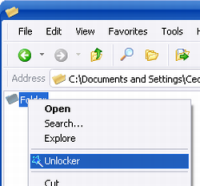 Have you have ever tried to delete some files or a folder full of files and recieved that annoying message telling you that a file cannot be deleted as it is in use or locked? Chances are you have, in that case, this is a handy little program to have around. Have you have ever tried to delete some files or a folder full of files and recieved that annoying message telling you that a file cannot be deleted as it is in use or locked? Chances are you have, in that case, this is a handy little program to have around.
You simply right click on the file that refuses to co-operate and select *unlock* from the right click context menu. This will gives you several (easy to understand) options such as Kill process, Unlock, Unlock all, etc.
This is one of those tiny little programs that you won’t need to use very often , but when you do, it’ll save you valuable time and frustration. It does exactly what it claims to do, no more, no less! Its freeware and you can download it right here.
Posted in Developer, Freeware, Main, Security, Utilities, Windows | No Comments »
Wednesday, January 24th, 2007
 Extracting data from an audio CD should be easy. It’s all digital data, right? What you copy onto your hard drive is an exact bit for bit copy of what was on the original CD. Wrong. Extracting data from an audio CD should be easy. It’s all digital data, right? What you copy onto your hard drive is an exact bit for bit copy of what was on the original CD. Wrong.
This is why sometimes copies sound muffled or distorted. Audio CDs, while digital, are still a very different standard from data CDs and getting an exact copy of the data isn’t quite as simple,technically speaking, as you might think.
For casual use there are any number of tools to extract tracks from audio CDs, but this is the tool for those who want the best.
Check out the website for a full list of features, more info, and the download.
Posted in Audio, Commercial, Developer, Main, Shareware, Utilities, Windows | No Comments »
Wednesday, January 24th, 2007
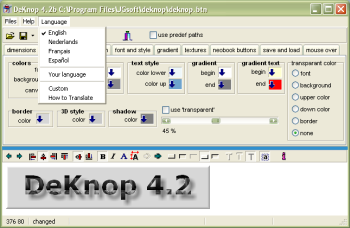 DeKnop (“The button” in dutch, in case you were wondering) is a freeware graphics editor that lets you create buttons for your web site. This makes it extremely easy as you don’t need any particular graphic designing knowledge. DeKnop (“The button” in dutch, in case you were wondering) is a freeware graphics editor that lets you create buttons for your web site. This makes it extremely easy as you don’t need any particular graphic designing knowledge.
Its interface provides a step by step way to create simple buttons for your web page, and why not being particularly advanced looking, it could still be useful for people who want basic buttons on their website for web links, navigation, etc.
Some of its features include automatic up/down effects for use in mouse over java scripts,gradients, ability to save button images as PNG, JPG, BMP or GIF(non LZW) format. DeKnop also supports projects, allowing you to save your work and continue on it later or reuse it for other jobs.
You can check it out here.
Posted in Business, Commercial, Design, Developer, Freeware, Information Management, Main, Shell and Desktop, Themes, Utilities, Windows | No Comments »
|
|
|




