Archive for the 'Windows' Category
Tuesday, December 19th, 2006
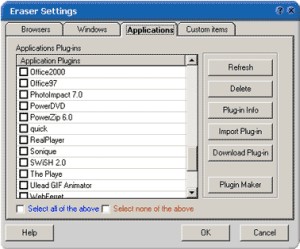 If you value your privacy online and you are in need of a software that will help achieve privacy protection with ease, you should try Track Eraser Pro. Tracks Eraser Pro will protect you by cleaning up all the tracks of Internet activities on your computer. If you value your privacy online and you are in need of a software that will help achieve privacy protection with ease, you should try Track Eraser Pro. Tracks Eraser Pro will protect you by cleaning up all the tracks of Internet activities on your computer.
What I really appreciate about Track Eraser Pro is that it’s an easy to use software. Only one click is enough to erase the cache, cookies, history, typed URLs, autocomplete memory, index.dat from your browser, and temp folder, run history, search history, open/save history, recent documents, etc.
Its free plugins gives you the opportunity to erase the tracks of up to 50 popular applications, such as playlist of Realplayer, Mediaplayer, QuickTime, recent files of Office, Acrobat, Winzip, etc easily.
That’s not all, a new version has just been recently released with these changes:
- Internet Explorer 7 fully supported
- Added support for Opera 9
- Added a Stop button
- Added Recycle Bin right click menu
- GUI optimized, Clean Hard Disk Free Space moved to Settings page main screen
- Minor bugs fixed
The only thing you might have an issue with like I did, is the price. It costs about $29.95. When I consider the fact that there certain freeware that does what it does, you may be tempted to ignore it. But it works very well and it has some extra features that is lacking in most other applications. Go check it out first! If you like it , go for it , if not don’t go past the trial version.
Are you ready to give it a try? CLICK HERE!
Posted in Commercial, Developer, Freeware, Main, Security, Utilities, Windows | No Comments »
Monday, December 18th, 2006
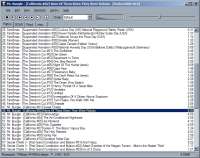 Foobar2000 is another music player program. It’s got a pretty basic interface, so its not exactly for someone who who expect tons of skins, or who likes looks rather than sound and functionality, but its still a perfectly simple and efficient player. It supports a lot of audio formats, WAV, AIFF, VOC, AU, SND, Ogg Vorbis, MPC, MP2, MP3, MPEG-4 AAC and more can be added through official add-ons. Foobar2000 is another music player program. It’s got a pretty basic interface, so its not exactly for someone who who expect tons of skins, or who likes looks rather than sound and functionality, but its still a perfectly simple and efficient player. It supports a lot of audio formats, WAV, AIFF, VOC, AU, SND, Ogg Vorbis, MPC, MP2, MP3, MPEG-4 AAC and more can be added through official add-ons.
Even if it doesn’t support skins, you can customize the way this player displays the main window as much as you want. Fonts, background colors and text formatting can be changed using scripting.It also supports keyboard shortcuts.Media management is another strong point that can be found in foobar. Users with huge playlists will be happy with this.
Finally, advanced audio features! It can prevent clipping, control the preamp level and there are some sound processing modules available. While it looks very basic, it’s actually very customizable, maybe a little too customizable for beginners, so i guess it can be either way, simple or advanced depending on what you want from it.
It’s free and you can check it out here.
Posted in Audio, Developer, Freeware, Main, Multimedia, Utilities, Voice, Windows | 1 Comment »
Monday, December 18th, 2006
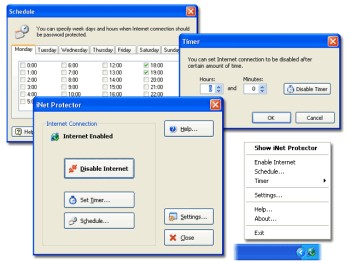 If you are a parent who wants to monitor and limit the time your children spend online or you are an employer concerned about the amount of time your employees spend online not doing the company’s work, then you might want to check out this software. It is called iNet Protector. If you are a parent who wants to monitor and limit the time your children spend online or you are an employer concerned about the amount of time your employees spend online not doing the company’s work, then you might want to check out this software. It is called iNet Protector.
iNet Protector helps to restrict access to the Web and password protect Internet connection. It allows you to enable and disable Internet connection any time. In order to enable Internet access, user defined password must be entered. The fact that there is some sort of flexibility, I mean you can schedule time periods when Internet connection should be disabled or enabled, makes this software useful.
A new updated version of this shareware was released a couple of days ago with the latest change being that the installer has been worked on to perform better.
Want to check it out? CLICK HERE!
Posted in Design, Developer, Internet, Main, Security, Shareware, Social Software, Utilities, Windows | 1 Comment »
Sunday, December 17th, 2006
 WinAMP is one of those must have programs. Some people swear by Windows Media Player but I’ve always found it to be a little bit dull. WinAMP has way better skins and visualizations. WinAMP is one of those must have programs. Some people swear by Windows Media Player but I’ve always found it to be a little bit dull. WinAMP has way better skins and visualizations.
With it you have access to their own Digital Music Store containing over 2,500,000 songs,and a thing called In2TV which is free episodes of classic TV streamed direct to your player. Also you have portable device support for iPod®, PlaysForSure®, and Creative® Devices. The player supports SHOUTcasts and also rips CDs to disc.
WinAMP is the cool audio player of choice. The pro version will cost you $20, but the free version is still available so check it out at http://www.winamp.com/player.
Posted in Audio, Commercial, Developer, Freeware, Main, Music, Shareware, Windows | No Comments »
Sunday, December 17th, 2006
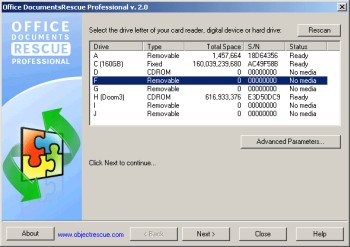 It could be really distressing not being able to find a valuable document you could have sworn was supposed to be there. Yeah! Believe me I Know that feeling. That’s why a software like Office DocumentsRescue Professional whose purpose is to retrieve your lost documents can really be a life saver. It could be really distressing not being able to find a valuable document you could have sworn was supposed to be there. Yeah! Believe me I Know that feeling. That’s why a software like Office DocumentsRescue Professional whose purpose is to retrieve your lost documents can really be a life saver.
Office DocumentsRescue Professional helps recover lost data from Hard Drives, CompactFlash cards (type I/II), IBM Microdrives, SmartMedia cards, MultiMedia cards (MMCs), Secure Digital (SD) cards, Memory Sticks, CD/DVD disks and any other storage device with the addition of wide range file format support: DOC, XLS, PPT, RTF, LIT, etc. It is an effective document recovery tool for Microsoft Word, Excel, PowerPoint, Project, Publisher, Visio etc
The real beauty of this software is that it doesn’t matter what caused your loss of document; PC crashes, accidental deletions, formatting of hard drive etc, Office Documents Rescue Pro gets it back for you. Isn’t it great?
Do you know how many jobs have been lost to lost documents? This might be your job saver, Check it out HERE.
Posted in Developer, Information Management, Main, Office, Shareware, Text, Utilities, Windows | No Comments »
Friday, December 15th, 2006
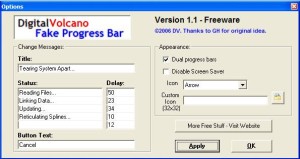 Fake Progress Bar is an application which creates a fake progress bar! With this “tool” you will be able to look busy when in fact you are just being lazy. Fake Progress Bar is an application which creates a fake progress bar! With this “tool” you will be able to look busy when in fact you are just being lazy.
This is by far the most useful program for anyone who wants to take a little break at work while the boss thinks you are being really busy! You will be able to create all kind of actions. If the predefined ones aren’t enough then you can create your own custom action for the progress bar.
Also it has a setting so your computer won’t go into screensaver mode keeping your computer looking really busy! ; )
You can grab it here, when ya get time outta your busy schedule of course!
Posted in Commercial, Developer, Freeware, Fun, Main, Shell and Desktop, Windows | No Comments »
Friday, December 15th, 2006
 Adobe just have released the first beta version of new Photoshop (CS3). One of the biggest (or can we say greatest) update in new version is that it will now run natively on Intel Macs. Adobe just have released the first beta version of new Photoshop (CS3). One of the biggest (or can we say greatest) update in new version is that it will now run natively on Intel Macs.
The official FAQ also mentions non-destructive Smart Filters, Quick Selection tool, Reine Edge, Automatic layer alignment and blending, Vanishing Point with multiple, adjustable angle perspective planes, and Black and White conversion.
The beta version of CS3 will be available for everybody here. If you want to find out more information on this topic visit blogs at Adobe’s website.
Posted in Business, Design, Developer, Mac Stuff, Main, Multimedia, News, Photo, Social Software, Windows | 3 Comments »
Friday, December 15th, 2006
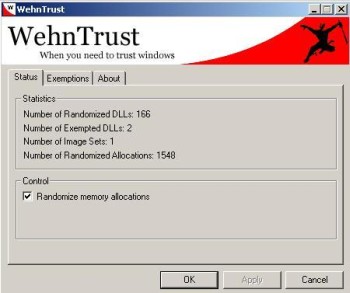 WehnTrust is a Host-based Intrusion Prevention System (HIPS) that provides secure buffer overflow exploitation countermeasures. It helps protect Windows-based computers against worms and malware that spread through software vulnerabilities. WehnTrust is a Host-based Intrusion Prevention System (HIPS) that provides secure buffer overflow exploitation countermeasures. It helps protect Windows-based computers against worms and malware that spread through software vulnerabilities.
In simpler terms, it’s added protection for your computer against mailicious software being used against it, such as hacking attempts. Once WehnTrust is installed, all applications on the computer are automatically protected against nearly all forms of vulnerability exploitation. It isn’t a replacement for antivirus and antispyware products. It’s meant to be used in along with antivirus and antispyware products to help protect a computer from all of the various ways in which it could be compromised.
It’s a useful layer of protection for those concerned about the security of there computer. But the downside is it doesn’t really offer much feedback if it should actually manage to prevent something.
It’s available in a pay-for ‘Commercial’ version and a ‘Home user’ version which is free. You can get more information by reading the faq and download it from here.
Posted in Developer, Freeware, Internet, Main, Security, Shareware, Windows | No Comments »
Friday, December 15th, 2006
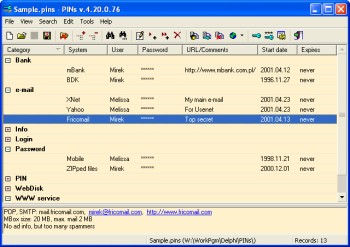 If you’re like most people who spend much time online, pretty soon you’ll find yourself with a lot of usernames and passwords for various emails, forums, social network sites etc online. This leads to it being very hard to remember them all. If you’re like most people who spend much time online, pretty soon you’ll find yourself with a lot of usernames and passwords for various emails, forums, social network sites etc online. This leads to it being very hard to remember them all.
Some people choose to just use the same password for various sites, but this is very insecure to do. If someone were to find out your password, then they’d have access to everything! But its too hard to remember different passwords for everything right? Thats where PINs comes in handy. It’s a freeware password manager that does all the remembering for you.
It uses a secure 448 bit Blowfish algorithm to ensure the data isn’t crackable. Also the password used for securing access to stored data is not saved anywhere. The cool thing I like about this particular password manager is that it doesn’t require any installation. This means that it can be run from a USB drive or even a floppy disk. So you can easily have access to all your passwords from any computer. Even if you should happen to lose it, your passwords are securely encrypted and can’t be accessed without the master password.
It has a lot of useful features such as unlimited number of entries and data files, a powerful random password generator, expired passwords tracking, and more…
Go check it out at the homepage here for more details and to download it, it’s freeware! : )
Posted in Developer, Freeware, Information Management, Main, Security, Utilities, Windows | 2 Comments »
Friday, December 15th, 2006
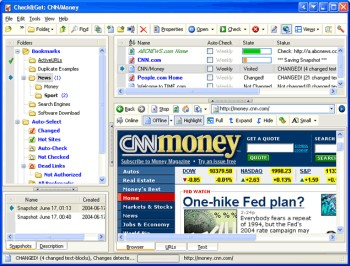 Need an easier way to check the latest updates on your favorite websites? This software does just that and much more in a quick and easy way. Need an easier way to check the latest updates on your favorite websites? This software does just that and much more in a quick and easy way.
Check&Get is a handy and powerful bookmark manager and web monitoring program that lets you check your favorite Internet pages and detect if their content has changed or has become unavailable. Not only that, it can notify you of changes or web-server downtime by bookmark highlighting, by pop-up message, by playing a sound file or by sending you e-mail message with the updated web page. And what really makes this software a delight is that it can even download the updated file from the Internet and save it to the specified folder on your hard disk. So you can browse it offline.
A new updated version of Check&Get has just been released version 3.1.0.440. The latest changes in the new updated version:
- Compatibility with Internet Explorer 7 added
- Additional Proxy settings added
- Usage of memory and performance optimized
Want to try it out? Click HERE!
Posted in Commercial, Developer, Information Management, Internet, Main, Shareware, Social Software, Windows | No Comments »
|
|
|




