
Blogs at Free Downloads Center

Archive for the 'Windows' Category

Microsoft Office 2007

Thursday, November 16th, 2006
microsoft_office_badge.JPGNow that Microsoft has finalized the code of Microsoft Office 2007 at last, corporate customers will be able to get their hands on Office Small Business 2007 soon.

The rest of us will have to wait until early next year to buy a boxed version of Word, Excel, PowerPoint, Outlook and the other members of the Office 2007 family. The consumer editions of Microsoft Office 2007 will hit the stores early next year, in step with the Vista operating system.

Some of the major changes in Office 2007 include the fact that major programs each organize features into tabs rather than drop-down menus and dialog boxes and New XML-based files, which squeeze more data into fewer kilobytes have been added. It is worthy of note that you won’t be able to open a file in the new format immediately when using earlier versions of the programs. This will make sharing work with people without the new version [those who haven’t upgraded] difficult. (more…)
SendToAny

Thursday, November 16th, 2006

1140546040-1.jpgIn the world of freeware and shareware there are not many programs that deliver exactly what they promise but this simple freeware really sets itself apart as it does exactly what it is supposed to do.
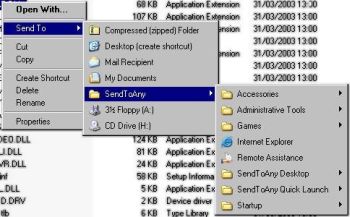
SendToAny is a simple freeware that extends the Windows Explorer ‘Send To’ context menu with all known links. This is accomplished by synchronizing the Send To Menu with the Start Menu, Desktop and Quick Launch Menu. It allows any file to be sent to any application, regardless of file-type association, or an applications’ registration status.

One other thing I love about this program is that it resolves all types of links, including Microsoft Installer (MS Office, Adobe Acrobat, etc), which are normally invisible to the Send To menu.

As great as this program is I think it will be better if more options are introduced.
Want to check it out? Click Here!

Google renews Desktop 4.5

Thursday, November 16th, 2006

sidebar_refresh.jpgGoogle has refreshed the design of the recent 4.5 release of Google Desktop. To my mind now it’s better, faster and more personalized. In later versions of Google Desktop gadgets are floating on the desktop and the Sidebar has a definitely new look.
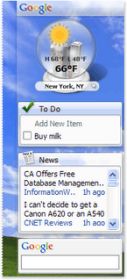
The new Sidebar is transparent, so it fits seamlessly with your desktop environment. Gadgets that fought for attention now look right at home, and content-heavy gadgets get new frames and icons that make it easier to tell them apart. All of this leads to a better place to find your email, news, feeds, stock prices, weather and other essential information. And this version is compatible with all of the latest software including Microsoft Vista, Office 2007 and Mozilla Firefox 2.0.

via googledesktop

You can download and try the new Sidebar in Google Desktop now right from here.

Wallperizer 1.2.1- Give Your PC An Ever-changing Look!

Monday, November 13th, 2006

987654345678.jpgTired of your system wearing the same old look? Well, this freeware offers to give your computer a new and ever-changing look. 
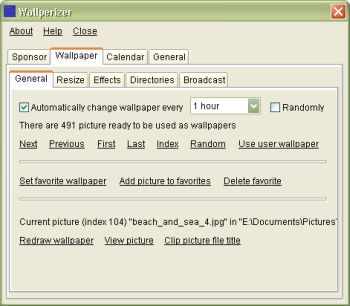
Wallperizer is a desktop wallpaper changer, which allows you to add up to 100 directories, where the program would look for pictures that would be used as wallpapers. It’s really nice because the wallpapers can be changed automatically, either in order or randomly. 

One of the cool features of Wallperizer is Brightness normalization. This is an automatic process where bright pictures are made darker and dark pictures are made brighter. Brightness normalization can be used to bring the brightness of wallpapers close to environmental light. 

Another cool feature is that a calendar can be displayed on the wallpaper. These calendars have skins that you can edit, load and save. 

For more features check out the History of changes

A new updated version has just been released, 1.2.1 and the major change in this new update is that a label has been added below the list of directories, from which the wallpaper pictures are loaded, which shows the entire name of the focused directory. This is useful when a directory name is very long 

For more info and free download; Click here! Previous version can be found here.

SYSTEM REQUIREMENTS: Windows 98 / Me / NT4 / 2000 / XP / Vista. On Windows Vista, the program must currently be run as administrator. 

NOTE: Though there are no special requirements for running the program; for Windows NT4 you need to have installed service pack 6. 

To install the program, just run the downloaded file (but first close any running instances of the program).

GameBoost – give your game a boost

Monday, November 13th, 2006

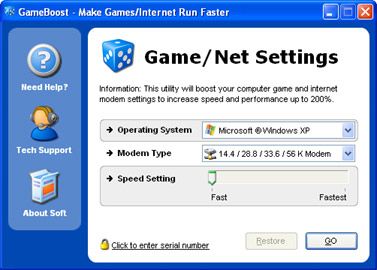
122222222222221111111111.jpgThe problem with downloading and playing games on the system or even online at times is that you may not get the best speed out of your PC and Internet connection. You experience some glitches or slow downs. This software, Game Boost helps put an end to such problems or at least reduce their frequency of occurrence. 

GameBoost is a shareware from the stables of PGWARE. Based off of their GameGain and Throttle products, GameBoost increases overall speed and squeezes out every last bit of performance your computer and Internet connection is capable of. 

One of the things I like about it is that it is very easy to use and fully compliant with all versions of Windows. It also adjusts itself to your computer specifications.

GameBoost is a tool for all that allows you to modify your computers settings to increase gaming and Internet speed performance. The fact that no modifications to your hardware are made and all adjustments and settings are done in an easy to use interface makes this program a darling. GameBoost makes direct changes to system registry and system files to enhance memory, screen drawing, animations, refresh rates, CPU threading speeds, Internet speed. 

Tired of those frame rate glitches or slow downs disrupting your favorite games? Give GameBoost a try! 

Click here for trial version and more info!

Copyright © 2001-2026, Free Downloads Center. Free Downloads Center Blog is proudly powered by WordPress.