Author Archive
Friday, December 29th, 2006
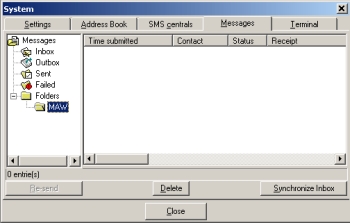 In need of something to help you handle your text messages with ease? Well I have a recommendation for you. It’s SMS-it. In need of something to help you handle your text messages with ease? Well I have a recommendation for you. It’s SMS-it.
SMS-it allows you to send a short message to a mobile phone using your computer. It supports Picture messages: Caller Group Graphic, Operator Logo, Ringtones, and FlashSMS.
It is so easy to send messages with SMS-it. Messages can be sent in different ways:
- Through a modem, using a dial-up SMS center
- Through the internet, using an account with an internet SMS center
- Through a mobile phone attached to the computer (IE attached to the IR port).
One thing worthy of note though is that sending Picture messages, Caller Group Graphics, Operator Logos and Ringtones only work for Nokia phones. Most new phones can however now receive FlashSMS.
Want to give it a shot? CHECK IT OUT HERE!
Posted in Developer, Information Management, Internet, Main, Mobile, Shareware, Social Software | 1 Comment »
Friday, December 29th, 2006
 Here is a useful application to make it easy to watch your favorite DVDs on your mobile equipment. CloneDVD Mobile converts your DVD movies easily into a format that your mobile equipment can play without any difficulty. In case you are wondering what kind of mobile equipment this supports, Sony PSP, Apple iPod Video, iAudio X5, Creative Labs ZEN Vision, etc. Here is a useful application to make it easy to watch your favorite DVDs on your mobile equipment. CloneDVD Mobile converts your DVD movies easily into a format that your mobile equipment can play without any difficulty. In case you are wondering what kind of mobile equipment this supports, Sony PSP, Apple iPod Video, iAudio X5, Creative Labs ZEN Vision, etc.
The fact that you also get to convert your DVDs to other file formats, such as DivX, XviD, AVI, MP4, and so on, makes it a really useful tool.
A new version has just been released with these changes:
- New: added THM-Thumbnail support for Sony PSP
- Added several new profiles: “BlackBerry Pearl”, “SmartDisk FlashTrax”, “Nokia N93/95”
- Fix: Zoom option could result in incorrect vertical offset (video image shifted downwards)
- Fix: still some DVDs resulted in inverted subtitles
- Several small fixes and improvements
- Updated languages
And lots more.
Ready to watch your movies on the go? CLICK HERE!
Posted in Audio, Business, Commercial, Developer, Information Management, Main, Mobile, Movies, Multimedia, Music, Shareware, Utilities, Video, Windows | No Comments »
Wednesday, December 27th, 2006
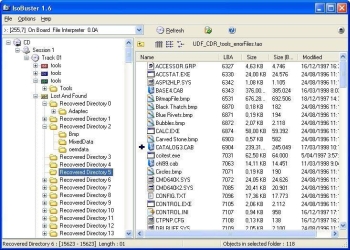 If you’ve had problems in the past rescuing lost files from bad CDs or DVDs, this is going to be a welcome addition to your software collection. If you’ve had problems in the past rescuing lost files from bad CDs or DVDs, this is going to be a welcome addition to your software collection.
IsoBuster can rescue lost files from a bad or trashed CD or DVD or a Blue Ray disc (e.g. BD or HD DVD). Save important documents, precious pictures or video from the family, your only system backup, etc.
A new updated version has just been released, IsoBuster 2.0 with these changes:
- BD (Blu Ray) and HD DVD support
- Implemented the ability to use other system installed code pages, such as MAC, SYMBOL, UTF8 etc., for ISO9660
- Properties for drives show, next to CD and DVD, also BD and HD DVD Read and Write capabilities
- Installation and IsoBuster.exe are now code signed to make Windows (more or less) happy
- VISTA style directory icons when ran on a VISTA system
- Default to SPTI on a VISTA system, even when the app is not running in admin mode
- HTML help would not launch on VISTA due to OS changes. This is now correctly implemented
- On VISTA the Panel with image-file-name was often not properly painted. Changed the Panel with a another Windows component
- HFS(+) Mac File System, with multiple of 512 byte blocks support
and lots more.
CLICK HERE for more info on latest changes and download.
Posted in Business, Commercial, Developer, Main, Multimedia, Shareware, Utilities, Windows | No Comments »
Wednesday, December 27th, 2006
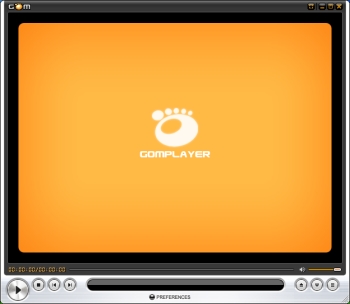 GOM Player is a freeware media player that supports many features for advanced users who desire to watch video files at the best quality. GOM Player supports most popular codecs (AVI, DAT, MPEG, DivX plus many more) with its own embedded codec system that you won’t have to look for appropriate codecs everytime you can’t play a certain video format. GOM Player is a freeware media player that supports many features for advanced users who desire to watch video files at the best quality. GOM Player supports most popular codecs (AVI, DAT, MPEG, DivX plus many more) with its own embedded codec system that you won’t have to look for appropriate codecs everytime you can’t play a certain video format.
One of the things I love about this great freeware is that you can watch video files while you are downloading them! GOM has a registered patent for playing broken AVI files and files that are still being downloaded. You can also customize the player by creating your own skin, setting toggle keys, VMR modes, detailed resolution etc.
A new updated version was released a couple of days ago with these latest changes:
- Disable double-click with left mouse button checkbox added (this removes the delay for the one-click action)
- Fixed a bug with MPEG2-AAC in MP4 files
- Supports MicroDVD (.sub) subtitle files
- Supports .SSA/.ASS subtitle files
Try it! You’ll be hooked! Click HERE for more info and free download!
Posted in Developer, Freeware, Fun, Main, Movies, Video, Windows | 1 Comment »
Wednesday, December 27th, 2006
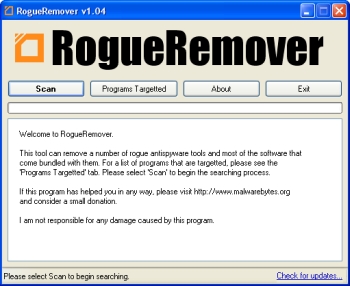 In a bid to optimize our PC’s, we often fall victim to rogue applications that rather than do what they claim to do constitute nuisance eating up valuable space on our hard drive. Rogue Remover is specifically designed to help to tackle the problem of these rogue applications. In a bid to optimize our PC’s, we often fall victim to rogue applications that rather than do what they claim to do constitute nuisance eating up valuable space on our hard drive. Rogue Remover is specifically designed to help to tackle the problem of these rogue applications.
RogueRemover is a utility that can remove various rogue antispyware, antivirus and hard drive cleaning utilities. Rogue applications are applications that rather than remove spyware, provide false positives, distribute malware or spyware, advertise, or provide useless uninstallers. RogueRemover is a really useful tool for all. It’s so easy to use. Try it out ! You will love it!
Check it out HERE, It’s free!
Posted in Commercial, Freeware, Internet, Main, Security, Social Software, Utilities, Windows | No Comments »
Wednesday, December 27th, 2006
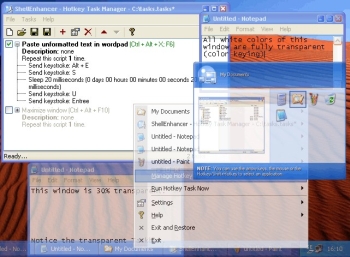 Need an enhancer to enhance the default shell of Windows and make your life easier? ShellEnhancer might just come in handy. Need an enhancer to enhance the default shell of Windows and make your life easier? ShellEnhancer might just come in handy.
ShellEnhancer is designed to really make things easier for you. There are 2 two types of taskswitcher included in this application. They are Enhanced TaskSwitcher and Mosaic TaskSwitcher. You can use them to replace the default Windows Alt+Tab taskswitcher.
ShellEnhancer allows you to make your own tasks. Tasks consist of a number of commands which get executed one after the other. Available commands include: insert text, send keystroke, manipulate windows, run program, start screensaver, lock workstation and many other. Tasks can be executed with hotkeys, mouse gestures or screen corners. An On Screen Display can be shown when a task is run.
A couple of days ago a new updated version of this application was released, ShellEnhancer 3.0.0.91. This new updated version came with these changes:
- Major rewrite of the backend, making it much more stable and fixing the applications crashes like for Java applications, Winamp..
- Because of this [the major rewrite], ShellEnhancer now requires Windows XP or later
- Live Preview: continuously update the little preview in the Enhanced Alt+Tab Taskswitcher
- Full Windows XP native Unicode support
- Major fixes for the Shell Enhanced Applications feature, especially when applied to windows of Windows Explorer
- The mouse-screen-corner feature now fully supports multi-monitor systems
- Option to rollup windows by double clicking on title bar
- More options for the On Screen Display (OSD)
- Minimized-to-tray windows icons are restored when ShellEnhancer is restarted after it crashes
etc.
Click HERE to check it out! It’s FREE!
Posted in Design, Freeware, Main, Shell and Desktop, Utilities, Windows | 1 Comment »
Tuesday, December 26th, 2006
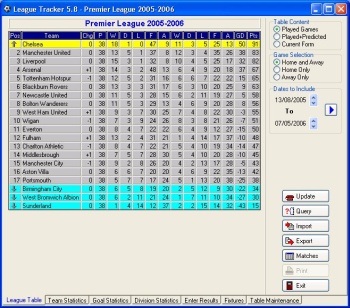 Here is a great software for all soccer fans; Ltrack. If you have always been finding it difficult to keep track of your favorite leagues, this software could be the solution to your problem. Here is a great software for all soccer fans; Ltrack. If you have always been finding it difficult to keep track of your favorite leagues, this software could be the solution to your problem.
Ltrack is a program for tracking one or more soccer leagues. This software supports League and non-league games. It also produces statistics for teams, players, goals, penalties, and more. The league table and statistics can be displayed, printed, or exported in a variety of different formats.
The fact that Ltrack provides an on-line update facility to keep your league up to date with the latest results over the Internet makes it a soccer fan’s delight. Are you a soccer fan? Go for this software, it’s FREE!
Want to check it out? CLICK HERE!
Posted in Commercial, Developer, Freeware, Fun, Information Management, Internet, Main, Windows | 1 Comment »
Tuesday, December 26th, 2006
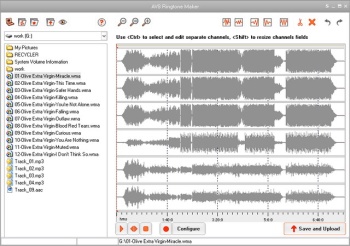 If you are someone who always want to stand out and be unique in everything you do, you are going to love what this software can do for you. AVS Ringtone Maker helps bring individuality to your cell. With this software you can create custom ringtones from any input audio of the following formats: MP3, WAV, AMR and upload it to cell phones & mobile devices via Bluetooth, IrDA or USB. If you are someone who always want to stand out and be unique in everything you do, you are going to love what this software can do for you. AVS Ringtone Maker helps bring individuality to your cell. With this software you can create custom ringtones from any input audio of the following formats: MP3, WAV, AMR and upload it to cell phones & mobile devices via Bluetooth, IrDA or USB.
AVS Ringtone Maker allows you to take your favorite song or soundtrack from your favorite movie. You can even select a small part you like or the whole file and send it to your cell phone. This really cool software allows you to make any sound a ringtone so you don’t have to have the conventional ringtones that others are using. You can record a wind howl, your own voice, your kids laugh, your doorbell, or any sound that comes to mind and make it your ringtone.
AVS Ringtone Maker is a part of AVS4YOU.com package. Which if you register for allows you access to 22 tools from the AVS4YOU.com package.
For more info and download, CLICK HERE!
Posted in Audio, Commercial, Developer, Fun, Main, Utilities, Voice, Windows | 1 Comment »
Tuesday, December 26th, 2006
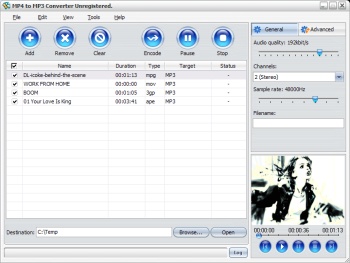 In need of a great software that can help you to meet your MP4 to MP3 conversion needs with ease? Then you need to check out MP4 to MP3 Converter. In need of a great software that can help you to meet your MP4 to MP3 conversion needs with ease? Then you need to check out MP4 to MP3 Converter.
MP4 to MP3 converter enables you to convert MPEG1, MPEG2, MPEG4, WMV, AVI, MP4, 3GPP, 3G2, MOV, RM, RMVB, OGG, DV, H.264 files to the audio files such as MP3, WAV, AC3, WMA, M4A, OGG, AAC etc easily and quickly.
I really love the fact that it works with virtually all MP3 players, portable media or MP4 players quite well. This cool software supports multithreading and batch conversion, so the conversion speed is super fast. The fact that it is easy to handle makes it a must have. You can pause, stop and continue the conversion at any moment.
MP4 to MP3 Converter is a really cool tool that is so powerful and easy-to-use that your desired conversion is achieved with a couple of clicks. Want to try it out?
CLICK HERE To Learn More And Get A Trial Download.
Posted in Audio, Developer, Main, Multimedia, Music, Shareware, Utilities, Video, Voice, Windows | No Comments »
Tuesday, December 26th, 2006
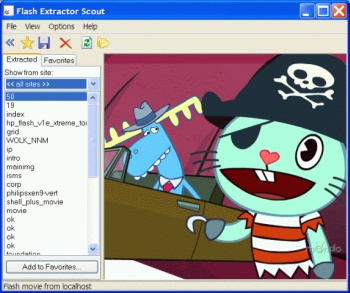 If you are in need of a program that will allow you to save flash movies from the Internet, then you will definitely find this one very useful. I’m talking about Flash Movie Extractor Scout. If you are in need of a program that will allow you to save flash movies from the Internet, then you will definitely find this one very useful. I’m talking about Flash Movie Extractor Scout.
Flash Movie Extractor Scout allows you to save flash movies from Internet Explorer, Mozilla Firefox and Opera browsers. And it’s not just flash movies, it allows you to save flash movies, flash videos and flash games extracted from Internet Explorer, Mozilla Firefox and Opera browsers. With this software you can save and store favorite flash movies easily on your computer using the “Favorites” feature.
So now that you know you can store your flash movie, videos and games easily with this nice software. Won’t you check it out? If you are still wondering what the benefits of this software are. Let me share some with you.
Benefits:
- Save video from YouTube, Google Video and other web-sites;
- Save all flash movies from Internet Explorer, Mozilla Firefox and Opera browsers, save SWF to disk, convert SWF to EXE;
- Extract streaming flash video;
- Capability of extracting and saving text and JPG images from flash movies;
Etc.
CLICK HERE for more info on benefits, features and downloads.
Posted in Business, Commercial, Design, Developer, Information Management, Internet, Main, Shareware, Utilities, Video, Windows | 2 Comments »
|
|
|




