Archive for the 'Developer' Category
Tuesday, April 10th, 2007
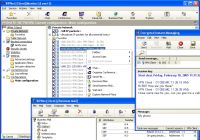 ViPNet Office is an IP VPN and it provides secure client-to-client (client-to-office) encryption so that mobile workers, home workers, and remote offices can communicate securely over the Internet with a staff at work directly and central VPN gateway. It features build-in secure business applications: encrypted instant messaging (IM), encrypted file exchange, build-in personal firewall with IDS, tunnel securing Internet traffic between your offices, and online visibility of VPN users. ViPNet Office is an IP VPN and it provides secure client-to-client (client-to-office) encryption so that mobile workers, home workers, and remote offices can communicate securely over the Internet with a staff at work directly and central VPN gateway. It features build-in secure business applications: encrypted instant messaging (IM), encrypted file exchange, build-in personal firewall with IDS, tunnel securing Internet traffic between your offices, and online visibility of VPN users.
While other available VPN solutions provide only client-to-site or site-to-site connections (remote access to a corporate VPN), ViPNet VPN technology goes further and offers not only client-to-site connection, but also worldwide real client-to-client connectivity. ViPNet supports NAT-traversal and an advanced encryption AES, 3DES, and DES.
Posted in Developer, Information Management, Internet, Mobile, Programming, Security, Shareware, Windows | No Comments »
Friday, April 6th, 2007
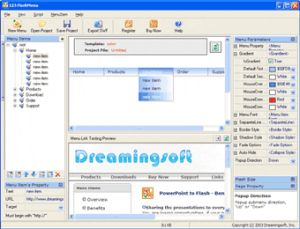 Need a tool to help you create professional Flash Menu easily? Check out 123 Flash Menu Need a tool to help you create professional Flash Menu easily? Check out 123 Flash Menu
123 Flash Menu is a powerful tool to create impressive and professional Flash menu in only 3 steps.
A great thing about this software is that it comes with hundreds of pre-created templates to help you implement personalized menu. It also provides cool dynamic effects like animations, sounds, gradient and transparent without any programming skill.
You will love the fact that the program offers multi-level Flash menu with fully customizable text, font, link, background, border style, shadow style and pop-up effects. The fact that the publish wizard can help you generate advanced HTML scripts, makes this tool very useful.
In the latest version of Flash Menu, which just hit the market recently, the major change is “Enhanced publishing function”.
CHECK IT OUT [ Go to http://www.dreamingsoft.com/123flashmenu]
Posted in Business, Design, Developer, Internet, Main, Programming, Shareware, Utilities, Windows | 3 Comments »
Thursday, April 5th, 2007
 If you love scrabble and word games, you are going to love this game, WordZap. If you love scrabble and word games, you are going to love this game, WordZap.
WordZap is a word game where you race your computer opponent to create the most unique words from a given set of letters. When opponents make the same word, it is zapped from both lists. As you get better, your computer opponent becomes cleverer to match your ability.
WordZap is a fast-paced addictive word game you can play over the Net — or against the computer. Though the game is interesting, if you are not into word spell games you may find it boring. But for those who love playing with words the game is fun.
The only thing you may hesitate about this game is its price, $20 may seem to much for something hat would have better success as freeware. But you can have as well time with the trial version and see if it’s worth your money.
Check it out HERE or visit http://www.wordzap.com/
Posted in Developer, Fun, Games, Internet, Main, Shareware, Windows | No Comments »
Tuesday, April 3rd, 2007
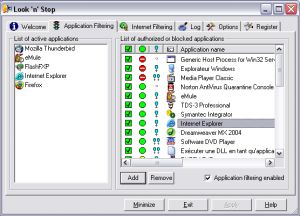 Worried about internet hacker attacks? Look ‘n’ Stop may help you put a stop to hackers’ interference. Worried about internet hacker attacks? Look ‘n’ Stop may help you put a stop to hackers’ interference.
Look ‘n’ Stop provides a permanent and highly secured protection against Internet hacker attacks. It protects you against the “Trojan horse” that tries to transmit your personal data to the outside without your agreement.
The recently released version has these cool changes:
- DLL filtering for Windows Vista
- New display options in the TCP connections dialog box
- Added more information for TCP SPI alerts (Windows 2000/XP/
Vista only)
- Windows 2000/XP/Vista only: Several fixes and improvements in TCP Stateful Packet Inspection (in particular in timeout handling)
- Problem sometimes when doing rule copy/paste in Internet Filtering
- Problem sometimes when displaying IP address in Application Filtering alerts
- For Win9x/Me only: connected applications were never removed from the list in the Application Filtering tab
Still not convinced this is for you; check out what Look ‘n’ Stop can do for you
- Blocks spywares and keystroke loggers.
- Makes your PC invisible to hackers.
- Tracks the attacks attempts through logged events. .
- Includes a password protection of the configuration.
- Very efficient and highly configurable for advanced users.
- Features extension through plugins.
- Automatically updates new releases.
Want to check out the trial version and get more info about what this software can do for you? Go to http://www.looknstop.com/En/index2.htm
Posted in Design, Developer, Information Management, Internet, Main, Security, Shareware, Utilities, Windows | 1 Comment »
Tuesday, April 3rd, 2007
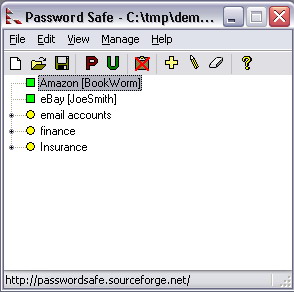 If you need your passwords to be safe you’ll need a safe. That’s what Password Safe is all about. If you need your passwords to be safe you’ll need a safe. That’s what Password Safe is all about.
Password Safe is a password database utility where users can keep their passwords securely encrypted on their computers. The cool thing about this very useful tool is that just a single Safe Combination unlocks all your passwords so you don’t have to cram different combinations for different passwords.
The latest version which was just recently released has these changes:
- Password expiration notice can now be given a few days prior to actual expiration
- Exported/imported text format is now documented in online help
- Default Autotype string can be specified per database
- PWS may configured not to minimize during Autotype (Manage->Options->Misc). ‘Always on Top’ takes precedence
- If the PWS_PREFSDIR environment variable is defined, that’s where the pwsafe.cfg file will be read from, instead of the same directory as the executable
- List view columns now selectable, entries sortable by any column,
- Tree view may be configured to show all groups first, instead of strict alphabetic order
- Fixed: No longer crashes after you specify to remember 0 databases
- Fixed: to close application now works
- Fixed: Merge operation now fixed
- Fixed: Similar problem in Compare operation fixed
- Fixed: Autotype menu & shortcut no longer disabled if field is empty
- Fixed: Text in Password field no longer truncated with large texts
- Fixed: Menu display no longer trashed if accelerator pressed with an open menu
- Fixed: Autotype now works again for all entries
- Fixed: Right-click->unlock on system tray icon now same as double-clicking on locked system tray icon
And lots more.
Want to try it out, it will cost you nothing, it’s open source so you don’t have to pay a dime not just to use it but to even modify it to suit your needs.
Go to https://sourceforge.net/projects/passwordsafe to see for yourself if it’s what you need.
Posted in Backup, Commercial, Developer, Freeware, Information Management, Main, Security, Windows | No Comments »
Monday, April 2nd, 2007
 If you are looking for a messenger that can help deliver all your messages easily no matter the medium, you might want to check out Omega Messenger. If you are looking for a messenger that can help deliver all your messages easily no matter the medium, you might want to check out Omega Messenger.
Omega Messenger lets you chat with anyone easily, friends, customers, co-workers, family etc. The major plus for this tool is that is compatible with the major instant messenger networks Yahoo! Messenger, MSN Messenger, AOL Instant Messenger, and ICQ.
Omega Messenger is an online communications tool designed to be more efficient than the others currently on the market. But it’s major minus is its price, there are a lot of free messengers out there so you may feel like “why should I cough up $15 for something I can get free alternatives for”.
Well, for one thing it works and works well but the final decision as to whether you will go for this communication tool that works with major instant messenger networks or not will be up to you. So check out the trial download first and see if for you there is a difference when compared with your usual free messenger.
Go to http://www.omega-expert.com/messenger.html for trial download and more info.
Posted in Chat, Developer, Internet, Main | No Comments »
Monday, April 2nd, 2007
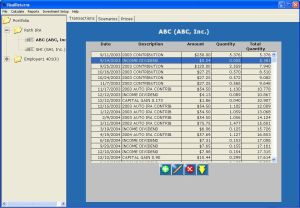 Need investment friendly software that can help you keep track of your investments and even project future earnings? You might want to check out RealReturns. Need investment friendly software that can help you keep track of your investments and even project future earnings? You might want to check out RealReturns.
RealReturns calculates investment returns using a variation of the concept known as “Compound annual growth rate” (CAGR).
How does this work?
Basically, it will tell you what rate of return your investments would have had to earn in a savings account to achieve the same results. With RealReturns, not only will be able to precisely determine the results of your investments, you will also be able to forecast your investments and generate useful reports.
One other good thing about this software is its of use. It is designed to be simple to use with minimal key pressing, so you don’t need to be an expert to use it.
Want to check it out? RealReturns is compatible with Windows Millenium Edition, XP, and Windows 2000.
Check it out at http://www.brandotech.com/
Posted in Business, Commercial, Developer, Information Management, Main, Shareware, Utilities, Windows | 1 Comment »
Friday, March 30th, 2007
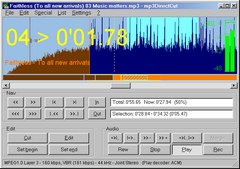 If you have tried other tools designed for editing mpeg audio and you’ve not found what you need, mp3DirectCut may just be the thing for you. If you have tried other tools designed for editing mpeg audio and you’ve not found what you need, mp3DirectCut may just be the thing for you.
mp3DirectCut is a small tool for editing mpeg audio directly. With this tool, you can remove parts, change the volume, split files or copy regions to new files- all without the need to decompress your mp3 into pcm/wav. This definitely saves work, encoding time and disk space. And the fact that there is no quality loss through any re-compressions makes this tool a darling.
The built in recorder creates mp3 on the fly from your audio input. Using Cue sheets, pause detection or Auto cue you can easily divide long files.
The latest version, mp3DirectCut 2.05, which has just been released has these latest changes:
- Undo function extended
- Ini file stored in user profile if necessary
- Command line option /split for Cue sheets and Project files
- Reading Project files with relative paths
- Keeping Lame header params
- ID3v1 genre list extended
- Converting possible 8.3 filenames
- Some more improvements
CLICK HERE or go to http://mpesch3.de1.cc/mp3dc.html. For more info and download, IT’S FREE!!!!
Posted in Audio, Developer, Freeware, Main, Multimedia, Music, Voice, Windows | 6 Comments »
Friday, March 30th, 2007
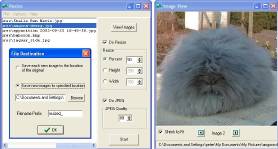 If you need a cool tool to resize your images, this is something worth checking out. If you need a cool tool to resize your images, this is something worth checking out.
Resize allows you to resize a batch of bitmaps or convert to jpeg or both. This is useful for creating many thumbnails for websites simultaneously. It is also useful for resizing the frames for animated gifs.
The cool thing about this is that Resize uses pixel averaging for shrinking images which gives much better quality than sub-sampling. The resizing algorithm produces high quality images because it uses all available information from the source image.
The latest version, Resize 2.7 which just hit the software market has these latest changes:
- Faster resizing – especially when resized by an integer ratio
- Message telling you when processing is complete and where the images have been saved to with a link
Ready to see what it can do for you? CLICK HERE
Posted in Commercial, Design, Developer, Main, Photo, Shareware, Windows | 2 Comments »
Thursday, March 29th, 2007
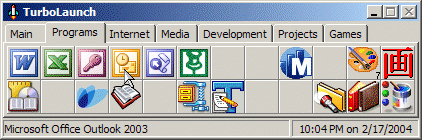 Check out this fully configurable tool-bar style application. It is called TurboLaunch Check out this fully configurable tool-bar style application. It is called TurboLaunch
TurboLaunch is a fully configurable tool-bar style application that can be set up to run many programs and perform certain pre-programmed actions. The cool thing about TurboLaunch is that like a toolbar, pictures are used to distinguish what a button is configured to do.
What you will no doubt like about this software is the fact that though TurboLaunch automatically uses the default icon, you have complete control and can change the icon to whatever you want.
The latest version released just recently is TurboLaunch 5.0.10.
The major change in this updated version is that when changing screen resolution, TurboLaunch should stay stuck to the same edges of the screen. This should not only work when changing resolutions while TurboLaunch is running, but also when you change resolutions while TurboLaunch is closed.
Want to try it out? It’s shareware so you can check out the trial version first before coughing up the dough.
Go to http://www.savardsoftware.com/turbolaunch/ to try it out!
Posted in Design, Developer, Main, Programming, Shareware, Shell and Desktop, Utilities, Windows | No Comments »
|
|
|





