Archive for the 'Developer' Category
Thursday, December 7th, 2006
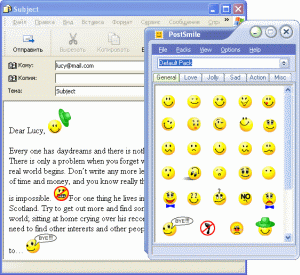 With PostSmile sending emails and posting on message boards gets to be fun. You can Drag and Drop images and animations, smiles and emoticons, text or HTML snippets, quotes and signatures into your email, message board or web-forum postings. With PostSmile sending emails and posting on message boards gets to be fun. You can Drag and Drop images and animations, smiles and emoticons, text or HTML snippets, quotes and signatures into your email, message board or web-forum postings.
One thing I appreciate about this program is that the smiley faces are divided into clear categories – Happy, Love, Sad, Communication, Other, Signatures, Famous Quotes, Love Quotes, Proverbs, Jokes and Compliments. PostSmile offers a wide variety of smiley faces but that’s not all, hundreds and hundreds of great emoticons are available in the PostSmile’s Online Collections Gallery. It also works well with all major email programs.
Like me you may be having an issue with the price. You may find it difficult to comprehend why you should part with $24.95 for smiley faces. Well they are offering a 25% Christmas discount presently, so it only goes for $18.71 for now. If you are still having an issue with the price, check out the trial version. But you need to note that you’ll only get limited smileys with the trial version , to get access to hundreds of emoticons , you’ll have to buy the full version.
Learn more and Check out the trial version!
Posted in Commercial, Design, Developer, Fun, Information Management, Internet, Main, Multimedia, Shareware, Social Software, Utilities | 1 Comment »
Thursday, December 7th, 2006
 If you manage or run a website (or just upload or download a lot of files by FTP) then you’re probably very familiar with FTP (File Transfer Protocol). The method of uploading and downloading files to and from web servers. If you manage or run a website (or just upload or download a lot of files by FTP) then you’re probably very familiar with FTP (File Transfer Protocol). The method of uploading and downloading files to and from web servers.
But what happens if you find yourself at a computer that hasn’t got your usual FTP program installed? Or maybe you just don’t wanna install another bloated program you’ll only ever use the basic functions of! What happens is you can go to the Web2ftp website and do it all from a webpage! That’s right, any server, anywhere in the world.
You just put in your FTP details such as server, username, and password, and work away as usual with uploading or downloading! You can even select multiple files at the same time by using the shift key. It supports file sizes of up to 50 Mb for download, 50 Mb for binary upload, and an editing function of up to 200 Kb files.
Tip : If while downloading, your browser tries to open a file instead of saving it, just right click and select “Save as”.
Check it out right here.
Posted in Business, Commercial, Developer, Freeware, Information Management, Internet, Main, Utilities, Windows | No Comments »
Wednesday, December 6th, 2006
 Deskloops is a program to help you navigate through your open windows easier. It creates a loop of all your windows which you can scroll through by going left or right. Alternatively you can go to the top of the screen and scroll through thumbnails of your windows. Deskloops is a program to help you navigate through your open windows easier. It creates a loop of all your windows which you can scroll through by going left or right. Alternatively you can go to the top of the screen and scroll through thumbnails of your windows.
Its much easier to watch it in action than it is to describe it, so check out the first video here entitled “Getting started” and you’ll understand clearer!
It’s a pretty well made program and the navigation system is pretty simple and uncluttered and gets the job done. Although i think nowadays many people will just stick to tabs. But for anyone who doesn’t use tabs, its worth checking out. Also the optional 3D effect feature looks pretty cool, but may get in the way after a while.
I’d recommend checking this out to anyone who finds themselves with a lot of windows open frequently and who doesn’t already use tabs!
You can download it here and read more info and watch some video demos/tutorials. Oh and its free!
Posted in Business, Design, Developer, Freeware, Fun, Internet, Main, Open Source, Utilities, Windows | 1 Comment »
Wednesday, December 6th, 2006
 If you are in need of a freeware that will help to make file name searches easier and faster, this application is for you.Instant File Name Search is a fast and easy to use search tool. You can instantly search files by name or wildcards on your computer or local network. If you are in need of a freeware that will help to make file name searches easier and faster, this application is for you.Instant File Name Search is a fast and easy to use search tool. You can instantly search files by name or wildcards on your computer or local network.
This cool tool supports:
- Instant search of files by name or wildcards
- Boolean operators (AND, OR, NOT)
- Search in various directories or LAN resources
- Database management (you can create several databases)
- Taskbar icon and hot keys for quick access
- Win95/98/ME or WinNT/2000/XP.
Want to check it out? CLICK HERE!
Posted in Commercial, Developer, Freeware, Main, Utilities, Windows | No Comments »
Wednesday, December 6th, 2006
If you need to back up your DVDs but you can’t afford the ridiculous prices most software go for; you’ll definitely love this. Have you heard of RipIt4Me, this is a freeware that beats most shareware in its class hands down.
RipIt4Me is a freeware utility that helps you backup your copy protected DVDs. Yeah “copy protected”. A lot of DVD’s, these days, are equipped with stronger copy protections – such as ARccOS and RipGuard DVD. A lot of programs even expensive sharewares cannot handle these types of discs. Ripping this files using RipIt4Me is an easy thing.
The beautiful thing about RipIt4Me is that it is fully automated, the wizard will guide you through all the necessary steps involved. And you even have an alternative of using a “1-Click” mode that will perform all the involved steps automatically for you.
A new updated version has just been released. This version, RipIt4Me 1.6.0.0 has these latest changes:
- This version works on Linux under Wine
- Better handling of multiple sets of buttons in a menu.
- Fixed a problem with DVDs that have a very large number of buttons. The cleanup no longer fails, but might take a bit longer
- Improved the analysis to handle DVDs that have large numbers of menus (Ice Age 2 for example)
- The “Next” button in Step 1 no longer can be pressed if a valid DVD isn’t present in the selected drive
- Now checks for CeEKey.exe on startup, and offers to kill the process. CeEKey.exe has been found to potentially create problems when the PSL file is imported
etc.
CLICK HERE FOR FREE DOWNLOAD AND MORE INFO!
Posted in Business, Commercial, Developer, Freeware, Linux, Main, Multimedia, Video, Windows | No Comments »
Tuesday, December 5th, 2006
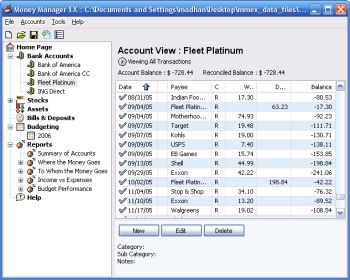 Money Manager Ex is a free open-source money managing and budgeting program. Money Manager Ex is a free open-source money managing and budgeting program.
Usually you gotta pay for decent personal finance software, so if you’re tryin’ to manage your money, you’ll appreciate that this ones free.
But how good is it? Pretty good! – You can manage multiple accounts and checking, savings, credit card, or loan accounts. You can even create your own categories and easily organise where your money goes into these. You can also track your bills and deposits and be reminded of upcoming bills and deposits so you won’t forget and lose track of them.You can import files from excel, microsoft money, and quicken, and also export to excel format. It also supports printing with inbuilt print preview.
Other useful features include viewing spending by category over a date range or by single category over time and viewing income versus expenses and how you’re doing on a budget.
Overall this is definitely worth checking out for anyone trying to budget and manage their finances better, its even free, which helps!
You can get more info and download it by clicking the homepage here.
Posted in Business, Commercial, Developer, Freeware, Internet, Main, Shareware, Social Software, Utilities, Windows | No Comments »
Tuesday, December 5th, 2006
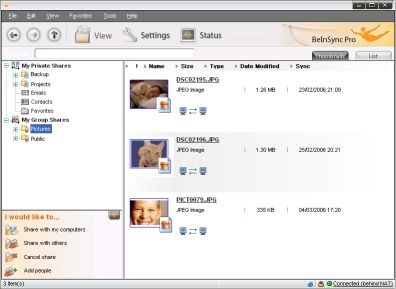 Checking my email on Yahoo! not too long ago I came across an advert of this wonderful software that helps you keep your files and emails in sync between your PCs. If you have multiple systems in different places like work, home and your laptop you will find this software useful. It’s called BeInSync and like the name suggests it helps you to always be in sync with all necessary info from anywhere. Checking my email on Yahoo! not too long ago I came across an advert of this wonderful software that helps you keep your files and emails in sync between your PCs. If you have multiple systems in different places like work, home and your laptop you will find this software useful. It’s called BeInSync and like the name suggests it helps you to always be in sync with all necessary info from anywhere.
BeInSync seamlessly and securely keeps your files and emails in sync between your PCs, making them available where and when you need them. It ‘s a great alternative to remote access products. Unlike GoToMyPC, you don’t have to long into that computer to send a file to yourself. BeInSync runs quietly in the background.
Beinsync makes it possible for you to
- Have your data in sync at home work and on the move
- Travel light and get to your data using remote Web Access
- Share any size files with colleagues, partners and friends.
Want to check it out? Click here!
Posted in Business, Developer, E-mail, Freeware, Internet, Main, Open Source, Shareware | No Comments »
Monday, December 4th, 2006
 If you are a musician, specially a keyboard player, there’s an emphasis these days on “the gear”; having the newest gear, what’s the new gear like, what does it give you? You would think from the way people talk in music technology magazines that the instruments play themselves. I think most people believe that. If you are a musician, specially a keyboard player, there’s an emphasis these days on “the gear”; having the newest gear, what’s the new gear like, what does it give you? You would think from the way people talk in music technology magazines that the instruments play themselves. I think most people believe that.
To get a real perspective you should visit this really wonderful web resource, a kind of electronic music wakeup call. 120 Years of Electronic Music covers the years 1870 to 1990 and shows you lush pictures and gives you a detailed history of every worthwhile cutting edge instrument made in the last 120 years. Makes you wonder why people don’t just play them rather than looking for new stuff all the time.
Well, okay maybe that’s too simple. Perhaps you should remind your muso friends that people who don’t know history are doomed to repeat it. If they don’t get that then maybe you should get smarter friends.
Posted in Developer, Fun, Internet, Main, Music | No Comments »
Monday, December 4th, 2006
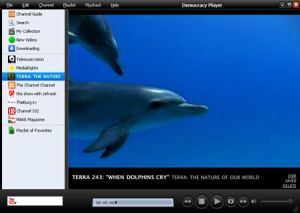 Despite the serious sounding name, Democracy Player is actually a very good video player. But it’s so much more too. Aside from the fact it claims to play virtually all video formats (Quicktime, WMV, MPEG, AVI, XVID, and more), you can also search for videos from inside it! Despite the serious sounding name, Democracy Player is actually a very good video player. But it’s so much more too. Aside from the fact it claims to play virtually all video formats (Quicktime, WMV, MPEG, AVI, XVID, and more), you can also search for videos from inside it!
Your chosen video or videos then downloads to your computer where they are kept for a default of 5 days before being deleted, but you can choose to save them forever too. It even allows you to search YouTube, Yahoo Video, Google Video, and more, right from inside it!
I was a little confused by the interface at first until i realised how simple it was, the “My Collection” link to the left is everything you downloaded, “New Videos” is downloaded videos you haven’t watched yet, and “Downloading” is videos currently being downloaded. So it’s all pretty easy to use!
It has lots of channels built in and feeds from video sites, so you’ll never be lost for something to watch!
I have a feeling we’ll be hearing a lot more about this cool program! You can download it for free and find out more info by checking out the homepage here.
Posted in Business, Commercial, Developer, Freeware, Fun, Main, Social Software, Video, Web services | 1 Comment »
Monday, December 4th, 2006
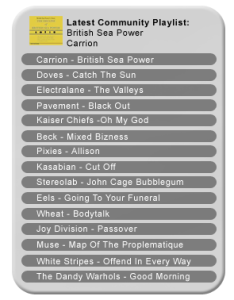 Have you been searching for a good and easy to use playlist creator? If yes, you are in luck. I present to you, The Filter! Have you been searching for a good and easy to use playlist creator? If yes, you are in luck. I present to you, The Filter!
The Filter (which is formerly known as iCueMix) creates perfect playlists from your iTunes library. It lets you rediscover your music collection in just a few clicks. Just highlight a couple of tracks and let The Filter give you the playlist. You can also create auto-refreshable lists for your commute to work, your gym visits or any other activity.
A new updated version, version 1.3.2.4 was released recently with these changes:
- Fixed registration problem resulting from attempting to login with unknown user credentials.
- Added shortcut to store recommendation on main player window.
- Corrected problem with offline usage. In previous versions the ‘optimize for offline use’ did not always result in recommendation information being downloaded from The Filter’s community server to the user’s PC.
- Fixed a bug that caused the application to fail under some circumstances when trying to perform an ‘instant playlist’ using played most songs.
- Setting the playlist prefix to contain the ‘)’ or ‘(‘ character no longer crashes the player
Other minor bug fixes.
- Modified filtering algorithm to remove recommendations with low relevance.
CLICK HERE FOR MORE INFO AND DOWNLOAD!
Posted in Business, Commercial, Developer, Freeware, Fun, Main, Multimedia, Music | No Comments »
|
|
|




