Archive for the 'Internet' Category
Thursday, January 18th, 2007
Genie Soft has a great program which solves a problem I’ve had many times in my tech support career: how to back up Outlook Express. Yes, you can search the folders for where the files are hidden and copy them to another computer. But that’s a pain.
This super little program supports backing up the data of all the identities in Microsoft Outlook Express in the same backup file. You can even backup as a self-executable EXE file that can be run on any machine even if the main Genie Backup Manager isn’t running or installed. That’s very cool.
Unlike other backup methods you can copy Multiple Identities, Message Rules, and All accounts and Preferences, as well as Signatures, Stationery, your Address Book. It’s a marvel.
Take the high road to Genie Soft for more…
Posted in Business, Developer, E-mail, Information Management, Internet, Main, Security, Shareware, Utilities, Windows | No Comments »
Thursday, January 18th, 2007
 Based on the excellent Ewido Anti-Malware package, this new AVG offering is a do-it-all solution against viruses, worms, trojans, spyware and adware. Based on the excellent Ewido Anti-Malware package, this new AVG offering is a do-it-all solution against viruses, worms, trojans, spyware and adware.
The software is active for 30 days, so you can try out all the features before you buy, and buy is what you will probably do. It’s not wildly expensive and as far as I can see is very effective against keeping spyware threats at bay. Some of the threats I tested it on, like Spy Sheriff and Brave Sentry were not completely removed, but I think more needs to be done to free your machine of those nasty bugs.
Head over to Grisoft for more…
Posted in Business, Developer, Internet, Main, Security, Shareware, Windows | 3 Comments »
Wednesday, January 17th, 2007
 Here’s one more web-based service that you can find useful. It’s called My ip-address & location and (yes, you’re totally right) it does exactly what the developers says. For those of you who still don’t get it let me explain… Just a bit 🙂 Here’s one more web-based service that you can find useful. It’s called My ip-address & location and (yes, you’re totally right) it does exactly what the developers says. For those of you who still don’t get it let me explain… Just a bit 🙂
It is a web service that will automatically look up your IP address automatically, and locate your (means yours computers) current location by using Google Maps. Well, sometimes it didn’t trace you to your home PC showing just the location of your ISP, or the node of your ISP that you connect to. Can you look up other IP addresses? Yes, definitely.
Just try it. It’s even fun (for just a bit though).
Posted in Developer, Freeware, Fun, Information Management, Internet, Security, Utilities, Web services | 3 Comments »
Tuesday, January 16th, 2007
 If you’ve started using Internet Explorer 7, then you need to consider getting this cool tool that promises to improve your browsing experience. IE7pro. If you’ve started using Internet Explorer 7, then you need to consider getting this cool tool that promises to improve your browsing experience. IE7pro.
IE7pro is an add-on for Internet Explorer 7 which adds lots of features and extras that make your IE easier, more useful, more secure and more customizable.
The new version, IE7pro 0.9.6 which just hit the web on January 12 has these cool changes added to it:
- Support mouse gestures
- Fix the 404 bug of ADFilter
- Improve save whole page to picture
- Support Drag & Drop images without link
Go and Check it out: http://www.ie7pro.com/, It’s FREE!
Posted in Browsers, Developer, Freeware, Information Management, Internet, Main, Open Source, Windows | 1 Comment »
Tuesday, January 16th, 2007
Here is a nice instant messenger for you. TerraIM
It’s an instant messenger which connects to the AIM and ICQ instant messaging networks using either OSCAR or TOC as the protocol. It uses the wxWidgets toolkit and supports advanced features such as file transfer, logging, and tabbing.
The recent version, TerraIM 1.2.5 released just before the new year has these changes
- Fix text showing white on white or black on black
- Add option to keep buddy list always on top
- Add an option to auto-reconnect
- Sort the away messages dropdown box alphabetically
- Fix a potential crash when TerraIM is disconnected
- Fix the positioning of the remote control warning window
- Fix blocked buddies showing up when logging in invisible
- Improve the IM/Profile HTML display to correctly show Windings/Webdings etc
- Fix the invisibility status checkbox not updating with multiple logins
Etc.
CHECK IT OUT HERE!
Posted in Developer, Freeware, Information Management, Internet, Main, Social Software, Windows | No Comments »
Monday, January 15th, 2007
 If you give a Web site your e-mail address, will you get spammed? Can you safely download files from a site you just found? Will clicking a search-result link dazzle you with endless pop-ups? The free SiteAdvisor add-in for Internet Explorer and Firefox answers these questions and more. If you give a Web site your e-mail address, will you get spammed? Can you safely download files from a site you just found? Will clicking a search-result link dazzle you with endless pop-ups? The free SiteAdvisor add-in for Internet Explorer and Firefox answers these questions and more.
It gives every site a good/bad rating and backs up its analysis with a wealth of data.Mcafee SiteAdvisor is a program that works as an add on to Internet Explorer or Firefox. You simply use your browser as normal, but every site you go to will show a rating by site advisor. You’ll get an alert if you visit any site that’s known to harbour spyware or adware. Also as you search in say, google, the list of sites in your search results will have an icon beside them to symbolise if its safe or not.
Go here to download the free version.
Posted in Browsers, Commercial, Developer, Information Management, Internet, Main, Security, Shareware, Windows | No Comments »
Friday, January 12th, 2007
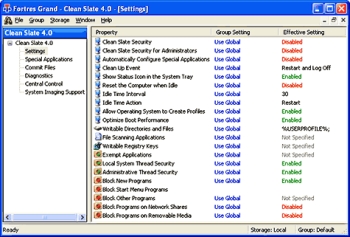 This is a really cool tool for administrators; Clean Slate. Protecting computers especially public access ones from inexperienced and malicious users can be a tough task but this nice software, Clean Slate takes the pain off the job. This is a really cool tool for administrators; Clean Slate. Protecting computers especially public access ones from inexperienced and malicious users can be a tough task but this nice software, Clean Slate takes the pain off the job.
Clean Slate is designed to protect public access computers from malicious or inexperienced users. The beautiful thing is that it does this while not restricting users’ activities, it will scour drives back to their original state upon reboot. The fact that it takes only minutes to install and needs no attention, ever, for most installations makes it an administrator’s best friend.
The real feature that makes this a must have is that no matter what the users have done it restores the computer to its original configuration. When I say “no matter what”, I actually mean “no matter what”, including erasing files, installing software, downloading viruses and Trojan horses, and altering icons. “Ain’t this a beauty?”
Go check it out: CLICK HERE!
Posted in Commercial, Developer, Internet, Main, Security, Shareware, Shell and Desktop, Utilities, Windows | No Comments »
Thursday, January 11th, 2007
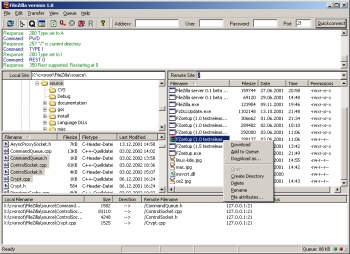 Here is a fast and reliable FTP client and server with lots of useful features and an intuitive interface for you; it is called FileZilla. Here is a fast and reliable FTP client and server with lots of useful features and an intuitive interface for you; it is called FileZilla.
FileZilla is a powerful FTP-client for Windows NT4, 2000 and XP. Designed for ease of use and with support for as many features as possible, while maintaining great speed and reliability, this software is really a nice piece of work.
Some of the main features of FileZilla, which you are sure to enjoy include:
- Ability to resume Uploads/Downloads (if the server supports it)
- Site Manager with folders
- Timeout detection
- Firewall support
- SOCKS4/5 and HTTP1.1 Proxy support
- SSL secured connections
- SFTP support
- Multi-language support
etc.
The latest version, FileZilla 3.0.0 Beta 5 which has just been released has these changes incorporated into it:
- Fix format string vulnerabilities
- Partial drag and drop support
- Lots of small bug fixes
Want to check it out? CLICK HERE!
Posted in Business, Developer, Freeware, FTP, Information Management, Internet, Main, Programming, Utilities, Windows | 1 Comment »
Thursday, January 11th, 2007
 If you are in need of a freeware that can help you deal with computer problems, eliminating system crashes, freezes and slow-downs and returning your system to the top shape status it used to have, then you need this software, Advanced WindowsCare Personal. If you are in need of a freeware that can help you deal with computer problems, eliminating system crashes, freezes and slow-downs and returning your system to the top shape status it used to have, then you need this software, Advanced WindowsCare Personal.
Advanced WindowsCare is a comprehensive PC care utility that takes a one-click approach to help protect, repair and optimize your computer. It provides an all-in-one and super convenient solution for PC maintenance and protection.
The one-click thing and the speed at which it does its job really make this software a must-have.
The recent version, Advanced WindowsCare Personal 2.3.0 has this latest changes incorporated into it:
- Added “News Center” Window
- Improved compatibility with Windows Vista
- Fixed “Registry Scan” bugs
- Fixed “Security Defense” bugs
- Fixed general bugs
How about checking it out yourself? Seeing is believing! Click Here!
Posted in Business, Developer, Information Management, Internet, Main, Security, Shareware, Utilities, Windows | No Comments »
Wednesday, January 10th, 2007
 ArtRage is a really cool art program that is almost as good as the real thing, but without the expense or mess! You can “paint” very impressive paintings on your computer. ArtRage is a really cool art program that is almost as good as the real thing, but without the expense or mess! You can “paint” very impressive paintings on your computer.
There is obviously a lot of added benefits, if you make a mistake you can easily undo or change it, unlike the real world.
You can create any style of painting or drawing that you can imagine, from cartoons to oil paintings. There’s lots of different things to use such as crayons, pencils ,oils, chalk, markers etc. Paints smear and blend just like the real world and things can be adjusted in many ways. The interface is very easy to use, simple and tidy.
They say a picture is worth a thousand words, so rather than me just describe what’s possible with this program, check out some of the examples people have created here at the official ArtRage forum (plus i dont feel like typing a thousand words!)
Check out the ArtRage site for more details, the free edition is free (surprise surprise) but the full edition is only $19.95, surprisingly good value in my opinion!
Posted in Business, Commercial, Design, Developer, Freeware, Internet, Main, Multimedia, Shareware, Windows | No Comments »
|
|
|




