Archive for the 'Main' Category
Monday, October 29th, 2007
 DAZ Studio is a free 3D modeling program that gives users a virtual studio that claims to let even inexperienced users and wannabe artists create exciting animations and images. It mainly deals with 3D models of characters. You can either animate them or create still shots. DAZ Studio is a free 3D modeling program that gives users a virtual studio that claims to let even inexperienced users and wannabe artists create exciting animations and images. It mainly deals with 3D models of characters. You can either animate them or create still shots.
The reason its free is because they hope you’ll pay for additional models, backgrounds, props etc. The program allows the creation of some pretty detailed animation, as a quick search on YouTube will show some impressive animations are possible.
Like most of these kinds of programs, it does have a learning curve, so patience is required and I recommend you read the documentation and tutorials before you rush into using it. Read more info and download it.
Posted in Animation, Design, Freeware, Internet, Main, Utilities, Windows | No Comments »
Monday, October 29th, 2007
 One thing that can be very important to a business, company, software developer etc, is having a logo. It can really add the professional touch to a product or company, as well as helping with brand recognition. One thing that can be very important to a business, company, software developer etc, is having a logo. It can really add the professional touch to a product or company, as well as helping with brand recognition.
Logo Design Studio helps you to easily create a logo, potentially saving you a lot of money that you may otherwise have to pay a professional logo designer. It comes with over 200 industry based logo templates and more than 850 logo design objects, as well as a slogan and tagline resource library. By adjusting the colors, fonts, shapes and effects you can easily make your logo exactly as you want it. You can also import your own graphics or pictures to further give your logo a unique look.
This is a pretty cool program for anyone starting up a company, new product, etc.
Check it out here.
Posted in Design, Developer, Internet, Main, Photo, Shareware, Utilities, Windows | 3 Comments »
Friday, October 26th, 2007
 There are a number of different programs on the internet today responsible for doing a number of different things, but what makes Hamachi such a standout program is that it happens to be a program that a lot of people use to facilitate their day-to-day lives. What I mean by that is that a lot of people want to connect with each other in a way that things like firewalls and internet inconsistencies sometimes prevent, but you can use Hamachi to help remedy those problems and make true peer to peer connection a possibility. There are a number of different programs on the internet today responsible for doing a number of different things, but what makes Hamachi such a standout program is that it happens to be a program that a lot of people use to facilitate their day-to-day lives. What I mean by that is that a lot of people want to connect with each other in a way that things like firewalls and internet inconsistencies sometimes prevent, but you can use Hamachi to help remedy those problems and make true peer to peer connection a possibility.
The thing that makes a lot of people like Hamachi straight out of the box is the fact that Hamachi is a program that is easy to use and easy to set up. There is in fact no configuration required whatsoever; you just put the name of the network in and the password for the network and then you are good to go. The Hamachi program can then be used in order to initiate a direct connection between two computers that are both connected to the internet. The important part, however, is that this connection can be done regardless of any of the other circumstances of either of the two computers. This is important because it is relatively innovative in that sense.
More information can be found at https://secure.logmein.com/products/hamachi/vpn.asp?lang=en
Posted in Beta version, Browsers, Design, Developer, Information Management, Internet, Main, P2P, Programming, Security, Shareware, Utilities, Windows | 1 Comment »
Thursday, October 25th, 2007
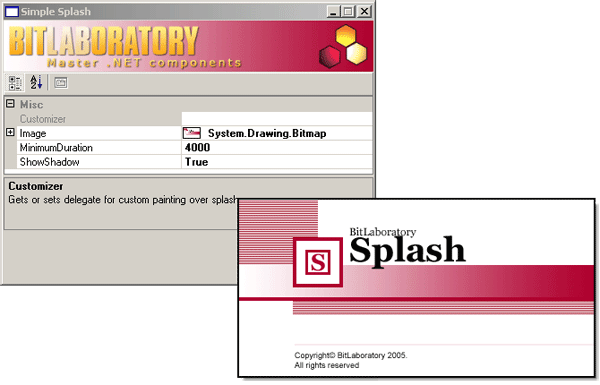
Have you ever loaded a piece of software and seen a sort of title screen for the software while it was loading? This title screen usually has information about the program version, name and release date and might also include a couple of graphics in order to help users identify a specific corporate or proprietary software brand. Did you know that you could make these screens for your own programs too if you wanted to do so? Well, one of the ways that you can do it is through the use of the Splash Screen software being discussed here.
The opening splash screen for the software makes it look like a Microsoft product, but don’t be fooled; this is a freeware product created by the excellent BitLaboratory.com. The product will allow you to use a number of different options such as the image and the transition and then sit back and see what results. The splash screen is quite fun to tinker with and that is perhaps why even this simple program has the ability to enjoy a large amount of popularity. It is still in an early phase of development, but you can expect there to be many new versions to come with new functionality and usage.
More information can be found at http://www.bitlaboratory.com/Default.aspx?tabIndex=1&tabID=10
Posted in Business, Commercial, Design, Developer, Information Management, Internet, Main, Shareware, Utilities, Windows | No Comments »
Thursday, October 25th, 2007
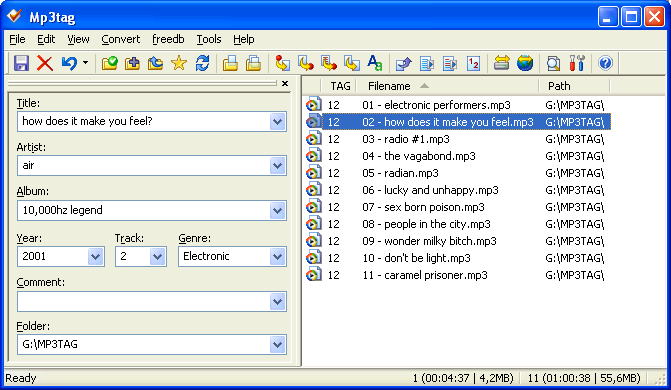
Google Desktop Search has become very popular in today’s world. Nowadays not only can you use the search to look for things on the internet right from your desktop, but at the same time you can also get it to remember past searches so that if you make it again it can tell you exactly which websites from the search you already visited. A lot of people love Google Desktop Search and while it certainly has a lot going for it, there is always room for improvement. Some of this improvement is provided by the software being reviewed here.
The Audio Indexer is what is known as a freeware plugin, meaning that you can use it to enhance the functionality of Google Desktop Search and that you do not have to actually pay anything in order to use it. Once installed, you can then use the plugin in order to get the Google Desktop software to actually index tags on different audio files. Tags are things like artist name, title of the song, track number on a CD, name of the album and of course the run-time of the actual song. These are all tags that the plugin can help Google Desktop index and therefore it can help you greatly when you take a look at the file information later on down the road.
More information can be found at http://mp3tag.de/en/gds.html
Posted in Catalogue, Design, Developer, Freeware, Information Management, Main, Plugin, Utilities | No Comments »
Thursday, October 25th, 2007
 So, most people that have a windows operating system are already well aware of the fact that their operating system has a disk defragmenter option that you can use when times get tough, your hard drive begins to run slow and everything seems like it needs to be fixed. People run the defrag program and it tends to make things better. Therefore, why would you need another defrag program to use instead of the Windows disk defragmentation service? Well, there are a number of reasons that you could require one and the two main ones have to do with the idea of automation and the idea of efficiency. So, most people that have a windows operating system are already well aware of the fact that their operating system has a disk defragmenter option that you can use when times get tough, your hard drive begins to run slow and everything seems like it needs to be fixed. People run the defrag program and it tends to make things better. Therefore, why would you need another defrag program to use instead of the Windows disk defragmentation service? Well, there are a number of reasons that you could require one and the two main ones have to do with the idea of automation and the idea of efficiency.
First and foremost, the program that comes with Windows is not particularly efficient. Not only does it take a lot of resources to use, but at the same time it also doesn’t do the job as efficiently as it could. The IObit program fixes both of these points by being able to run in the background seamlessly with your other programs; something that it could only do through the reduction of system resource usage which in turn can only come from more efficient operation. As to the second aspect, the aspect of automation, the program can be configured to scan for fragmentations automatically and therefore can be used to keep your hard drive running smoothly without you having to constantly check on the progress.
More information is available at http://www.iobit.com/iobitsmartdefrag.html
Posted in Developer, Main, Programming, Security, Shareware, Shell and Desktop, Utilities, Windows | No Comments »
Tuesday, October 23rd, 2007
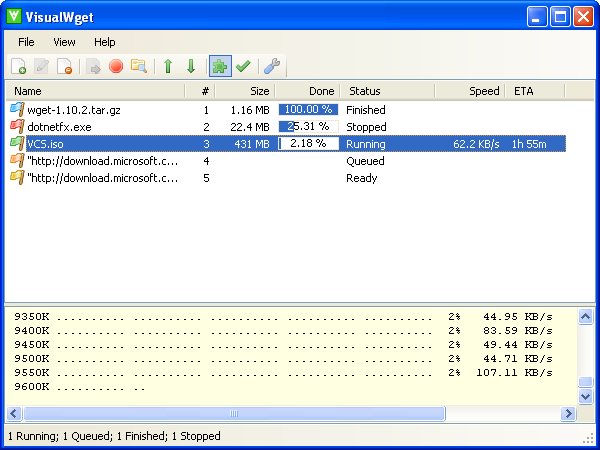 One of the most annoying things about a new Windows operating system is the fact that downloads are sometimes very hard to track. This is especially true with the download windows provided by internet explorer and firefox and therefore in order to make things better the use of a third party freeware software for managing downloads is needed. Now, while there are a number of different pieces of software out there that can do this function, few of them are as good as the newly released Beta 4 Rev 2 version of the Visual Wget software. One of the most annoying things about a new Windows operating system is the fact that downloads are sometimes very hard to track. This is especially true with the download windows provided by internet explorer and firefox and therefore in order to make things better the use of a third party freeware software for managing downloads is needed. Now, while there are a number of different pieces of software out there that can do this function, few of them are as good as the newly released Beta 4 Rev 2 version of the Visual Wget software.
This is a piece of software that is capable of following a large number of downloads as you make them. The software is actually designed to show a list of downloads much in the same way that you would see a list of jobs in other software packages and therefore it allows you to keep track on everything that you download. You can see what it is, the priority it has in your download queue, the status of the download and what the download is doing at that exact moment. If you download a lot, then this is a piece of software that can help you enormously.
More information can be found at http://visualwget.blogspot.com/
Posted in Developer, Download Managers, Internet, Main, Shareware, Utilities, Windows | 1 Comment »
Tuesday, October 23rd, 2007
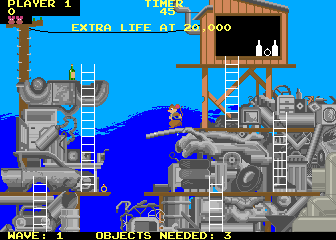 MAME is actually an acronym that stands for Multiple Arcade Machine Emulator. If you are interested in figuring out exactly what MAME does, then you need to understand the concept of computer emulation. What an emulator does it is it confuses your computer into thinking that it is something that it is not. For example, this particular emulator might be used to confuse your computer into thinking that it is a specific arcade machine and therefore allow you to play a number of different arcade games on your computer. There are emulators that exist for most of the popular console systems of today and the MAME is just another in a long line of very useful emulation devices. MAME is actually an acronym that stands for Multiple Arcade Machine Emulator. If you are interested in figuring out exactly what MAME does, then you need to understand the concept of computer emulation. What an emulator does it is it confuses your computer into thinking that it is something that it is not. For example, this particular emulator might be used to confuse your computer into thinking that it is a specific arcade machine and therefore allow you to play a number of different arcade games on your computer. There are emulators that exist for most of the popular console systems of today and the MAME is just another in a long line of very useful emulation devices.
MAME works with game data files, known as ROMs, in order to reproduce the visual look and feel of a specific game right there on the screen of your monitor. There are 2600 different unique arcade games that can be emulated using MAME covering the three decades that precede this one. In addition to the 2600 unique arcade video games, MAME can also perform approximately 2000 variations on the unique for a total of about 4600 different arcade games currently able to be emulated onto your computer through the use of the MAME software. Oh, and by the way, it is completely free!
More information can be found at http://mamedev.org/
Posted in Developer, Freeware, Games, Main, Multimedia, Programming, Windows | No Comments »
Tuesday, October 23rd, 2007
 There are so many different software programs and categories of programs out there today that it is sometimes difficult to ensure that a program gets raised to the surface through anything but sheer luck. While there is certainly going to be luck involved if this program gets to the top of the freeware spectrum, at the same time there is also going to be a lot to talk about in regards to all of the different features that this great program really does seem to have! There are so many different software programs and categories of programs out there today that it is sometimes difficult to ensure that a program gets raised to the surface through anything but sheer luck. While there is certainly going to be luck involved if this program gets to the top of the freeware spectrum, at the same time there is also going to be a lot to talk about in regards to all of the different features that this great program really does seem to have!
Joost for Windows is a work in progress; that is to say that it is a software piece that is constantly evolving as new updates are added and old bugs are fixed. At the current moment, it functions as a minimum-feature program that you can use to watch TV on the internet. When it is finished, it promises to be a very good program and gives you not only the high quality that internet TV sometimes lacks (especially in full screen mode, as YouTube viewers can attest to), but also gives you many typical TV functions such as easy channel surfing and the ability to select from dozens if not hundreds of television shows to watch.
More information can be found at http://www.joost.com/
Posted in Beta version, Developer, Information Management, Internet, Main, Video, Web services, Windows | No Comments »
Thursday, October 18th, 2007
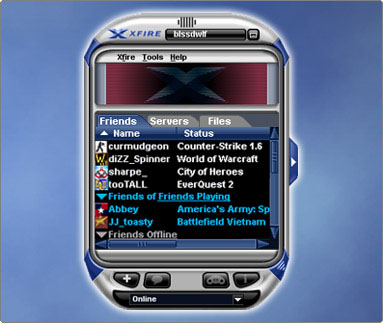
There are so many new instant messaging programs out there today that it is sometimes difficult to see where one program ends and another begins in terms of features. Well, the Xfire 1.82 software is quite different from that simply for the reason that it is quite different from all other instant messenger programs that currently exist. It is not different in the sense that it costs money (it is freeware just like all of the other instant messaging programs), but at the same time it is different because of area of specialty that it happens to cover.
The Xfire program, as many people are now already aware, is an instant messenger for gamers. If your friends happen to be playing games online, then you can find out which games they are playing and where they are playing them. If your friends are playing a specific game at a specific location, you will be able to know that from their Xfire status. You can even join the game that they are playing at that very moment just through a single click of your mouse. Truly, it is an excellent and pioneering program that allows gamers to enhance their gaming situation to the max. It even allows them to receive instant messages without interrupting their game play.
More information is available at http://www.xfire.com/
Posted in Chat, Developer, Freeware, Internet, Main, Social Software, Windows | 1 Comment »
|
|
|




