Archive for the 'Shareware' Category
Tuesday, March 13th, 2007
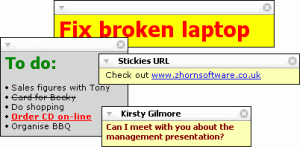 If you have a problem remembering your schedule and you find yourself late for certain meetings and events just because you forgot or you had it written somewhere but couldn’t find it on time, then this application could be of great help. I’m talking about Stickies. If you have a problem remembering your schedule and you find yourself late for certain meetings and events just because you forgot or you had it written somewhere but couldn’t find it on time, then this application could be of great help. I’m talking about Stickies.
Stickies is a PC utility to cut down on the number of Post-It notes. It stores all information in a single text-based file. They are yellow rectangular windows onto which you can put some text notes. One of the things I love about it is that once Stickies is used to create notes, the notes will stay on screen until you take them away. Just like a real sticky piece of paper.
Latest Changes in the latest version, Stickies 6.0b, includes:
- “Unlock/lock” action available on skins
- Can now snap to other stickies when shift-bulk-moving
- Left-click to place the cursor at a specific location, and then press and click at a different location to select the text in-between
- Setting an alarm into the past removes it
- Single-item right-click menu pops up on snoozing for clarity
- Save As style guesses at a font style and colour now rather than copying the default style font
- Message-ID now written into the headers for SMTP mails
- Bug meaning locked stickies can be change after being unrolled fixed
- Recurring stickies now have the correct create date, not a copy of the original
- “Don’t duplicate” was only intermittantly working depending on on-top status at sleep time
- Pressing alt-enter with the Friends top item selected no longer causes a crash
- Close button mouseover now drawn correctly
- Unrolling a sticky using a skin which doesn’t support rolling would cause it to disappear until Stickies was restarted
- “stickies.exe -” now obeys the default settings for a new sticky
- Creating any new sticky no longer forces on the desktop “set drop shadow” setting
Want to check it out? CLICK HERE
Posted in Business, Design, Developer, Information Management, Main, Shareware, Shell and Desktop, Windows | No Comments »
Monday, March 12th, 2007
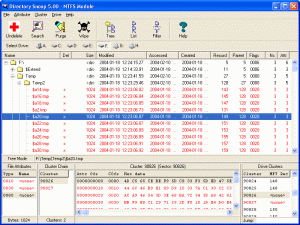 If you are searching for a tool that can help search and recover important documents or totally delete sensitive information, you need to check out Directory Snoop. If you are searching for a tool that can help search and recover important documents or totally delete sensitive information, you need to check out Directory Snoop.
Directory Snoop is a forensic search, recovery, and wipe utility for Windows. Just as the name implies this cool tool gives you the ability to snoop through your directory of files with advanced search functions.
With Directory Snoop you can:
- Recover erased files and data from individual clusters
- Display raw directory structures and purge erased file names left behind
- Snoop through files and clusters with advanced search functions
- Wipe sensitive data to prevent recovery
This cluster-level search tool allows Windows users to snoop through their FAT and NTFS formatted disk drives to see what data may be hiding in the cracks. Supported media include local hard drives, floppy disks, Zip disks, MO disks, and flashcard devices.CLICK HERE or Go to http://www.briggsoft.com/dsnoop.htm for more info and trial download.
Posted in Backup, Business, Commercial, Developer, Main, Security, Shareware, Utilities, Windows | 1 Comment »
Monday, March 12th, 2007
 XnView is a fast multi-format graphics browser, viewer, and converter. It can read more than 400 file formats, such as gif, bmp, jpeg, png, targa, multipage tiff, camera RAW, jpeg 2000, mpeg, Avi, Quicktime, and many more. EXIF & IPTC metadata is also supported. XnView is a fast multi-format graphics browser, viewer, and converter. It can read more than 400 file formats, such as gif, bmp, jpeg, png, targa, multipage tiff, camera RAW, jpeg 2000, mpeg, Avi, Quicktime, and many more. EXIF & IPTC metadata is also supported.
The image viewer part of it has an Explorer-like browser that allows quick and simple browsing of directory contents. The program is free for private use and has many features for image viewing, management, and processing. It supports red eye reduction, crops and transforms JPG images losslessly, generates HTML pages and contact sheets, and provides batch conversion and batch renaming. Slide shows with transitions effects, screen capturing, WIA & TWAIN support (scanner & digital cameras), image comparison, file operations, and more can all be done easily. Like the sound of it?
Check out the homepage here!
Posted in Browsers, Business, Developer, Main, Shareware, Shell and Desktop, Utilities, Video, Windows | No Comments »
Friday, March 9th, 2007
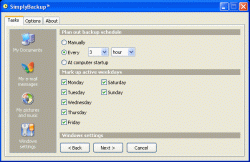 Need a fast and easy back up program? You need to check out SimplyBackup. Need a fast and easy back up program? You need to check out SimplyBackup.
SimplyBackup is a fast and easy backup program for Windows. It provides both manual and automatic data backup. It includes many useful features, such as Zip file compression, native file copying, strong AES-256 encryption, HTML log report, and more.
If there is in one thing you will enjoy about this software, it’s the user interface; it’s so simple and easy to learn that even fresh computer users won’t have a problem with it.
Another cool thing is that SimplyBackup includes backup templates to automatically back up My Documents, Windows desktop, Outlook folders, e-mail messages, address book, Windows system settings, and many more. You don’t have to specify those locations manually anymore.
You will also love the fact SimplyBackup is fast and has little impact on your system. It takes minimum system resources when running on your computer. The installation package is very small.
Don’t you think it’s worth checking out?
For more info and download, CLICK HERE or visit http://www.simplybackup.info/
Posted in Backup, Business, Commercial, Developer, Main, Shareware, Shell and Desktop, Utilities, Windows | No Comments »
Friday, March 9th, 2007
 If you need a program to help you keep an eye on your system especially the things that are not so obvious to the ordinary eye, you might want to check out SensorsView. If you need a program to help you keep an eye on your system especially the things that are not so obvious to the ordinary eye, you might want to check out SensorsView.
SensorsView is a program that monitors temperature of CPU, motherboard, hard disks, voltages, and fan speeds. It informs you about critical values of any parameters of your system (e.g. about overheating the processor or a stop of fans). You will appreciate the fact that SensorsView informs you about it and stores info in the log file.
The latest version, SensorsView Pro 3.1 Build 3061 was released on March 6, a couple of days ago.
In a nut shell it’s cool features include:
- Support almost all monitoring chips and motherboards
- Notification at critical values
- Showing chosen parameter in the tray
- Showing CPU usage
- Showing physical memory usage
- Showing HDD usage
- Showing NIC usage
- Log file for events and warning messages
Etc
Want to check it out? CLICK HERE
Posted in Developer, Main, Programming, Shareware, Shell and Desktop, Windows | No Comments »
Friday, March 9th, 2007
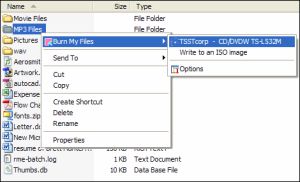 If there was ever a one click CD and DVD burning software, this is it. Burn My Files integrates with Windows Explorer. You need only select your file or folder, and with just one click, burn a CD or burn DVD. It’s so simple and very easy to use. If there was ever a one click CD and DVD burning software, this is it. Burn My Files integrates with Windows Explorer. You need only select your file or folder, and with just one click, burn a CD or burn DVD. It’s so simple and very easy to use.
The really cool thing about this software is that unlike most shareware, it offers a fully featured trial version for 30 days. This means you can try it free for 30 days and see if it’s something worth paying for or not. The publishers are that confident of their product.
Go and check out, you really don’t have anything to lose.
Go to http://www.burnmyfiles.com/
These are the cool features you will enjoy:
- Integrates with Windows Explorer
- One click to start burn
- CD burning software
- DVD burning software
- Burn DVD +R and -R
- Create ISO images
Posted in Audio, Developer, Main, Shareware, Utilities, Windows | No Comments »
Friday, March 9th, 2007
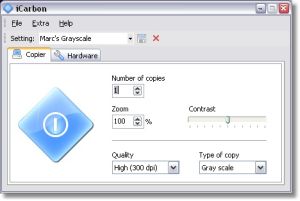 Have you ever had the need to photocopy something? who hasn’t! But you don’t have a photocopier, right? So you have to go pay for photocopies someplace. Well not anymore! Have you ever had the need to photocopy something? who hasn’t! But you don’t have a photocopier, right? So you have to go pay for photocopies someplace. Well not anymore!
At least not if you have a scanner and printer anyway!
iCarbon is a small freeware program that enables you to combine your scanner and printer to act just like a photocopier does. It’s compatible with TWAIN-compatible scanners. Configuration options include the paper size, color type (black and white, grayscale and color) contrast and quality settings.
It’s a useful little tool to have around whenever you need a quick copy of a document and it’s easy to use. Check it out.
Posted in Business, Design, Developer, Main, Photo, Shareware, Windows | No Comments »
Wednesday, March 7th, 2007
If you are tired of your desktop’s same old look, you might want to try using this freeware. It’s called Resolution Changer.
Resolution Changer is a command line application that can change your desktop width, height, color depth, and refresh rate temporarily or permanently (via command line switches).
One useful thing about this software is that it allows you to run another application in a specific display resolution and return to the previous resolution when the application finishes. The command lines switches let you alter only certain dimensions and choose the best refresh rate (or a specific one).
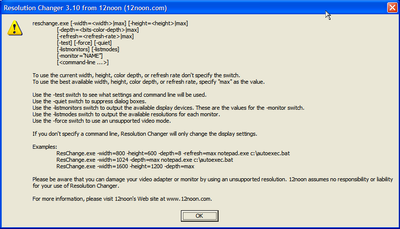
The latest version has these changes:
- Fixed a bug with parsing the command line
- Added support for using ‘max’ for width and height
- Added -test switch
Though the software really does what it says- changes resolution, you may not really find any major use for it. But it’s still worth checking out.
Give it a shot, it’s free! Go to http://www.12noon.com/reschange.htm
Posted in Commercial, Design, Main, Shareware, Shell and Desktop, Utilities, Windows | No Comments »
Wednesday, March 7th, 2007
 Here’s an easy to use, simple to understand, budgeting program that won’t break the bank (as it’s free!). It’s called PearBudget and it can help you manage your finances a little better. Here’s an easy to use, simple to understand, budgeting program that won’t break the bank (as it’s free!). It’s called PearBudget and it can help you manage your finances a little better.
All it takes is three easy steps…
You simply enter an estimate of what you think you’ll spend during your yearly budget, this only takes a few minutes once a year. Next you hold onto your receipts and record your expenses, you only need to do this once or twice a month. Lastly you click “analyse” and it tells you how you’ve done!
While PearBudget isn’t a piece of software as such. (All it is is an Excel spreadsheet, made into a template for entering financial details.) It’s simple and effective to use!
At the moment its an .XLS file (Opens with Excel or OpenOffice) that you have to download but they are working on an online version and you can sign up for the beta of this or download the offline version, all by going here!
Posted in Business, Developer, Freeware, Internet, Main, Open Source, Shareware, Utilities, Windows | 2 Comments »
Wednesday, March 7th, 2007
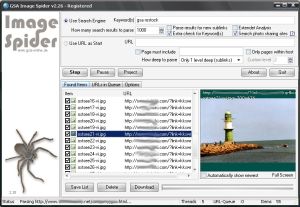 Check out this cool tool that can help you download images automatically. It is called GSA Image Spider. Check out this cool tool that can help you download images automatically. It is called GSA Image Spider.
GSA Image Spider can download all the images from a webserver automatically and this it does as you like it, with or without sublinks. It is a very easy to use software with a good user interface and it gives you amazing results in seconds.
Looking for relevant images from different websites? You can enter a keyword to find the relevant image from websites around the world easily.
Want to try out the demo version first and get a feel of the program? It provides only limited functionality and does not include many functions available in the registered version. You only get 10 images with the demo version but you will still get a feel of how it works and be able to make an informed decision whether to buy it or not.
Go check it out! Visit http://gsa-online.de/eng/image_spider.html or CLICK HERE!
Posted in Developer, Download Managers, Internet, Main, Photo, Shareware, Windows | No Comments »
|
|
|




