Archive for the 'Shareware' Category
Tuesday, December 4th, 2007
 Now you can regulate and control the inflow of short messages that you have been receiving in your Smartphone. It is possible with SmartSMSFilter Light for Smartphone 1.0 software. It acts like a filter enabling you to have the SMS blocked or accepted. The software is required to be shifted to the Smartphone for installating to start with the work. Using the program is easy for anyone as the features are not complicated. Now you can regulate and control the inflow of short messages that you have been receiving in your Smartphone. It is possible with SmartSMSFilter Light for Smartphone 1.0 software. It acts like a filter enabling you to have the SMS blocked or accepted. The software is required to be shifted to the Smartphone for installating to start with the work. Using the program is easy for anyone as the features are not complicated.
SmartSMSFilter Light for Smartphone 1.0 software saves you from the unwanted messages. You can set different features like to accept the messages with signal, without signal or dismiss the messages. You can set these options for the number that you are having in your contact list and also for the numbers that are undefined. Downloading the program is so much easier and the installation is done by transferring the file to the Pocket PC. The Status Bar would display the current Program State and you can select the option for activating the function.
When you activate the Program State you can control the incoming sms. The sms can be controlled to be accepted from particular contacts that are set in the list. If you do not want the incoming sms to be obstructed by the program you can disable it for freely receiving the messages. This can help you to get rid of the unwanted messages that are sent by the network services. The contact list shows the icon for having the sms disabled or enabled from the numbers. You can have the action applied to all the incoming messages and also can have the messages directly saved to the inbox without any signal. You can change the schedule settings by setting the start time, end time and the week days for it. Customize the option relating to the default message action and selecting contact list format. The help file gives all the information from the downloading to the working of the program.
{More Info and Download}
Posted in Developer, Mobile, Security, Shareware, SMS, Text | No Comments »
Tuesday, December 4th, 2007
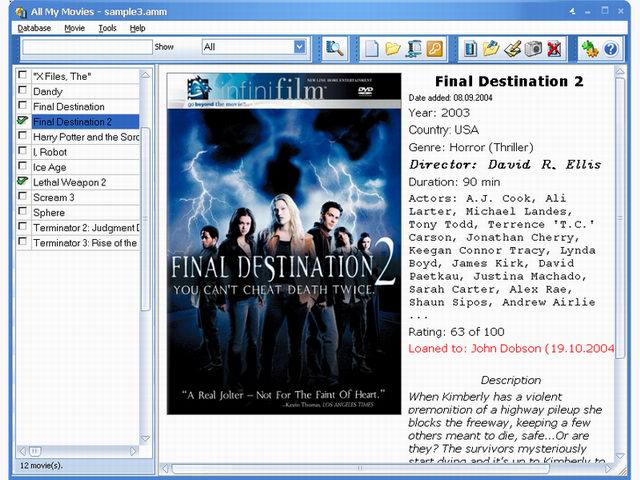
If you’ve been looking for a movie database manager but you haven’t been able to find something solid, this maybe what you need- All My Movies.
All My Movies is a movie database manager, the main features being demonstrative and handy vision of all your movie collection; importing screenshots directly from your movie DVDs or AVI files to the database which can help you remember movie using your visual memory and evaluate quality of the movie’s picture; fast movie search by any of the database fields; export your movie collection to HTML, plain text or Microsoft Excel format; easy to use loan manager.
In the latest version which just hit the software market, these changes have been effected:
Added:
- XLXS (MS Excel 2007) format support for import your movies from;
- Warning if you don’t assign any fields for the columns (MS Excel and text import);
- Ability to group movies by Studio. Right click over the movies list and select “Group by – Studio” menu item;
- “View-Orphans” menu item to Names directory. Shows only those persons, who didn’t assisted in your movies;
- CTRL-A shortcut for all persons selection in Names directory
Fixed:
- IMDb.com import function has been adapted for recent changes;
- Plugins for new online databases support are works in trial mode too
Want to see if it’s what you’ve been looking for? Check http://www.bolidesoft.com/allmymovies.html for more info.
Posted in Catalogue, Design, Developer, Information Management, Main, Shareware | No Comments »
Saturday, December 1st, 2007
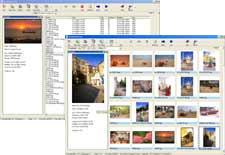 If you don’t like having pornographic pictures on your system or you just want to censor what your kids see on your system, then this tool my come in handy. It is called Media Detective. If you don’t like having pornographic pictures on your system or you just want to censor what your kids see on your system, then this tool my come in handy. It is called Media Detective.
Media Detective is a tool for helping you remove pornographic media from your PC. How does it work?
It scans media files on the computer, such as pictures and movies, to check whether they contain adult content. This is accomplished by opening and inspecting the files for skin tone present. The files are then rated according to their potential for obscenity and are displayed. You are then free to delete according to your discretion.
Want to check it out? Go to http://www.mediadetective.com/
Posted in Developer, Files and Folders, Internet, Main, Movies, Multimedia, Security, Shareware, Windows | No Comments »
Wednesday, November 28th, 2007
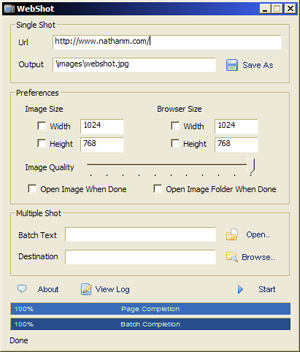
Need a tool to take screenshots and thumbnails easily? This should help you out.
WebShot is a simple utility that gives you the ability to take screenshots and thumbnails of webpages or websites. With this simple but tool software you can take screenshots of a single webpage or screenshots of multiple webpages in batch mode. But the simplicity should not turn you off if you are an advanced kind of user because Webshot also comes with a command line executable for advanced users.
In the recently released version there are new changes including:
- Fixed multi-threaded async pluggable protocol
- Compiled with Microsoft Visual Studio 2008
Want to try it out? It’s freeware!!! Go to http://www.websitescreenshots.com/
Posted in Developer, Internet, Main, Shareware, Utilities, Windows | 1 Comment »
Tuesday, November 27th, 2007
 In case you like to display images in an elegant manner for all to see; you can try creating a web gallery. Html Web Gallery Creator 1.0 software presents you the features that would help you to make an exquisite image gallery. Making web galleries was never so easy and simple that it could be done by even a normal user. Best part is that you can have a lot of fun while making the gallery for publishing on the website. In case you like to display images in an elegant manner for all to see; you can try creating a web gallery. Html Web Gallery Creator 1.0 software presents you the features that would help you to make an exquisite image gallery. Making web galleries was never so easy and simple that it could be done by even a normal user. Best part is that you can have a lot of fun while making the gallery for publishing on the website.
With this interesting software, all your pictures would make up such a beautiful gallery with so many effects that would catch up the eye. The screen of the software is dull looking but the options and the tasks that it performs are effective. You can have the folder loaded with the program for making the gallery. You can save the project so that you won’t loose the gallery configuration that you set for the one you made. The pictures are loaded with the program and they are shown in the sequence form at the screen. You can click on the image or scroll between the images through the previous and next option. You can set the picture appearance by rotating it through the right click of the mouse. (more…)
Posted in Design, Developer, Internet, Multimedia, Photo, Shareware, Windows | No Comments »
Tuesday, November 27th, 2007
 Now you can enjoy movies and videos with whole new exciting features that would make your movie viewing a whole lot more appealing. 5star Movie Enhancer 1.0.7.1026 software allows you to improve and enlarge the videos without any special technical skills. The software 5star Movie Enhancer 1.0.7.1026 is worthy to be bought as it performs different functions in an effortless and user friendly manner. Now you can enjoy movies and videos with whole new exciting features that would make your movie viewing a whole lot more appealing. 5star Movie Enhancer 1.0.7.1026 software allows you to improve and enlarge the videos without any special technical skills. The software 5star Movie Enhancer 1.0.7.1026 is worthy to be bought as it performs different functions in an effortless and user friendly manner.
5star Movie Enhancer 1.0.7.1026 software would not be taking much of your precious time to get downloaded and it get installed in no time so that you get more time for having fun watching the videos. When you launch the program a very pleasing screen appears in front of you. The software provides the best viewing experience and lets you to create High Definition videos from the normal DVD-Video. While having the changes done you can also watch the videos with the in-built player that it has. It will help you to get rid of the black borders like problems and you would definitely enjoy the excitement with the full screen view. (more…)
Posted in Movies, Multimedia, Shareware, Video, Windows | 2 Comments »
Tuesday, November 27th, 2007
 If you’re fond of music you must be having a large collection at your system. But as it increases don’t you think it becomes real hectic to manage them all. Now, you won’t need to worry as you can get all your music files arranged according to your wish and get any file whenever you want. To do this you need to get Music Collection 2.04.620 software that helps you to keep proper track of the music files. If you’re fond of music you must be having a large collection at your system. But as it increases don’t you think it becomes real hectic to manage them all. Now, you won’t need to worry as you can get all your music files arranged according to your wish and get any file whenever you want. To do this you need to get Music Collection 2.04.620 software that helps you to keep proper track of the music files.
Music Collection 2.04.620 software helps you to manage the files so that it becomes easy for you to track them. Download and install the software at your PC for getting the work done. Launch the software and get the options that are much convenient to use. You can get the files with placed with a tree structure. You can seek for the music files according to your selected categories. Get the collection set by the artists, albums, etc and arrange them in different fields. Set the collection, choose your favorites and record the lyrics for enjoying each line of the song. The list of the songs is shown according to selected category on the screen.
Looking for a particular file you can have the files sorted with alphabetical order also. Keeping a track of when you added new files becomes easier with the history option. Want to keep any notes or have any thing recorded or write anything you also have the notepad attached to the program. Enjoy the music at the same time through the in-built player or even an external player. Keep a check on the memory status and choose the settings according to your needs. It also gives you the browser access for getting more music with you. You also get the help guide that would assist you to arrange your music files in the best manner. (more…)
Posted in Catalogue, Information Management, Internet, Multimedia, Music, Shareware, Windows | 1 Comment »
Tuesday, November 27th, 2007
 Macintosh users can now make their video viewing experience be a bit different and a lot more interesting with YourView 1.0.1 software that also allows them to share the videos. The software can be used by anyone without any difficult as the options are easy to learn and operate. With the YourView 1.0.1software you can tag and navigate the videos in various ways. Macintosh users can now make their video viewing experience be a bit different and a lot more interesting with YourView 1.0.1 software that also allows them to share the videos. The software can be used by anyone without any difficult as the options are easy to learn and operate. With the YourView 1.0.1software you can tag and navigate the videos in various ways.
Getting the software downloaded and installed would take just a few clicks. The screen of the program is good and pleasing but not flashy. You can create files and edit the videos according to your liking. You can make the videos more amazing by adding up different effects and making the video including the features from the options that you want to have.
The screen of the software shows the video on the upper left side so that you can know about the changes altogether. You can prepare demos or tutorials from the videos that you have taken. You can make the selection for the name, category and also set the start and end time. It also has the option for ratings and lead in, lead out option. The features as tutorials and icons are shown on the right side if the screen. You can select and deselect the selections made by you any time and put new changes to the video you’re making. The simple working features like ‘Remove’, ‘Apply’, ‘Edit’, ‘Delete’, etc are placed on the screen itself for your convenience. (more…)
Posted in Developer, Mac Stuff, Shareware, Video | No Comments »
Monday, November 26th, 2007
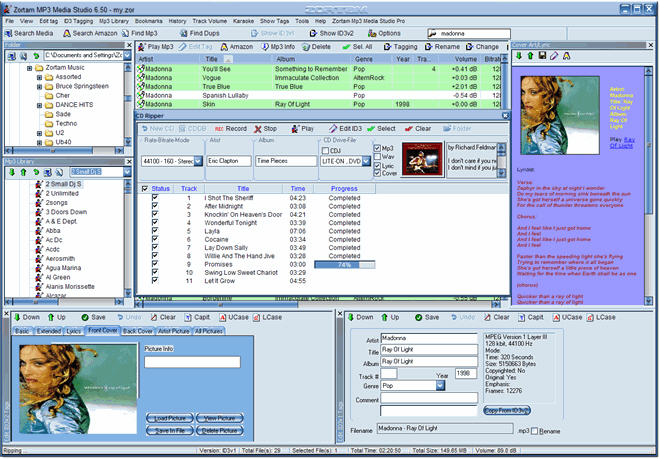
Zortam Mp3 Media Studio is all-in-one Mp3 application that is really loaded.
Why do I call it loaded?
It contains MP3 organizer for searching and cataloguing Mp3 files into Mp3 library, editing ID3v1 and ID3v2.3 tags converting audio CD to MP3 and WAV format using CDDB. With Zortam Media Studio you can easily search for song lyrics from the internet, also get batch lyrics and cover picture update from the internet, create lyrcis book. But that’s not all converting Wav to Mp3 files and Mp3 to Wav files, managing M3u playlists, renaming files using ID3 tags, searching for duplicate Mp3 files are among the other cool features available in this cool tool.
See what I mean by loaded?
In the latest version, the major change effected is:
- Improved algorithm for Zortam auto tagging from Zortam Music Database (ZMLIMD)
Want to try it out? Visit http://www.zortam.com/index.php
Posted in Catalogue, Commercial, Design, Developer, Internet, Main, Music, Shareware, Windows | 1 Comment »
Monday, November 26th, 2007
 There is this software that could be a lifesaver for software development teams or support departments, it is called Eventum. There is this software that could be a lifesaver for software development teams or support departments, it is called Eventum.
Eventum is an issue tracking system that can be used by a support department to track incoming technical support requests, or by a software development team to quickly organize tasks and bugs.
In the latest version which just hit the market a couple of days ago, some changes in features were effected, these include:
- Fixed error with DB error when removing assignees from issue assignment list;
- Rewritten error handling to create less smaller error reports;
- Make issue associated list as text field;
- Implementing per project “mail aliases”;
- Made timetracking window input more convenient;
- Display email addresses to whom email was sent when issue was updated;
- Add “Show Times spent on issue” to weekly report page;
- Improved Weekly Reports output possibilities;
- Fixed bug with reminders when no recipients are found;
- Fixed bug with emails downloaded from mail server only being sent to issue assignee;
- Added support level to list issues page;
- Added ability to control if a custom fields is required and validation options from backend;
- Added option to include custom fields on close issue;
- Changed customer API to support multiple contracts;
- Fixed bug with closed issue notification going out even when it shouldn’t have;
- Updated Smarty and PEAR packages to latest versions;
- Fixed bug with expandable tables;
- And so much more…
For more info go to http://dev.mysql.com/downloads/other/eventum/
Posted in Business, Developer, Internet, Main, Programming, Shareware, Windows | No Comments »
|
|
|




