Archive for the 'Social Software' Category
Thursday, December 7th, 2006
 Having duplicate files on your PC can rob you of precious disk space and even slow down your system, that’s why this freeware is a really useful tool. I’m talking about CloneSpy. Like the name suggests it spies out clones [duplicates] of files on your system and helps you to get rid of them. Having duplicate files on your PC can rob you of precious disk space and even slow down your system, that’s why this freeware is a really useful tool. I’m talking about CloneSpy. Like the name suggests it spies out clones [duplicates] of files on your system and helps you to get rid of them.
In case you are wondering why you need this freeware, maybe you are thinking, duplicates will always be obvious and you can get rid of them when you see them. That’s the problem, they are not always obvious. Duplicate files can have exactly the same contents regardless of their name, date, time and location. CloneSpy helps you to fish them out with ease. CloneSpy is also able to find files that are not exactly identical, but have the same filename. So if you want to get rid of older versions of your favorite files you can do so with ease. It can also find zero length files, which are files that have no content.
Want to try it? CLICK HERE FOR FREE DOWNLOAD!
Posted in Commercial, Developer, Main, Shareware, Social Software, Utilities | No Comments »
Thursday, December 7th, 2006
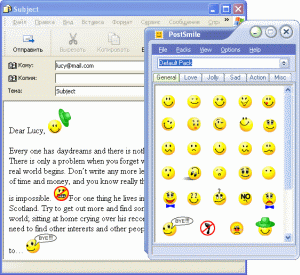 With PostSmile sending emails and posting on message boards gets to be fun. You can Drag and Drop images and animations, smiles and emoticons, text or HTML snippets, quotes and signatures into your email, message board or web-forum postings. With PostSmile sending emails and posting on message boards gets to be fun. You can Drag and Drop images and animations, smiles and emoticons, text or HTML snippets, quotes and signatures into your email, message board or web-forum postings.
One thing I appreciate about this program is that the smiley faces are divided into clear categories – Happy, Love, Sad, Communication, Other, Signatures, Famous Quotes, Love Quotes, Proverbs, Jokes and Compliments. PostSmile offers a wide variety of smiley faces but that’s not all, hundreds and hundreds of great emoticons are available in the PostSmile’s Online Collections Gallery. It also works well with all major email programs.
Like me you may be having an issue with the price. You may find it difficult to comprehend why you should part with $24.95 for smiley faces. Well they are offering a 25% Christmas discount presently, so it only goes for $18.71 for now. If you are still having an issue with the price, check out the trial version. But you need to note that you’ll only get limited smileys with the trial version , to get access to hundreds of emoticons , you’ll have to buy the full version.
Learn more and Check out the trial version!
Posted in Commercial, Design, Developer, Fun, Information Management, Internet, Main, Multimedia, Shareware, Social Software, Utilities | 1 Comment »
Tuesday, December 5th, 2006
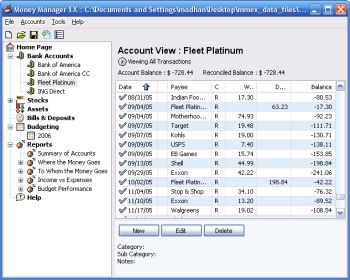 Money Manager Ex is a free open-source money managing and budgeting program. Money Manager Ex is a free open-source money managing and budgeting program.
Usually you gotta pay for decent personal finance software, so if you’re tryin’ to manage your money, you’ll appreciate that this ones free.
But how good is it? Pretty good! – You can manage multiple accounts and checking, savings, credit card, or loan accounts. You can even create your own categories and easily organise where your money goes into these. You can also track your bills and deposits and be reminded of upcoming bills and deposits so you won’t forget and lose track of them.You can import files from excel, microsoft money, and quicken, and also export to excel format. It also supports printing with inbuilt print preview.
Other useful features include viewing spending by category over a date range or by single category over time and viewing income versus expenses and how you’re doing on a budget.
Overall this is definitely worth checking out for anyone trying to budget and manage their finances better, its even free, which helps!
You can get more info and download it by clicking the homepage here.
Posted in Business, Commercial, Developer, Freeware, Internet, Main, Shareware, Social Software, Utilities, Windows | No Comments »
Monday, December 4th, 2006
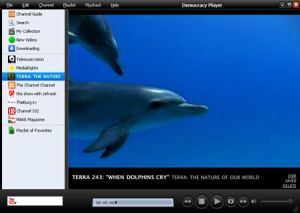 Despite the serious sounding name, Democracy Player is actually a very good video player. But it’s so much more too. Aside from the fact it claims to play virtually all video formats (Quicktime, WMV, MPEG, AVI, XVID, and more), you can also search for videos from inside it! Despite the serious sounding name, Democracy Player is actually a very good video player. But it’s so much more too. Aside from the fact it claims to play virtually all video formats (Quicktime, WMV, MPEG, AVI, XVID, and more), you can also search for videos from inside it!
Your chosen video or videos then downloads to your computer where they are kept for a default of 5 days before being deleted, but you can choose to save them forever too. It even allows you to search YouTube, Yahoo Video, Google Video, and more, right from inside it!
I was a little confused by the interface at first until i realised how simple it was, the “My Collection” link to the left is everything you downloaded, “New Videos” is downloaded videos you haven’t watched yet, and “Downloading” is videos currently being downloaded. So it’s all pretty easy to use!
It has lots of channels built in and feeds from video sites, so you’ll never be lost for something to watch!
I have a feeling we’ll be hearing a lot more about this cool program! You can download it for free and find out more info by checking out the homepage here.
Posted in Business, Commercial, Developer, Freeware, Fun, Main, Social Software, Video, Web services | 1 Comment »
Sunday, December 3rd, 2006
 No longer is it just talk-talk-talk! The first phase of the release of Windows Vista and Microsoft Office 2007 has just been implemented. At an event held on Thursday, Microsoft’s Steve Balmer announced the business availability of Windows Vista, Microsoft 2007 and over 30 other applications that are targeted for the business world. No longer is it just talk-talk-talk! The first phase of the release of Windows Vista and Microsoft Office 2007 has just been implemented. At an event held on Thursday, Microsoft’s Steve Balmer announced the business availability of Windows Vista, Microsoft 2007 and over 30 other applications that are targeted for the business world.
The event was held at the NASDAQ Marketsite in New York City. 11 years ago Microsoft pulled this kind of double release stunt [Windows 95 and Office 95] and had a record breaking success. Will history repeat itself for Vista and Office 2007? Let’s wait and see.
Microsoft said it plans to spend “hundreds of millions” of dollars to market the Windows upgrade. The marketing budget will eclipse the $500 million Microsoft spent to market Windows XP, the predecessor to Windows Vista.
Now that Microsoft has stayed true to their promise of releasing the first version for businesses, we can rest assured that we all will be able to get the “everybody version” [consumer version] early next year as promised.
Click here for the full gist of the launch.
Click here for more info on Office 2007 and free test drive of Office 2007.
Posted in Business, Commercial, Information Management, Main, Multimedia, News, Office, OS Updates, Programming, Security, Shareware, Social Software, Windows | No Comments »
Sunday, December 3rd, 2006
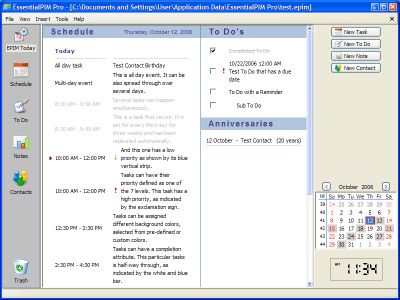 EssentialPIM is another PIM program (Personal Information Manager in case you were confused!) These things are very useful for not having to remember 100 different things such as birthdays, meetings, appointments, to-do lists etc. You can easily make a note of something you have to do in two months time that you might otherwise forget by then. It has color coded day, week, and month schedules. EssentialPIM is another PIM program (Personal Information Manager in case you were confused!) These things are very useful for not having to remember 100 different things such as birthdays, meetings, appointments, to-do lists etc. You can easily make a note of something you have to do in two months time that you might otherwise forget by then. It has color coded day, week, and month schedules.
You can import (and export) from a whole bunch of other software such as Outlook, Outlook Express, and Google Calendar. You can even sync it with Windows Mobile Pocket PC and Smartphone devices, if your lucky enough to have one of those!
It’s pretty detailed and feature packed with an easy to follow layout and some useful features such as to-do list, contacts manager etc. I’d recommend checking it out to anyone who wants to be more productive or simply has a bad memory!
There’s a free version and a paid version. What’s the difference? Click here to find out or go to the main homepage here for more info.
Posted in Browsers, Business, Information Management, Main, Shareware, Social Software | No Comments »
Sunday, December 3rd, 2006
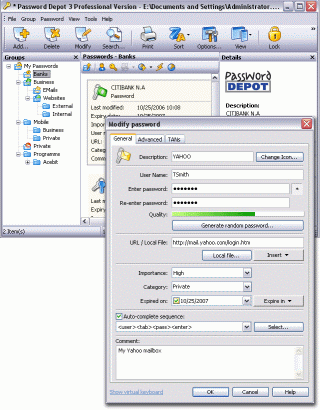 In one of my recent posts I told you about a software that can help you manage your passwords effectively, but in case you are not satisfied with that for any reason, you might consider checking this out! Password Depot. In one of my recent posts I told you about a software that can help you manage your passwords effectively, but in case you are not satisfied with that for any reason, you might consider checking this out! Password Depot.
Password Depot is a powerful and extremely user-friendly tool for the management of all your passwords. It offers rock-solid protection of your data due to double encryption with Rijndael 256. Your password list is protected twice: with the master password and with an internal key. Password Depot really stands out from the pack.
Some its great features include:
- User-friendly interface for convenient management of your passwords and access details: for the Internet, online banking (TANs), online shopping etc.
- Generate uncrackable passwords using the integrated Password Generator
- Maximum protection of your sensitive data thanks to the security algorithm Rijndael 256-Bit
- Protection from keyloggers and spyware: Password Depot protects your passwords even if your computer is infected with spyware and keyloggers
- Password Depot 3 runs on every Windows PC. Optionally, it also runs on USB flash drives
- Network compatible – allows shared use on a local network
- Store password lists on FTP servers for worldwide access to your data etc.
Though it’s not a freeware, you can try it out for free for 30 days.
CLICK HERE for more info and download!
Posted in Business, Commercial, Developer, Information Management, Internet, Main, Security, Shareware, Social Software, Utilities | No Comments »
Wednesday, November 29th, 2006
 This is a free open-source MSN Messenger clone called aMSN. If for any reason you want to use MSN messenger but without using the official MSN messenger client, then maybe its time to check this out. This is a free open-source MSN Messenger clone called aMSN. If for any reason you want to use MSN messenger but without using the official MSN messenger client, then maybe its time to check this out.
It does just about everything the official MSN messenger program does, plus some more, such as being able to sign into more than one account at a time. It supports display pictures, custom emoticons, file transfer, even webcam support.
When you read the list of features, you’ll see its virtually identical to the official client in every way, but one potentially useful thing is that you can download plug-ins from the site, as well as this, its also skinnable.
You can check out all the features in full and download it by going here.
Posted in Commercial, Developer, Internet, Main, Open Source, Shareware, Shell and Desktop, Social Software, Utilities, Windows | No Comments »
Tuesday, November 28th, 2006
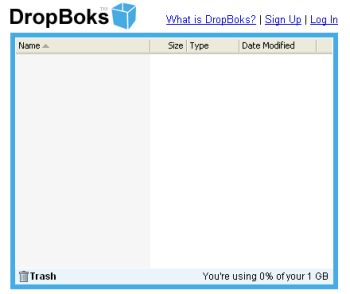 You need a place where you can upload and download files without any additional features like at Box.net? Well, try DropBoks. You need a place where you can upload and download files without any additional features like at Box.net? Well, try DropBoks.
It is a free storage solution where you can store up to 1GB of information. The only catch here is that you can’t upload (and download) big file at once (for example big music archive or a whole DivX movie or something else) – there’s a limit only 50MB at time.
It’s very simple to use (navigate) – sign up, then browse to the files you wish to upload and… in general that’s all. Selected files will be uploaded to a special folder from where users can download those files. When you don’t need some file anymore simply drag and drop it onto the trash icon.
Ps: One more thing. Remember I’ve told you that this service was free? Well, it’s so but guys who are running that site just ask for a $1 fee so there won’t be any ads.
Just try it for yourself. I’ve got a feeling you’ll love it.
Posted in Business, Commercial, Developer, Freeware, Information Management, Internet, Main, Open Source, Social Software, Utilities, Web services | No Comments »
Tuesday, November 28th, 2006
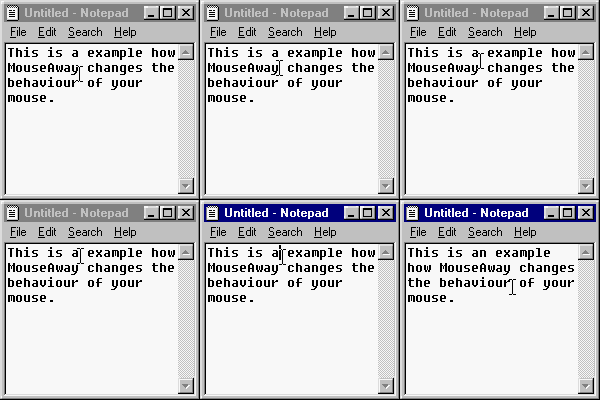 MouseAway is a simple and very small program that you may find useful. It simply moves your mouse cursor out of the way if you’re typing, so that you don’t have to manually move it yourself each time. MouseAway is a simple and very small program that you may find useful. It simply moves your mouse cursor out of the way if you’re typing, so that you don’t have to manually move it yourself each time.
It’s a pretty basic program that only does exactly as it says. The upside to it being so small and basic means it takes up very little memory. So if this is an minor annoyance for you, having to move the mouse cursor out of the way every time you type, then maybe it’s worth trying out!
(If its a major one, you really need to chill out a little!)
It’s freeware and you can download it from the homepage right here!
Posted in Commercial, Freeware, Main, Social Software, Text, Utilities | 1 Comment »
|
|
|





