Archive for the 'Social Software' Category
Monday, January 29th, 2007
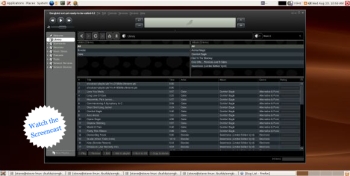 Songbird is a media player, but not all media players are quoted as promising “to be the Firefox of media players”. Songbird is a media player, but not all media players are quoted as promising “to be the Firefox of media players”.
Apparently the user interface is very similar to iTunes, but the main thing I noticed about this media player is its ability to list all the sound or video files on a page, almost as if they were local files.
You see how this thing operates, is you surf to sites such as mp3 blogs etc, by using the built-in browser, and all the media on the page will be listed. You can then choose if you would like to save or play any of these songs/videos locally to your collection. Of course you can also play and organize playlists etc, with your current mp3 or video collection that resides on your computer.
It is pretty cool to be able to instantly play media without having to open it in a separate program.
This might be useful software for anyone who routinely browses for music or videos online. You can find out more details and download it by clicking here!
Posted in Business, Commercial, Developer, Fun, Information Management, Internet, Linux, Mac Stuff, Main, Multimedia, Music, Shareware, Social Software, Utilities, Windows | No Comments »
Monday, January 29th, 2007
7-Zip is an open-source file archiver with high compression ratio. It can compress your files using a variety of methods, such as 7z, ZIP, GZIP, BZIP2 and TAR. It can also extract RAR, CAB, ISO, ARJ, LZH, CHM, Z, CPIO and NSIS archives.
 Like other file archives you may be used to, 7-zip can integrate into the windows shell and it also has a command-line version. 7-ZIP also offers some advantages over other windows based archive programs such as winzip and winrar: Like other file archives you may be used to, 7-zip can integrate into the windows shell and it also has a command-line version. 7-ZIP also offers some advantages over other windows based archive programs such as winzip and winrar:
Open-source – You can read and modify the program source code.
- Cross-platform – You can run 7-zip on any modern operating system (Windows, Linux, OS X, and so on)
- No registration – There are no annoying splash screens or nagging registration pop-ups
- Provides a compression ratio that is 2-10% better than PKZIP and WINZIP provide for ZIP and GZIP archives.
Note that you can register 7-zip if you want to support it by clicking Help->About 7-Zip->register in the 7-Zip File manager but it’s not a requirement and it will never bug you to.
There are two basic ways you can associate certain file types with 7-zip. The easiest way is to open up the 7-zip file manager and choose Tools->Options and in the System tab choose the file extensions you want to associate with 7-zip. This will make it so files ending in those extensions are automatically opened in the 7-Zip file manager for extraction. If you choose to add the associations manually by the standard MS Windows way of right-clicking on a file, choosing “open with”, selecting the “always open files of this type with this program” and then browse for the 7-zip program then make sure you select C:\Program Files\7-Zip\7zFM.exe. There are two other binaries in the 7-Zip installation folder that could confuse you and they are called 7z.exe and 7zG.exe; so make sure to use 7zFM.exe (FM means File Manager)
It is possible that 7-Zip can handle all your file archiving needs but you may run into some files that were compressed using Winzip and they won’t always be compatible with 7-Zip. I personally haven’t came across this issue but just be aware of it.
To extract all the files of an archive first click Edit->Select All and then click the ‘Extract’ Button (As shown in the included screenshot)
Posted in Developer, Freeware, Linux, Mac Stuff, Main, Open Source, Social Software, Utilities, Windows | 8 Comments »
Friday, January 26th, 2007
 Got this cool way for you to stay on top of things easily. It’s called KlipFolio. It is a small, smart, and easily configurable personal dashboard. Got this cool way for you to stay on top of things easily. It’s called KlipFolio. It is a small, smart, and easily configurable personal dashboard.
What can it do?
It can be used to monitor anything online and I mean anything; weather, stocks, news, RSS feeds, auctions, whatever, the choice is yours, right on your desktop. So you can really be on top of things easily with KlipFolio, you don’t have to go check on your favorite sites always to know what the latest happenings are, this personal dashboard brings it all to your desktop.
The latest version, KlipFolio 4 Beta B , which just got released yesterday has these changes:
- Added auto-hide, always-on-top and normal window layering modes
- Layouts now saved for floating, strip and sidebar modes within session
- Minimize menu item, system tray icon and Win+K shortcut now minimizes everything
- Klips can now be collapsed by clicking on ghosts
- Made it easier to enter a sidebar mode gesturally when overshooting target
- Klips no longer ‘bumping’ offscreen (so easily)
Etc.
CLICK HERE for more info and download!
Did I fail to mention that it’s free? Yeah it is absolute free.
Posted in Commercial, Developer, Freeware, Information Management, Internet, Main, Shell and Desktop, Social Software, Windows | 1 Comment »
Thursday, January 25th, 2007
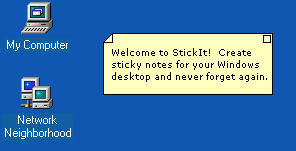 If you are one of those people who easily forgets things and needs constant reminders to do what you are supposed to do, you need to check this out, I call it the sticky reminder but the publisher calls it StickIt. If you are one of those people who easily forgets things and needs constant reminders to do what you are supposed to do, you need to check this out, I call it the sticky reminder but the publisher calls it StickIt.
StickIt is a Windows desktop sticky note application. With this cool tool you can create notes and place them anywhere on your computer. I love the fact that the notes don’t just disappear, they remain where they are – where you left them, until you close them –and get this; they will even reappear after rebooting your computer. So no forgetting those important stuff again.
The notes can be customized by you. You are given the option of selecting from a wide range of text colors and background colors for your notes. Go and check it out! It’s free.
CLICK HERE for download and more info.
Posted in Business, Design, Developer, Information Management, Main, Shareware, Shell and Desktop, Social Software, Text, Utilities, Windows | No Comments »
Wednesday, January 24th, 2007
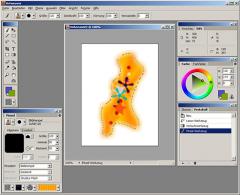 Artweaver is a ‘natural painting program’ allowing you to create art with simulations of real life materials, it has a fair amount of potential.There are a few natural painting programs available, but usually they are rather limited. Most image editing application are geared towards post-image manipulation, rather than creating your image from scratch.Artweaver is an application aimed at artists capable of painting through a pen tablet or directly on to their screen, using a mouse. It has a wide range of brushes and the brush simulation is as realistic as possible, with chalk, charcoal, pencils and other brushes included. Artweaver is a ‘natural painting program’ allowing you to create art with simulations of real life materials, it has a fair amount of potential.There are a few natural painting programs available, but usually they are rather limited. Most image editing application are geared towards post-image manipulation, rather than creating your image from scratch.Artweaver is an application aimed at artists capable of painting through a pen tablet or directly on to their screen, using a mouse. It has a wide range of brushes and the brush simulation is as realistic as possible, with chalk, charcoal, pencils and other brushes included.
As well as its natural painting, it will enable you to make sketches from existing photos and also add effects to images. It will enable you to import from a wide range of image formats. Its freeware and available here.
If you like this, you might also wanna check out my earlier review of a similar program here.
Posted in Design, Developer, Freeware, Main, Photo, Social Software, Utilities, Windows | 2 Comments »
Tuesday, January 23rd, 2007
MySpace.com has filed a federal lawsuit against a man who allegedly sent millions of spam “bulletins” advertising Web sites where users of the popular online social network could buy ring tones, polo shirts, and other products and services.
MySpace, owned by News Corp., sued Scott Richter Friday in U.S. District Court in Los Angeles. The suit seeks a permanent injunction barring Richter and affiliated companies from the online community. It also seeks unspecified monetary damages.
The latest spam suit is not the first against Richter. Microsoft and then-New York Attorney General Eliot Spitzer sued Richter in 2003, when the defendant was known as one of the top spammers in the world, according to Microsoft. Richter and his company OptInRealBig.com LLC agreed to pay $7 million in a settlement reached two years later.
via Information Week
Posted in Internet, News, Social Software, Web services | No Comments »
Monday, January 22nd, 2007
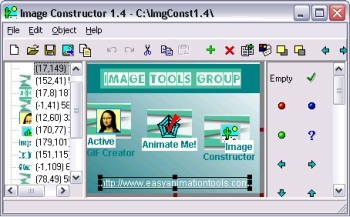 In need of a software that can help you create pictures in form of texts and small images? Then you might want to check out Image Constructor. In need of a software that can help you create pictures in form of texts and small images? Then you might want to check out Image Constructor.
Image Constructor helps you to create pictures in form of texts and small images over some background with picture or gradient fill and import them to graphical files. This software is really useful in making web graphics; structural diagrams; flow-charts; presentation materials; beautiful pictures etc.
I love the fact that Image Constructor is built with simplicity in mind. So there are no special requirements for this software, this means you should be able to enjoy it fully no matter what kind of system you are using.
Check it out: http://www.easyanimationtools.com/products/imageconstructor/
Posted in Commercial, Design, Developer, Main, Multimedia, Shareware, Social Software, Utilities, Windows | No Comments »
Tuesday, January 16th, 2007
Here is a nice instant messenger for you. TerraIM
It’s an instant messenger which connects to the AIM and ICQ instant messaging networks using either OSCAR or TOC as the protocol. It uses the wxWidgets toolkit and supports advanced features such as file transfer, logging, and tabbing.
The recent version, TerraIM 1.2.5 released just before the new year has these changes
- Fix text showing white on white or black on black
- Add option to keep buddy list always on top
- Add an option to auto-reconnect
- Sort the away messages dropdown box alphabetically
- Fix a potential crash when TerraIM is disconnected
- Fix the positioning of the remote control warning window
- Fix blocked buddies showing up when logging in invisible
- Improve the IM/Profile HTML display to correctly show Windings/Webdings etc
- Fix the invisibility status checkbox not updating with multiple logins
Etc.
CHECK IT OUT HERE!
Posted in Developer, Freeware, Information Management, Internet, Main, Social Software, Windows | No Comments »
Monday, January 15th, 2007
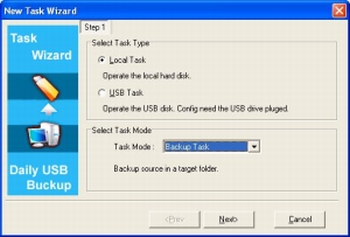 Daily USB Backup is a little program to help you backup your important info or synchronise it with an external drive. It has a file and folder filter so it only backups what you want backed up and it can Monitor the source files automatically and synchronize only the files new or changed. It can also encrypt zipped backup files for added security. Daily USB Backup is a little program to help you backup your important info or synchronise it with an external drive. It has a file and folder filter so it only backups what you want backed up and it can Monitor the source files automatically and synchronize only the files new or changed. It can also encrypt zipped backup files for added security.
It has USB drive binding support, which means it can be set to recognize only your drive, that way it won’t just start backing up to just any drive that gets connected. The program will monitor the change of system disk letter and recognize the new letter of USB driver. It can recognize the bound disk with several USB disks connected. Which will help the program synchronize files with the right USB driver. If your USB drive isn’t connected, the program will remind you to connect it at the scheduled time. After the alert, it will automatic perform the task in the next 10 minutes.
This is a pretty cool idea for anyone who has say, a laptop that they want to keep synchronized or backed up on an external drive.
You can get more info and download the demo here.
Posted in Business, Commercial, Developer, Information Management, Main, Security, Shareware, Social Software, Utilities, Windows | No Comments »
Monday, January 15th, 2007
 MediaMonkey is software to help you manage your Mp3 collection, and they sure cater for a large one! They say it can handle 50,000+ music files, but don’t worry, it works just as well on smaller collections! MediaMonkey is software to help you manage your Mp3 collection, and they sure cater for a large one! They say it can handle 50,000+ music files, but don’t worry, it works just as well on smaller collections!
It includes portable audio device synchronization that allows you to quickly synch tracks and playlists with iPods and other portable audio devices. Its player automatically adjusts volume levels so that you don’t have continually fiddle with the volume control and supports hundreds of Winamp plug-ins and visualizations; or if you prefer, it can use Winamp as the default player.
On top of all this it does much more, It can automatically identify tracks who’s tags are missing and look them up online, it also looks up album covers from Amazon. It can also arrange playlists with ease and rip and burn, for a full list of features check out the site here and you can grab the free version!
I’d recommend this for anyone who’s a big music fan and has a large mp3 collection.
Posted in Business, Commercial, Developer, Freeware, Fun, Information Management, Main, Music, Shareware, Social Software, Windows | No Comments »
|
|
|





