Archive for the 'Windows' Category
Thursday, November 22nd, 2007
 Are you an artist who has so far avoided computer art due to feeling more comfortable with traditional artist medium such as pencil, paints, etc? Are you an artist who has so far avoided computer art due to feeling more comfortable with traditional artist medium such as pencil, paints, etc?
Before you turn your back on digital art methods, you might wanna check out TwistedBrush. It has one of the most realistic brush engines you are likely to find in any art program. It lets you choose from a wide selection of brush and paint types with very realistic results that come as close to real life paint and canvas as possible. It comes with lots of brushes (12 in the free version and a huge 3000 in the paid version). It also has drawing tablet support.
This will definitely be of interest to any traditional artists thinking about moving into the digital world, all with less mess and lots of features you can only get with technology! Check it out here for the full list of features and some examples
Posted in Animation, Commercial, Design, Main, Shareware, Windows | No Comments »
Wednesday, November 21st, 2007
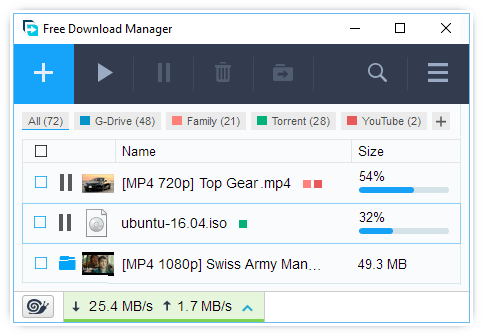 The newest version of this excellent piece of software was just released on November 18th and there are a number of new things included within the software package guaranteed to delight previous users. A lot of improvements have been made to things like the groups features and these improvements go a long way towards cutting down on redundancies and ultimately making sure that the whole software runs more smoothly. The newest version of this excellent piece of software was just released on November 18th and there are a number of new things included within the software package guaranteed to delight previous users. A lot of improvements have been made to things like the groups features and these improvements go a long way towards cutting down on redundancies and ultimately making sure that the whole software runs more smoothly.
If you are new to this program, then the Free Download Manager can definitely make your life a lot easier. It is a program that you can download for free and use to download files from any website you want. You can actually use it to download whole websites as well and you can also order your downloads so that you can find out with just a simple window maximization what the status of every file you are currently downloading is. All in all, it tracks fantastically and since it is full featured freeware as well, a lot of people have benefited greatly from its use.
More information about this software as well as download links are available at the homepage of the creator at http://www.freedownloadmanager.org/.
Posted in Developer, Download Managers, Freeware, Internet, Main, Windows | 7 Comments »
Friday, November 16th, 2007
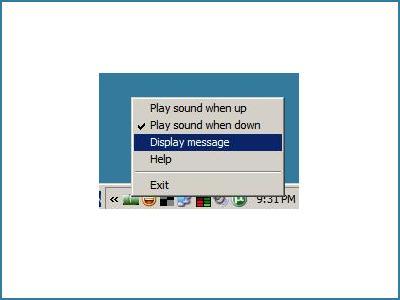 I’ve always loved simple tools, to have a tool doing one thing and doing it well is one thing I really love. That is why I like Am I Online!? I’ve always loved simple tools, to have a tool doing one thing and doing it well is one thing I really love. That is why I like Am I Online!?
Am I Online!? is a simple piece of software that will alert you when you lose Internet access and most importantly will also alert you when the connection comes back online. This way you will not have to constantly try to access a web page, or keep an eye in a “ping” window. It will alert you instantly with a message box and a sound when your connection comes back online.
Want to try out this simple tool? I know you may be thinking, doesn’t windows do that on its own, tell you when you online or not? Well the truth is, this does it faster and it’s sort of cooler.
The only thing I have against this tool though is that it would have had much success as a freeware getting donations than as the shareware it currently is, don’t know many people who will pay $10 for something they can get for free elsewhere.
But all in all the final decision , to buy or not to buy is up to you, go try it out the free edition first.
Go to http://www.easytousetools.com/am_i_online
Posted in Developer, Main, Plugin, Shareware, Utilities, Windows | No Comments »
Friday, November 16th, 2007
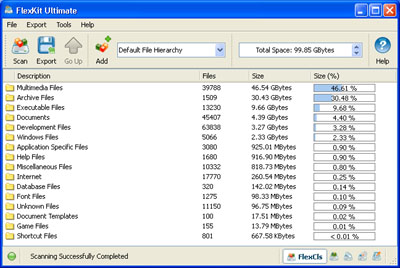 Here is a really cool tool that could come in handy. It is called FlexKit. Here is a really cool tool that could come in handy. It is called FlexKit.
FlexKit is an integrated file management toolkit, the cool thing about this software is that it allows you to classify and categorize files, analyze disk utilization patterns and identify storage consumption hot-spots But that is not all with FlexKit you also get to eliminate duplicate files and free-up storage space.
If you don’t want to make a financial commitment yet, you could try out the freeware version, FlexKit Express. FlexKit Express is completely free and may be used for any personal and commercial purposed.
If you want a more powerful and flexible version, FlexKit Professional will be your ideal choice. It is especially designed for professionals and power users. In addition to more powerful capabilities, FlexKit Professional provides command line utilities for all available file management tools.
Want to give it a try? Go to http://www.flexense.com/flexkit
Posted in Information Management, Main, Programming, Shareware, Windows | 4 Comments »
Thursday, November 15th, 2007
 Most of us desire to record audios to have them stored in our computers or share it with friends. Sound Recorder Pro 2.0 software would help you do this in a convenient way. You can have the digital recordings done with the help of this software. The software can let you record almost all type of audios from the CD, microphone, etc. The professional user is certainly going to be thrilled by this utility and the normal user too would be benefited by it. Most of us desire to record audios to have them stored in our computers or share it with friends. Sound Recorder Pro 2.0 software would help you do this in a convenient way. You can have the digital recordings done with the help of this software. The software can let you record almost all type of audios from the CD, microphone, etc. The professional user is certainly going to be thrilled by this utility and the normal user too would be benefited by it.
Just download, install and get started with the recoding of the audios. The appearance of the software is attractive in a simple manner. The color of the screen catches the eye of the user. You have the volume control and the options for the recording placed on the screen. When you’re ready to do the recording you need to start the recording after that you can play or copy the recording to a destination. It shows the information on the top of the recording status bar. Make the selection for the audio recording to be microphone, phone line, CD player, Stereo mix, etc. For making the recoding task more personalized and according to your requirements. You can set the recording options and enable the file to be saved as Mp3 or Wav file. Enable or disable the noise reduction and even set the bitrate, sample rate selected. Make the selection of the mode to be stereo, dual channel or mono. If you do not want any changes then you can have the default settings activated and also have the file operation dialog box opened after the recording. The software lacks as the help file for the program is available online only. Users not having the internet access cannot have any further information instantly.
Even though it has one drawback but that also is not going to hurt much as the benefits overwhelm it.
{More info and download}
Posted in Audio, Commercial, Developer, Shareware, Windows | No Comments »
Tuesday, November 13th, 2007
 Having a Zune player but you cannot have all the songs and videos into the format supported by it. Searching for a solution then Convexsoft Video Zune Converter 1.4 software might prove to be a good one for you. Now you can have various formats files converted to the Zune-compatible format and also you can extract the audios from the video files. It’s multipurpose as it can be used by normal and even professional users both. Having a Zune player but you cannot have all the songs and videos into the format supported by it. Searching for a solution then Convexsoft Video Zune Converter 1.4 software might prove to be a good one for you. Now you can have various formats files converted to the Zune-compatible format and also you can extract the audios from the video files. It’s multipurpose as it can be used by normal and even professional users both.
To begin with just get the software downloaded and installed at your system. The program opens with the list space set at the left side and the right side has the device picture set there that shows the playing option below it. It easy to make the selection as you can make the individual file selection or even select the folder. If you have chosen the wrong file select and remove it and even if you have chosen the wrong folder then you can clear all. When you’re done with the selection of files then you just need to have the output file format selected. Make the separate destination folder and, browse and direct the files to it or you can choose an existing destination. Not just converting the video files if you want to have the audio from any audio-visual file you can perform the work of extraction also. The screen of the program also gives a pleasing look to the user so that it does not create monotony while working. When you’re converting the videos you need not to have the process taking place one by one for each file as the program also supports the batch conversion process. The ‘Help’ file can be accessed through the ‘Help’ option on the menu bar.
The features are easy to learn and software is also fun to work with.
{More info and download}
Posted in Developer, Microsoft, Shareware, Utilities, Windows | No Comments »
Monday, November 12th, 2007
 CR8type is a font editor and designer capable of working with OpenType fonts. It’s equally useful to both beginners and professionals alike, as it has some advanced features,(it comes with a 22 page pdf manual) or you can just stick with the basics. CR8type is a font editor and designer capable of working with OpenType fonts. It’s equally useful to both beginners and professionals alike, as it has some advanced features,(it comes with a 22 page pdf manual) or you can just stick with the basics.
Fonts can contain up to 65535 glyphs and it has a full-featured toolbox for glyph design and drawing. You can edit glyphs in True Type points mode, or nodes and control points mode. Transform (rotation, skew and stretch) points, glyphs, and composite glyphs, and map glyphs to any of 65536 unicode characters. A new feature in the latest version is the ability to convert TrueType or OpenType TT fonts to OpenType PS fonts.
It comes with CR8tracer, a free utility for creating fonts from your own handwriting!
This program is worth checking out if your into font design!
More info and the trial here
Posted in Commercial, Design, Developer, Main, Shareware, Utilities, Windows | 3 Comments »
Wednesday, November 7th, 2007
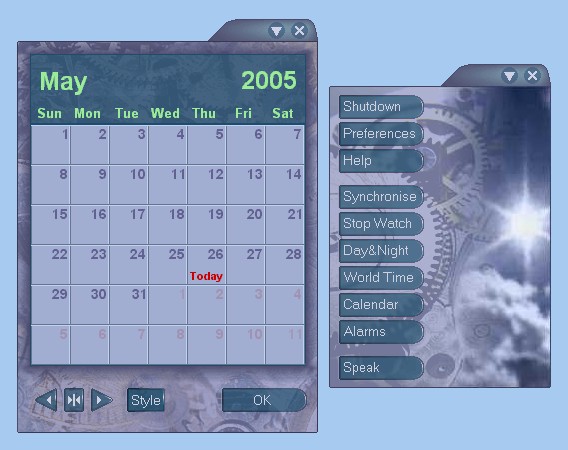 Talking Time Keeper is a program that, as the name implies, tells you the time by talking! But it also has some other potentially useful features. Talking Time Keeper is a program that, as the name implies, tells you the time by talking! But it also has some other potentially useful features.
For example, it has very customizable multiple reminders, alarms and countdown timers.
The time can be announced on the hour/half hour/quarter, or on demand. It can be customized to use different voices, these are actual real voices.(Well,that is to say, they’re recordings of real voices anyway!)
Your own voice can even be recorded to announced the time if you have a microphone! (and some spare uh.. time!) You can also choose what kind of chimes to use including a grandfather clock. In addition it has a calendar, day/night map and world time for as many countries as you want. It’s also skinnable.
All in all if you really love time,and talking, you’ll really love this program! Interested? Take the time to click here for more info!
Posted in Calendar, Developer, Information Management, Main, Reminder, Shareware, Time Managment, Windows | No Comments »
Tuesday, November 6th, 2007
 Warning Forever is a high tech themed shoot-em-up with an old school arcade feel. As you begin the game you have a simple to use interface with a choice to define or view your control keys and other settings or simply just start the game. Warning Forever is a high tech themed shoot-em-up with an old school arcade feel. As you begin the game you have a simple to use interface with a choice to define or view your control keys and other settings or simply just start the game.
The game play consists of you and a well armed ship which you must destroy before the time is up. If you survive this you progress through increasingly more difficult levels. You can control the angle of your shooting for various coverage and move your ship right around the screen.
Tip : the game installs to c:\wf by default, so you can find it in there.
This is a cool game with pretty good graphics and sound for what it is, a fast paced, slightly addictive arcade-style game. It’s free, so if this is your kind of thing and you have some time to use up, check it out here.
Posted in Developer, Freeware, Main, Windows | No Comments »
Tuesday, November 6th, 2007
 After a while of adding links to your bookmarks/favorites, you find your links collection growing and its almost a certainty that some sites will have moved or changed. This can leave you with some dead, useless links in your bookmarks/favorites. This program will check them all and tell you which ones are “dead”, keeping your collection that little bit tidier by cleaning out those obsolete links and also duplicates. After a while of adding links to your bookmarks/favorites, you find your links collection growing and its almost a certainty that some sites will have moved or changed. This can leave you with some dead, useless links in your bookmarks/favorites. This program will check them all and tell you which ones are “dead”, keeping your collection that little bit tidier by cleaning out those obsolete links and also duplicates.
It’s compatible with Firefox, Internet Explorer, Mozilla and Opera and as well as this it can also work with comma separated and tab delimited links in text files.You also have the choice of downloading Favicons so you can tell your bookmarks apart better. A backup option is included, which is handy just in case you get carried away with deleting!
It’s freeware and you can grab it from the website right over here.
Posted in Freeware, Internet, Main, Utilities, Windows | No Comments »
|
|
|




