Archive for the 'Windows' Category
Friday, March 2nd, 2007
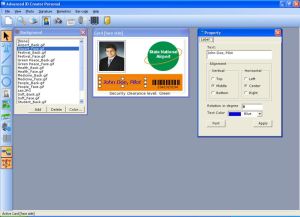 Here is a cool and really easy to use ID creator for you. Here is a cool and really easy to use ID creator for you.
Advanced ID Creator allows you to create professional and smart-looking employee cards on any Windows compatible printer. With this software you can put your style into your ID cards, and do it pretty fast.
The cool thing about this software is that it allows you to create a great looking ID card. With Advanced ID Creator, you can use a wide variety of tools to add text, graphics, shapes, barcodes, shadows and other effects to your design. There are so many possibilities to be explored with this cool and very easy to use software.
The latest version, Advanced ID Creator Personal 7.12.26, has these changes:
- Fast and Easy way to create and print photo ID Cards and Badges
- Free ID Card Templates
Though this software is free, there is a professional edition with more features that is shareware, Advanced ID Creator Professional Edition.
Want to check it out? CLICK HERE
Or visit http://www.advancedidcreator.com/aidc_free.asp
Posted in Business, Design, Developer, Freeware, Fun, Information Management, Main, Shareware, Shell and Desktop, Themes, Utilities, Windows | 1 Comment »
Friday, March 2nd, 2007
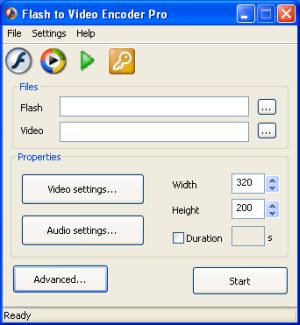 This software will help you solve your flash to video conversion problems easily. This software will help you solve your flash to video conversion problems easily.
Flash to Video Encoder PRO will convert Flash (swf) movies to video AVI, ASF, WMV, MPEG, DVD files or burn directly to DVD. And if you want to add watermarks, logos and copyright messages to video file, this software helps you get it done quite easily.
The great thing about Flash to Video Encoder PRO is that it allows human interaction on Flash content during conversion. One other thing I’m sure you’ll love is the fact that you will be able to convert Flash SWF files to MP4 media content for your mobile devices.
The latest version, Flash to Video Encoder PRO 4.5 has these cool changes:
- Now you can create MPEG with your own width and height
- Fixed some DVD bugs
- Some minor bugs fixed
It’s really worth checking out. CLICK HERE for more info or Visit http://www.geovid.com/Flash_to_Video_Encoder_PRO/
Posted in Developer, Fun, Information Management, Main, Multimedia, Shareware, Utilities, Windows | No Comments »
Friday, March 2nd, 2007
 VirusTotal is a totally free online service that can scan a file for viruses and malware. The difference with this is it scans using several well known virus scanning engines such as the following: VirusTotal is a totally free online service that can scan a file for viruses and malware. The difference with this is it scans using several well known virus scanning engines such as the following:
- Aladdin (eSafe)
- ALWIL (Avast! Antivirus)
- Authentium (Command Antivirus)
- Avira (AntiVir)
- Bit9 (FileAdvisor)
- Cat Computer Services (Quick Heal)
- ClamAV (ClamAV)
- CA Inc. (Vet)
- Doctor Web, Ltd. (DrWeb)
- Eset Software (NOD32)
- ewido networks (ewido anti-malware)
- Fortinet (Fortinet)
- FRISK Software (F-Prot)
- F-Secure (F-Secure)
- Grisoft (AVG)
- Hacksoft (The Hacker)
- Ikarus Software (Ikarus)
- Kaspersky Lab (AVP)
- McAfee (VirusScan)
- Microsoft (Malware Protection)
- Norman (Norman Antivirus)
- Panda Software (Panda Platinum)
- Prevx (Prevx1)
- Softwin (BitDefender)
- Sophos (SAV)
- Sunbelt Software (Antivirus)
- Symantec (Norton Antivirus)
- UNA Corp (UNA)
- VirusBlokAda (VBA32)
- VirusBuster (VirusBuster)
You can simply upload your file and they’ll email you back a report. Alternatively you can follow the instructions to email them your file and they’ll also send you a report. This service can only scan one file at a time that is sent to it, but the fact that it use multiple scanners makes it far superior to just using one scanner. Definitely worth bookmarking in case you ever have a suspicious file or are just the ultra paranoid type! Click Here for the homepage.
Posted in Developer, Internet, Main, Security, Shareware, Utilities, Web services, Windows | No Comments »
Thursday, March 1st, 2007
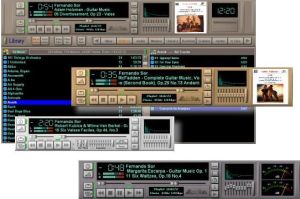 If you’ve been having issues managing your MP3 collection, MuzicMan will really come in handy. If you’ve been having issues managing your MP3 collection, MuzicMan will really come in handy.
Tagged an all-in-one solution for PC-based music needs, MuzicMan is a really useful tool as it makes your MP3 music more accessible and easier to manage. You will love the fact that MuzicMan is not just another MP3 player; it can capture, encode and manage a large MP3 collection through a very simple and logical interface that is so easy to use anyone can use it.
It also comes with cool customizable skins. You should give it a shot!
Go to http://www.muzicman.com/ for more info and trial download.
Posted in Audio, Developer, Main, Music, Shareware, Windows | No Comments »
Thursday, March 1st, 2007
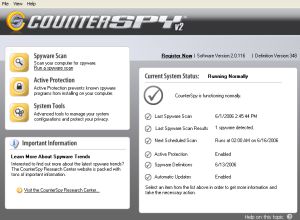 If you’ve been looking for a total solution to your spyware, adware, keyloggers, trojans etc problem, this software should so the trick. It’s called CounterSpy. If you’ve been looking for a total solution to your spyware, adware, keyloggers, trojans etc problem, this software should so the trick. It’s called CounterSpy.
Get rid of any software that might be tracking and reporting your private information to a third party with CounterSpy. Though it’s a shareware, unlike others in it’s category with a free trial of CounterSpy you can scan and remove spyware, adware, keyloggers, trojans and other malware.
What are the things you stand to gain with this software?
- Heavy-duty antispyware protection treads lightly on system resources
- Hybrid design combines antimalware technology with our award-winning spyware detection and removal
- Kernel-level Active Protection™ defends 24-7
- Deep-rooted malware is exterminated at boot time, before Windows loads
- Incremental definition updates greatly reduce update downloading time
- Vista compatible: Integrates seamlessly with theVista Windows Security Center
Want to check it out? CLICK HERE
Posted in Business, Developer, Internet, Main, Security, Shareware, Social Software, Utilities, Windows | No Comments »
Wednesday, February 28th, 2007
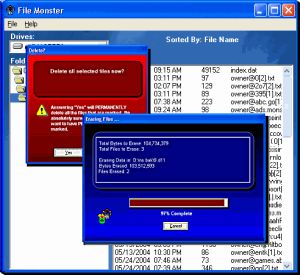 If you are looking for something to help with complete deletion of files for your system, then you’ll need to check out File Monster. Completely erasing files from your system by actually overwriting the information in the file, File monster gets the job of complete and total deletion of files easily.Why do you need a total delete in the first place? If you are looking for something to help with complete deletion of files for your system, then you’ll need to check out File Monster. Completely erasing files from your system by actually overwriting the information in the file, File monster gets the job of complete and total deletion of files easily.Why do you need a total delete in the first place?
When you delete files with normal deletion methods, your data is still available because the procedure only tells the operating system to not recognize the file as being present anymore; the data can be easily recovered by someone who knows how to go about it. So if you’ve got sensitive material you don’t want to risk not being able to delete it completely or do you?
The latest version released recently has this major change:
- Added Windows Vista Compliance Features (e.g. the data files are stored under the “Application Data” folder rather than under the “Program Files” folder). The new version will detect if you already have data and relocate the files for you
Want to check it out? Go to http://www.nstarsolutions.com/fm
Posted in Business, Developer, Information Management, Main, Programming, Security, Shareware, Utilities, Windows | No Comments »
Wednesday, February 28th, 2007
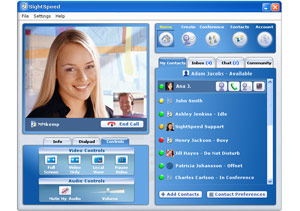 SightSpeed is a free video and voice call program that allows you to make free pc to pc voice and video calls over your broadband Internet connection. SightSpeed is a free video and voice call program that allows you to make free pc to pc voice and video calls over your broadband Internet connection.
It also allows you to make calls to regular landline phones and cell phones (similar to what you can already do in programs like Skype). Those calls do cost you money, but the costs are still lower than from a regular home phone. You can buy “phone out” credits quickly by credit card. These credits are prepaid, so you need to purchase them in advance if you plan to use SightSpeed to make calls to regular phones.
At this time you can only make video calls to other SightSpeed users, pc to pc (also supports Mac).
Its a useful tool for anyone who needs to videochat with colleagues or friends and the set up is easy, but they even have video tutorials in case you need them. Check it out at the website here, for the download and more details.
Posted in Developer, Internet, Mac Stuff, Main, Multimedia, Skype, Voice, Windows | 3 Comments »
Tuesday, February 27th, 2007
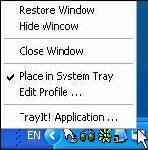 TrayIt! is a nifty tool for Windows 95/98/Me, NT/2000/XP. It lets you save Taskbar space for minimized windows by creating a small icon, for each application you apply to it, in the System Tray (The System Tray is the area is located near the Windows Clock). TrayIt! is a nifty tool for Windows 95/98/Me, NT/2000/XP. It lets you save Taskbar space for minimized windows by creating a small icon, for each application you apply to it, in the System Tray (The System Tray is the area is located near the Windows Clock).
All you need to do is start trayit1.exe, which becomes an invisible process on your machine, and then press and hold the Ctrl button on your keyboard whenever you minimize an application window. Instead of minimizing the application to your Taskbar, showing a rectangle with the application’s icon and title bar description, you’ll just see the application’s icon in the System Tray. You can then maximize the window by clicking the icon.
TrayIt’s Web site says: “this is particularly useful for background tasks you typically keep running on your PC all day long like your favorite E-mail client, Real Player, etc..” But, for myself anyway, I have a more important use for this tool: What I do is load Trayit! onto my USB drive that I take everywhere with me for use as an external hard drive. I plug this USB drive into computers that aren’t mine, such as my sister’s family room computer whenever I’m over at her place. Then I launch Trayit! from my USB drive which runs invisibly on her computer until the computer is reboot. Every time I run an application that I don’t want closed by another family member using the computer when I’m away, I minimize it with Trayit! before I leave. Now my young nieces won’t close any windows I have open that are perhaps performing a long download, system scan, or whatever, while I’m away. Very handy.
One issue I’ve come across is that some applications, such as mIRC, already implement a special feature when you hold the Ctrl key while minimizing the window (doing so in mIRC allows you to set a temporary password). This shouldn’t be a problem, as Trayit! should still minimize the application properly after your particular application runs it’s special feature.
Posted in Developer, Main, Task Manager, USB, Utilities, Windows | 1 Comment »
Tuesday, February 27th, 2007
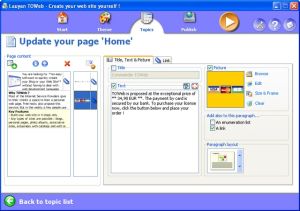 If you are seeking to create a blog or website without any web designing skill, I know something that will make it easy for you; TOWeb. If you are seeking to create a blog or website without any web designing skill, I know something that will make it easy for you; TOWeb.
TOWeb is a software that is very useful for people and organizations wishing to create a blog or a Web site without any Web designing skills. It’s really very useful to use; just enter your texts, add your pictures, and create your graphical theme using the random theme generator features.
Using TOWeb you can add any kind of Web page to your website; you can also enhance your pictures with frames and effects. What you will appreciate about this software is that it lets you protect any sensitive content with passwords, emails are automatically protected from spam, and click a single button to publish your Web site to your Web space using the provided list of hosts.
The latest version, TOWeb 1.71 has these changes:
- Bug fix : catalog item names were not displayed in the index pages when the item paragraphs are indented
- Improvement: the target of a link in a paragraph can now be specified. Default is the automatic mode but you may choose to open a link in the same web page or in a new web browser window
- Bug fix : the topic group presentation with just an image was also displaying the title and the “More…” link
- Bug fix : the option “Do not truncate texts and do not show the ‘More…’ links” located in the “Advanced topic settings” was not working for topic groups
- Correction : links to catalog item pages inside the shopping cart may have been pointing to wrong items especially on catalogs containing more than 10 items
Want to check it out! CLICK HERE! Or go to http://www.lauyan.com/en/tw-home/index.html
Posted in Business, Commercial, Developer, Internet, Main, Programming, Windows | 1 Comment »
Tuesday, February 27th, 2007
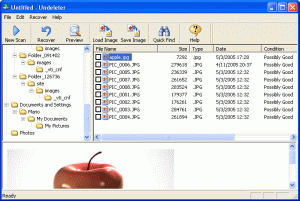 If you are still having problems with data recovery, you should check out this software, Smart Undelete. If you are still having problems with data recovery, you should check out this software, Smart Undelete.
Smart Undelete is a powerful file “unerase” or undelete and data recovery software that works very well in undeleting both hard drives and floppy discs. It’s so easy to use, offering many flexible and useful options that are sure to help get your precious data back as quick and as easy as possible.
Smart Undelete helps recover:
- Files emptied from the Recycle Bin, or those bypassing it.
- Files deleted by viruses or application programs
- Files accidentally deleted on a share network
- Files deleted using removed directories
- Files deleted prior to your Smart Undelete installation
- Files deleted using a DOS prompt command
If you’ve ever lost precious data by accidentally deleting them when you don’t intend to, you will appreciate this software.
Go check it out! CLICK HERE FOR TRIAL VERSION. Or go to http://www.smartundelete.com/
Posted in Backup, Commercial, Developer, Main, Shareware, Utilities, Windows | 2 Comments »
|
|
|




