Author Archive
Friday, September 28th, 2007
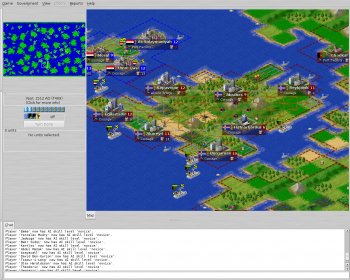
If you are looking for a fun way to keep yourself entertained, but you don’t want to go out and spend a ton of money on video games or movies, Freeciv may be just the thing for you. Available for both Macintosh and Windows, Freeciv is an open source game which allows you to build your own civilization and try to be the best ruler in the world.
While the game is very similar to the Civilization series, it also has its differences. In any case, Freeciv can afford you a ton of joy and entertainment without an unreasonable price tag. Plus, it is much more flexible with your operating system than many of the more popular games.
Whether you want to start a game with your friends or play alone, Freeciv has tons of options and you can even customize the rules of game play to make your game more or less difficult depending on your skill level.
To start playing now, check out: http://www.freeciv.org/
Posted in Freeware, Fun, Games, Internet, Mac Stuff, Main, Windows | No Comments »
Thursday, September 27th, 2007
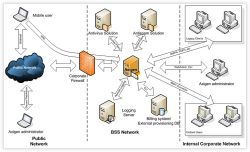 Almost every large business, public school system, and individual has an email address, but using a free email from a random source may not be the best way to stay organized with your company or school. That is why companies and schools purchase mail servers to do the job for them. This way, only people that are in direct connection with the company or school may join, and there is much less opportunity for spam and viruses to infect the system. Almost every large business, public school system, and individual has an email address, but using a free email from a random source may not be the best way to stay organized with your company or school. That is why companies and schools purchase mail servers to do the job for them. This way, only people that are in direct connection with the company or school may join, and there is much less opportunity for spam and viruses to infect the system.
Axigen is one of these personal mail servers which has just hit the market. It has been tested to accept emails from outside mail clients, as well as working with all of the major internet browsers. These tests have eliminated almost all of the major issues that may have made the program obsolete in the real world.
Now that Axigen has become better developed and ready to hit the streets, there are several different versions available. One of these versions is specifically for working with a Linux operating system. The other version is for use with any of the other large operating systems. Probably one of the greatest features of this program is the ability to work on any computer rather than being limited to one operating system or another.
Modeled after many of the older mail servers, this new Axigen version has started off on the right foot, and is expected to grow in popularity very quickly. As a mail server, Axigen has done a great job thus far of covering all of their bases. Of course, since this is a brand new program, there will surely be fixes that need to be taken care of. However, at this point in time, the program download is available to those who are interested in creating their own server. To some, the cost of downloading such a new program is a little bit high, but others believe that if the program continues to develop as well as it already has, the price is definitely worthwhile. Axigen is very similar to some of the other large mail servers and gives you almost all of the same capabilities, still at a competitive cost to the other available servers. Axigen is really making strides toward becoming a very popular mail server in the near future.
If you are interested in setting up your own mail server and trying out a fairly new program, check out Axigen.com and download the full version program today.
Posted in Beta version, Business, Developer, E-mail, Information Management, Internet, Main, Security, Shareware, Social Software | 2 Comments »
Thursday, September 27th, 2007
 Whether you are a webpage designer or you just want to make a custom birthday card, X-Fonter can add that special touch. All word processors come with some sort of standard fonts, but after years and years of the same boring letters, you might just want to add something a little fancier or a little more fun. Whether you are a webpage designer or you just want to make a custom birthday card, X-Fonter can add that special touch. All word processors come with some sort of standard fonts, but after years and years of the same boring letters, you might just want to add something a little fancier or a little more fun.
X-Fonter 6.2 is the latest in new font technology. This program allows you to view, manage, and create your own fonts in both two-dimensions and three-dimensions. Among the additions and fixes made to the latest version are the ability to store your favorite fonts in special easy-access folders, and repairs to the ‘Select All’ function.
Overall, if you are looking for a creative way to spice up your typing, X-Fonter has a lot to offer, and it comes at the low price of only $35. Of course, there are tons of fonts to be downloaded off the internet as well, but the risk of downloading a virus is much greater with free downloads than real programs.
To check out your version of X-Fonter, go to: http://www.blacksunsoftware.com/
Posted in Design, Developer, Main, Programming, Shareware, Shell and Desktop, Utilities, Windows | No Comments »
Wednesday, September 26th, 2007
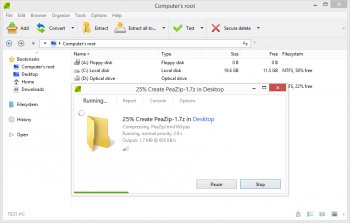 PeaZip has recently released its newest version of compression software in both the standard and portable options. Designed to save you space and improve the performance of your computer, this handy new program allows you to compress, span, and encrypt almost any file. PeaZip has recently released its newest version of compression software in both the standard and portable options. Designed to save you space and improve the performance of your computer, this handy new program allows you to compress, span, and encrypt almost any file.
As a utility program, PeaZip could not be more helpful. It does everything it says it does, and then some. First off, PeaZip supports most of the mainstream file types so you won’t have to search for multiple programs or a specific file type. Secondly, the latest version of the program has added a simpler toolbar to make the process of compression much easier. Lastly, since the functionality of the program is obviously not a problem, the designers have decided to allow you to change the skins and designs of your program while it is running. It’s just one more feature added to an already stellar program.
Beyond all of the great features this program has to offer in itself, there are also multiple versions and setup options which many other programs do not offer. You can purchase PeaZip for any Windows or Linux operating system. Then you can choose which kind of installation you wish, whether that be standard, portable, or RPM.
In any case, the program has earned very high ratings, and it is only getting better by the minute. To download your free version of PeaZip, check out: http://peazip.sourceforge.net/
Posted in Archive, Backup, Commercial, Freeware, Linux, Main, Windows | 7 Comments »
Wednesday, September 26th, 2007
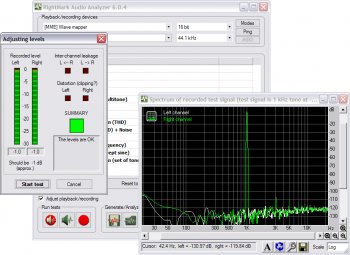
Sometimes you just can’t get the right sound out of your computer’s speakers no matter what you do. The RightMark Audio Analyzer was designed to help you troubleshoot these problems so you can get the absolute best signal from your speakers. By testing the sound card and other audio related devices in your computer, RightMark gives you a visual representation of what is happening with the audio signal as it passes through the inner workings of your computer.
RightMark has created custom audio clips which are played through your speaker and then rerecorded from the other side. You are then given a graph which allows you to see sound levels and other information such as individual speaker performance.
The latest edition of RightMark’s Audio Analyzer has been greatly improved with better stability, and even more user options for flexibility with the tests you perform. Currently this software is only available for Windows operating systems, but if the program continues to grow in popularity there will surely be more releases made.
To check out your free copy of this program and start testing your audio system go to: http://audio.rightmark.org/
Posted in Audio, Developer, Freeware, Information Management, Main, Utilities, Windows | 1 Comment »
Wednesday, September 26th, 2007
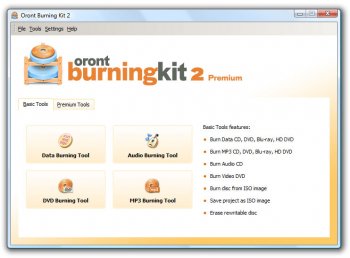
If you are looking to add a CD or DVD burner to your computer, or you just want a simpler way to burn your own copies, Oront is one of the latest programs released to do that and so much more. Not only can you perform all of the basic functions of a regular CD/DVD burner application, but you can also use this program to retain files from discs that have become corrupt or even burn to several different discs all at the same time.
Oront has released their new premium version software kit just this month, and it has already become very popular. Since it is relatively new there are a few small bugs that have yet to be found, but the designers have already begun debugging the program bit by bit.
The Oront Burning Kit is designed to support all Windows operating systems, but there have not yet been any releases for other operating systems. However, this is only a minor setback. You can download your trial version of the shareware or purchase the program for only $40 at Oront.com
Posted in Audio, CD/DVD burner, Developer, Main, Shareware, Windows | No Comments »
Monday, September 24th, 2007
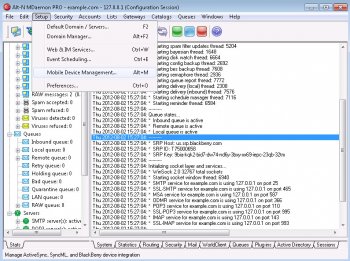
If you are looking for the solution to all of your messaging problems, MDaemon may be just right for you. MDaemon is a unique kind of mail server which also gives you the ability to scan for viruses and spam on your computer.
While most email clients have some sort of spam blocker, they are only updated once every couple months. MDaemon, on the other hand, offers the latest in anti-spam and anti-virus technology. Some of the latest fixes in the MDaemon programming include: updates to the spam list, simplified graphics, and improvements to the anti-spam technology, which now allows you to block PDF based files as well as regular spam mail. All of these updates have led to exceptionally good reviews in all areas of the program.
Aside from all the great features that come with the program, the price is also very important. Compared to other groupware programs, MDaemon costs much less. If this will be your first attempt at creating your own server, it is definitely worthwhile to get a less expensive program to begin with and work your way up. MDaemon is one of the best places to start.
One of the only real set backs to the MDaemon groupware is that it is a Windows only program. Granted, it does work on all Windows operating systems, new and old, it will not work on Mac, Linux or any other major operating system. This may or may not be a big deal depending on the type of computer you will be working with, but overall this is a small concern considering how common the Windows operating system is.
Ultimately, the MDaemon mail server is one of the greatest programs to hit the market. The cost of the program itself is a fraction of the cost of other popular servers, and the program still goes out of its way to give you top of the line protection against both viruses and spam mail. Despite the fact that this program is really only available for Windows operated computers, it is still a great deal, and if all of your computers work on Windows systems there is no need for concern. The best part of this program is all of the updates and fixes that have already been taken care of, and it is still early in the game for MDaemon. This program will be completely glitch free in the very near future, and then the only necessary updates will be to the spam list. This way you will never have to worry about the latest viruses getting through your main defense.
If you think MDaemon is the server for you, get your own download at http://www.altn.com/Products/MessagingSolutions/MDaemon and start messaging today.
Posted in Design, Developer, Internet, Main, Security, Windows | 2 Comments »
Monday, September 24th, 2007
 If you think your company is ready to start investing, PatternExplorer 3.66 is the absolute best way to track the market before you make your final decision. PatternExplorer does just what the name implies. It explores the market and finds the patterns which it then displays to you in an easy to read format for your convenience. If you think your company is ready to start investing, PatternExplorer 3.66 is the absolute best way to track the market before you make your final decision. PatternExplorer does just what the name implies. It explores the market and finds the patterns which it then displays to you in an easy to read format for your convenience.
When you first install the program it automatically searches for the latest information on the stock exchange. Then you can choose to view the information on a graph or chart of your choice. PatternExplorer also allows you to analyze stocks, indices, and other relevant information all at once without having to figure the numbers on your own or hire a stock broker. This will save you time and money. Plus, using this program you can educate yourself on the trends of the market for a long time before you decide to jump in.
Ultimately, the best way to get educated and start exchanging now is by downloading Pattern Explorer at: http://www.patternexplorer.com/
Posted in Business, Developer, Main, Shareware, Utilities, Windows | No Comments »
Monday, September 24th, 2007
 With so much going on at one time, it is hard to resist having multiple windows open on your desktop, plus all of the underlying CPU usage that is normally going on. For this reason, many people deal with overloading their computers, and have to settle for slowing down a bit and letting their computer work at a slower pace. In a fast-paced world this can be greatly annoying. Hence, the creation of a program that can monitor your CPU usage and prioritize those programs that are using too many CPUs and allow the other programs to work at a similar rate. With so much going on at one time, it is hard to resist having multiple windows open on your desktop, plus all of the underlying CPU usage that is normally going on. For this reason, many people deal with overloading their computers, and have to settle for slowing down a bit and letting their computer work at a slower pace. In a fast-paced world this can be greatly annoying. Hence, the creation of a program that can monitor your CPU usage and prioritize those programs that are using too many CPUs and allow the other programs to work at a similar rate.
Process Tamer is a widely popular program because it takes complete control of all of your active tasks and manages them to make your computer a more efficient machine. If one program is moving too fast, Process Tamer will slow it down and let the others catch up. This way you are at a much lower risk of overloading your computer, which will ultimately save you time, money, and a few headaches.
Probably the best part of this program is that it is completely free and still it does exactly what it is intended to do. Unfortunately it is designed for newer operating systems, which is basically anything after 2000.
To learn more about this great offer and help your computer run better, check out: http://www.donationcoder.com/Software/Mouser/proctamer
Posted in Design, Developer, Main, Programming, Shareware, Shell and Desktop, Utilities, Windows | No Comments »
Sunday, September 23rd, 2007
 These days, everybody and their brother has their own special toolbar, and they take the opportunity to automatically install these toolbars on your computer whenever you install a new program. Unfortunately, this can lead to you opening your browser window only to find six different toolbars and only a half screen to actually see the internet. These days, everybody and their brother has their own special toolbar, and they take the opportunity to automatically install these toolbars on your computer whenever you install a new program. Unfortunately, this can lead to you opening your browser window only to find six different toolbars and only a half screen to actually see the internet.
Of course, you can always select which toolbars you wish to show and which ones you don’t want to show, but this doesn’t necessarily mean that they are uninstalled. The toolbar is still on your computer, it is just invisible now.
The newest version of Toolbar Uninstaller is here to help you get rid of all those useless toolbars so you can actually see what you’re trying to find on the internet instead of having to scroll up and down because there isn’t enough room on your screen. This program is designed to automatically detect all of the toolbars that have been installed on your computer and bring them to your attention. From there, you can keep the ones you want and delete the others through the uninstaller.
This new version of Toolbar Uninstaller also has some updates since the previous version was released. Some of these updates include fixes to the error codes, changes to the update list, and fixing a minor glitch in the captioning system.
All of these fixes have definitely made the new Toolbar Uninstaller a great way to get rid of all the extra junk on your browser window and make it easier for you to find what you are looking for.
Clean up your computer with Toolbar Uninstaller
Posted in Developer, Freeware, Main, Security, Shareware, Shell and Desktop, Utilities, Windows | No Comments »
|
|
|




