Author Archive
Tuesday, November 27th, 2007
 Now you can enjoy movies and videos with whole new exciting features that would make your movie viewing a whole lot more appealing. 5star Movie Enhancer 1.0.7.1026 software allows you to improve and enlarge the videos without any special technical skills. The software 5star Movie Enhancer 1.0.7.1026 is worthy to be bought as it performs different functions in an effortless and user friendly manner. Now you can enjoy movies and videos with whole new exciting features that would make your movie viewing a whole lot more appealing. 5star Movie Enhancer 1.0.7.1026 software allows you to improve and enlarge the videos without any special technical skills. The software 5star Movie Enhancer 1.0.7.1026 is worthy to be bought as it performs different functions in an effortless and user friendly manner.
5star Movie Enhancer 1.0.7.1026 software would not be taking much of your precious time to get downloaded and it get installed in no time so that you get more time for having fun watching the videos. When you launch the program a very pleasing screen appears in front of you. The software provides the best viewing experience and lets you to create High Definition videos from the normal DVD-Video. While having the changes done you can also watch the videos with the in-built player that it has. It will help you to get rid of the black borders like problems and you would definitely enjoy the excitement with the full screen view. (more…)
Posted in Movies, Multimedia, Shareware, Video, Windows | 2 Comments »
Tuesday, November 27th, 2007
 If you’re fond of music you must be having a large collection at your system. But as it increases don’t you think it becomes real hectic to manage them all. Now, you won’t need to worry as you can get all your music files arranged according to your wish and get any file whenever you want. To do this you need to get Music Collection 2.04.620 software that helps you to keep proper track of the music files. If you’re fond of music you must be having a large collection at your system. But as it increases don’t you think it becomes real hectic to manage them all. Now, you won’t need to worry as you can get all your music files arranged according to your wish and get any file whenever you want. To do this you need to get Music Collection 2.04.620 software that helps you to keep proper track of the music files.
Music Collection 2.04.620 software helps you to manage the files so that it becomes easy for you to track them. Download and install the software at your PC for getting the work done. Launch the software and get the options that are much convenient to use. You can get the files with placed with a tree structure. You can seek for the music files according to your selected categories. Get the collection set by the artists, albums, etc and arrange them in different fields. Set the collection, choose your favorites and record the lyrics for enjoying each line of the song. The list of the songs is shown according to selected category on the screen.
Looking for a particular file you can have the files sorted with alphabetical order also. Keeping a track of when you added new files becomes easier with the history option. Want to keep any notes or have any thing recorded or write anything you also have the notepad attached to the program. Enjoy the music at the same time through the in-built player or even an external player. Keep a check on the memory status and choose the settings according to your needs. It also gives you the browser access for getting more music with you. You also get the help guide that would assist you to arrange your music files in the best manner. (more…)
Posted in Catalogue, Information Management, Internet, Multimedia, Music, Shareware, Windows | 1 Comment »
Tuesday, November 27th, 2007
 Macintosh users can now make their video viewing experience be a bit different and a lot more interesting with YourView 1.0.1 software that also allows them to share the videos. The software can be used by anyone without any difficult as the options are easy to learn and operate. With the YourView 1.0.1software you can tag and navigate the videos in various ways. Macintosh users can now make their video viewing experience be a bit different and a lot more interesting with YourView 1.0.1 software that also allows them to share the videos. The software can be used by anyone without any difficult as the options are easy to learn and operate. With the YourView 1.0.1software you can tag and navigate the videos in various ways.
Getting the software downloaded and installed would take just a few clicks. The screen of the program is good and pleasing but not flashy. You can create files and edit the videos according to your liking. You can make the videos more amazing by adding up different effects and making the video including the features from the options that you want to have.
The screen of the software shows the video on the upper left side so that you can know about the changes altogether. You can prepare demos or tutorials from the videos that you have taken. You can make the selection for the name, category and also set the start and end time. It also has the option for ratings and lead in, lead out option. The features as tutorials and icons are shown on the right side if the screen. You can select and deselect the selections made by you any time and put new changes to the video you’re making. The simple working features like ‘Remove’, ‘Apply’, ‘Edit’, ‘Delete’, etc are placed on the screen itself for your convenience. (more…)
Posted in Developer, Mac Stuff, Shareware, Video | No Comments »
Thursday, November 15th, 2007
 Most of us desire to record audios to have them stored in our computers or share it with friends. Sound Recorder Pro 2.0 software would help you do this in a convenient way. You can have the digital recordings done with the help of this software. The software can let you record almost all type of audios from the CD, microphone, etc. The professional user is certainly going to be thrilled by this utility and the normal user too would be benefited by it. Most of us desire to record audios to have them stored in our computers or share it with friends. Sound Recorder Pro 2.0 software would help you do this in a convenient way. You can have the digital recordings done with the help of this software. The software can let you record almost all type of audios from the CD, microphone, etc. The professional user is certainly going to be thrilled by this utility and the normal user too would be benefited by it.
Just download, install and get started with the recoding of the audios. The appearance of the software is attractive in a simple manner. The color of the screen catches the eye of the user. You have the volume control and the options for the recording placed on the screen. When you’re ready to do the recording you need to start the recording after that you can play or copy the recording to a destination. It shows the information on the top of the recording status bar. Make the selection for the audio recording to be microphone, phone line, CD player, Stereo mix, etc. For making the recoding task more personalized and according to your requirements. You can set the recording options and enable the file to be saved as Mp3 or Wav file. Enable or disable the noise reduction and even set the bitrate, sample rate selected. Make the selection of the mode to be stereo, dual channel or mono. If you do not want any changes then you can have the default settings activated and also have the file operation dialog box opened after the recording. The software lacks as the help file for the program is available online only. Users not having the internet access cannot have any further information instantly.
Even though it has one drawback but that also is not going to hurt much as the benefits overwhelm it.
{More info and download}
Posted in Audio, Commercial, Developer, Shareware, Windows | No Comments »
Tuesday, November 13th, 2007
 Having a Zune player but you cannot have all the songs and videos into the format supported by it. Searching for a solution then Convexsoft Video Zune Converter 1.4 software might prove to be a good one for you. Now you can have various formats files converted to the Zune-compatible format and also you can extract the audios from the video files. It’s multipurpose as it can be used by normal and even professional users both. Having a Zune player but you cannot have all the songs and videos into the format supported by it. Searching for a solution then Convexsoft Video Zune Converter 1.4 software might prove to be a good one for you. Now you can have various formats files converted to the Zune-compatible format and also you can extract the audios from the video files. It’s multipurpose as it can be used by normal and even professional users both.
To begin with just get the software downloaded and installed at your system. The program opens with the list space set at the left side and the right side has the device picture set there that shows the playing option below it. It easy to make the selection as you can make the individual file selection or even select the folder. If you have chosen the wrong file select and remove it and even if you have chosen the wrong folder then you can clear all. When you’re done with the selection of files then you just need to have the output file format selected. Make the separate destination folder and, browse and direct the files to it or you can choose an existing destination. Not just converting the video files if you want to have the audio from any audio-visual file you can perform the work of extraction also. The screen of the program also gives a pleasing look to the user so that it does not create monotony while working. When you’re converting the videos you need not to have the process taking place one by one for each file as the program also supports the batch conversion process. The ‘Help’ file can be accessed through the ‘Help’ option on the menu bar.
The features are easy to learn and software is also fun to work with.
{More info and download}
Posted in Developer, Microsoft, Shareware, Utilities, Windows | No Comments »
Tuesday, November 13th, 2007
 When you’re viewing the videos in your PC, don’t you often feel like having those on your phone or any other device? Even sometimes it happens that you can want to have a particular music, etc but the problem arises that it is not a single file rather it is a video file. ABest RM RMVB Video Converter 3.74 software is the one that would help you to solve the problem as it has all the required function to perform the work. When you’re viewing the videos in your PC, don’t you often feel like having those on your phone or any other device? Even sometimes it happens that you can want to have a particular music, etc but the problem arises that it is not a single file rather it is a video file. ABest RM RMVB Video Converter 3.74 software is the one that would help you to solve the problem as it has all the required function to perform the work.
For converting the video to various different formats and having the music files extracted you just need to get the software downloaded from the site and get it installed at your system. When you’re done with the installing and the launch the program; a decent deep colored appears in front of the user. The software shows the function that can be operated and understood well by even a normal user. You just need to make the selection of the files that you want to convert to the other format. The program supports the conversion from different formats to various other ones. It supports video conversion from RM, RMVB files to the AVI, Xvid, MPEG, WMV, Flash SWF, MP3, MP2 Audio, ands so many more. Along with all this you can have the audio files extracted from the audio-visual files. Make the selection of format in which you want the file to be converted from the mid bar containing the format labels. You can have the file played for making the confirmation about the selected file. You can get the different details about the files selected like the source video, frame size, status, etc. The ‘Help’ option is there for providing the details relating to the program so that it is easy for you to work on it.
The software with its capability to function at the best has reached the ratings of 4 points. Go get the software and let the music create ripples of enjoyment and fun flow all around you.
{More info and Download}
Posted in Developer, Information Management, Internet, Shareware, Video | 2 Comments »
Friday, October 12th, 2007
 You must have taken so many images with your digital camera. Have you ever thought that where do the bright spots on the images come from? It may happen because your camera may be suffering from Hot Pixel. Worried? Get the HotPixelDetector software to know that whether your worries are right or not. You must have taken so many images with your digital camera. Have you ever thought that where do the bright spots on the images come from? It may happen because your camera may be suffering from Hot Pixel. Worried? Get the HotPixelDetector software to know that whether your worries are right or not.
The software HotPixelDetector would let you find the hot pixels easily just in few steps. The work it does get completed in a jiffy which is equally true for its downloading and the installation. The process of detecting hot pixel is simple with fewer clear options that do the whole work. Select any of the images that you may have taken from your digital camera. When you load the image with the program you can have the view of the image. It is shown with another window naming ‘Dark frame’ that appears for the preview of the image. Viewing the EXIF info of the image is easy for if you want to check that they are not too old or have been taken by your new camera if you’re having one. The measure of the ‘Luminosity Threshold’ is to be set according to the requirements or let it what is set by the program. Then for detecting that whether is any problem with your camera or not click ‘Detect hot pixels’. The program detects and shows the information about the pixel on the screen. The affected areas are shown on the dark frame and the cluster peaks are shown separately with the list of hot pixels. You get al the information about the pixels with full details regarding colour value, luminosity, etc. click on the cluster peak a small box appears showing the hot pixels. You can have the results moved to an XML or HTML file. You can get your digital camera’s hot pixels checked so that you can get them removed. It’s accompanied by a help file that gives all the required information about the program and its functioning.
The software is worth buying for checking whether your digital cameras in proper condition.
{More info and Download}
Posted in Freeware, Multimedia, Utilities, Windows | No Comments »
Friday, October 12th, 2007
 Often we have many items to maintain that can lead to a chaotic situation. If you want to effortlessly reduce the chaos and do your work with ease then there is good chance that the Inventory Log software is possibly the best option for you. Often we have many items to maintain that can lead to a chaotic situation. If you want to effortlessly reduce the chaos and do your work with ease then there is good chance that the Inventory Log software is possibly the best option for you.
Getting the software takes a very little time of yours as downloading and installation is over in a breeze. The software has a nice and elegant appearance that you can observe after launching it. Set the list for the items that are used or kept at storage. You can add in the items relating to different categories like food, meat, beverages, etc. Record the quantity as it also helps you to keep a track of items. The list is shown in the middle of the screen so that you can know what is available and what needs to be purchased again. List s very long? No problems search the item writing the related word in the Search box. The calendar shows the manager view for maintaining the things. The Manager is for maintaining the records of the things available and update then when you make a new purchase. Changing the quantity units available, the requirement and always stock for the items is much easier to record. Want to have a look at the whole inventory, simple, just go tot the inventory option and all the inventory items are shown on the screen. The program analyses the inventory and prepares the shopping list that with specified categories. Have the back up stored so that you do not any record. Set the Store name and add or delete the departments according to the item that you use. Get the print of the list and the go on with shopping as this time you won’t forget anything. The help guide is not supported by the software but the working is easier.
So go ahead and make your work of managing things easier with the Inventory Log software at your disposal.
{More info and Download}
Posted in Business, Catalogue, Developer, Information Management, Shareware, Windows | No Comments »
Friday, September 14th, 2007
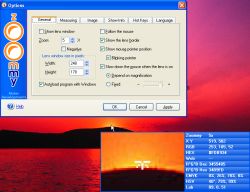 Zoommy is the software is for magnifying anything that is present on the desktop or anywhere else. It is also of much use for the partially visually impaired people using PC for their work. You can use it for having the information about the various aspects of the images. Zoommy is the software is for magnifying anything that is present on the desktop or anywhere else. It is also of much use for the partially visually impaired people using PC for their work. You can use it for having the information about the various aspects of the images.
The software gets quickly downloaded and installed. It opened up with a small rectangular screen on the right bottom of the desktop. Making the software active wherever you take the mouse the screen below shows the magnified form of the area. It has the zooming option from -4 x to 30 x that you can see the minor parts also. When you take the mouse to a place the blue information panel appears on the lens screen. It shows the Zoommy lens pixel size, the axis information, the RGB level of that particular area, HEX, etc. You need not to open the properties of the images. You can know the image properties of your desktop wallpaper and almost everything. It stays at your system tray and contains the right options. When you come back to the lens area then the lens disappears and the screen shows the options. You can zoom in and out whenever you want, have the measurements and also can slow down the mouse. Hide or show the lens; change the lens width and height; and show border and pointer position. Set the color mode, brightness, contrast and you can make it transparent through the given levels. Select the measure unit to be pixel, inches, percent, etc. You can choose the info to be shown on the blue panel and select the new profiles or delete one. Clicking on Options a dialog box appears showing different options. Set the general options relating windows, select image copying and saving options, etc. Set the color, transparency, etc; and select the hotkeys, language and info options. You can even take the screen shots of any area and save it as an image file.
The software is a good utility for design professionals and for the people who are visually impaired. The downside point of the software is that it does not have any help guide and needs internet access for any help. Overall we will still give it an appreciable 4 star rating because it performs exceedingly well.
(More info and Download)
Posted in Business, Commercial, Developer, Shareware, Shell and Desktop, Windows | No Comments »
Thursday, August 30th, 2007
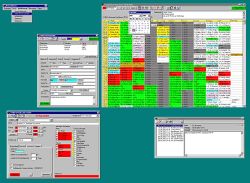 The office scheduler can keep the record of your business activities in the most detailed manner. The program would remind you of all the tasks. It would prove to be good software to manage everything like the appointments, reminders with alarms, etc. The office scheduler can keep the record of your business activities in the most detailed manner. The program would remind you of all the tasks. It would prove to be good software to manage everything like the appointments, reminders with alarms, etc.
The software do takes a bit of time for downloading but it’s quick with installation. the screen appears with a table like format. The rows and columns show the time, the appointments, and the executives and the room information that you put. You can know about the programs set in different rooms for availability. The weekly schedule can be set so that you don’t miss out anything. You can have the course overview and set the yearly schedule. A bar above the table shows the option to choose the resources or appointment like options. You can set the date and also it also has the calendar tool to make the year month and date settings. You can create a new appointment for a date with the dialog box. Set the customer, resources, make the notes and set the alarm all with specific date and time. The appointments can be edited and the details can be seen, with free times. You can search for customer details and also know all the appointment set with them. Also you can create a duplicate appointment. You can delete the set detail anytime and get the print of it. Also you can insert a new MS Excel sheet. You can easily set the schedule properties and program preferences. You can actualize; show the overlaps and the basic design appointments. Bookmark can be set and the resources can be defined. You can refresh the program and export the data to excel sheet.
The help option provides all the information. The software is good to use as it helps managing the business function easily.
(More info and Download)
Posted in Business, Commercial, Developer, Information Management, Shareware, Time Managment | 1 Comment »
|
|
|




